PS2 Further IGR Bug-hunt

I'm not sure what is your problem?
I mean, what path in IGR Path you've set for OPL, e.g. "mc0:/APPS/OPL_1357.ELF"?

IGR will not work when mode 6 is enabled.
I can test RRV (PAL) through USB with OPL 1357 if you like,
but from I remember at least "normal" IGR should work (kicking to OSDSYS).

Instead of using "latest daily OPL", check in "About" page, what is your OPL rev.
Here is also (under table) quick guide how to do it:
https://www.psx-place.com/resources/automated-daily-build-system-for-opl-wle-fceumm-ps2.702/.
 
Ah, I had mc0:// maybe it should be mc0:/

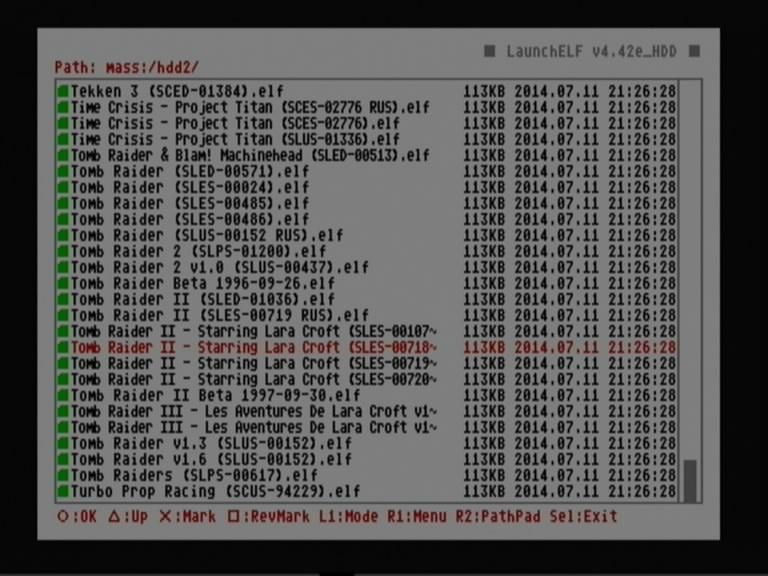
You can check the path in wLe, by entering it:
snapshot20140715024432.jpg

Here it'll be mass:/hdd2/...

For MC it'll probably be mc0:/APPS/...
uLe.png


I'm using commit 6e847bd

While downloading OPL daily build from https://akuhak.github.io/test_build/,
there is also DETAILED_CHANGELOG inside it.
From here rev can be also checked.
 
The OPL i'm using has rev1357 as latest in changelog. Is there a newer build available ?

Hmm, I thought that's what I was using, but in the 'About' in OPL it says rev1564 ... Wonder where I got that.

Now I'm really using rev1357
 
Last edited:
That does look to be the literal source of them :P

Looks like ifcaro is more 'stable' builds and Jay-Jay's gets updated much more often. (hence daily)

Usually in that scenario I'd run the dailys, Maybe I'll switch back.
 
What is you path in IGR Path?

Could you enable debug colors (Disable Debug Colors - Off) in OPL?
After you'll trigger IGR, what is the last debug color that you're getting?
If it is red, then the path it's wrong.
If it's light blue, then your app that you set in IGR path should launch.

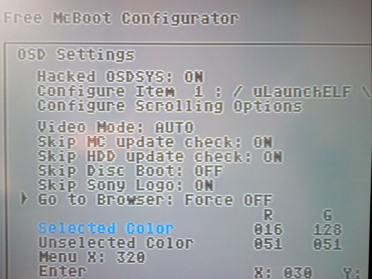
BTW in FMCB Configurator -> OSD Settings... -> Go to Browser:
go-to.png

When you set Force OFF, you should always be kicked into PS2Browser
instead of MC browser.
 
Ah, Mine was set to opposite. Force ON, figuring that was 'Force go to Browser' :P That part does work now. (with Force Off)

Changed path to MASS:/APPS/OPL_1357.ELF and renamed file accordingly.

Debug Colors:

Yellow -> Blue -> Red -> Black -> PS2Browser.
 
Theoretically case size also matter...
So maybe it should be mass:/APPS/OPL_1357.ELF.
If you have "Apps" folder, it should be mass:/Apps/OPL_1357.ELF.
If OPL_1357.elf:
mass:/Apps/OPL_1357.elf, mass:/APPS/OPL_1357.elf.
Unfortunately red debug color means that there is something wrong.

Can you also try to copy OPL into MC?
e.g. in mc1:/APPS/OPL_1357.ELF and type it in IGR Path.
Maybe there is something wrong with supporting USB devices after triggering IGR?

EDIT: I've set my path in IGR path mass:/OPL_r1357.ELF
and I'm also getting red debug color.
However everything is fine from memory card (mc1:/APPS/OPL_r1357.ELF).
 
Last edited:
ah, I believe I was using MASS and MC0/1. will try mass and mc0/1.

It would be nice if OPL had a file dialog instead of a text box here. so you select an existing file and the path auto-populates.

I've looked at the source a bit, but PS2 dev is still beyond me :p
 
It would be nice if OPL had a file dialog instead of a text box here. so you select an existing file and the path auto-populates.

Yes I've also thought about it, but maybe adding simple file explorer\dialog will increase size of OPL drastically?
Currently it needs ~1.1 MB, so it is quite a lot especially for 8 MB MC.
 
Also, Using small case device and mc0 -- IGR does launch OPL :) First time it's done that for me. Was on SLUS-20014

Shouldn't be too difficult to LCase() everything before the first ':' in IGR Path string. Almost seems like a commit I might be able to handle :P
 
So to summary you experience with IGR path.
Currently it works only from MC (mc0, mc1), or it also works from USB (mass)?
 
works from mc with lowercase mc0:/

Will try mass:/ in a bit

Update: mass:/ did not work.
 
Last edited:
Did IGR ever work from usb? Haven't been around long enough to know the history...

Through other projects I found depending on the module used you may need to specify mass0:/ sometimes.... But then the IGR code might not even load usb modules for all I know?

Best regards
 
I'm not sure if IGR ever worked from USB, but for now I've tried OPL 1086 & 1357 with
"mass0:/OPL_r1357.ELF", "mass1:/OPL_r1357.ELF", "mass:/OPL_r1357.ELF" unfortunately without luck.

Everything is fine from MC, when I'll have more time maybe I'll also try "hdd0:/".
 
I was using 1357 before, Just switched to 1564. I find it reads my game configs .. where 1357 did not.

mass:/ did not work in this build either. I wonder if mc?:/ wildcards work ( mass?:/ ) . Just found out those are a thing.
 
Back
Top