PS3 Game Patches

Oh, i see, didn't know that's how it behaves. Thank you for clarifying this. I was messing with Serious Sam games, and i found out that the fusion version of the game is indeed modable. I didn't test this yet, but there is some info on steam comunity on this. It seems that the mods should be in .gro extension, and named propperly, like All_01.gro, All_02.gro etc. So no extracting is needed. But i saw that all the mods available on steam have dat files, on ps3 there is edat. So i will check this further and i'll let you know.
Maybe we should try to somewhat increase the visual settings first in Serious Sam, because the default PS3 settings are horrible.
Or even better: Unlock the dev console for use with a USB keyboard
 
Oh, i see, didn't know that's how it behaves. Thank you for clarifying this. I was messing with Serious Sam games, and i found out that the fusion version of the game is indeed modable. I didn't test this yet, but there is some info on steam comunity on this. It seems that the mods should be in .gro extension, and named propperly, like All_01.gro, All_02.gro etc. So no extracting is needed. But i saw that all the mods available on steam have dat files, on ps3 there is edat. So i will check this further and i'll let you know.
I was talking about Doom 3 BFG, sorry for the confusion.
About Serious Sam 3, I don't know how it behaves. I leave the testing on that game for someone more knowlegeable in how that game works. I'll install the game anyway. If you find something about the settings, let's us know so we can test them. :joyous:
Once I get home I'll be testing a autoexec.cfg I made for Doom 3 BFG based on the commands I know that work on ID Tech based games.
About RAGE, can someone here with plenty of space on the HDD/SSD test? I'm almost out of space on my PS3.

i don t think the rage engine would have vblank restrictions
GTA V and Red Dead Redemption sadly have. GTA IV doesn't so it can be set to higher framerates. Though on GTA IV we are severely CPU limited due to the most likely PPU centric approach on the game's programming.
 
Last edited by a moderator:
I was talking about Doom 3 BFG, sorry for the confusion.
About Serious Sam 3, I don't know how it behaves. I leave the testing on that game for someone more knowlegeable in how that game works. I'll install the game anyway. If you find something about the settings, let's us know so we can test them. :joyous:
Once I get home I'll be testing a autoexec.cfg I made for Doom 3 BFG based on the commands I know that work on ID Tech based games.
About RAGE, can someone here with plenty of space on the HDD/SSD test? I'm almost out of space on my PS3.
btw when it comes to id tech 5 games, there is also Wolfenstein: The New Order.
 
I was talking about Doom 3 BFG, sorry for the confusion.
About Serious Sam 3, I don't know how it behaves. I leave the testing on that game for someone more knowlegeable in how that game works. I'll install the game anyway. If you find something about the settings, let's us know so we can test them. :joyous:
Once I get home I'll be testing a autoexec.cfg I made for Doom 3 BFG based on the commands I know that work on ID Tech based games.
About RAGE, can someone here with plenty of space on the HDD/SSD test? I'm almost out of space on my PS3.

Yes, i understand you were talking about Doom 3 BFG. And for that game i didn't know how it maintain constant 60fps. So thank you for clarifying that once again.

As about Serious Sam games, i was messing with them. Trying to understand better the difference between Pc and Ps3 versions. In Serious Sam HD Second Encounter, there is mod for First Encounter, and some other mods... So as i read through steam comunity i found all the console commands, and i will share that here, it's a very long list... And i will add some pictures for you guys to see what i'm refering to. I learned that all the Serious Sam HD games and mods use the serious engine 3, and the Serious Sam 3 BFE use serious engine 3.5, those are very similar, and share many assets, but be aware there are some differences.

EDIT: Here is the list of all console commands for serious engine 3
https://steamcommunity.com/sharedfiles/filedetails/?id=1363421270

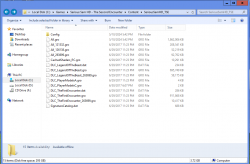
And here is an image to see all the files in content folder of Serious Sam HD Second Encounter
Capture.PNG
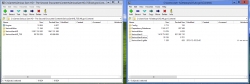
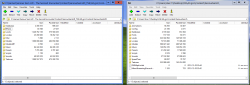
And a couple more to see the difference, that is in fact minimal. On the right it's unmodded PS3 All.gro and on the left it's the PC version of SSHD: Second Encounter.
Capture.PNG
Capture.PNG
 
Last edited:
Thanks to Artemis, I've disabled shadows in Sonic Unleashed and this is the first time it hit 30fps in this zone ! (There is still drops around 20, but this is way less consequent than before) And this with a moderate overclock.
Just using what I've found here.
https://wiki.rpcs3.net/index.php?title=Sonic_Unleashed
Code:
#
Disable shadows
0
illusion
0 00E0464C 38000000
#
Disable motion blur
0
illusion
0 00E234E8 38000000
#
Disable depth of field
0
illusion
0 00E5D7C4 38000000
#
Disable reflection
0
illusion
0 00E1EEF0 38000000
#
I don't recommend "Disable motion blur". It just look super awkward without it as the game rely on it to give the feeling of speed x)
OOCDp7D.jpeg
 
Last edited:
Thanks to Artemis, I've disabled shadows in Sonic Unleashed and this is the first time it hit 30fps in this zone ! (There is still drops around 20, but this is way less consequent than before) And this with a moderate overclock.
Just using what I've found here.
https://wiki.rpcs3.net/index.php?title=Sonic_Unleashed
OOCDp7D.jpeg
You're giving me hope to finally finish that game .
The game is actually pretty advanced in certain features that undoubtedly make it heavier that it should be.
I'll give it a go with those patches. :emmersed:
 
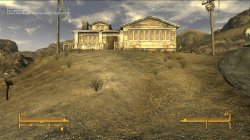
After my tests on Doom 3 and Fallout New Vegas, I found that neither accept any kind of patching or ini/cfg editing. It was kind of disapointing.
But in other hand, the Transformers games made by High Moon Studios allow for some ini editing that can allow some extra performance. They are some the few UE3 games where we can actually edit something.
 
After my tests on Doom 3 and Fallout New Vegas, I found that neither accept any kind of patching or ini/cfg editing. It was kind of disapointing.
But in other hand, the Transformers games made by High Moon Studios allow for some ini editing that can allow some extra performance. They are some the few UE3 games where we can actually edit something.

You are right about Doom 3 BFG, I even try to load WAD's in Doom 1 and Doom 2 but they wouldn't show in game.

Same goes for Serious Sam 3 BFE, the console would freeze if i add full conversion mods from PC (SSHD: First Encounter, SSHD: Second Encounter) but game accepts some basic modding like changing player models and sounds. I tried many combinations with this game but I would always hit a wall.
 
You are right about Doom 3 BFG, I even try to load WAD's in Doom 1 and Doom 2 but they wouldn't show in game.

Same goes for Serious Sam 3 BFE, the console would freeze if i add full conversion mods from PC (SSHD: First Encounter, SSHD: Second Encounter) but game accepts some basic modding like changing player models and sounds. I tried many combinations with this game but I would always hit a wall.

Serious sam 3 have unlocked framerate
Doom 3 BFG is 60fps
First and Second encounter are 30fps
 
After my tests on Doom 3 and Fallout New Vegas, I found that neither accept any kind of patching or ini/cfg editing. It was kind of disapointing.
But in other hand, the Transformers games made by High Moon Studios allow for some ini editing that can allow some extra performance. They are some the few UE3 games where we can actually edit something.

What ini settings did you try changing in Fallout New Vegas?

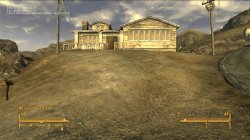
There are some that don't work, like Resolution and FOV for example, but there are plenty that do. Quick example below with some visually obvious changes for demonstrative purposes.

Default ini settings

iMaxAnistropy = 8 and FGrassStartFadeDistance = 3500

Default.jpg

Modified ini settings

iMaxAnistropy = 0 and FGrassStartFadeDistance = 0

Edited ini.jpg

---------------------------

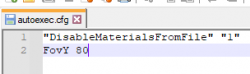
Also, I've been doing further testing with the autoexec.cfg files in games made by Monolith Productions using the LithTech Jupiter EX engine after discovering that the FPS cap could be changed.

In addition to changing the MaxFPS cap line to a specific figure, the line can just be deleted entirely. Setting the MaxFPS cap at 60 seems to limit the game to ~58 FPS, but deleting it entirely allows the game to hit 59.94 FPS. Setting the MaxFPS cap at 30 seems to limit the game to ~29.6 FPS but setting it at 30.33 allows it to reach 29.98 - 30.03 FPS. I haven't been able to achieve an exact 29.96 FPS cap on this title.

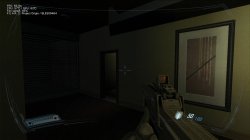
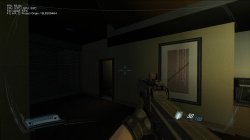
I've found that you can also change the FOV in both F.E.A.R. 2 and Condemned 2 by introducing the FovY line to the autoexec.cfg file though. For F.E.A.R. 2, I would reccomend keeping it to 80 or lower as numbers above 80 result in clipping from some weapons (primarily the SMG). For Condemned 2, I didn't notice any visible clipping, but haven't tested beyond 90 as I'm content with that.

upload_2024-5-14_0-58-3.png

Default F.E.A.R. 2 FOV

Default FOV.jpg

F.E.A.R. 2 80 FOV

FOV 80.jpg
 
What ini settings did you try changing in Fallout New Vegas?

There are some that don't work, like Resolution and FOV for example, but there are plenty that do. Quick example below with some visually obvious changes for demonstrative purposes.

Default ini settings

iMaxAnistropy = 8 and FGrassStartFadeDistance = 3500

View attachment 43052

Modified ini settings

iMaxAnistropy = 0 and FGrassStartFadeDistance = 0

View attachment 43053

---------------------------

Also, I've been doing further testing with the autoexec.cfg files in games made by Monolith Productions using the LithTech Jupiter EX engine after discovering that the FPS cap could be changed.

In addition to changing the MaxFPS cap line to a specific figure, the line can just be deleted entirely. Setting the MaxFPS cap at 60 seems to limit the game to ~58 FPS, but deleting it entirely allows the game to hit 59.94 FPS. Setting the MaxFPS cap at 30 seems to limit the game to ~29.6 FPS but setting it at 30.33 allows it to reach 29.98 - 30.03 FPS. I haven't been able to achieve an exact 29.96 FPS cap on this title.

I've found that you can also change the FOV in both F.E.A.R. 2 and Condemned 2 by introducing the FovY line to the autoexec.cfg file though. For F.E.A.R. 2, I would reccomend keeping it to 80 or lower as numbers above 80 result in clipping from some weapons (primarily the SMG). For Condemned 2, I didn't notice any visible clipping, but haven't tested beyond 90 as I'm content with that.

View attachment 43054

Default F.E.A.R. 2 FOV

View attachment 43055

F.E.A.R. 2 80 FOV

View attachment 43056

I was trying the v-sync and framerate related settings for Fallout New Vegas. I didn't even tried the other settings since they weren't in line with what I was looking.
But thank you very much for letting us know what works and what doesn't.
Also thanks for sharing commands for the Monolith based games.
 
Serious sam 3 have unlocked framerate
Doom 3 BFG is 60fps
First and Second encounter are 30fps

Serious Sam 3 BFE have fps all over the place... it's varying from 30 to 60.
First and Second Encounters are playable on PC as mods for SS 3 BFE but not on consoles.
Doom 3 indeed has constant 60fps but as @NunoRS2000 already said, it lowers the resolution to make that possible.
 
Serious Sam 3 BFE have fps all over the place... it's varying from 30 to 60.
First and Second Encounters are playable on PC as mods for SS 3 BFE but not on consoles.
Doom 3 indeed has constant 60fps but as @NunoRS2000 already said, it lowers the resolution to make that possible.
My mistake about firts and second encounter, since it was never released on ps3. Is on xbox 360, but i prefer original xbox classic version which can be run with backwards compatibility, better art-style, 60fps. IMO OG xbox release is the best release of classic.
 
Yeah SS3 runs like between 20-45fps. Wildly swinging around without v-sync. With added v-sync and a 30fps cap it already plays much better:
 
I'm going to begin organizing the main thread post.

Could you please post the games in the following format?
Title ID
GameID:
Version:

Memory patch:

Artemis file/code:


Additional patches: such as modifications to a config file in the game either to increase/decrease the graphics or if the fps patch is editing a file, add it to here.
 
Last edited:
Harry Potter and the Order of the Phoenix
BLES00070: [ 01.01 ]
Patch: - [ be32, 0x0066b764, 0x38800001 ]
works on both emulator and PS3.

Dragon Ball Z: Burst Limit
BLES00231: [ All ]
Patch: - [ byte, 0x004c4383, 0x01 ] # 60 FPS
- [ be32, 0x001622dc, 0x60000000 ] # No reset
- [ be32, 0x0016349c, 0x60000000 ] # Pause fix
BLUS30117: [ All ]
Patch: - [ byte, 0x004c4383, 0x01 ] # 60 FPS
- [ be32, 0x00162228, 0x60000000 ] # No reset
- [ be32, 0x001633e8, 0x60000000 ] # Pause fix
I couldn't test on console yet but I believe it may work since patches of similar structure worked before on my end. on RPCS3 works like a charm. initially targets 45fps and with the patch targets 60fps.

also asked the guy that made the 60fps patch for Half Life 2 if he can provide a 60fps patch for Portal.


EDIT 15/5 (not really related to the topic): my HDD died and until I get another, I won't be able to test and give feedback on patches and my saves from 24/8/2023 onwards went to shit.
 
Last edited:
KZ2 & KZ3 ARTEMIS Extended Fov FIX [Real Hardware]

Title ID: KILLZONE 2
GameID: BCES00081 - Feel free to test on BCUS98116
Version: 1.29

pydMjxc.png

ogq78vA.png


Artemis file/code:
Code:
Extended FOV
0
vFxMz
0 00EC096C 3F266666
#

---------------------------------------------------------------

Title ID: KILLZONE 3
GameID: BCES01007 - Feel free to test on BCUS98234
Version: 1.14

lVGjPDT.png

SmNigBk.png


Artemis file/code:
Code:
Extended FOV
0
vFxMz
0 0139BDF0 3F59999A
0 0139BEEC 3F59999A
#
 
Last edited:
Back
Top