PS3-HW Hardware Questions/Issues? - Post Syscon Logs/details here

STLcardsWS

Administrator
For help with your Syscon logs, post them here.​

All previous thread were merged into this thread.
We have alot of threads asking the same issue.

Help would be better served in a single thread, as help can address multiple user's.​
 
Last edited:
Syscon Error Cause
.
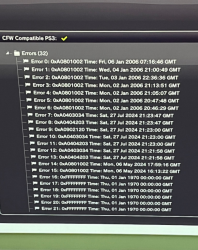
I have ylod and ı have Syscon error is like this. What do you think is the main reason? The beginning starts with 1002 and ends with 1002. I think it is related to Nec/Tokin. However, as you can see, there is also a problem ending with 3034. I think there is also a problem with Rsx. Also, the problem ending with 4303 has been seen 3 times, I think it is related to South Bridge?
 

Attachments

  • 454554.png
    454554.png
    466.2 KB · Views: 110
Last edited by a moderator:
FAT CECHK04 SYSCON (1002, 3003) then (3010)
.
hi, i have a FAT CECHK04 with error 0xa0081002, 0xa0093003, 0xa0102113.

I changed all 8 nec tokins, and now i have only one error: 0xa0203010.

here the log:

[mullion]$
bringup
[SSM] state: 0000 -> 0101
Bringup Mode #0 (0xFF)
[SSM] ssmCb_OnStartingBePowOn() called.
[SSM] First Boot.
[SSM] Bringup mode : syspm_stat=00000000/00000000
[POWSEQ] PowerSeq_Setup called.
[SSM] state: 0101 -> 0201
[POWSEQ] AV Backend Setup
[SSM] state: 0201 -> 0102
errlog
ofst[ 96]:err_code:0xffffffff, clock:0xffffffff
ofst[100]:err_code:0xa0061002, clock:0xffffffff
ofst[104]:err_code:0xa0093003, clock:0xffffffff
ofst[108]:err_code:0xa0061002, clock:0xffffffff
ofst[112]:err_code:0xa0093003, clock:0xffffffff
ofst[116]:err_code:0xa0061002, clock:0xffffffff
ofst[120]:err_code:0xa0093003, clock:0xffffffff
ofst[124]:err_code:0xa0203010, clock:0xffffffff
ofst[ 0]:err_code:0xa0203010, clock:0xffffffff
ofst[ 4]:err_code:0xa0203010, clock:0xffffffff
ofst[ 8]:err_code:0xa0203010, clock:0xffffffff
ofst[ 12]:err_code:0xa0203010, clock:0xffffffff
ofst[ 16]:err_code:0xa0203010, clock:0xffffffff
ofst[ 20]:err_code:0xa0203010, clock:0xffffffff
ofst[ 24]:err_code:0xa0203010, clock:0xffffffff
ofst[ 28]:err_code:0xa0203010, clock:0xffffffff
ofst[ 32]:err_code:0xa0203010, clock:0xffffffff
ofst[ 36]:err_code:0xa0203010, clock:0xffffffff
ofst[ 40]:err_code:0xa0203010, clock:0xffffffff
ofst[ 44]:err_code:0xa0203010, clock:0xffffffff
ofst[ 48]:err_code:0xa0203010, clock:0xffffffff
ofst[ 52]:err_code:0xa0203010, clock:0xffffffff
ofst[ 56]:err_code:0xa0203010, clock:0xffffffff

how can i proceed? im stucked here. Thank you.

 
Last edited by a moderator:
Syscon Error Cause
.
Based on my experience in repairing PS3, you just need to replace the NEC capacitors on the back of the chip, and use tantalum capacitors to substitute them. It's better not to replace the components near the chip, as it can easily cause problems.
 
Last edited by a moderator:
PS3 CECHA00 with 2120, 1001 and 2022 errors
.Hello everyone, I need help with a PS3 I got from a joblot. It crashes fairly late in the boot process and does not generate new error codes. It has been reflowed with a BGA station (communication error could have been bga related) and I have also replaced one Nec / Tokin on the Cell and RSX to no avail. I am quite skilled with a soldering iron and I would like to know if this is possibly a software issue.

Here's the bringup :
Code:
bringup
[SSM] state: 0000 -> 0101
Bringup Mode #0 (0xFF)
[SSM] ssmCb_OnStartingBePowOn() called.
[SSM] First Boot.
[SSM] Bringup mode : syspm_stat=00000000/00000000
[POWSEQ] PowerSeq_Setup called.
[SSM] state: 0101 -> 0201
[POWSEQ] AV Backend Setup
[SSM] state: 0201 -> 0102
[SSM] state: 0102 -> 0202
[SSM] state: 0202 -> 0103
[SSM] state: 0103 -> 0203
[SSM] ssmCb_BeforeBeOn() called.
[SSM] state: 0203 -> 0104
Psbd_SbTransMode_Half:0x20e2
Press Ctrl+C to exit
>$ bringup
[SSM] state: 0104 -> 0204
[SSM] state: 0204 -> 0105
[SSM] state: 0105 -> 0400
(PowerOn State)
[SERV NVS] READ CMD

Boot Loader SE Version 1.0.0 (Build ID: 1673,16934, Build Data: 2006-10-30_12:39:57)
Copyright(C) 2006 Sony Computer Entertainment Inc.All Rights Reserved.
[SERV SETCFG] XDR (CH0,CH1) ASSERT
[SERV SETCFG] XDR (CH0,CH1) DEASSERT
[INFO]: Connecting to Debug Device (SB UART)
[SERV NVS] READ CMD
[SERV NVS] READ CMD
[SERV NVS] READ CMD
[SERV NVS] READ CMD
[SERV NVS] READ CMD
[SERV NVS] READ CMD
[SERV NVS] READ CMD
[SERV NVS] READ CMD
[SERV NVS] READ CMD
[SERV NVS] READ CMD
[SERV NVS] READ CMD
[SERV NVS] READ CMD
[SERV NVS] READ CMD
[SERV NVS] READ CMD
[SERV NVS] READ CMD
[SERV NVS] READ CMD
[SERV NVS] READ CMD
[SERV NVS] READ CMD
[SERV NVS] READ CMD
[SERV NVS] READ CMD
[SERV NVS] READ CMD
[SERV NVS] READ CMD
[SERV NVS] READ CMD
[SERV THERM] NOTIFY_MODE CMD
[SERV NVS] READ CMD
[SERV NVS] WRITE CMD
[SERV THERM] NOTIFY_MODE CMD
[SERV NVS] WRITE CMD
[SERV NVS] WRITE CMD
[SERV DEVPM] CONTROL_PCI_BUS_POWER_STATE CMD
[SSM] *** FATAL ERROR requested by OS ***
[SSM] state: 0400 -> 0700
[POWSEQ] AV Backend Letup
[SSM] ssmCb_AfterBeOn() called.
[SSM] Shutdown mode : syspm_stat=00000000/00000000
[POWSEQ] PowerSeq_Letup called.
[SSM] state: 0700 -> 0600
(PowerOff State) (Fatal)
bringup
Do nothing. (FatalOff State)

And the becount :
Code:
becount
Bringup : 1777 times
Shutdown: 1741 times
Power-on: 107day 06hour 30min 21sec
And finally the full errlog :
Code:
errlog
ofst[108]:err_code:0xffffffff, clock:0x153abb2f  2011/04/15 08:15:43
ofst[112]:err_code:0xa0801001, clock:0x15452305  2011/04/23 05:41:25
ofst[116]:err_code:0xa0901001, clock:0x154eaab2  2011/04/30 11:10:42
ofst[120]:err_code:0xa0801001, clock:0x156014b0  2011/05/13 16:11:28
ofst[124]:err_code:0xa0801001, clock:0x1701cd66  2012/03/25 12:34:46
ofst[  0]:err_code:0xa0802022, clock:0x17c10f42  2012/08/17 14:18:42
ofst[  4]:err_code:0xa0802022, clock:0x17c10f44  2012/08/17 14:18:44
ofst[  8]:err_code:0xa0802022, clock:0x17c9ca93  2012/08/24 05:16:03
ofst[ 12]:err_code:0xa0802022, clock:0x17c9ca95  2012/08/24 05:16:05
ofst[ 16]:err_code:0xa0802022, clock:0x17c9e006  2012/08/24 06:47:34
ofst[ 20]:err_code:0xa0802022, clock:0x17c9e008  2012/08/24 06:47:36
ofst[ 24]:err_code:0xa0802022, clock:0x17ca3b36  2012/08/24 13:16:38
ofst[ 28]:err_code:0xa0802022, clock:0x17ca3b38  2012/08/24 13:16:40
ofst[ 32]:err_code:0xa0802022, clock:0x17ca425a  2012/08/24 13:47:06
ofst[ 36]:err_code:0xa0802022, clock:0x17ca425c  2012/08/24 13:47:08
ofst[ 40]:err_code:0xa0802022, clock:0x17ca4320  2012/08/24 13:50:24
ofst[ 44]:err_code:0xa0802022, clock:0x17ca4322  2012/08/24 13:50:26
ofst[ 48]:err_code:0xa0802022, clock:0x17ca536d  2012/08/24 14:59:57
ofst[ 52]:err_code:0xa0802022, clock:0x17ca536f  2012/08/24 14:59:59
ofst[ 56]:err_code:0xa0802022, clock:0x17d48059  2012/09/01 08:14:17
ofst[ 60]:err_code:0xa0802022, clock:0x17d4805b  2012/09/01 08:14:19
ofst[ 64]:err_code:0xa0801001, clock:0x181d46d7  2012/10/26 13:04:23
ofst[ 68]:err_code:0xa0801001, clock:0x1abf2228  2014/03/21 16:15:36
ofst[ 72]:err_code:0xa0801001, clock:0x200c6fcf  2017/01/14 05:12:47
ofst[ 76]:err_code:0xa0902120, clock:0x2b42b7f9  2022/12/31 09:06:01
ofst[ 80]:err_code:0xa0902120, clock:0x2b42b845  2022/12/31 09:07:17
ofst[ 84]:err_code:0xa0902120, clock:0x2b42b858  2022/12/31 09:07:36
ofst[ 88]:err_code:0xa0902120, clock:0x2b42baf1  2022/12/31 09:18:41
ofst[ 92]:err_code:0xa0902120, clock:0x2b42bb04  2022/12/31 09:19:00
ofst[ 96]:err_code:0xa0902120, clock:0x2b42bb15  2022/12/31 09:19:17
ofst[100]:err_code:0xa0902120, clock:0x2b42bb27  2022/12/31 09:19:35
ofst[104]:err_code:0xa0902120, clock:0x2b42bc98  2022/12/31 09:25:44

Many thanks in advance, Antviau
Also admins, I have been on this website for a while so it would be nice to be able to post elsewhere.
 
Last edited by a moderator:
PS3 CECHA00 with 2120, 1001 and 2022 errors
.
Error 2120 seems to be related with the bus connection between the RSX and the HDMI controller: https://www.psdevwiki.com/ps3/Syscon_Error_Codes#2120_(HDMI_I/O_Error)

It is related to the error 2022: https://www.psdevwiki.com/ps3/Syscon_Error_Codes#2022_(DVE)

Thanks I already know, I always research the error codes first. Do you think I should think about changing the HDMI controller? Also the console does not generate new error codes when powered and takes a while before crashing. It's also impossible to access safe mode, it just does not beep when I keep pressing the power button, even when using known good power button boards.

Here's the SB UART log, it seems to be running OFW 4.81 :
Code:
Boot Loader SE Version 4.8.1 (Build ID: 5329,50649, Build Date: 2016-10-24_12:11                                                                                        :11)
SDK Version: 481.000
Copyright(C) 2016 Sony Computer Entertainment Inc.All Rights Reserved.
[INFO]: === eXtreme Data Rate Memory Subsystem ===
[INFO]: (Configured Memory Size per single XIO channel: 128 MBytes.)
[INFO]: XIO channel[0] is available.
[INFO]: XIO channel[1] is available.
[INFO]: ---> Total 256 MBytes are now in use.
[INFO]: SPU enable [0, 2, 3, 4, 5, 7] 11111101
[INFO]: BE:3.1, SB:DX3.1
Device: PATAC0:Cable Not Connect
Cell OS SDK4.8.1 000 (release build: r50649 2016_10_24_190000)
Copyright 2016 Sony Computer Entertainment Inc.
revision: 50622
date:     Mon Oct 24 12:13:25 JST 2016
skip 2nd initialization step
lv2(0): total memory size: 249MB+640KB
lv2(0): kern memory size:   12MB+640KB (heap:3492KB  page pool:4736KB)
lv2(0): user memory size:  237MB
lv2(2):
lv2(2): Cell OS Lv-2 32 bit version 4.8.1
lv2(2): Copyright 2011 Sony Computer Entertainment Inc.
lv2(2): All Rights Reserved.
lv2(2):
lv2(2): revision: 50649
lv2(2): build date: 2016/10/24 12:19:35
lv2(2): processor: Broadband Engine  Ver 0x0000  Rev 0x0201
lv2(2): PPU:0, Thread:0 is enabled.
lv2(2): PPU:0, Thread:1 is enabled.
sysmgr : altering lv0 or lv1 is detected.
lv2(2): rsx:      b08 500/650 vpe:ff shd:3f  [AP0005585:1:1:15:a:7:2:f:1][16:3:1                                                                                        :1:1:3:1][0:0:0]

lv2(2): Available physical SPUs: 6/7
system event id=0xe1, rtc=0, size=24 [0x5354523a50415441 0x43303a4361626c65 0x20                                                                                        4e6f7420436f6e 0x6e65637400000000]
It says "altering lv0 or lv1 is detected", is that normal?
 
Last edited by a moderator:
PS3 CECHA00 with 2120, 1001 and 2022 errors
.
I had an error 2120 that was solved by replacing the IC2502 (SiL9132), but before replacing it I found shorts on the following tracks:
Pin 15 (DDCLK) on the HDMI port
Pin 16 (DDData) on the HDMI port
R4027 (HDMI_I2C_SCL) next to the Syscon
R4028 (HDMI_I2C_SDA) next to the Syscon
 
Last edited by a moderator:
PS3 CECHA00 with 2120, 1001 and 2022 errors
.
I had an error 2120 that was solved by replacing the IC2502 (SiL9132), but before replacing it I found shorts on the following tracks:
Pin 15 (DDCLK) on the HDMI port
Pin 16 (DDData) on the HDMI port
R4027 (HDMI_I2C_SCL) next to the Syscon
R4028 (HDMI_I2C_SDA) next to the Syscon
I'll check that out, thanks. I'm leaning towards a software issue due to the fact that the system does not generate new error codes and after comparing with the SB log from a working PS3 of the same model. The system shuts down just before mounting the flash.

Here's the log from my working CECHB00 :
Code:
Boot Loader SE Version 4.9.1 (Build ID: 5374,50754, Build Date: 2023-12-07_13:37  :12)
SDK Version: 491.000
Copyright(C) 2023 Evilnat [Akatsuki]. 02/27/2024. Happy CFW moments.
[INFO]: === eXtreme Data Rate Memory Subsystem ===
[INFO]: (Configured Memory Size per single XIO channel: 128 MBytes.)
[INFO]: XIO channel[0] is available.
[INFO]: XIO channel[1] is available.
[INFO]: ---> Total 256 MBytes are now in use.
[INFO]: SPU enable [0, 1, 2, 5, 6, 7] 11101111
[INFO]: BE:3.1, SB:DX3.2
Device: PATAC0:Cable Not Connect
Cell OS SDK4.9.1 000 (release build: r50754 2023_12_07_130000)
Copyright 2024 Evilnat [Akatsuki] 02/27/2024  .
revision: 50750
date:     Thu Dec  7 13:38:43 JST 2023
skip 2nd initialization step
storage: ACL check will be skipped for device id ffffffffffffffff
storage: ACL check will be skipped for device id 0
storage: ACL check will be skipped for device id 1
lv2(0): total memory size: 249MB+640KB
lv2(0): kern memory size:   12MB+640KB (heap:3492KB  page pool:4736KB)
lv2(0): user memory size:  237MB
lv2(2):
lv2(2): Cell OS Lv-2 32 bit version 4.9.1
lv2(2): Copyright(C) 2024 Evilnat [Akatsuki]. 02/27/2024.
lv2(2): Happy CFW moments.
lv2(2):
lv2(2): revision: 50754
lv2(2): build date: 2023/12/07 13:42:31
lv2(2): processor: Broadband Engine  Ver 0x0000  Rev 0x0201
lv2(2): PPU:0, Thread:0 is enabled.
lv2(2): PPU:0, Thread:1 is enabled.
lv2(2): rsx:      b08 500/650 vpe:ff shd:3f  [AP0005844:1:1:8:c:11:2:f:1][39:2:1  :1:1:3:1][0:0:0]

lv2(2): Available physical SPUs: 6/7
lv2(2): mounting the flash file system : OK
lv2(2): creating the initial system process : OK
lv2(2): entering stand-alone mode.
lv2(2): system software: PS3 console mode (game memsize=200MB)
lv2(2): creating the system software process : OK
lv2(2): sys_init: system software process set-up done.
lv2(2): initial system process done.
lv2(2): [system utility]: BD Drive connect error.
lv2(2):
lv2(2): Prepare to shutdown ....
lv2(2): Going to shutdown.
system event id=0xe1, rtc=189302396, size=24 [0x5354523a50415441 0x43303a4361626c65 0x204e6f7420436f6e 0x6e65637400000000]

For those curious, in the end I was right, it was a hard brick. I had to desolder both nand chips and patch them using my FlashCatUsb MACH 1 and two crucial pieces of software for this: FlowRebuilder and PS3dumpChecker. In the end I managed to get the system to boot into Safe Mode. So for those getting "altering lv0 and lv1 detected" this is the solution.

------- Merged Post -------

Also, while it my case it worked I would strongly recommend using the 3.55 FSM patch for this, as you can get errors in Safe Mode that make reinstalling the update impossible.
 
Last edited by a moderator:
My first SYSCON log, what does it all mean?
.
Hi team,
Have pulled my first log, looks to me like nec/tokin but does it say which? I gather I have 8 (cechc01)?

Code:
[mullion]$ auth

Sending scopen...
scopen OK.
Sending AUTH1...
AUTH1 OK.
Sending AUTH2...
AUTH2 OK.
Auth successful!


[mullion]$ bringup
bringup

[SSM] state: 0000 -> 0101
Bringup Mode #0 (0xFF)
[SSM] ssmCb_OnStartingBePowOn() called.
[SSM] First Boot.
[SSM] Bringup mode : syspm_stat=00000000/00000000
[POWSEQ] PowerSeq_Setup called.
powerstate
[SSM] state: 0101 -> 0201
[POWSEQ] AV Backend Setup
[SSM] state: 0201 -> 0102
[SSM] state: 0102 -> 0202
[SSM] state: 0202 -> 0103
[SSM] state: 0103 -> 0203
[SSM] ssmCb_BeforeBeOn() called.
[SSM] state: 0203 -> 0104
Psbd_SbTransMode_Half:0x21e2
[SSM] state: 0104 -> 0204
[SSM] state: 0204 -> 0105
[SSM] state: 0105 -> 0400
(PowerOn State)
[SERV NVS] READ CMD

Boot Loader SE Version 3.4.0 (Build ID: 3932,45679, Build Date: 2010-06-07_23:08:10)
Copyright(C) 2010 Sony Computer Entertainment Inc.All Rights Reserved.
[SERV SETCFG] XDR (CH0,CH1) ASSERT
[SERV SETCFG] XDR (CH0,CH1) DEASSERT
[INFO]: Connecting to Debug Device (SB UART)
[SERV NVS] READ CMD
[SERV NVS] READ CMD
[SERV NVS] READ CMD
[SERV NVS] READ CMD
[SERV NVS] READ CMD
[SERV NVS] READ CMD
[SERV NVS] READ CMD
[SERV NVS] READ CMD
[SERV NVS] READ CMD
[SERV NVS] READ CMD
[SERV NVS] READ CMD
[SERV NVS] READ CMD
[SERV NVS] READ CMD
[SERV NVS] READ CMD
[SERV NVS] READ CMD
[SERV NVS] READ CMD
[SERV NVS] READ CMD
[SERV NVS] READ CMD
[SERV NVS] READ CMD
[SERV NVS] READ CMD
[SERV NVS] READ CMD
[SERV NVS] READ CMD
[SERV NVS] READ CMD
[SERV NVS] READ CMD
[SERV THERM] NOTIFY_MODE CMD
[SERV NOTIF] CONTROL_LED
[SERV NOTIF] RING_BUZZER
[SERV NOTIF] CONTROL_LED
[SERV NVS] READ CMD
[SERV NVS] READ CMD
[SERV NVS] READ CMD
powerstate

ATA Power          : ON
PCI Power          : OFF
RSX Power          : ON
XDR Power          : ON
Eurus Power        : ON
SB Power           : ON
RSX Thermal Sensor : AVAILABLE
BE Thermal Sensor  : AVAILABLE
[mullion]$ [SERV NVS] READ CMD
errlog
[SERV NVS] READ CMD
[SSM] *** Power Fail RS ***
[SSM] state: 0400 -> 0700
[POWSEQ] AV Backend Letup
[SSM] ssmCb_AfterBeOn() called.
[SSM] Shutdown mode : syspm_stat=00000000/00000000
Wait WmMcCom_DeadEvent timeout
[ERROR]: 0xa0801002
[POWSEQ] PowerSeq_Letup called.
[SSM] state: 0700 -> 0600
(PowerOff State) (Fatal)
errlog

ofst[ 20]:err_code:0xffffffff, clock:0x24389d60  2019/04/04 10:48:00
ofst[ 24]:err_code:0xa0901001, clock:0x2438b3cb  2019/04/04 12:23:39
ofst[ 28]:err_code:0xa0801002, clock:0x243a07b0  2019/04/05 12:33:52
ofst[ 32]:err_code:0xa0801002, clock:0x243a07b8  2019/04/05 12:34:00
ofst[ 36]:err_code:0xa0801002, clock:0x243a07ce  2019/04/05 12:34:22
ofst[ 40]:err_code:0xa0801002, clock:0x243a0816  2019/04/05 12:35:34
ofst[ 44]:err_code:0xa0801002, clock:0x243a0823  2019/04/05 12:35:47
ofst[ 48]:err_code:0xa0901001, clock:0x243a14c0  2019/04/05 13:29:36
ofst[ 52]:err_code:0xa0801002, clock:0x243b30dd  2019/04/06 09:41:49
ofst[ 56]:err_code:0xa0801002, clock:0x243b30f1  2019/04/06 09:42:09
ofst[ 60]:err_code:0xa0801002, clock:0x243b30f9  2019/04/06 09:42:17
ofst[ 64]:err_code:0xa0801002, clock:0x243b3101  2019/04/06 09:42:25
ofst[ 68]:err_code:0xa0801002, clock:0x243b310f  2019/04/06 09:42:39
ofst[ 72]:err_code:0xa0801002, clock:0x243b311f  2019/04/06 09:42:55
ofst[ 76]:err_code:0xa0801002, clock:0x243b3127  2019/04/06 09:43:03
ofst[ 80]:err_code:0xa0901001, clock:0x243b3182  2019/04/06 09:44:34
ofst[ 84]:err_code:0xa0901001, clock:0x243b62cd  2019/04/06 13:14:53
ofst[ 88]:err_code:0xa0901001, clock:0x243c8cea  2019/04/07 10:26:50
ofst[ 92]:err_code:0xa0901001, clock:0x243c8df8  2019/04/07 10:31:20
ofst[ 96]:err_code:0xa0801004, clock:0x243c8ef7  2019/04/07 10:35:35
ofst[100]:err_code:0xa0801002, clock:0x2f43e579  2025/02/15 23:53:29
ofst[104]:err_code:0xa0801002, clock:0x2f43e586  2025/02/15 23:53:42
ofst[108]:err_code:0xa0801002, clock:0x2f43e58f  2025/02/15 23:53:51
ofst[112]:err_code:0xa0801002, clock:0x2f43e596  2025/02/15 23:53:58
ofst[116]:err_code:0xa0801002, clock:0x2f43e61a  2025/02/15 23:56:10
ofst[120]:err_code:0xa0801002, clock:0xffffffff
ofst[124]:err_code:0xa0801002, clock:0x0b488680  2005/12/31 00:00:00
ofst[  0]:err_code:0xa0801002, clock:0x0b488735  2005/12/31 00:03:01
ofst[  4]:err_code:0xa0801002, clock:0x0b488d00  2005/12/31 00:27:44
ofst[  8]:err_code:0xa0801002, clock:0x0b4b5c9f  2006/01/02 03:38:07
ofst[ 12]:err_code:0xa0801002, clock:0x0b4b5d5c  2006/01/02 03:41:16
ofst[ 16]:err_code:0xa0801002, clock:0x0b4b5de5  2006/01/02 03:43:33
[mullion]$
 
Last edited by a moderator:
PS3 diag and repair
.Hello everyone, this is my first post on this forum!
I own a PS3 model CECHK08 and performed an IHS removal on the CELL processor because idle temperatures were hitting 85+°C and nothing else helped. During the process, I scratched a corner of the processor and knocked off one of the SMD capacitors near it. I found the capacitor and soldered it back in place.

After reassembling the console, it displayed YLOD and shut down. I couldn't restore functionality, so I decided to pull logs from SYSCON to narrow down the issue.
The console throws error A0801001, which points to the CPU or unstable CPU power. Since this error isn't definitive and the problem could be anywhere, I'm posting here to get advice on next steps.

To clarify:

I inspected the scratches under a microscope and tested for continuity. No traces on the processor were cut, but the varnish layer (including on traces and shielding) is damaged. I've heard that on the Nintendo Switch, damaging the solder mask on shielding can cause instability—could something similar happen on the PS3? I plan to cover the scratches with solder mask once I'm sure no further work is needed here.

The detached SMD capacitor might have burned out while I was re-soldering. I don't know its exact specs, but I tested it with a transistor tester before reinstalling (it was functional at the time).

I'm willing and able to tinker with the console before tossing it and buying a new one, so I'd appreciate any advice or help!

Code:
>$ ERRLOG GET 00
00000000 A0801001 FFFFFFFF
Press Ctrl+C to exit
>$ ERRLOG GET 01
00000000 A0902120 26519BAE
Press Ctrl+C to exit
>$ ERRLOG GET 02
00000000 A0801001 26519BAE
Press Ctrl+C to exit
>$ ERRLOG GET 03
00000000 A0801001 260FA10D
Press Ctrl+C to exit
>$ ERRLOG GET 04
00000000 A0801001 1C406B54
Press Ctrl+C to exit
>$ ERRLOG GET 05
00000000 FFFFFFFF FFFFFFFF
Press Ctrl+C to exit
>$ ERRLOG GET 06
00000000 FFFFFFFF FFFFFFFF
Press Ctrl+C to exit
>$ ERRLOG GET 07
00000000 FFFFFFFF FFFFFFFF
Press Ctrl+C to exit
>$ ERRLOG GET 08
00000000 FFFFFFFF FFFFFFFF
Press Ctrl+C to exit
>$ ERRLOG GET 09
00000000 FFFFFFFF FFFFFFFF
Press Ctrl+C to exit
>$ ERRLOG GET 0A
00000000 FFFFFFFF FFFFFFFF
Press Ctrl+C to exit
>$ ERRLOG GET 0B
00000000 FFFFFFFF FFFFFFFF
Press Ctrl+C to exit
>$ ERRLOG GET 0C
00000000 FFFFFFFF FFFFFFFF
Press Ctrl+C to exit
>$ ERRLOG GET 0D
00000000 FFFFFFFF FFFFFFFF
Press Ctrl+C to exit
>$ ERRLOG GET 0E
00000000 FFFFFFFF FFFFFFFF
Press Ctrl+C to exit
>$ ERRLOG GET 0F
00000000 FFFFFFFF FFFFFFFF
Press Ctrl+C to exit
>$ ERRLOG GET 10
00000000 FFFFFFFF FFFFFFFF
Press Ctrl+C to exit
>$ ERRLOG GET 11
00000000 FFFFFFFF FFFFFFFF
Press Ctrl+C to exit
>$ ERRLOG GET 12
00000000 FFFFFFFF FFFFFFFF
Press Ctrl+C to exit
>$ ERRLOG GET 13
00000000 FFFFFFFF FFFFFFFF
Press Ctrl+C to exit
>$ ERRLOG GET 14
00000000 FFFFFFFF FFFFFFFF
Press Ctrl+C to exit
>$ ERRLOG GET 15
00000000 FFFFFFFF FFFFFFFF
Press Ctrl+C to exit
>$ ERRLOG GET 16
00000000 FFFFFFFF FFFFFFFF
Press Ctrl+C to exit
>$ ERRLOG GET 17
00000000 FFFFFFFF FFFFFFFF
Press Ctrl+C to exit
>$ ERRLOG GET 18
00000000 FFFFFFFF FFFFFFFF
Press Ctrl+C to exit
>$ ERRLOG GET 19
00000000 FFFFFFFF FFFFFFFF
Press Ctrl+C to exit
>$ ERRLOG GET 1A
00000000 FFFFFFFF FFFFFFFF
Press Ctrl+C to exit
>$ ERRLOG GET 1B
00000000 FFFFFFFF FFFFFFFF
Press Ctrl+C to exit
>$ ERRLOG GET 1C
00000000 FFFFFFFF FFFFFFFF
Press Ctrl+C to exit
>$ ERRLOG GET 1D
00000000 FFFFFFFF FFFFFFFF
Press Ctrl+C to exit
>$ ERRLOG GET 1E
00000000 FFFFFFFF FFFFFFFF
Press Ctrl+C to exit
>$ ERRLOG GET 1E
oVfKDfL.jpeg

By the way, this might be relevant: the console crashes into YLOD about 5–10 seconds after startup. I've read online that this is a typical sign of faulty NEC/Tokin capacitors. When I removed the IHS, I heated the processor with a hair dryer—could that have caused the capacitors to fail?
 
Last edited by a moderator:
Help Diagnosing YLOD / SYSCON Errors
.
Hi,

I have an old PAL 60GB (COK-002) PS3, and on powering I get a brief green light, then multiple beeps and a red light. I don't really see a yellow before the red LED :/

I've removed and tested the APS-227 PSU independently first with a DC load, and it seems to work fine supplying 12V, and 5V at standby. (pic). I then reattached it to the board.

Next, I'd soldered a USB-UART converter to the Mullion syscon and successfully authenticated. The errlog is as follows.

Code:
[mullion]$
errlog
ofst[ 28]:err_code:0xffffffff, clock:0x0b488916  2005/12/31 00:11:02
ofst[ 32]:err_code:0xa0202120, clock:0x0b488916  2005/12/31 00:11:02
ofst[ 36]:err_code:0xa0202120, clock:0x0b488916  2005/12/31 00:11:02
ofst[ 40]:err_code:0xa0202120, clock:0x0b488916  2005/12/31 00:11:02
ofst[ 44]:err_code:0xa0202120, clock:0x0b488916  2005/12/31 00:11:02
ofst[ 48]:err_code:0xa0202120, clock:0x0b488917  2005/12/31 00:11:03
ofst[ 52]:err_code:0xa0202120, clock:0x0b488917  2005/12/31 00:11:03
ofst[ 56]:err_code:0xa0202120, clock:0x0b488917  2005/12/31 00:11:03
ofst[ 60]:err_code:0xa0802020, clock:0x0b48891a  2005/12/31 00:11:06
ofst[ 64]:err_code:0xa0802020, clock:0x0b48891a  2005/12/31 00:11:06
ofst[ 68]:err_code:0xa0801004, clock:0x0b48898b  2005/12/31 00:12:59
ofst[ 72]:err_code:0xa0202120, clock:0x0b4889fc  2005/12/31 00:14:52
ofst[ 76]:err_code:0xa0202120, clock:0x0b4889fc  2005/12/31 00:14:52
ofst[ 80]:err_code:0xa0202120, clock:0x0b4889fc  2005/12/31 00:14:52
ofst[ 84]:err_code:0xa0202120, c

And the output of the bringup command:

Code:
[mullion]$
bringup
[SSM] state: 0000 -> 0101
Bringup Mode #0 (0xFF)
[SSM] ssmCb_OnStartingBePowOn() called.
[SSM] First Boot.
[SSM] Bringup mode : syspm_stat=00000000/00000000
[POWSEQ] PowerSeq_Setup called.
[SSM] state: 0101 -> 0301
[SSM] PowSeq Fail : Detected !
[SSM] state: 0301 -> 0700
[POWSEQ] AV Backend Letup
[SSM] Shutdown mode : syspm_stat=00000000/00000000
[ERROR]: 0xa0093004

tmp 00
*** Inaccurate Temperature:0.00(0x0000) **

tmp 01
*** Inaccurate Temperature:0.00(0x0000) ***

becount
Bringup : 1461 times
Shutdown: 1280 times
Power-on: 86day 00hour 14min 36sec

Seeing errors 1004, I checked all the fuses, thermistors, and link ICs shown in this pic as well and didn't notice anything odd with them. Continuity on all of those. The other two errors, 2020 & 2120, suggest they're HDMI related, but I'm not sure what to test / probe for this.

Would appreciate some guidance on what to check next, or if anyone has gotten this combination of errors before and how to interpret them. Thanks.

This is a CECH-C03 console btw. This is my first post, so please let me know if I can provide any other relevant info to help diagnose.
 
Last edited by a moderator:
seeking some advice regarding 1002 errors
.hello all! just looking for some quick advice regarding a PS3 Slim (CECH-2004A) with 1002 errors
if it runs too cool the console tends to shut down and beep thrice, however if it is warm enough (about 70c) then crashes occur less often.

i dont really have the tools (and skills) at the minute to do a nec tokin replacement of my own, and there are no places that could get them done around me either

could i just keep the fan speeds on default and let the console warm up so it doesnt shut down or will that end up damaging stuff at some point?
 
Last edited by a moderator:
PS3 diag and repair
.Hello everyone, this is my first post on this forum!
I own a PS3 model CECHK08 and performed an IHS removal on the CELL processor because idle temperatures were hitting 85+°C and nothing else helped. During the process, I scratched a corner of the processor and knocked off one of the SMD capacitors near it. I found the capacitor and soldered it back in place.

After reassembling the console, it displayed YLOD and shut down. I couldn't restore functionality, so I decided to pull logs from SYSCON to narrow down the issue.
The console throws error A0801001, which points to the CPU or unstable CPU power. Since this error isn't definitive and the problem could be anywhere, I'm posting here to get advice on next steps.

To clarify:

I inspected the scratches under a microscope and tested for continuity. No traces on the processor were cut, but the varnish layer (including on traces and shielding) is damaged. I've heard that on the Nintendo Switch, damaging the solder mask on shielding can cause instability—could something similar happen on the PS3? I plan to cover the scratches with solder mask once I'm sure no further work is needed here.

The detached SMD capacitor might have burned out while I was re-soldering. I don't know its exact specs, but I tested it with a transistor tester before reinstalling (it was functional at the time).

I'm willing and able to tinker with the console before tossing it and buying a new one, so I'd appreciate any advice or help!

Code:
>$ ERRLOG GET 00
00000000 A0801001 FFFFFFFF
Press Ctrl+C to exit
>$ ERRLOG GET 01
00000000 A0902120 26519BAE
Press Ctrl+C to exit
>$ ERRLOG GET 02
00000000 A0801001 26519BAE
Press Ctrl+C to exit
>$ ERRLOG GET 03
00000000 A0801001 260FA10D
Press Ctrl+C to exit
>$ ERRLOG GET 04
00000000 A0801001 1C406B54
Press Ctrl+C to exit
>$ ERRLOG GET 05
00000000 FFFFFFFF FFFFFFFF
Press Ctrl+C to exit
>$ ERRLOG GET 06
00000000 FFFFFFFF FFFFFFFF
Press Ctrl+C to exit
>$ ERRLOG GET 07
00000000 FFFFFFFF FFFFFFFF
Press Ctrl+C to exit
>$ ERRLOG GET 08
00000000 FFFFFFFF FFFFFFFF
Press Ctrl+C to exit
>$ ERRLOG GET 09
00000000 FFFFFFFF FFFFFFFF
Press Ctrl+C to exit
>$ ERRLOG GET 0A
00000000 FFFFFFFF FFFFFFFF
Press Ctrl+C to exit
>$ ERRLOG GET 0B
00000000 FFFFFFFF FFFFFFFF
Press Ctrl+C to exit
>$ ERRLOG GET 0C
00000000 FFFFFFFF FFFFFFFF
Press Ctrl+C to exit
>$ ERRLOG GET 0D
00000000 FFFFFFFF FFFFFFFF
Press Ctrl+C to exit
>$ ERRLOG GET 0E
00000000 FFFFFFFF FFFFFFFF
Press Ctrl+C to exit
>$ ERRLOG GET 0F
00000000 FFFFFFFF FFFFFFFF
Press Ctrl+C to exit
>$ ERRLOG GET 10
00000000 FFFFFFFF FFFFFFFF
Press Ctrl+C to exit
>$ ERRLOG GET 11
00000000 FFFFFFFF FFFFFFFF
Press Ctrl+C to exit
>$ ERRLOG GET 12
00000000 FFFFFFFF FFFFFFFF
Press Ctrl+C to exit
>$ ERRLOG GET 13
00000000 FFFFFFFF FFFFFFFF
Press Ctrl+C to exit
>$ ERRLOG GET 14
00000000 FFFFFFFF FFFFFFFF
Press Ctrl+C to exit
>$ ERRLOG GET 15
00000000 FFFFFFFF FFFFFFFF
Press Ctrl+C to exit
>$ ERRLOG GET 16
00000000 FFFFFFFF FFFFFFFF
Press Ctrl+C to exit
>$ ERRLOG GET 17
00000000 FFFFFFFF FFFFFFFF
Press Ctrl+C to exit
>$ ERRLOG GET 18
00000000 FFFFFFFF FFFFFFFF
Press Ctrl+C to exit
>$ ERRLOG GET 19
00000000 FFFFFFFF FFFFFFFF
Press Ctrl+C to exit
>$ ERRLOG GET 1A
00000000 FFFFFFFF FFFFFFFF
Press Ctrl+C to exit
>$ ERRLOG GET 1B
00000000 FFFFFFFF FFFFFFFF
Press Ctrl+C to exit
>$ ERRLOG GET 1C
00000000 FFFFFFFF FFFFFFFF
Press Ctrl+C to exit
>$ ERRLOG GET 1D
00000000 FFFFFFFF FFFFFFFF
Press Ctrl+C to exit
>$ ERRLOG GET 1E
00000000 FFFFFFFF FFFFFFFF
Press Ctrl+C to exit
>$ ERRLOG GET 1E
oVfKDfL.jpeg

By the way, this might be relevant: the console crashes into YLOD about 5–10 seconds after startup. I've read online that this is a typical sign of faulty NEC/Tokin capacitors. When I removed the IHS, I heated the processor with a hair dryer—could that have caused the capacitors to fail?

I would still lean towards the IHS removal being your issue here I mean the whole risk of doing that is the damage you can do to the CPU, and your error read out also points to exactly that.

When you say idle temps were at 85C and nothing else helps what do you mean by nothing else, what all did you do before doing the IHS removal? Was the motherboard reflowed/reworked?
 
Last edited by a moderator:
PS3 diag and repair
.
Are you sure the capacitor didn't short out? I'm not super familiar with the PS3 pinouts/schematic, but given it's right next the to CPU, seems like a likely cause. I wouldn't know the size of the capacitor to tell you what to get.
 
Last edited by a moderator:
PS3 diag and repair
.
When you say idle temps were at 85C and nothing else helps what do you mean by nothing else, what all did you do before doing the IHS removal? Was the motherboard reflowed/reworked?
When I said 'nothing else helped,' I meant the obvious steps—reapplying thermal paste and cleaning the interior. Unfortunately, there was absolutely no improvement from these actions. Also, I'd replaced the thermal paste two years prior, and it was still fresh since I hadn't used the PS3 since then.
And no, before this, the PS3 hadn't undergone any technical work beyond dust cleaning and thermal paste replacement.

Are you sure the capacitor didn't short out? I'm not super familiar with the PS3 pinouts/schematic, but given it's right next the to CPU, seems like a likely cause. I wouldn't know the size of the capacitor to tell you what to get.
The SMD capacitor I mentioned is about 1mm long (maybe smaller—I didn't measure it), very tiny. I checked the soldering quality with a multimeter, including for short circuits, and everything seemed fine. Before reinstalling it, I tested it with a transistor tester, and if I recall correctly, it showed a capacitance of ~68 pF. If I could find the exact specs of this capacitor, I'd replace it with a new one just to be safe.
 
Last edited by a moderator:
SYSCON error 14ff,1601,1701
.
Recently picked up multiple console to learn how to repair them.

Have a CECHE01 with 14D runtime throwing syscon 14ff,1601,1701. Console works and can sit at XMB indefinitely but will crash randomly when running a game. Apparently, these are the cell tokins if anyone can confirm.
 
Last edited by a moderator:
YLOD Syscon error help
.
Hello guys
I have a CECHK PS3 with DIA-002 mobo, bought it for cheap
Turns on, works for 2-3 seconds, fan tries to speed up and then console beeps 3 times
It is already delided, no damage there
First time i opened it up and read the syscon, it had 5-6 3034/4102
But later on it's only 0xa0232120 error every time
Tried putting pressure on RSX, sometimes it makes YLOD apper instantly, within a second after power button is pressed
Checked IC6301 (There is no DIA-002 service manual, but i guess it's the same thing based on SEM-001 schematics) - no shorts there afaik, compared it to another completely working DIA-002 mobo
I suppose RSX BGA solder might be the issue, but i'm not sure

I am currently building a bga solder station and will be able to reball/reflow, so if neccesarry, i can do it in the future

Any ideas?
hngghn.png
 
Last edited by a moderator:
Back
Top