
You are using an out of date browser. It may not display this or other websites correctly.
You should upgrade or use an alternative browser.
You should upgrade or use an alternative browser.
HDD Not working
- Thread starter Bosgas
- Start date
-
- Tags
- hdd ps3 hdd recover recover

Berion
Developer
First sector is LBA 0. And shouldn't be empty, should looks like my LBA 0 (Sector 0) or Yours LBA 1 (Sector 1). 
On Your earlier screen, diskmgmt.msc says that Disk 1 is not initialized, so it means that he didn't recognized MBR or GPT which is good sign. There is possibility that if this HDD was used before by Windows before You put it to PS3 to format, there will be some left overs on first sector from MBR (but only there and in few specific places). Maybe it is the reason why HDD Reader reject it. Make screen of it anyway.
If You are ready for tough journey, download Linux Mint and write it to USB via i.e Rufus. You don't need install Linux, it will run from USB and You will have access to Your environment too. Once You boot it, follow the tutorial: https://www.psx-place.com/threads/tutorial-hdd-mounting-and-decryption-on-linux.23308/
On Your earlier screen, diskmgmt.msc says that Disk 1 is not initialized, so it means that he didn't recognized MBR or GPT which is good sign. There is possibility that if this HDD was used before by Windows before You put it to PS3 to format, there will be some left overs on first sector from MBR (but only there and in few specific places). Maybe it is the reason why HDD Reader reject it. Make screen of it anyway.
If You are ready for tough journey, download Linux Mint and write it to USB via i.e Rufus. You don't need install Linux, it will run from USB and You will have access to Your environment too. Once You boot it, follow the tutorial: https://www.psx-place.com/threads/tutorial-hdd-mounting-and-decryption-on-linux.23308/
Last edited:
First sector is LBA 0. And shouldn't be empty, should looks like my LBA 0 (Sector 0) or Yours LBA 1 (Sector 1).
On Your earlier screen, diskmgmt.msc says that Disk 1 is not initialized, so it means that he didn't recognized MBR or GPT which is good sign. There is possibility that if this HDD was used before by Windows before You put it to PS3 to format, there will be some left overs on first sector from MBR (but only there and in few specific places). Make screen of it anyway.
I've ony used thi specific disk on ps3m it's the original, Hitachi PS3 slim disk.
Maybe when i first pluged it in it screwd something.
This is my Sector 0.
Attachments
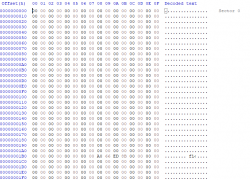
Oh, that's really strange! From what model this HDD came from (CECHwhichexactly) ?
Meanwhile, I edited my preview post and point to how to read it on Linux (not by HDD Reader Linux's version but native tools).
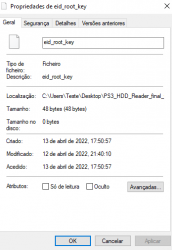
How did You dump ERK, by what tool? Does it have 48 bytes?
2504A
Yes 48bytes, and i used rebug toolbox
Berion
Developer
Ok, so I have also CECH-2504 and her HDD don't looks like this.
So it seems the best approach would be if You goes by Linux way (do not use WSL or WSL2, it will not work there as You will not be able to compile kernel modules; and avoid VM until You are fine with pointing them real PS3 HDD (i.e it is very annoying in VBox to do) or mounted raw disk image if have any from this HDD).
Another way would be using decrypting drive/image by ENCDEC Emulator and using R-Studio (You need scan it, it should find UFS2 partition) but recovery data is in paid spectrum features of that app.
So it seems the best approach would be if You goes by Linux way (do not use WSL or WSL2, it will not work there as You will not be able to compile kernel modules; and avoid VM until You are fine with pointing them real PS3 HDD (i.e it is very annoying in VBox to do) or mounted raw disk image if have any from this HDD).
Another way would be using decrypting drive/image by ENCDEC Emulator and using R-Studio (You need scan it, it should find UFS2 partition) but recovery data is in paid spectrum features of that app.
First sector is LBA 0. And shouldn't be empty, should looks like my LBA 0 (Sector 0) or Yours LBA 1 (Sector 1).
On Your earlier screen, diskmgmt.msc says that Disk 1 is not initialized, so it means that he didn't recognized MBR or GPT which is good sign. There is possibility that if this HDD was used before by Windows before You put it to PS3 to format, there will be some left overs on first sector from MBR (but only there and in few specific places). Maybe it is the reason why HDD Reader reject it. Make screen of it anyway.
If You are ready for tough journey, download Linux Mint and write it to USB via i.e Rufus. You don't need install Linux, it will run from USB and You will have access to Your environment too. Once You boot it, follow the tutorial: https://www.psx-place.com/threads/tutorial-hdd-mounting-and-decryption-on-linux.23308/
So on the windows side of things there's nothing left to do right?
Berion
Developer
From free solutions, no.
Your last chance is this: https://www.psx-place.com/threads/tutorial-hdd-mounting-and-decryption-on-linux.23308/
Your last chance is this: https://www.psx-place.com/threads/tutorial-hdd-mounting-and-decryption-on-linux.23308/
Ok, so I have also CECH-2504 and her HDD don't looks like this.
So it seems the best approach would be if You goes by Linux way (do not use WSL or WSL2, it will not work there as You will not be able to compile kernel modules; and avoid VM until You are fine with pointing them real PS3 HDD (i.e it is very annoying in VBox to do) or mounted raw disk image if have any from this HDD).
Another way would be using decrypting drive/image by ENCDEC Emulator and using R-Studio (You need scan it, it should find UFS2 partition) but recovery data is in paid spectrum features of that app.
Im going to use a bootable pen. well, wish me luck.
I hope something can be done.
You mean that Sector 0 does not look like yours?
Berion
Developer
I wish You luck. ^^
Sector 0 looks like empty. Yet maybe those values in the middle means something, so not all is lost and don't loose hope yet (besides that, multipath-tools have different implementation of PS3PT support than HDD Reader)! You see, not everything was researched fully. Normally, it should be all encrypted in there but we know that not exactly entire HDD is encrypting and not whole LBA0 is in use.
Oh, and You've got my attention as data recovery and obscure storages are in my tight spectrum of interests.
Sector 0 looks like empty. Yet maybe those values in the middle means something,
so not all is lost and don't loose hope yet (besides that, multipath-tools have different implementation of PS3PT support than HDD Reader)! You see, not everything was researched fully. Normally, it should be all encrypted in there but we know that not exactly entire HDD is encrypting and not whole LBA0 is in use.Oh, and You've got my attention as data recovery and obscure storages are in my tight spectrum of interests.
I wish You luck. ^^
Sector 0 looks like empty. Yet maybe those values in the middle means something,
Oh, and You've got my attention as data recovery and obscure storages are in my tight spectrum of interests.
thanks ill keep informed, just creating the drive
I was actually struggling with the compiling, was never good at programing, thanks.Just FYI, I've deleted all bswap16 from attachments in tutorial thread and made all in one package with all versions, included compiled one. Also added compiled bswap16-ecb for Linux Mint 20.3 64bit, so use exactly this (tested and works fine).
Just FYI, I've deleted all bswap16 from attachments in tutorial thread and made all in one package with all versions, included compiled one. Also added compiled bswap16-ecb for Linux Mint 20.3 64bit, so use exactly this (tested and works fine).
WHen running insmod '/home/mint/ps3/bswap16.ko' but with the correct file name i get invalid module format

Izofeu
Member
Btw t's not necessary to boot into Linux. For the less tech savvy people, you can use a VM with virtualbox, just start it as administrator and add the physical drive so that the VM sees it. No risk of accidentally wiping your pc this way.First sector is LBA 0. And shouldn't be empty, should looks like my LBA 0 (Sector 0) or Yours LBA 1 (Sector 1).
On Your earlier screen, diskmgmt.msc says that Disk 1 is not initialized, so it means that he didn't recognized MBR or GPT which is good sign. There is possibility that if this HDD was used before by Windows before You put it to PS3 to format, there will be some left overs on first sector from MBR (but only there and in few specific places). Maybe it is the reason why HDD Reader reject it. Make screen of it anyway.
If You are ready for tough journey, download Linux Mint and write it to USB via i.e Rufus. You don't need install Linux, it will run from USB and You will have access to Your environment too. Once You boot it, follow the tutorial: https://www.psx-place.com/threads/tutorial-hdd-mounting-and-decryption-on-linux.23308/
Berion
Developer
Of course You need rename kernel module or rename it in script.
In theory compiling bswap16 is easy but if Your distro don't have linux-headers in repo or for some reason is mismatched with current load kernel, it will be pain in the ass. Also bswap16-ecb author add alternative make file. Anyway, I adding already compiled versions to match default kernels from not updated live Mint because it is handier than fighting with programmer stuff. I'm not a programmer and really hate solving problems related to code, it is not for my fragile mind.
- - -
How running Linux can accidentally wiping PC?
VM needs lots of resources, some UEFI are bugged as hell and resetting vm support, physical drive support in VBox is broken (work ok in VMWare). It is a bad idea in the first place IMO as introducing additional problems.
In theory compiling bswap16 is easy but if Your distro don't have linux-headers in repo or for some reason is mismatched with current load kernel, it will be pain in the ass. Also bswap16-ecb author add alternative make file. Anyway, I adding already compiled versions to match default kernels from not updated live Mint because it is handier than fighting with programmer stuff. I'm not a programmer and really hate solving problems related to code, it is not for my fragile mind.
- - -
How running Linux can accidentally wiping PC?
VM needs lots of resources, some UEFI are bugged as hell and resetting vm support, physical drive support in VBox is broken (work ok in VMWare). It is a bad idea in the first place IMO as introducing additional problems.
Last edited:
Of course You need rename kernel module or rename it in script.
In theory compiling bswap16 is easy but if Your distro don't have linux-headers in repo or for some reason is mismatched with current load kernel, it will be pain in the ass. Also bswap16-ecb author add alternative make file. Anyway, I adding already compiled versions to match default kernels from not updated live Mint because it is handier than fighting with programmer stuff. I'm not a programmer and really hate solving problems related to code, it is not for my fragile mind.
- - -
How running Linux can accidentally wiping PC?
VM needs lots of resources, some UEFI are bugged as hell and resetting vm support, physical drive support in VBox is broken (work ok in VMWare). It is a bad idea in the first place IMO as introducing additional problems.
Daaaamn!
Im gonna download v20
Berion
Developer
Compiled versions in attachment (in tutorial thread) are for Mint 18.3, 19.3, 20.0 and 20.3. All 64bit versions. Those match to their default kernels.
If You have some different distro and/or with different kernel version, just open Terminal, go to source folder of bswap16-ecb, and type there "make" or switch to root and then type "make" (i.e on Debian types it will be "sudo make"). Should compile as user anyway. You need linux-headers-* so if install them as they are mandatory (in live sessions, they will be installed of course in RAM).
If You have some different distro and/or with different kernel version, just open Terminal, go to source folder of bswap16-ecb, and type there "make" or switch to root and then type "make" (i.e on Debian types it will be "sudo make"). Should compile as user anyway. You need linux-headers-* so if install them as they are mandatory (in live sessions, they will be installed of course in RAM).
Izofeu
Member
I'm not invalidating what you said, just saying there are two options  . I've used physical drive access with virtualbox before and it worked fine for me. Linux works fine whether virtualization in bios is on or off. How can you accidentally wipe a pc? An average user can ignore warnings / use random options which will wipe your drive (I've done that before so speaking from my experience XD).
. I've used physical drive access with virtualbox before and it worked fine for me. Linux works fine whether virtualization in bios is on or off. How can you accidentally wipe a pc? An average user can ignore warnings / use random options which will wipe your drive (I've done that before so speaking from my experience XD).Similar threads
-
PS4 PS4 HDD deleted savegames restore - last step needed
- Started by John37
- Replies: 2
-
PS3 Need Help On How To Transfer Old HDD Data To PS3's New SSD
- Started by IvanGremory
- Replies: 1
-
-
