Checkity_CheckYoSelf
Member
So I managed today to wiggle my way thru getting my FreeMcboot card setup after imaging my HDD with FHDB.
Since then i've went thru all the other setup steps to get my internal HDD ready for putting games on. I formatted it, opened up OPL once then exited (also changed setting to auto detect HDD), verified folders were on the HDD in ULaunchelf.
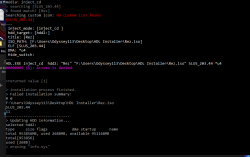
I'm now trying to put games on, and getting the HDL batch installer to recognize the HDD in my pc, but it's acting like it's having permission issues or something. I'm getting a "00000005 (5): Access is denied." readout in the command and an error 1L listed in the interface itself. I'm getting a similar error in the other HDL apps.
Any insight as to what could be the problem?
Since then i've went thru all the other setup steps to get my internal HDD ready for putting games on. I formatted it, opened up OPL once then exited (also changed setting to auto detect HDD), verified folders were on the HDD in ULaunchelf.
I'm now trying to put games on, and getting the HDL batch installer to recognize the HDD in my pc, but it's acting like it's having permission issues or something. I'm getting a "00000005 (5): Access is denied." readout in the command and an error 1L listed in the interface itself. I'm getting a similar error in the other HDL apps.
Any insight as to what could be the problem?