


jolek
Senior Member
-
HDL Dump Helper GUI is a graphical program, which helps to install PS2 games from a PC onto the PS2. Its based on the command line program hdl_dump and includes mostly all its functions in an easier way.
With it you can install PS2 games over LAN or on a locally connected PS2 HDD through IDE or USB. It also can list and edit the installed games from the HDD which is stored in your PS2. You also can copy the games back from the PS2 HDD onto your PC.
HDL Dump Helper GUI is coded in Java and therefore it works on nearly all OS (e.g. many Linux Distributions, Windows) except MAC OS, because there is no hdl_dump for MAC included.
The only thing you need is the Java Runtime Environment in the latest Version.
-
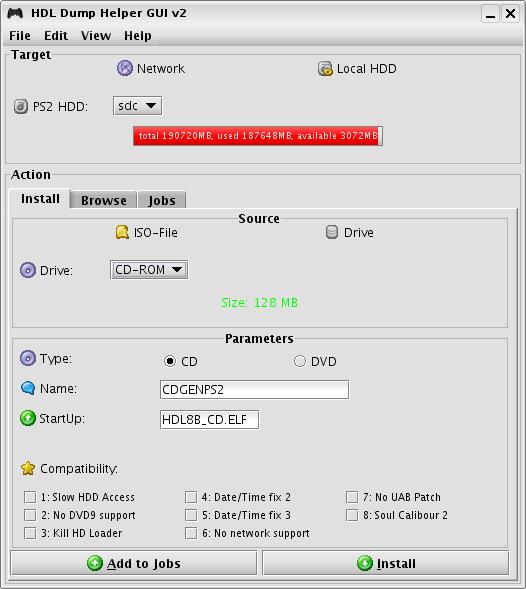
The program should be very self explaining because of its tool tips.
For Windows:
- To start the GUI on Windows you can use the .exe file or just double click .jar file,
which should also work when JRE is successfully installed. - If both things arent working then goto 'Start' -> 'Run' and type 'cmd'.
- Then switch to the folder containing the GUI using the command 'cd'.
Now type 'java -jar hdldh_gui.jar' and the GUI should start up.
For linux:
- To start the GUI on a Linux Distribution you can double click the bash-script ./launcher-linux if its made executable via 'chmod +x <file>'.
- If you are in the console you can also type ./launcher-linux or 'java -jar hdldh_gui.jar'.
- You also can create a desktop shortcut if you want.
There is an Included icon which you can use for it in the '/files' folder called desk_icon.png.
Just choose the bash script and the icon when creating a desktop shortcut.
- To start the GUI on Windows you can use the .exe file or just double click .jar file,
-
For more help use the help of the program.
You also can manually access it by opening the "help.html" file in the files/ folder with a browser -- available in various languages.
-
Changelog:
v2.3 (14.10.12):
--------------------
(fix): fixed problems with java 7 (thx at El_Patas)
+ added Brazilian Portuguese language file (thx at joelima1310)
v2.2 (01.03.09):
--------------------
+ added the possibility to add a copy action to the job list. Now many copy
processes from the ps2 hdd onto your pc hdd can be easily done through the
job list
+ added the posibility to remotely shutdown the ps2 console (e.g. after having
done all jobs)
(fix): fixed some bugs in the language file system (i missed some translations)
now everything should be displayed in your chosen language
(fix): increased the size of the HDD statusbar
+ added the spanisch and catalonian language file (thx at El_Patas)
+ added the possibility to disable the splash-screen
+ added the possibility to select more than one game or one job in the lists (only works with deleting)
v2.1 (06.08.08):
--------------------
+ added language file support (EN/DE included, you can create others by your own: see help)
v2.0 (02.08.08):
--------------------
- totally recoded
- too many changes to list
-
2.2:
http://www.mediafire.com/file/uesoc95cqcqmhgw/hdl_dump_helper_gui_2.2.rar.
2.1:
http://www.mediafire.com/file/zz1jhkzkkls5ux5/hdl_dump_helper_gui_2.1.zip.
2.0:
http://www.mediafire.com/file/30s1y3aogq561uo/hdl_dump_helper_gui_2.zip.
The official release thread can be found here:
[APP] HDL Dump Helper GUI - ModControl.com - GermanysNr1MultiConsoleSceneSource.
Backup:
https://web.archive.org/web/20090205001548/http://www.modcontrol.com/Board/thread.php?threadid=6494.
Feel free to contact an author with any suggestions: ([email protected])


