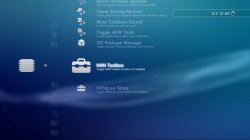
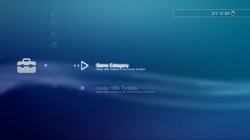
HEN Toolbox

PS3 HEN Toolbox v1.00

You can use it without webman, just disable the webman menu if you dont want to see it.


Please F%$# off with your fake brick comments.


Yes, you can have both, or you can even have HAN Toolbox, inside HEN Toolbox if you want.
Sorry. I was lying to everyone who read and believed me
 
When you enable dev_blind, next time after restarting the console, it does not allow for HEN to be enabled again as it gets stuck at the screen of "Enabling HEN..."
Not happening to me, dev_blind gets unmounted when restarted so not related to this HEN toolbox. Something that you did caused that!
 
i have Han toolbox on PS3 HEN 2.2.2
and now can I install HEN Toolbox 1.00 on PS3 HEN 2.2.2?
Does both toolbox work same time?
Yes,Both toolbox work same time
Now,I have two Toolbox
One is Han Toolbox 0.7.1
Two is HEN Toolbox v1.00
I'm very happy because I have Two Toolbox
Thank You Very Much to DeViL303
Because He Spends a lot of time & Hard Work on HEN Toolbox
 
Yes, both work, also in HEN Toolbox > Firmware Settings there is an option to move HAN Toolbox into the HEN Toolbox menu. This is optional and its just for people who don't like a cluttered game category, you can also disable the package manager and move HENbrew store into the Toolbox if you want for an even cleaner XMB. HFW tools can be disabled in network, and made to show in HEN Toolbox too.

Note: if you move package manager into the toolbox, and then remove the toolbox, you will have no way to install packages anymore. You have been warned. ;)


EVERY item in HEN toolbox can be toggled on and off, so you can customize it how you like it.
 
If I move Han toolbox to Hen toolbox
Whatever If I don't like
Can I back Han toolbox same place?
Yes.

ls-screenshot-0.bmp

ls-screenshot-0.jpg ls-screenshot-1.jpg
ls-screenshot-1.bmp
 
Last edited:
If HEN toolbox has all HEN toolbox functions, is having both even necessary?
Not really, but people like what they like, so I added support. HAN Toolbox is mostly obsolete though yeah.

Ok I just have one doubt. I am trying to disable Singstar Icon from appearing but it is always showing up again...can you help me?
Not sure, that option is working fine here, I cant really fix it if I cant replicate the issue here. Sorry.
 
If HEN toolbox has all HEN toolbox functions, is having both even necessary?


Not needed but I made a customized one with links to other items that aren't in HEN Toolbox. Makes it nice as I can just move that into HEN Toolbox and not have to rewrite the XML mods I have done for HAN into the new toolbox. This is a really nifty feature and saves a lot of time cutting and pasting. I only have a 500gb internal so I hosted the 125+ custom PSP/PS2 PKG files I have made. These I made before PSP ISO support came out and only had a 320gb HDD. Now I just need a external HDD so I can just have everything I want installed.
 
I also made HEN Toolbox so you can install applications to the HEN Toolbox menu. This works great if you use icon0s like these as it makes apps look like normal XMB options.

ICON0.PNG ICON0 (1).PNG ICON0 (2).PNG ICON0 (3).PNG ICON0 (4).PNG ICON0 (5).PNG ICON0 (6).PNG ICON0 (7).PNG ICON0 (10).PNG ICON0 (11).PNG ICON0 (12).PNG ICON0 (13).PNG ICON0 (14).PNG ICON0 (15).PNG ICON0 (16).PNG


To move an app to the HEN Toolbox, just change its PARAM.SFO to the category HM. You can either do this and rebuild the pkg with the modified SFO then install it, or just modify the SFO in dev_hdd0/game/XXXXXXXXX/ and then rebuild the database or run the app to move it to the toolbox.

To see what I mean here is a Rebug Toolbox and blackb0x ftp pkg attached, They're set up to install into HEN Toolbox

ls-screenshot-5.jpg
 

Attachments

Last edited:
I never heard about sMAN, but sMAN is giving the same problem as webMAN?
Non, sMAN produit sûrement des erreurs mais il est moins "lourd" en mémoire que WebMAN et le couple "sMAN-ManaGunZ" est pour le moment parfait sur ma PS3 en HEN-2.2.2.

No, sMAN certainly produces errors but it is less "heavy" in memory than WebMAN and the couple "sMAN-ManaGunZ" is for the moment perfect on my PS3 in HEN-2.2.2.
 
As well as being able to install apps to the HEN Toolbox menu, i have added support for other XMB mods to be added. One on hdd, and one on USB.

HTBADDON1 is the content ID to use for the HDD addon, and htb_external.xml on root of usb000 for the USB addon.
Code:
<Query class="type:x-xmb/folder-pixmap" key="HTBADDON1" src="xmb://localhost/dev_hdd0/game/HTBADDON1/USRDIR/main.xml#main"/>
<Query class="type:x-xmb/folder-pixmap" key="HTBEXTXML" src="xmb://localhost/dev_usb000/htb_external.xml#external"/>

These queries I added for HAN Toolbox and HENbrew store can be used too. These are used when you use the HEN Toolbox Firmware settings menu to move those mods into HEN Toolbox (if installed). its a simple rename of the main xml that moves the mod.
Code:
<Query class="type:x-xmb/folder-pixmap" key="han_toolbox_htb" src="xmb://localhost/dev_hdd0/game/HANTOOLBX/USRDIR/han_toolbox_htb.xml#han_toolbox_xmb_main" />
<Query class="type:x-xmb/folder-pixmap" key="henbrew_store_htb" src="xmb://localhost/dev_hdd0/game/HENBSTORE/USRDIR/henbrew_store_htb.xml#henbrew_store_xmb_main" />
 
One of my requests is in HEN Toolbox, a screenshot function when pressing a specific button whenever you're in XMB or you're in game without affecting performance of gameplay, without go to Pause Menu, that sucks that I can't capture the perfect moment of game. @DeViL303

The Toolbox is very easy to use and very complete in first version thank you but I think it deserves have this feature also, keep good work bro
 
Last edited:
Non, sMAN produit sûrement des erreurs mais il est moins "lourd" en mémoire que WebMAN et le couple "sMAN-ManaGunZ" est pour le moment parfait sur ma PS3 en HEN-2.2.2.

No, sMAN certainly produces errors but it is less "heavy" in memory than WebMAN and the couple "sMAN-ManaGunZ" is for the moment perfect on my PS3 in HEN-2.2.2.

You could let me know how you installed sMAN in your HEN. I tried but I was not lucky, I'm in HEN 2.2.2 and I used sMAN 1.12 and I was successful. I added the path in boot_plugin.txt also tried rephrase .sprx for cfw 3.55 but none of that worked for me. Could you tell me how you did the installation?
 
One of my requests is in HEN Toolbox, a screenshot function when pressing a specific button whenever you're in XMB or you're in game without affecting performance of gameplay, without go to Pause Menu, that sucks that I can't capture the perfect moment of game. @DeViL303

The Toolbox is very easy and complete thank you but I think it deserves have this feature also, keep good work bro
This is an XMB Mod, not a plugin. So its not possible.
You could let me know how you installed sMAN in your HEN. I tried but I was not lucky, I'm in HEN 2.2.2 and I used sMAN 1.12 and I was successful. I added the path in boot_plugin.txt also tried rephrase .sprx for cfw 3.55 but none of that worked for me. Could you tell me how you did the installation?
please find another thread related to sMAN, this is completely off topic.
 
This is an XMB Mod, not a plugin. So its not possible.

But are you thinking made a plug-in about this? Everyone has been complained about this issue, we can't take Screenshot in perfect in game without go to Pause Menu then we can't print the perfect moment of the game, it should create with shortcut when pressing a button them immediately save into photos
 
Back
Top