
You are using an out of date browser. It may not display this or other websites correctly.
You should upgrade or use an alternative browser.
You should upgrade or use an alternative browser.
PS2 How play PS1 games on PS2 slim using USB
- Thread starter Rosssiiii
- Start date


gamerman 5000
Developer
In my opinion, I don't see the point of playing PSX on a PS2 through "network" because there is no problem with USB at all, unless there is game compatibility through this medium that does not have USB.
I have only tried USB.
but as @L2000 says, yes it can.
ok if for the ps1 games there is not difference in performance between play with SMB or using USB i will go for the easier way, using usb.In my opinion, I don't see the point of playing PSX on a PS2 through "network" because there is no problem with USB at all, unless there is game compatibility through this medium that does not have USB.
I have only tried USB.
but as @L2000 says, yes it can.
please can you guide me to configure it ?
gamerman 5000
Developer
ok if for the ps1 games there is not difference in performance between play with SMB or using USB i will go for the easier way, using usb.
please can you guide me to configure it ?
This guide will be useful to you:
https://www.psx-place.com/threads/m...ames-in-the-app-section-of-opl-via-usb.41184/
helloThis guide will be useful to you:
https://www.psx-place.com/threads/m...ames-in-the-app-section-of-opl-via-usb.41184/

looks very difficult that one ...
1) first i have to set "application start mode" in MANUAL;
2) i have to create and copy that file in that path " mc0:/OPL/conf_apps.cfg "
but in my case what i have to write there "conf_apps.cfg" ? i have to set something about PSX ?
Nintendo and Sega are for other emulators and i'm just interested in psx games.

"Mortal Kombat 3 = mass:/POPS/XX.SCES_000.60.Mortal Kombat 3.ELF" maybe i should write that stuff for the game that i want;
but is mandatory start the application from OPL ? or i could manually start the .elf of POPStarter_2 from ulauncher saved on the usb key for example?
so i keep separated OPL and POPStarter
Last edited:
gamerman 5000
Developer
hello
looks very difficult that one ...
1) first i have to set "application start mode" in MANUAL;
2) i have to create and copy that file in that path " mc0:/OPL/conf_apps.cfg "
but in my case what i have to write there "conf_apps.cfg" ? i have to set something about PSX ?
Nintendo and Sega are for other emulators and i'm just interested in psx games.
The guide for PSX games refers to the guide to installing APPS only so that you know the installation procedure since PSX games are installed as applications.
Read the referenced guide first so you understand better.
but is mandatory start the application from OPL ? or i could manually start the .elf of POPStarter_2 from ulauncher saved on the usb key for example?
so i keep separated OPL and POPStarter
It is not mandatory, it just makes it look prettier with its covers, of course you can run it from UlaunchElf.
oh understand now, i would like to run "POPStarter" with ulauncher and just configure it.The guide for PSX games refers to the guide to installing APPS only so that you know the installation procedure since PSX games are installed as applications.
Read the referenced guide first so you understand better.
It is not mandatory, it just makes it look prettier with its covers, of course you can run it from UlaunchElf.
so that file "conf_apps.cfg" is necessary only to run "POPStarter" as application in OPL but in my case will not be necessary.
so i have:
1) extract the rom from the cd and convert in .VCD as show by the guide.
2) create a folder called POPS in the root of the console
3) and put inside that
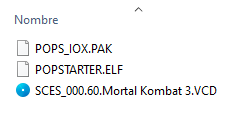
4) for any game rename the file .elf in:
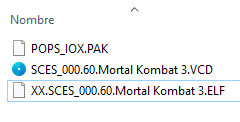
and after that i don't need to configure more the Popstarter from PS2 OSD settings and should be able to run games from Popstarter OSD ?

Hellooh understand now, i would like to run "POPStarter" with ulauncher and just configure it.
so that file "conf_apps.cfg" is necessary only to run "POPStarter" as application in OPL but in my case will not be necessary.
so i have:
1) extract the rom from the cd and convert in .VCD as show by the guide.
2) create a folder called POPS in the root of the console
3) and put inside that
4) for any game rename the file .elf in:
and after that i don't need to configure more the Popstarter from PS2 OSD settings and should be able to run games from Popstarter OSD ?
where i can safely download the POPS_IOX.PAK file ?
sorry, i should change the title because i have decided that for ps1 games if there is not a performance change compared to SMB i would like to simply use the usb for gaming.
but is correct as i understand i have to to and i explained in the post #9 of this theared ?
i would like to play without go inside OPL, i understand that i could directly play the "POPSTARTER.ELF" file right ?
Last edited:
gamerman 5000
Developer
Hello
where i can safely download the POPS_IOX.PAK file ?
For copyright reasons, sharing links to these files is not allowed.
sorry, i should change the title because i have decided that for ps1 games if there is not a performance change compared to SMB i would like to simply use the usb for gaming.
but is correct as i understand i have to to and i explained in the post #9 of this theared ?
i would like to play without go inside OPL, i understand that i could directly play the "POPSTARTER.ELF" file right ?
Follow the guide I gave you and, if necessary, comment on your questions in that thread.
Similar threads
-

-
PS2 Mechapwnd PS2 not playing burned CDRs? Use high quality discs
- Started by shownomercyomer
- Replies: 2
-
PS2 I need with POPS installation for MX4SIO (aside from BDM Assault)
- Started by volventura
- Replies: 4
-