HWC's OSDSYS Launcher

PS2 HWC's OSDSYS Launcher v1.1

Anyway, FMCB v1.8b could be old, but it's rock solid. Newer version haves compatibility with DEX, PSX, etc but for CEX consoles, I advise you 1.8b or 1.8c unofficial installer.
 
Can you define what "random stuff" means or at least give a picture from PC and PS2?

7Fss0Tn.png
 
@sestain are using bootable version of uLe?
From what I remember FreeDVDBoot should have different version:
v4.43-HWC Jun 23 2020.

uLaunchELF v4.37 is quite old...
Can you re-format you USB device and use different w\uLaunchELF version?

Recent versions of wLaunchELF should have updated\fixed USB support.
However some USB devices (e.g. Kingston) may be still problematic.

You can download wLaunchELF 41e4ebe (14\01\2019) from here:
https://www.psx-place.com/resources/wlaunchelf.713/.
 
Back in the days I have the same problem as sestain have...
Something just got corrupted.
From what I remember I try uLe 4.42d, 4.37...

Currently with wLaunchELF 41e4ebe these problems are gone.
 
@sestain are using bootable version of uLe?
From what I remember FreeDVDBoot should have different version:
v4.43-HWC Jun 23 2020.

uLaunchELF v4.37 is quite old...
Can you re-format you USB device and use different w\uLaunchELF version?

Recent versions of wLaunchELF should have updated\fixed USB support.
However some USB devices (e.g. Kingston) may be still problematic.

You can download wLaunchELF 41e4ebe (14\01\2019) from here:
https://www.psx-place.com/resources/wlaunchelf.713/.

I tried newer version and older version but newer version doesnt show anything from usb and old shows the corrupted thing
 
Your file system may be corrupted, that is why I suggested to re-format your USB device.
Looking at content on your device, you ain't got much (only FMCB installer),
so formatting and copy content once again will not take much time...
 
Anyway, FMCB v1.8b could be old, but it's rock solid. Newer version haves compatibility with DEX, PSX, etc but for CEX consoles, I advise you 1.8b or 1.8c unofficial installer.

FMCB v1.8c already covered most of the common CEX, but not everything. It has incomplete support for the early CEX (SCPH-10000 and SCPH-15000), no support for the SCPH-50009 and also has no support for the HDD.
It pains me that USBHDFSD wasn't always working so well with all my releases, but it's supposed to have been one enhancement too.

I believe compatibility problems exist only if you have a modchip. I don't think it's a problem with the code itself, otherwise we should also have problems on all PS2s - not just modified consoles.
Since a modchip can modify EE/IOP memory, I cannot guarantee it'll not change the contents of memory in a way that causes things to not work. Perhaps the original FMCB developers took the time to shape FMCB so that it'll work nicely in the best-possible way (i.e. work around modchips), but I didn't.

4.37 it's rock solid @jolek
Trust me, I'm not the only one saying it...
That's one of the most stable releases
If you're saying this because of USB support: support for USB is defined by USBHDFSD, not LaunchELF itself.
If LaunchELF has some limitation, I hope to see more people improving it. Same thing goes for USBHDFSD.

I tried newer version and older version but newer version doesnt show anything from usb and old shows the corrupted thing

Earlier USBHDFSD versions have a limitation, whereby if the disk has no supported file system (FAT12/FAT16/FAT32), it'll assume that the disk has no partition table and mount it. Basically, it guesses and will guess wrong.
The late versions will reject such a disk.

Are you absolutely sure it has a MBR partition table and your partition is FAT32-formatted? Not exFAT and certainly not NTFS...
A long time ago, I used to also tell people to ensure that the partition is also flagged as the active partition. But I never really understood why it's necessary (since USBHDFSD will select the first one it recognizes).
 
Last edited:
Earlier USBHDFSD versions have a limitation, whereby if the disk has no supported file system (FAT12/FAT16/FAT32), it'll assume that the disk has no partition table and mount it. Basically, it guesses and will guess wrong.
The late versions will reject such a disk.

Are you absolutely sure it has a MBR partition table and your partition is FAT32-formatted? Not exFAT and certainly not NTFS...
A long time ago, I used to also tell people to ensure that the partition is also flagged as the active partition. But I never really understood why it's necessary (since USBHDFSD will select the first one it recognizes).

Thanks. After changing my usb to MBR partition table and used FAT32 it worked just fine
 
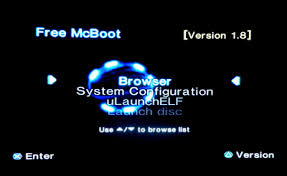
I have notice that when you replace BOOT.ELF (wLaunchELF) with HWC's OSDSYS Launcher in installer,
after installing FMCB, shortcut to wLaunchELF in FMCB menu:
pobrane.jpg

will not allow to start LaunchELF.
Instead of that it will start HWC's OSDSYS Launcher.
Because files have been replaced.

File browser is a kind of an important thing...
I know it can be assign to mass:/BOOT.ELF in FMCB configurator,
or disc with wLe can be write (burn).

What about add BOOT2.ELF into installer and add entry for it in "FREEHDB.CNF" & "FREEMCB.CNF"?
BOOT.ELF - will be HWC's OSDSYS Launcher
BOOT2.ELF - wlaunchELF
I have uploaded archive for test.

EDIT: Added version (OSDSYS MC01) that supports memory cards in both slots from here:
https://www.psx-place.com/threads/hwcs-osdsys-launcher.30258/page-4#post-267180.

It seems that there's someone on eBay selling FMCB memory cards with a "multi-region" installed FMCB v1.8C
which includes three different FMCBs installations made from three different consoles.
That setup is a nonsense as the KELFs are not really region free,
these are ELFs injected on the DVDELFs from XXX01, XXX04 and XXX06.
That seller does not seems to know that FMCB v1.9 exists and can do proper multi-region installations.
If you do not have these kind of frankenfmcb, ANY ELF in our release should work for you,
but if that's not the case, please select the proper one for your region,
else USE ANY ELF YOU WANT (or the one you hate the most)
 

Attachments

Last edited:
I have notice that when you replace BOOT.ELF (wLaunchELF) with HWC's OSDSYS Launcher in installer,
after installing FMCB, shortcut to wLaunchELF in FMCB menu:
pobrane.jpg

will not allow to start LaunchELF.
Instead of that it will start HWC's OSDSYS Launcher.
Because files has been replaced.

File browser is kind of a important thing...
I know it can be assign to mass:/BOOT.ELF in FMCB configurator,
or disc with wLe can be write (burn).

What about add BOOT2.ELF into installer and add entry for it in "FREEHDB.CNF" & "FREEMCB.CNF"?
BOOT.ELF - will be HWC's OSDSYS Launcher
BOOT2.ELF - wlaunchELF
I have uploaded archive for test.

I will add a link to that post on the OP as soon as I sit online on a PC.
 
@sp193 Yes, "working around issues due to/caused by modchips" hits the nail on the head, although we only debugged the most common ones (me: DMS3, dlanor: DMS4 AFAIR, MI and Clones: Multiple people)!


@jolek: Yes, placing wLE as BOOT2.ELF and having the OSDSYS-Launcher as BOOT.ELF is preferable for BOOT-ROM 2.30 and up, but generally wLE as BOOT.ELF seems to be preferable.
I am not yet sure about any issues, which might be caused by the "new structure".

There might be no disadvantage, but I am not quite certain.
 
Having uLE as DEV1 will not let OSDSYS Launcher from coldbooting on modchips configurated to DEV1 as boot priority. Get my point?
 
I wrote about OSDSYS-Launcher and not wLE...

Hence... I am not sure if any issues could arise from the "new structure", where OSDSYS-Launcher is BOOT.ELF and wLE is BOOT2.ELF, but I quite thoroughly thought about it since I proposed it a while ago (since you released the Launcher).

I haven't yet came across big issues.
It's cool for every app which supports "Exit to BOOT.ELF", because it would Launch back to FMCB.
It is just not so cool for those, who wanted to jump back to another app DIRECTLY!
 

Similar threads

Back
Top
