PS3 i got a error installing HAN ps3 hfw

snakeater3

Forum Noob
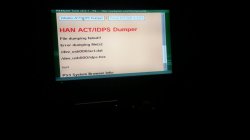
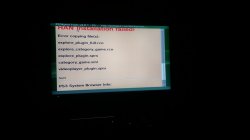
im trying to install han in a ps3 with 4.84 hfw but im getting the same error all the times
Error copying file(s):
explore_plugin_full.rco
explore_category_game.rco
explore_plugin.sprx
category_game.xml
videoplayer_plugin.sprx
NaN

what i have to do to fix this?
 

Attachments

  • WhatsApp Image 2019-05-10 at 2.37.50 PM.jpeg
    WhatsApp Image 2019-05-10 at 2.37.50 PM.jpeg
    44.8 KB · Views: 350
  • WhatsApp Image 2019-05-10 at 2.41.08 PM.jpeg
    WhatsApp Image 2019-05-10 at 2.41.08 PM.jpeg
    46.6 KB · Views: 313
try another usb formated to fat32
make sure all the files are on the root of the usb
i have done this same process in other ps3 (slim) and the problem does not appear, but when i try in my other ps3 (fat) the problem appears, its the same USB formated to fat32, i have done the same proccess in both ps3 but in the fat one, the problem appears, what can i do?
 
i have done this same process in other ps3 (slim) and the problem does not appear, but when i try in my other ps3 (fat) the problem appears, its the same USB formated to fat32, i have done the same proccess in both ps3 but in the fat one, the problem appears, what can i do?
Try to connect the USB to rightest port of your console.
Hope it helps:)
 
Try to connect the USB to rightest port of your console.
Hope it helps:)
i did this too, i did the same proccess in two different ps3 (slim and fat) the same usb, same files, same port (the right one)
but in the ps3 fat, the error appears :(
 
i did this too, i did the same proccess in two different ps3 (slim and fat) the same usb, same files, same port (the right one)
but in the ps3 fat, the error appears :(
Can you please tell that does the USB device appears in the PHOTO,MUSIC or VIDEO section in XMB?
 
I think your missing the HAN support files.
They need to be extracted to usb root.

Edit: My bad, same files, same usb but fails on one ps3 but not the other? Hmmm... I'm unsure now
 
I think your missing the HAN support files.
They need to be extracted to usb root.

Edit: My bad, same files, same usb but fails on one ps3 but not the other? Hmmm... I'm unsure now
what can i do to fix this? i tried all the usb slots, formatting the ps3, changing ''usb000'' to ''usb001'' and ''usb006'' in the han installation page and nothing works
 
Are you certain that the ps3 is recognising the usb?
Maybe that usb is busted?
You can test by plugging usb into left USB port and changing to "usb001".
I'm not to good with PS3 hardware if usb ports are busted
 
Are you certain that the ps3 is recognising the usb?
Maybe that usb is busted?
You can test by plugging usb into left USB port and changing to "usb001".
I'm not to good with PS3 hardware if usb ports are busted
i just updated to 4.84.2 hfw with that usb and the same port, my usb its not broken, if it was, i think i could not update
 
i just updated to 4.84.2 hfw with that usb and the same port, my usb its not broken, if it was, i think i could not update
There might be problem with HAN Support Files.Download fresh files from here:
** http://www.**ps3xploit.com >Doma...me =new)/hfw/release/han_supportfiles-484.zip
:)
 
If you're seeing "NaN" on the web page, it means you're running the patched 4.84 Webkit SPRX. You need to install HFW.
 
If you're seeing "NaN" on the web page, it means you're running the patched 4.84 Webkit SPRX. You need to install HFW.
when I try to update, the system says that it already has that version, what can i do? also i try to update with the update in my usb
 

Similar threads

Back
Top