PS5 importing VMC0.card save from ps4 to ps5?

Max7731

Member
I have a question about PS2 save data on PS5.

I extracted my PS2 save from a PS4 FPKG, and I have the files VMC0.card and VMC1.card. On my PS5, the same game is installed using the exact same FPKG, but the save files seem to use a different format (sdimg_* files instead of VMC*.card).

Is it possible to transfer the PS2 save from the PS4 version to the PS5 version? If so, what is the correct method to convert or import the VMC0.card save into the PS5 save format?

Thank you for your help.
 
It is not save but memory card image.

Open both in IsoBuster. If it will not recognize them, open in HxD (or any other hex editor) and show me first sectors.
 
Hi,
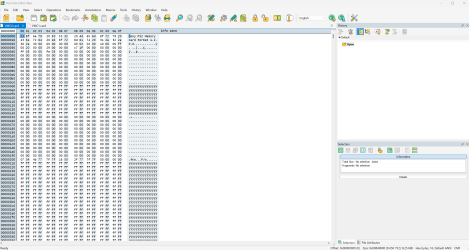
I opened the VMC0.card in a hex editor as requested. Here is the first sector of the memory card image.
Thank you.
 

Attachments

  • Capture d’écran 2026-06-02 134423.png
    Capture d’écran 2026-06-02 134423.png
    522.7 KB · Views: 5
  • Capture d’écran 2026-06-02 134548.png
    Capture d’écran 2026-06-02 134548.png
    528.6 KB · Views: 5
Not encrypted, seems to be raw dump. And the other two? ;]
Does sizes of both "formats" are equal to exactly 8MiB or larger?
Hi,
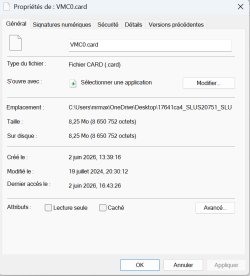
VMC0.card size: 8,650,752 bytes.
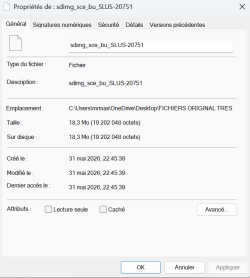
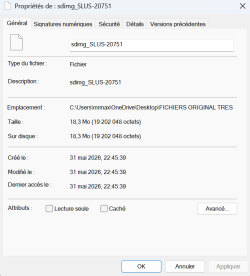
sdimg_sce_bu_SLUS-20751 size: 19,202,048 bytes.
sdimg_SLUS-20751 size: 19,202,048 bytes.
Attached are screenshots of the file properties.
Thank you.
 

Attachments

  • new1.png
    new1.png
    41.3 KB · Views: 1
  • new2.png
    new2.png
    40 KB · Views: 1
  • new 3.png
    new 3.png
    38.9 KB · Views: 1
So yours VMC0/1.card are ECC raw dumps (binary the same like *.VM2 on PS3 or *.ps2 on PCSX2).

But the other (judging by file size because you didn't show hex view ;]) are encrypted PFS containers. Which means you need find a way to decrypt them or mount them - on PS5 (no way to that on PC, the same with PS4's PFS containers in which eg. saves are encapsulated).
 
So yours VMC0/1.card are ECC raw dumps (binary the same like *.VM2 on PS3 or *.ps2 on PCSX2).

But the other (judging by file size because you didn't show hex view ;]) are encrypted PFS containers. Which means you need find a way to decrypt them or mount them - on PS5 (no way to that on PC, the same with PS4's PFS containers in which eg. saves are encapsulated).
Hello,
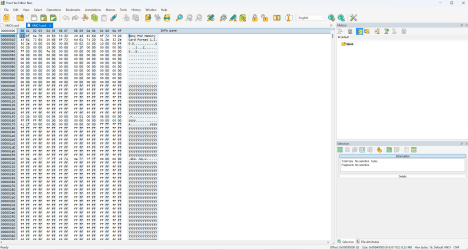
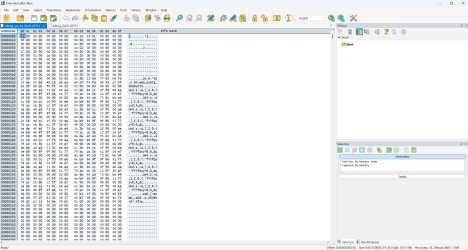
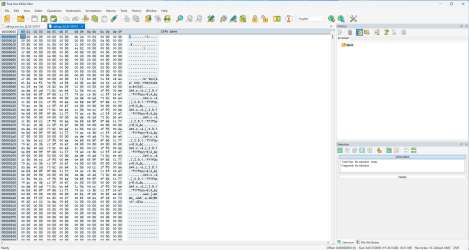
As requested, I am attaching the hexadecimal views of the beginning of both files: sdimg_sce_bu_SLUS-20751 and sdimg_SLUS-20751.
Both files are 19,202,048 bytes in size.
Do these appear to be encrypted PFS containers, or do you recognize them as something else?
Thank you for your help.

One more question:
Would it help if I could find a 100% save for James Bond 007: Everything or Nothing from someone who has already completed the game on PS5 and shared it online?
My main goal is simply to unlock all missions and levels. I'm wondering whether a shared PS5 save for James Bond 007: Everything or Nothing could be useful, or if the encryption/account binding would still prevent it from working.
Thank you.
 

Attachments

  • Capture d’écran 2026-06-03 135018.png
    Capture d’écran 2026-06-03 135018.png
    664.5 KB · Views: 5
  • Capture d’écran 2026-06-03 135111.png
    Capture d’écran 2026-06-03 135111.png
    670.9 KB · Views: 5
Last edited:
I never saw PFS from PS5 but it is not memory card image for sure. Could you mark cursor in text field interpretation and press CTRL+F, then search for pattern "Memory Card" (case sensitive)? If nothing found, it is encrypted container with unknown contents inside. Or just upload it to eg. on Mediafire and send me link in PM.

I don't know if saves encryption is anyhow bypassed on PS5 like on PS4. So at this stage they will not be helpful at all, for me.
 
Back
Top