Hello! I'm sorry in advance if this happens to be an obvious question, but i can't say i'm much familiar with the ins and outs of how these things work, so i thought i might give it a go and ask here.
So, here's the thing: I have a FAT PS3 model running HFW 4.86 connected to a widescreen CRT via S-Video with a 576i output and set to 16:9 aspect ratio, and would like it to stay that way.
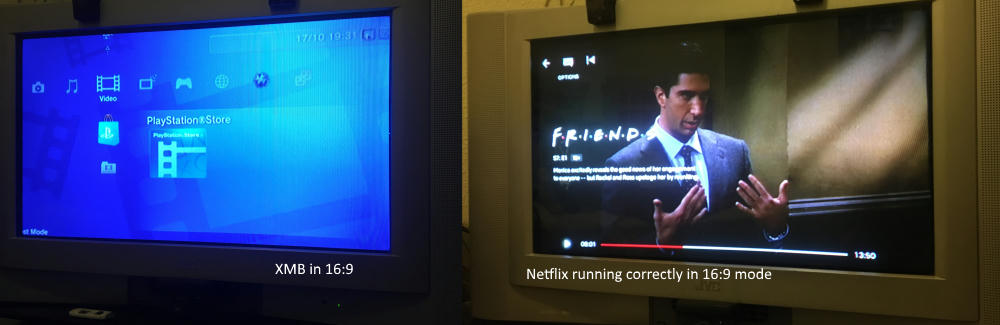
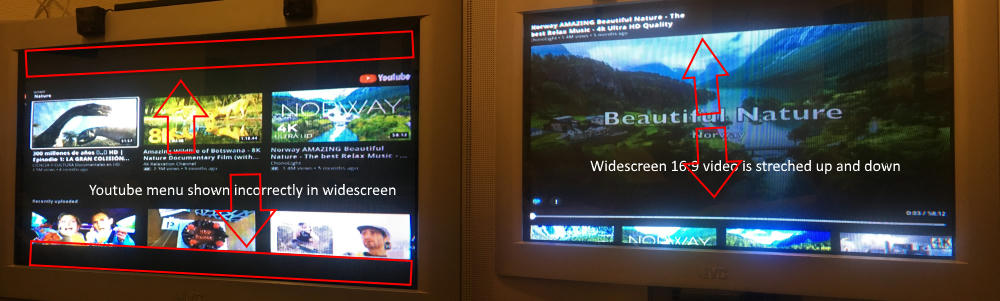
Apart from games, i like to use it also as a media center. While most of the games and other apps like Netflix are shown correctly in widescreen as they should be, YouTube seems to be not no matter what i try. I gave it a go to edit PARAM.SFO file and disable all of the 4:3 options it could have, leaving only the 576i option in widescreen, but that gave me no effect whatsoever, the still shows incorrectly on a widescreen TV. Is there any possible way to fix this? Maybe edit something inside the app itself or something? Could someone give me a hand with this, please? As with the way it's currently outputting, it's very hard to watch YouTube videos like this, and i don't know any YouTube alternatives to use with HFW either.
Thanks in advance!!!
So, here's the thing: I have a FAT PS3 model running HFW 4.86 connected to a widescreen CRT via S-Video with a 576i output and set to 16:9 aspect ratio, and would like it to stay that way.
Apart from games, i like to use it also as a media center. While most of the games and other apps like Netflix are shown correctly in widescreen as they should be, YouTube seems to be not no matter what i try. I gave it a go to edit PARAM.SFO file and disable all of the 4:3 options it could have, leaving only the 576i option in widescreen, but that gave me no effect whatsoever, the still shows incorrectly on a widescreen TV. Is there any possible way to fix this? Maybe edit something inside the app itself or something? Could someone give me a hand with this, please? As with the way it's currently outputting, it's very hard to watch YouTube videos like this, and i don't know any YouTube alternatives to use with HFW either.
Thanks in advance!!!