PS3Lock

[INFO] PS3Lock - (Password Protect your PS3 against Unauthorized Access / Set Restricted Access) v0.92

MixeryMaxe

Developer
3_PS3Lock_BG.png
Download(s):
Source Code:Homebrew Type:
Developer:


  • n/a

  • plugin (sprx)


'PS3Lock is an authentication-system for the PlayStation 3.
An personal password protects your PS3 against unauthorized access or gives you a restricted access"

Information below based on version 0.5.

PS3LOCK
How it works
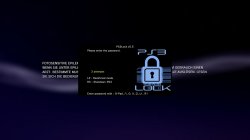
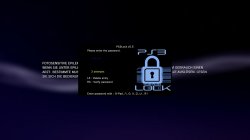
screenshot_2015_08_19_22_31_36.JPG screenshot_2015_08_19_22_31_44.JPG
After installation, at first boot you will be prompted to define a password (min. 2 digits, max. 10 digits).
To set the password you can use the following buttons:


  • :dpad-up:, :dpad-right:, :dpad-down:, :dpad-left:
  • :/\:, :o:, :x:, :[]:
  • :L1:, :R1:

With :L3: you can cancel the entry and with :R3: you can save the password.

After saving, the PS3 is protected by this password and is required after each restart. After 3 incorrect entries the PS3 will shut down automatically.Authentication is done in the same way as you save it or via an USB device. You have to set up this USB device and this device have to be in "/dev_usb000" (most right, close to BD drive) on PS3 startup. Don't forget to enable "USB authentication" in the settings menu.

Through the "restricted mode" it is possible to lock the "XMB settings" (except system update) and the "deleting apps/games" in the XMB. In this mode the games under "dev_hdd0/GAMEZ" are hidden (folder renamed in GAMEZx). For this mode no password is needed.

"PS3Lock sleep timer" gives you a time-limited access to the PS3.
The sleep timer can set to 0:30h, 1:00h, 1:30h, 2:00h, 2:30h, 3:00h.
After 3 warning messages (10, 5, 1min before the preset time), the PS3 will be shutdown.

Password protection for PS3Lock settings and XMB possible.
Password request for PS3Lock settings and in recurring to XMB (after closing apps/games).
Perfect child protection
Restricted mode + PS3Lock sleep timer is the perfect child protection. The restricted mode gives access to the PS3 without a password and through the sleep timer this mode is time-limited. After shutdown through the sleep timer the restricted mode is automatically disabled. If restricted mode is disabled you get access to the PS3 only with password.
Change Settings
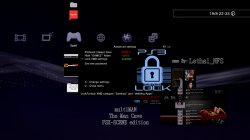
screenshot_2015_08_19_22_32_25.JPG

In XMB you have to push :start:+:R3: to open the settings menu.

-----------------------------------------
Password protection:

  • Enable/Disable password request after every reboot.
XMB password protection:

  • Enable/Disable password request after closing apps/games(USB authentication possible).
PS3Lock Sett. PW protection

  • Enable/Disable password request for PS3Lock settings(USB authentication not possible).
USB authentication

  • Enable/Disable USB authentication. This saves the password entry when you restart.
Restricted mode

  • Without password XMB settings (NOT system update) and "deleting apps/games" is locked.
  • "dev_hdd0/GAMEZ" folder is hidden (rename to GAMEZx).
Buzzer -incorrect PW

  • Enable/Disable PS3 buzzer if the entry is false.
    • 1. misentry = 1 beep
    • 2. misentry = 2 bepp
    • 3. misentry = 3 beep = PS3 shutdown
Menu sound

  • Enable/Disable Menu sound.
Advanced settings :L1:
screenshot_2015_08_19_22_33_39.JPG
-----------------------------------------
PS3Lock (sleep) timer:

  • Automatically turn off the PS3 after the defined time.
  • 0:30h, 1:00h, 1:30h, 2:00h, 2:30h, 3:00h.
Hide "GAMEZ" folder:

  • Manually hide/unhide your games in "dev_hdd0/GAMEZ" folder.
Lock XMB settings:

  • Manually lock/unlock XMB category "settings" and "deleting apps/games".
Set new password:

  • Here you can set a new password (min 2 digits, max 10 digits). !!CAUTION!! If you use the "USB authentication", you have to set up again the USB device.
PS3Lock Statistics :R1:
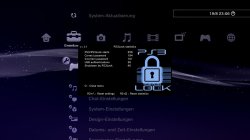
screenshot_2015_08_19_23_06_08.JPG
While you are in settings menu you can go to the statistics screen of PS3Lock. There are following infos:
-----------------------------------------
PS3/PS3Lock starts:

  • How often the PS3 was launched (with PS3Lock)
Correct password:

  • How often the correct password has been entered
Incerrect password:

  • How often the incorrect password has been entered
USB authentication:

  • How often performed an USB authentication
Shutdown through PS3Lock:

  • How often the PS3 was shutdown by PS3Lock . In the statistics screen you have also following options:
    • :R3: + :/\: Reset the PS3Lock config file
    • :R3: + :[]: Reset all statistics
Installation / Setup
1. Plugin installation on Cobra CFW

  • Copy the content from "~hdd0" to "/dev_hdd0".
  • Copy the boot_plugins.txt to "/dev_hdd0"
  • If boot_plugins.txt already exist on /dev_hdd0 then add the following line:
Code:
/dev_hdd0/Plugins/PS3Lock/ps3lock_vsh.sprx

  • Reboot the PS3.
2. USB-Authentication

  • Copy/Create the flag file "ps3.lock" to/on any USB device in fat32 format (X:/ps3.lock)
  • This USB device have to be in "/dev_usb000" (most right, close to BD drive)
  • Open the PS3Lock settings (:start:+:R3:)
  • Go to "USB authentication" and push :[]:
3. Background (VSH Menu)

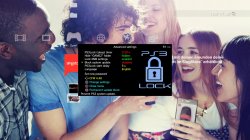
  • PS3Lock can also load a custom background pic from "/dev_hdd0/Plugins/PS3Lock/PS3Lock_BG.png" (720x400).
Forgot password ?
There are several ways to reset the password:
1. PS3Lock fail-safe button combo + flag file on USB device.

  • Create the flag file "ps3lock.reset" on any USB device in fat32 format (X:/ps3lock.reset).
  • This USB device have to be in "/dev_usb000" (most right, close to BD drive).
  • Start the PS3 and hit :R3: + :[]: + :o: on startup.
  • PS3Lock delete Config and the flag file "/dev_usb000/ps3lock.reset" from USB device.
  • PS3Lock now behaves like at the first start, now set up a new password.
2. With a correctly set up USB device AND "USB authentication" enabled in the settings.

  • Boot into XMB with this USB device.
  • Delete the PS3Lock config file with multiMAN or other file manager.
  • "/dev_hdd0/Plugins/PS3Lock/ps3lock_cfg.bin"
  • Reboot your PS3.
  • PS3Lock now behaves like in the first start, now set up a new password.
3. If you don't have an USB device OR "USB authentication" is disabled.
  • Boot into recovery mode.
  • Enter "3. Restore File System". The "boot_plugins.txt" will be delete, now all plugins are disabled.
  • Delete the PS3Lock config file with multiMAN or other file manager. "/dev_hdd0/Plugins/PS3Lock/ps3lock_cfg.bin"
  • Rebuild the "boot_plugins.txt" on "/dev_hdd0/" and reboot your PS3.
  • PS3Lock now behaves like in the first start, now set up a new password.
Changelogs & Credits
0.5

  • re-add restricted mode
  • add xmb pw protektion
  • add ps3lock settings pw protection
  • add sleep timer
  • add manually hide/unhide hdd0/GAMEZ folder
  • add manually lock/unlock xmb settings and "deleting apps/games"
  • confirm password while set a new password
  • add fail-safe button combo (password reset)
0.4

  • re-wrote the whole plugin (now based on VSH Menu)
  • add statistics

0.2


  • add restricted mode

0.1

  • initial release
  • add usb authentication

Credits to
@3141card
@ermak86
mysis
deank
@aldostools
@bitsbubba
 

Attachments

  • 56987-screenshot-581d1432597576-ps3lock-v0-2-ps3lock.png
    56987-screenshot-581d1432597576-ps3lock-v0-2-ps3lock.png
    49.3 KB · Views: 868
  • lockps3.png
    lockps3.png
    46 KB · Views: 863
Is this the 0.6 version or the 0.5
0.6 is not released atm, there is a 0.6 beta.
I have version 0.6 finished, after some tests i will release.

EDIT:
Changelog:
0.6
bugfix in restricted mode
add PS3Lock start delay
set your language in settings, now in extern file
block software update (thanks to @ermak86 for files)
Readme said:
...

*
Block system update:
Since version 0.6 you can block the system update, following CFW are supported:

- 4.46
- 4.50
- 4.55
- 4.60
- 4.66
- 4.70
- 4.75

In order to block the system update, i use the modified files from XMB Lock from @ermak86. Thank you mate :)
NOTHING is changed in dev_flash so this CAN'T cause a brick by incorrect use!
If you setup your CFW (the real, NOT the spoofed version) and the option is enabled then PS3Lock redirect
the original file "/dev_flash/vsh/module/software_update_plugin.sprx" to
"/dev_hdd0/Plugins/PS3Lock/Block_Update/software_update.block_XXX" (XXX your CFW). NOTHING touched in dev_flash!
This option is auto-enabled in "Restricted mode" or you can manually enable/disable in advanced settings.
You can also set the update block to "permanent", then the update block is auto-enabled after each restart
(independent from restricted mode).

- Open the PS3Lock settings -> Advanced settings
- Go to "Block system update"
- setup your CFW and push SQUARE

**
PS3Lock languages (ps3l_lang.db):
Since version 0.6 the languages are in an extern file. This language file (ps3l_lang.db) can be edit
with normal text editor (i use Notepad++). Don't add or remove the lines! Just edit!
There are 12 languages (number 10, 11 and 12 are placeholder for new languages).
PS3Lock has a language update function.

- Copy "ps3l_lang.db" on any USB device in fat32 format (X:/ps3l_lang.db)
- This USB device have to be in "/dev_usb000" (most right, close to BD drive)
- Open the PS3Lock settings -> Advanced settings
- Go to "Language" and push SQUARE

...

Advanced settings.JPG
 
Last edited:
Aw right didnt realise that was a beta. Have been using it for a while now and all is ok. Brilliant plugin
 
Looking forward to this plugin if you need any testing or out done before the official release let me know I'm more than willing to help
 
hope it will be possible to lock chosen user in future. so that one user cannot mess another user profile...


And also a feature to boot in unlock mode for a certain times...
for example, after booting unlocked twice... the next boot (3rd boot) automatically locks the ps3.
 
Last edited:
This is something I am looking for. Thanks :glee:

@MixeryMaxe - I was wondering whether its possible to lock just some games with this lock instead of locking the whole games folder.
Again nice program/app.
 
Hi @Jin799 , thanks.

Maybe it's possible but not with this version. I don't think that i will update this plugin because A i'm very busy with my real life and B the better way would be to rewrite the whole source code :)
Sorry
 
@MixeryMaxe - Yes thanks for letting me know.
I have kids whom I don't want to access some of the games in multiman so wanted to lock them individually. I don't like the way Sony have put parental control .
Xbox 360 on the other hand is better parental controls cos I can choose to allow some mature games to be unlocked.
 
Back
Top