PS3 Insert special characters in param.sfo

mizio90

Member
Hello everyone! I was trying to add a "special" character to param.sfo, something like rebug toolbox (see image).

Screenshot-20190410-130247.jpg

I can insert the "special" character in xml, but not in .sfo unfortunately ...:apologetic:
examining the param.sfo of the rebug toolbox with the aldo tools I see "? rebug toolbox", but insert "?" before the title will not work, showing on xmb "? game title" ...
any suggestions??? thanks anyway!
 
Hello everyone! I was trying to add a "special" character to param.sfo, something like rebug toolbox (see image).
Screenshot-20190410-130247.jpg

I can insert the "special" character in xml, but not in .sfo unfortunately ...:apologetic:
examining the param.sfo of the rebug toolbox with the aldo tools I see "? rebug toolbox", but insert "?" before the title will not work, showing on xmb "? game title" ...
any suggestions??? thanks anyway!
Just put in any 3 characters in like "XXX", then save it, then in an hex editor, add the special character in its place. It works, I've done it.
 
Last edited:
I'm not succeeding, I'm definitely wrong in something ...
if I try to insert es: ✧ (copy / paste)
before the title param.sfo editor will show "? game title" ...
then I open in HxD, scroll down to find the title and show here: "? title of the game" ...
well, at this point you should overwrite "?" with my special character "✧" (copy / paste) ... but this is calculated as 00 (.)!
needless to say, then I get a damaged data icon on XMB ...
maybe the special character is not correct? do you know where I can find it in the right format?
 
I'm not succeeding, I'm definitely wrong in something ...
if I try to insert es: ✧ (copy / paste)
before the title param.sfo editor will show "? game title" ...
then I open in HxD, scroll down to find the title and show here: "? title of the game" ...
well, at this point you should overwrite "?" with my special character "✧" (copy / paste) ... but this is calculated as 00 (.)!
needless to say, then I get a damaged data icon on XMB ...
maybe the special character is not correct? do you know where I can find it in the right format?
Well the PS3 will not be able to display all characters.

It can display all of these for example, but they must be edited into the param.sfo via hex.
https://www.psx-place.com/threads/special-symbols-and-animated-characters-on-the-xmb.13985/

I just added an animated star to this param.sfo, check it out. :D

https://www.dropbox.com/s/o30obixseuy2dl9/Example.pkg?dl=1
upload_2019-4-10_15-13-56.png


Also some more info here on characters: https://www.psdevwiki.com/ps3/XMB_Fonts#Palette_table

There might be more supported than that, i dont know, If you want to post your param.sfo, i can try edit it for you.

upload_2019-4-10_15-11-39.png
 
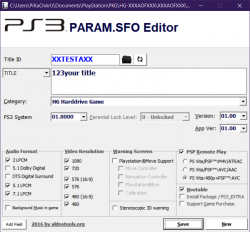
to make it easier for you, edit the param sfo with 3 numbers example
123[your title]
save it
see screenshot 0

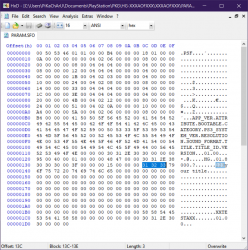
then in hex editor replace in the left side those 3 numbers (which will be 6 now) with the hex code of your symbol
example EF 91 B6

see screenshot 1

save it.

done.
 

Attachments

  • 0.png
    0.png
    111 KB · Views: 320
  • 1.png
    1.png
    294.4 KB · Views: 1,217
Last edited:
Hello everyone! I was trying to add a "special" character to param.sfo, something like rebug toolbox (see image).
Screenshot-20190410-130247.jpg

I can insert the "special" character in xml, but not in .sfo unfortunately ...:apologetic:
examining the param.sfo of the rebug toolbox with the aldo tools I see "? rebug toolbox", but insert "?" before the title will not work, showing on xmb "? game title" ...
any suggestions??? thanks anyway!

The problem with PARAM.SFO Editor is that Visual Basic 5's Textbox control does not allow Unicode characters.
To support Unicode the tool would require external activex and dlls that I prefer to don't use.

Although the method suggested by @DeViL303 works, it requires to find the unicode codes and hex edit the PARAM.SFO
A more simple method is using the official ps3sys.exe included in ps3gen tools. ;) It already support unicode characters.
 
The problem with PARAM.SFO Editor is that Visual Basic 5's Textbox control does not allow Unicode characters.
To support Unicode the tool would require external activex and dlls that I prefer to don't use.

Although the method suggested by @DeViL303 works, it requires to find the unicode codes and hex edit the PARAM.SFO
A more simple method is using the official ps3sys.exe included in ps3gen tools. ;) It already support unicode characters.
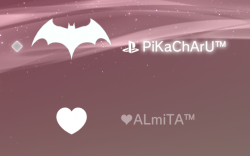
I just tried! actually everything is more immediate with Ps3sys.exe!
even if in any case the console does not recognize the character I wanted to insert (✧), it reproduces it as an underscore before the title ... who knows how many other characters the ps3 is not able to reproduce, so I chose to use the ★ as in toolbox rebug ..!
I didn't know these tools and I also struggled to find them, but what can I do exactly with these?
 
even if in any case the console does not recognize the character I wanted to insert io (✧), it reproduces it as an underscore before the title ... who knows how many other characters the ps3 is not able to reproduce?
You can test lots of characters at once in a PARAM.SFO, like 140 i think (just like twitter used to be, lol).

Also it shows that line when the character does not exist in the TTF font you are using. You can use other TTF files, and I expect you can modify fonts to have custom characters too.
 
are you saying that I could modify the .ttf file that is using the ps3 and insert in this the characters that I would like to reproduce on the xmb?
if the "✧" character is reproduced by XMB as "_" is because the system does not know it, inserting it in .ttf could it be reproduced on XMB?
 
Some btw's...

You should install the fonts from the PS3 firmware to your PC, extract the .TTF files from dev_flash and install them in PC
This way you can see the characters displayed fine in many programs in your PC

After that you can run the command charmap.exe to explore all the characters of a font
In it you can copy-paste the characer you want to use

And to insert it in the PARAM.SFO the most failproof way is in a hexeditor, this screenshot posted before is very explicit
First create a PARAM.SFO with one of the editor tools and add a TITLE easy to identify, as example XXXXXXXX, and save the PARAM.SFO
Then open it in a hexeditor, locate the XXXXXXXX and replace them
1-png.16405


But be careful with not changing the lenght of your string XXXXXXXX, inside the SFO there is a value that indicates the lenght of it, by changing the XXXXXXXX bytes in a hexeditor the value that indicates the lenght of them is not going to change (unless you learn where is located and you change it too)
So to make things easyer and failproof you need to replace only the bytes marked as XXXXXXXX
 
I just added an animated star to this param.sfo, check it out. :D
Pretty cool btw, loaded indirectly from imagefont.bin :encouragement:

Inside the .TTF files there are thousands of nice characters, actually in font slang are named "glyphs" instead of characters, because a lot of them are just "drawings"

One thing that called my attention is one of the fonts contains a group of glyps for tibetan drawings, very abstract and cool
 
extra tip:

you can use it in your local username too, looks pretty damn cool.
Did you told ALmiTA about the 0xEF91A0, 0xEF91A1, and 0xEF91A4 ? :D
https://www.psx-place.com/threads/s...characters-on-the-xmb.13985/page-2#post-81358

The codes are used in the same way, what happens is the PS3 firmware tryes to load the code of the character from the TTF files and from inside imagefont.bin
And imagefont.bin have preference over TTF

*One of the red heart icons i mentioned is animated as far i remember :)
 
I hope we can resurrect the idea of custom image font bin. Even if it is complicated to create. All we need to do is make a custom one , with better icons added, and just add that to CFW as standard from now on, so it only needs to be made once.

First example I mentioned before:


These would be cool for the game info in webman and other xmb mods like han toolbox, CFW Toolbox etc. They are the perfect size. Then there are others too, the PS2 logo. the rebug logo, @littlebalup little spinning Link guy. And i bet we can come up with another 50 if we think about it.

*One of the red heart icons i mentioned is animated as far i remember :)
all of the hearts are animated actually. Except the playing cards heart.


In case anyone wants em again, here is the pack i made attached, it comes with a text file with characters to copy and paste into xmls and param.sfo/rco etc, and images to show hex codes and icons, complete package with all image font icons.

upload_2019-4-11_1-0-11.png
 

Attachments

Last edited:
Did you told ALmiTA about the 0xEF91A0, 0xEF91A1, and 0xEF91A4 ? :D
https://www.psx-place.com/threads/s...characters-on-the-xmb.13985/page-2#post-81358

The codes are used in the same way, what happens is the PS3 firmware tryes to load the code of the character from the TTF files and from inside imagefont.bin
And imagefont.bin have preference over TTF

*One of the red heart icons i mentioned is animated as far i remember :)

hahaha
in fact she is my 0xE299A5

just noticed those hearts you mention are diferent of the one im using with ALmiTA (She´s my wife)
im using a white heart, looks better with all the theme icons
 
lemme share more icons:
tm: E2 84 A2
White Star: E2 98 85
Outlined star: E2 98 86
Cloud: E2 98 81
Sun:E2 98 89
Filled Diamond: E2 97 86
Outlined Diamond: E2 97 87
Up triangle: E2 96 B2
Down Triangle: E2 96 BC
Heart: E2 99 A5
Single Music Note: E2 99 AA
Double Music Note: E2 99 AB
Outlined Circle: E2 97 8B
Triangle Right: E2 96 B6
Triangle Left: E2 97 80
Number 1 Circled: E2 91 A0
Number 2 Circled: E2 91 A1
Number 3 Circled: E2 91 A2
Number 4 Circled: E2 91 A3
Number 5 Circled: E2 91 A4
Number 6 Circled: E2 91 A5
Number 7 Circled: E2 91 A6
Number 8 Circled: E2 91 A7
Number 9 Circled: E2 91 A8
Number 10 Circled: E2 91 A9
Number 11 Circled: E2 91 AA
Number 12 Circled: E2 91 AB
Number 13 Circled: E2 91 AC
Number 14 Circled: E2 91 AD
Number 15 Circled: E2 91 AE
Number 16 Circled: E2 91 AF
Number 17 Circled: E2 91 B0
Number 18 Circled: E2 91 B1
Number 19 Circled: E2 91 B2
Number 20 Circled: E2 91 B3
Lowercase A Circled: E2 93 90
Lowercase B Circled: E2 93 91
Lowercase C Circled: E2 93 92
Lowercase D Circled: E2 93 93
Lowercase E Circled: E2 93 94
Lowercase F Circled: E2 93 95
Lowercase G Circled: E2 93 96
Lowercase H Circled: E2 93 97
Lowercase I Circled: E2 93 98
Lowercase J Circled: E2 93 99
Lowercase K Circled: E2 93 9A
Lowercase L Circled: E2 93 9B
Lowercase M Circled: E2 93 9C
Lowercase N Circled: E2 93 9D
Lowercase O Circled: E2 93 9E
Lowercase P Circled: E2 93 9F
Lowercase Q Circled: E2 93 A0
Lowercase R Circled: E2 93 A1
Lowercase S Circled: E2 93 A2
Lowercase T Circled: E2 93 A3
Lowercase U Circled: E2 93 A4
Lowercase V Circled: E2 93 A5
Lowercase W Circled: E2 93 A6
Lowercase X Circled: E2 93 A7
Lowercase Y Circled: E2 93 A8
Lowercase Z Circled: E2 93 A9
Capital A Circled: E2 92 B6
Capital B Circled: E2 92 B7
Capital C Circled: E2 92 B8
Capital D Circled: E2 92 B9
Capital E Circled: E2 92 BA
Capital F Circled: E2 92 BB
Capital G Circled: E2 92 BC
Capital H Circled: E2 92 BD
Capital I Circled: E2 92 BE
Capital J Circled: E2 92 BF
Capital K Circled: E2 93 80
Capital L Circled: E2 93 81
Capital M Circled: E2 93 82
Capital N Circled: E2 93 83
Capital O Circled: E2 93 84
Capital P Circled: E2 93 85
Capital Q Circled: E2 93 86
Capital R Circled: E2 93 87
Capital S Circled: E2 93 88
Capital T Circled: E2 93 89
Capital U Circled: E2 93 8A
Capital V Circled: E2 93 8B
Capital W Circled: E2 93 8C
Capital X Circled: E2 93 8D
Capital Y Circled: E2 93 8E
Capital Z Circled: E2 93 8F
 
lemme share more icons:
tm: E2 84 A2
White Star: E2 98 85
Outlined star: E2 98 86
Cloud: E2 98 81
Sun:E2 98 89
Filled Diamond: E2 97 86
Outlined Diamond: E2 97 87
Up triangle: E2 96 B2
Down Triangle: E2 96 BC
Heart: E2 99 A5
Single Music Note: E2 99 AA
Double Music Note: E2 99 AB
Outlined Circle: E2 97 8B
Triangle Right: E2 96 B6
Triangle Left: E2 97 80
Number 1 Circled: E2 91 A0
Number 2 Circled: E2 91 A1
Number 3 Circled: E2 91 A2
Number 4 Circled: E2 91 A3
Number 5 Circled: E2 91 A4
Number 6 Circled: E2 91 A5
Number 7 Circled: E2 91 A6
Number 8 Circled: E2 91 A7
Number 9 Circled: E2 91 A8
Number 10 Circled: E2 91 A9
Number 11 Circled: E2 91 AA
Number 12 Circled: E2 91 AB
Number 13 Circled: E2 91 AC
Number 14 Circled: E2 91 AD
Number 15 Circled: E2 91 AE
Number 16 Circled: E2 91 AF
Number 17 Circled: E2 91 B0
Number 18 Circled: E2 91 B1
Number 19 Circled: E2 91 B2
Number 20 Circled: E2 91 B3
Lowercase A Circled: E2 93 90
Lowercase B Circled: E2 93 91
Lowercase C Circled: E2 93 92
Lowercase D Circled: E2 93 93
Lowercase E Circled: E2 93 94
Lowercase F Circled: E2 93 95
Lowercase G Circled: E2 93 96
Lowercase H Circled: E2 93 97
Lowercase I Circled: E2 93 98
Lowercase J Circled: E2 93 99
Lowercase K Circled: E2 93 9A
Lowercase L Circled: E2 93 9B
Lowercase M Circled: E2 93 9C
Lowercase N Circled: E2 93 9D
Lowercase O Circled: E2 93 9E
Lowercase P Circled: E2 93 9F
Lowercase Q Circled: E2 93 A0
Lowercase R Circled: E2 93 A1
Lowercase S Circled: E2 93 A2
Lowercase T Circled: E2 93 A3
Lowercase U Circled: E2 93 A4
Lowercase V Circled: E2 93 A5
Lowercase W Circled: E2 93 A6
Lowercase X Circled: E2 93 A7
Lowercase Y Circled: E2 93 A8
Lowercase Z Circled: E2 93 A9
Capital A Circled: E2 92 B6
Capital B Circled: E2 92 B7
Capital C Circled: E2 92 B8
Capital D Circled: E2 92 B9
Capital E Circled: E2 92 BA
Capital F Circled: E2 92 BB
Capital G Circled: E2 92 BC
Capital H Circled: E2 92 BD
Capital I Circled: E2 92 BE
Capital J Circled: E2 92 BF
Capital K Circled: E2 93 80
Capital L Circled: E2 93 81
Capital M Circled: E2 93 82
Capital N Circled: E2 93 83
Capital O Circled: E2 93 84
Capital P Circled: E2 93 85
Capital Q Circled: E2 93 86
Capital R Circled: E2 93 87
Capital S Circled: E2 93 88
Capital T Circled: E2 93 89
Capital U Circled: E2 93 8A
Capital V Circled: E2 93 8B
Capital W Circled: E2 93 8C
Capital X Circled: E2 93 8D
Capital Y Circled: E2 93 8E
Capital Z Circled: E2 93 8F
Did not know about those, I guess those are not in imagefont.bin, but in the TTF itself. Cool. They could be added to imagefont.bin too, so they are there regardless of font setting.

upload_2019-4-11_2-19-46.png

E2 92 B9 E2 93 94 E2 93 8B E2 93 98 E2 93 81 E2 91 A2 E2 93 84 E2 91 A2
 
Last edited:
I hope we can resurrect the idea of custom image font bin. Even if it is complicated to create. All we need to do is make a custom one , with better icons added, and just add that to CFW as standard from now on, so it only needs to be made once.

First example I mentioned before:

It would be cool to have a tag (like ps3, ps2, mini, etc) below homebrew apps, and it would be written Homebrew :)

Sent from my Redmi Note 5 using Tapatalk
 
It would be cool to have a tag (like ps3, ps2, mini, etc) below homebrew apps, and it would be written Homebrew :)

Sent from my Redmi Note 5 using Tapatalk
Nice idea. That could probably be done if we had used a different category in the PARAM.SFO like CB/SF from the start for all homebrew, then we could have homebrew folders, and sub categories etc. But scene is a bit too old now to get something like that to become a standard.

The way it works now though, ALL apps are HG, and they all will get the little PS3 logo. We could add a Homebrew logo to the title of apps, but that is not them same, although its an option.
 
Back
Top