PS2 [MX4SIO/SIO2SD] SD Card Adapter and SD-driver for the PS2 SIO2 interface

It is not network tool... Consider it as terminal in Linux or cmd in Windows.
I see, that sounds great. I didn't know that there is a terminal for PS2. Due to the missing ps2kbd.irx the keyboard doesn't work, butnice to know.

@Takeshi Would you mind linking/attaching the pictures here as well? :)
When it's working I'll share pictures of it :)
That's it! Now ps2link starts the test_bdm.elf and after about 15 seconds it goes to the PS2 browser screen, where I can see the Memory Card. That's the same what it does when I start the test_bdm.elf with wLaunch. But the ps2client did nothing, I got no message. The ps2client is still executing, I have to leave it with Ctrl+C.

__________
As I have no hope to get it working in the next few hours I'll post some pictures and a short video.
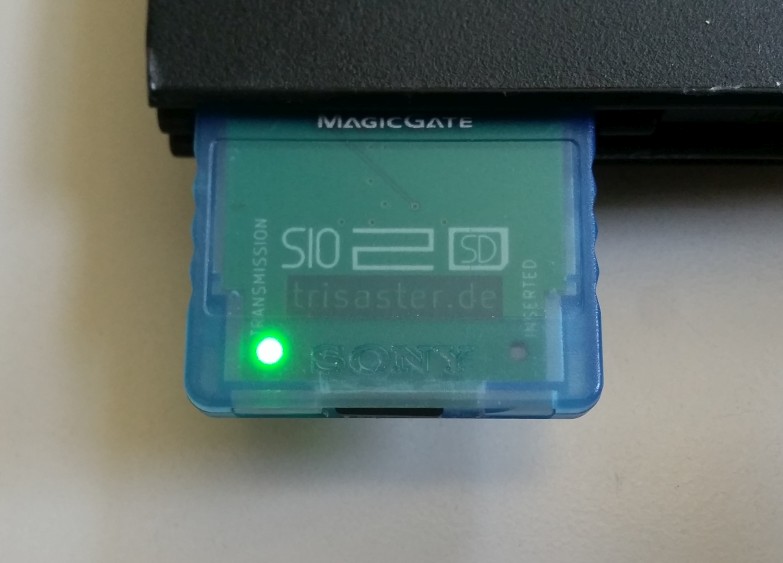
2020-05-15_sio2sd_01.jpg

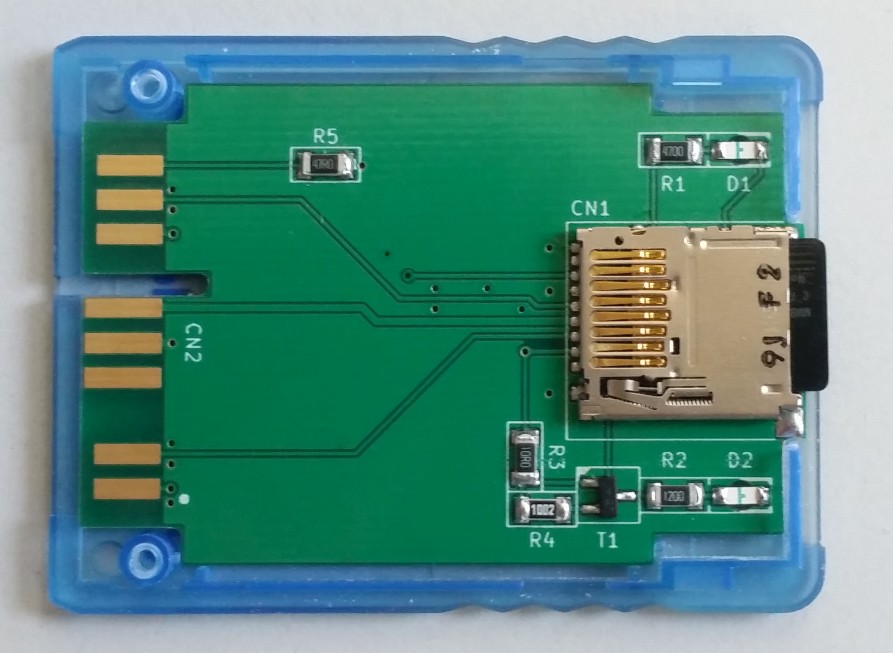
2020-05-15_sio2sd_02.jpg


The following Video shows a short LED test.
2020-05-16_sio2sd.mp4 (4.5 MB)
 
Last edited:
I added the picture and the video to the 1st post!

For those who see it: The writing of "Inserted" and "Transmission" is inversed in the Prototype-PCB.

@jolek or @STLcardsWS Can one of you embed the video?
 
That's it! Now ps2link starts the test_bdm.elf and after about 15 seconds it goes to the PS2 browser screen, where I can see the Memory Card. That's the same what it does when I start the test_bdm.elf with wLaunch. But the ps2client did nothing, I got no message. The ps2client is still executing, I have to leave it with Ctrl+C.
Can you post the output of ps2client? What OS are you using? Where did you get ps2client and ps2link from? Leaving with ctrl-c is normal.

The ps2 broadcasts the printed output, and ps2client will show it. I sometimes have 2 ps2clients running accidentally at the same time, then only the first started ps2client will show the output. I'm using ubuntu, I'm not sure how this works in other os. The broadcasted text will not work when your ps2 is behind a router. (or something like vmware with NAT networking, use bridged then).

15 seconds does seem about right. Let me know if you cannot get it working, then I can make another version that prints to the screen, and freezes when done. The disadvantage of this will be that you can only see the EE ouput of the application, not the IOP output of the SIO2SD driver.
 
  • Like
Reactions: TnA
What about attachments on psx-place.com?

Alternatively maybe @Takeshi would upload it somewhere there, or - if he is fine with it - someone else?
 
There is no point to add video into attachment,
because you will need to download it onto PC (or other device) to watch it.
Link as it is now or upload it to any service that I provide earlier will be better choice.
 
Actually, if the board-Software supports it, an attachment can be "embedded" without downloading it!
 
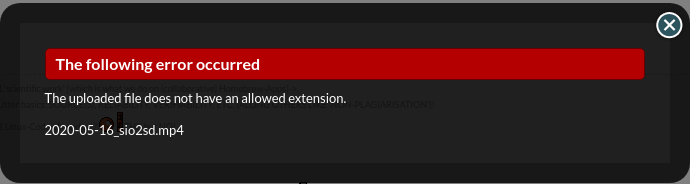
If you will try to upload it (.mp4) you will get this notice:
eer.png


Supported files to be add for attachment are:
  • Archives (pkg, 7z, rar, zip...)
  • Pictures (png, jpg...)
 
  • Like
Reactions: TnA
@Takeshi Keyboard works. ;] How would You be type anything if there is no OSK? It supports also scripting.

@TnA Everything which You see in the internet, You actually downloading. ;)
 
...but @jolek means "downloading" the entire file, whereas the embedding allows "streaming" of (only) "chunks"/parts!


Regarding PS2Link: @Takeshi Try to start the ELF from host via PS2Client and not MC!
 
Can you post the output of ps2client? What OS are you using? Where did you get ps2client and ps2link from? Leaving with ctrl-c is normal.
First I was using Kubuntu Host + VirtualBox + Win7 64 Bit Guest because I didn't find a Linux version. Now I tried a real Win7 Host System. In the VM I got no output in ps2client, in ps2link I got "executing host:test_bdm.elf" or something like this. With the nativ Win7 system I got "║¥☻♥☺" and no reaction of ps2link.
I got ps2client and ps2link from ... the internet. I don't know, I downloaded everything I found and that wasn't very much. One ps2client was from a package of PS2ClientLoader 1.31. It would be nice if someone can send me a working version of both.
(or something like vmware with NAT networking, use bridged then).
:rolleyes2:

@Takeshi Keyboard works. ;] How would You be type anything if there is no OSK? It supports also scripting.
The keyboard works with wLaunchELF, but not after launching RadShell. OSK?
I will try the scripting.
 
I got it! With Kubuntu it doesn't work because it doesn't work with a VM. With the nativ Win7 it doesn't work because both PS2 and PC had the IP adress 192.168.0.10. I don't remember thatI configured that. After changing the IP I got this:
loadelf: fname host:test_bdm.elf secname all
Input ELF format filename = host:test_bdm.elf
0 00100000 0003aba8 ....
1 0019293c 00000004 .
Loaded, host:test_bdm.elf
start address 0x1000d8
gp address 00000000
BDM (Block Device Manager) test application
Loading iomanX and fileXio IOP modules
fileXio: fileXio RPC Server v1.00
Copyright (c) 2003 adresd
Block Device Manager (BDM) v1.1
BDM: connecting fs MBR
BDM: BDM event thread running
FreeUsbd v.0.1.2
USBMASS: USB MASS Driver v1.1
sdCard v1.1

ERR: CMD 0 RSP FF -> CMD 0 doesn't receive response soon on some cards, so th
is error is normal, if there are no errors after this point.
ERR: CMD 0 RSP FF
Skipping init
ERR: CMD 17 RSP FF
ERR: Timeout on waiting for data (token).
Invalid Err Token FF
token FF Error CC err ECC failed Out of range Locked
ERR: CRC mismatch! CRC FFFF local 7FA1 0000
ERR: CMD 59 RSP FF
ERR: CMD 9 resp FF
ERR: Timeout on waiting for data (token).
Invalid Err Token FF
token FF Error CC err ECC failed Out of range Locked
ERR: CRC mismatch! CRC FFFF local 0041 0000
CSD reg: BDM: connecting device sdc0p0
Init done

CMD 18 response error FF BDM VFAT driver (FAT12/16/32) v1.1
BDM: connecting fs vfat

CMD 18 response error FF
CMD 18 response error FF Get Reboot Request From EE
And it seems like ... it's not working =/ I'm searching for the reason.
 
I checked the pinout of the microSD, of the memory card and the physical connection of it. I can't find any mistake and everything is connected.
When i am using a Memory Card instead of the SIO2SD I get exactly the same output. Is that normal?

To prevent an error in the procedure: I started wLaunchELF from mc0 using Dev1 of the mod chip. Then I swaped the MC from port 0 to port 1 and plugged in the SIO2SD in port 0. I run ps2link.elf from mc1, then ps2client and launch the test_bdm.elf which is located on the MC in the same folder like ps2link.elf.
Did I something wrong?

The filesystem is FAT32 and the SD card (8 GB) was tested.

Edit: When I leave the MC in port 0 and put the SIO2SD in port 1, then I get this output:
loadelf: fname host:test_bdm.elf secname all
Input ELF format filename = host:test_bdm.elf
0 00100000 0003aba8 ....
1 0019293c 00000004 .
Loaded, host:test_bdm.elf
start address 0x1000d8
gp address 00000000
BDM (Block Device Manager) test application
Loading iomanX and fileXio IOP modules
fileXio: fileXio RPC Server v1.00
Copyright (c) 2003 adresd
Block Device Manager (BDM) v1.1
BDM: connecting fs MBR
BDM: BDM event thread running
FreeUsbd v.0.1.2
USBMASS: USB MASS Driver v1.1
sdCard v1.1

ERR: CMD 0 RSP FF -> CMD 0 doesn't receive response soon on some cards, so this error is normal, if there are no errors after this point.
done 1 passes Init done
BDM VFAT driver (FAT12/16/32) v1.1
BDM: connecting fs vfat
Get Reboot Request From EE

With another SD card (32 GB) I got the same output. With the next SD card (32 GB) I got this:
[...]
ERR: CMD 0 RSP FF -> CMD 0 doesn't receive response soon on some cards, so this error is normal, if there are no errors after this point.
done 160 passes
Detected SD ver.2+ card
SD ver.2+ Block address
Card successfully initialized.
CSD reg:
CSD ver 2 BDM: connecting device sdc0p0
Init done
BDM: connecting device sdc0p1
BDM: sdc0p0 mounted to MBR
BDM VFAT driver (FAT12/16/32) v1.1
BDM: connecting fs vfat
VFAT: Fat type 32 Id FAT32
BDM: sdc0p1 mounted to vfat
Get Reboot Request From EE
 
Last edited:
  • Like
Reactions: TnA
@Takeshi In the last output I see this:
VFAT: Fat type 32 Id FAT32
BDM: sdc0p1 mounted to vfat

That indicates a FAT32 filesystem is found. sdc0p1 is the first partition on the sdc (SD Card) driver, so this card seems to work, but it should show a list of files on it. Can you try inserting a FAT32 USB stick also? And the sio2sd in port1 (not port0).

Note that only MBR partitions are supported, GPT is not supported but could be added.
 
USB-Drive:
Code:
 ERR: CMD 0  RSP FF  -> CMD 0 doesn't receive response soon on some cards, so this error is normal, if there are no errors after this point.
 ERR: CMD 0  RSP FF
 Skipping init
 ERR: CMD 17  RSP FF
 ERR: Timeout on waiting for data (token).
 Invalid Err Token FF
 token FF  Error  CC err  ECC failed  Out of range  Locked
 ERR: CRC mismatch! CRC FFFF  local 7FA1  0000
 ERR: CMD 59  RSP FF
 ERR: CMD 9 resp FF
 ERR: Timeout on waiting for data (token).
 Invalid Err Token FF
 token FF  Error  CC err  ECC failed  Out of range  Locked
 ERR: CRC mismatch! CRC FFFF  local 0041  0000
 CSD reg: BDM: connecting device sdc0p0
Init done

 CMD 18 response error FF BDM VFAT driver (FAT12/16/32) v1.1
BDM: connecting fs vfat

 CMD 18 response error FF
 CMD 18 response error FF USBMASS: connect: devId=1
USBMASS: Vendor: SanDisk
USBMASS: Product: Cruzer
USBMASS: Revision: 1.00
USBMASS: 15625215 512-byte logical blocks: (8000MB / 7629MiB)
BDM: connecting device usb0p0

 CMD 18 response error FF
 CMD 18 response error FF BDM: connecting device usb0p1
BDM: usb0p0 mounted to MBR
VFAT: Fat type 32 Id FAT32
BDM: usb0p1 mounted to vfat

 CMD 18 response error FF
 CMD 18 response error FF Get Reboot Request From EE

SD card (FAT16 and FAT32 tested)
Code:
 ERR: CMD 0  RSP FF  -> CMD 0 doesn't receive response soon on some cards, so th
is error is normal, if there are no errors after this point.
 done 1 passes Init done
BDM VFAT driver (FAT12/16/32) v1.1
BDM: connecting fs vfat
Get Reboot Request From EE

SD card + USB drive
Code:
 ERR: CMD 0  RSP FF  -> CMD 0 doesn't receive response soon on some cards, so this error is normal, if there are no errors after this point.
 done 1 passes Init done
BDM VFAT driver (FAT12/16/32) v1.1
BDM: connecting fs vfat
USBMASS: connect: devId=1
USBMASS: Vendor: SanDisk
USBMASS: Product: Cruzer
USBMASS: Revision: 1.00
USBMASS: 15625215 512-byte logical blocks: (8000MB / 7629MiB)
BDM: connecting device usb0p0
BDM: connecting device usb0p1
BDM: usb0p0 mounted to MBR
VFAT: Fat type 32 Id FAT32
BDM: usb0p1 mounted to vfat
Get Reboot Request From EE

Broken SD card (after reconnecting)
Code:
 done 134627 passes Init done
BDM VFAT driver (FAT12/16/32) v1.1
BDM: connecting fs vfat
Get Reboot Request From EE

And now I know why I got the error block with a working SD card. It's important to reconnect the SD card after the PS2 OS got access to the card (it sends periodic the data 0x84). If you don't, you get the error like there is no SD card.
 
@TnA ...Which is why I say that having an MCU on board to filter only the accesses to the SD Card will be an important feature. ;)

BTW, the need for retry of the very first sent command may be because some cards require a certain number of clock cycles for initialization. It is still not entirely clear how a driver that is compatible with all cards should be written.
 
I think first some universal C code should be written (so that it can be portable), and then some suitable MCU that can easily be obtained chosen.
The necessary features may be:
- at least 6 I/O lines, though it would be good if it can detect card insertion/removal and drive the LEDs too.
- some fast method of passing through the /CS line. The PIC16F1825 has a 'digital modulator' module that is very suitable for this. If the MCU does not support this, then an external logic element could be used.
- >24MHz SPI slave port with the MCU being capable of reading data fast-enough to cope with PS2's timing
- internal oscillator (I don't think the stability of an external one is necessary in this case)
- small case size
- low price - as its function does not justify a high one.

It would be good if the PCB can support pinouts of for example two different MCUs, so if people who want to do it themselves can't find one, or in case one can't be found, can use the other. But maybe this is a bit to ambitious.

I am only familiar with some Microchip MCUs, but I think it would be nice of one PIC16 and one of Atmel is supported.
If you have any other suggestions though, I am open to ideas - as I said - I have basically no experience with most diverse MCUs, so there may be something more suitable out there.

There could be other cool features implemented, but maybe that is going too far.
For example having the MCU initialize the card.
One thing that would be nice though, would be to have decent debugging capabilities - for example through the LED(s).
The MCU should be able to detect if all lines were connected properly, and if communication with the driver was established. Maybe this should also be handled by driver code - running an initial test, or something like that.

This is what I can think of at this point.

As for the SD Card slot - I think that maybe having the PCB support both a micro SD Card slot and a normal one would be good. I originally imagined a (normal SD Card) push-push slot with the card going into the MC case, so that if one does not want to make a whole in the case, they can simply assemble the case and leave the card inside. But I think those SD Card slots (push-push) are too big and expensive. So a necessary compromise (to have enough space for the MCU) could be to make the SD Card slot mounted so that the card sticks out somewhat.
All-in-all - the more things the PCB can support - the better. :)
 

Similar threads

Back
Top