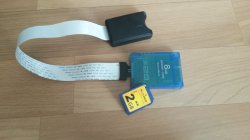
PS2 [MX4SIO/SIO2SD] SD Card Adapter and SD-driver for the PS2 SIO2 interface

Wisi:"* cmd.sector_size might take long time - better have the 512 be a macro."
Done. I added this becouse I wanted the size to be configurable. I tested with 2048 byte reads.
I don't know how you optimized that, but you can simply sum cmd.sector_size to the offset, rather than using multiplication.
I guess I'd be using variable size too. :) Should I give the 2048 'sector' size to the BDM, or should that be used only locally in the driver?
 
Should I give the 2048 'sector' size to the BDM, or should that be used only locally in the driver?
The sector size is still 512 so towards BDM it should still be 512. If the sector size is actually changed that would mean re-formatting the SD cards. We're not doing that ;). We're only transferring the data in blocks of 2048bytes max.
I'm not sure how the SD card will respond if we request a number of sectors that is not a multiple of 4. For instance reading 1 sector (512byte) would still be possible? As 512+2 bytes? I can't find the right documentation about this.
 
I think that once you use CMD16 to set a different transfer-block-size, you can't read less. So we actually have to stop early, and not get the CRC, or somehow do a dummy transfer to some local buffer to get the CRC.
But for writing it gets more complicated, as we would have to read the old contents of the 2048-byte block, merge it with the incomplete data from the BDM (<4 sectors) and then write, which sounds like a bad idea. But I think writing is generally slow, so maybe we could just use 512-byte blocks for it always?
It is the performance gain from using 2048-byte blocks really that significant, to decide on using such blocks?
I guess we would be sending CMD16 before each transfer pretty much. Could even make the unaligned to 4 sectors reads transfers separate, but this can slow things down more.
 
I think we can send CMD16 every time. And set it to 512, 1024 or 2048, depending on what's requested. CMD16 only has to be sent again if we need to change the size.
 
From SD Card specs: "CMD16: In case of SDSC Card, block length is set by this command." And according to other info, that is limited to 512-2048 bytes.
"In case of SDHC and SDXC Cards, block length of the memory access commands are fixed to 512 bytes."
So did you actually test if the read data was correct when a different block length is used.
SDSC cards are usually quite old, small in capacity and slow, so even though there would be some gain using higher-size blocks for them, I'd rather not do that unless there would be some gain on the commonly used now and faster SDHC cards.

BTW, coding the driver is going slow. I am still making the SIO2MAN-compatible part... I am trying to separate the SD Card functions from the rest.
 
  • Like
Reactions: TnA
From SD Card specs: "CMD16: In case of SDSC Card, block length is set by this command." And according to other info, that is limited to 512-2048 bytes.
"In case of SDHC and SDXC Cards, block length of the memory access commands are fixed to 512 bytes."
So did you actually test if the read data was correct when a different block length is used.
SDSC cards are usually quite old, small in capacity and slow, so even though there would be some gain using higher-size blocks for them, I'd rather not do that unless there would be some gain on the commonly used now and faster SDHC cards.
Yes, I think you're right. I've been trying to test this again with no succes. The data I read before was probably invalid.
 
There is something I don't see in your DMA reading code - _read_buffer()starts with polling for data-ready token - /* Wait start-token 0xFE */
https://gitlab.com/ps2max/ps2sdk/-/...rycard/sio2sd_bd/src/spi_sdcard_driver.c#L134
but is not done in the DMA code:
https://gitlab.com/ps2max/ps2sdk/-/blob/master-ps2max/iop/memorycard/sio2sd_bd/src/sdCard.c#L551
So I guess we have no choice but to exit the interrupt-only-driven code every DMA transfer and use thread-waiting for the data-ready token. My experience shows that on the second and subsequent iterations, it usually comes quite soon though, so in the interrupt there can be code to check for it in a loop with ~1-10 iterations and if it doesn't arrive within that time, only then go back to the thread, and wait there for it. (It may be a good idea to do at least 2-3 iterations though.)
I am now at rewriting my PIO code, and later when I hopefully, finally get to the DMA one, I will probably implement that.
 
There is something I don't see in your DMA reading code - _read_buffer()starts with polling for data-ready token - /* Wait start-token 0xFE */
https://gitlab.com/ps2max/ps2sdk/-/...rycard/sio2sd_bd/src/spi_sdcard_driver.c#L134
but is not done in the DMA code:
https://gitlab.com/ps2max/ps2sdk/-/blob/master-ps2max/iop/memorycard/sio2sd_bd/src/sdCard.c#L551
So I guess we have no choice but to exit the interrupt-only-driven code every DMA transfer and use thread-waiting for the data-ready token. My experience shows that on the second and subsequent iterations, it usually comes quite soon though, so in the interrupt there can be code to check for it in a loop with ~1-10 iterations and if it doesn't arrive within that time, only then go back to the thread, and wait there for it. (It may be a good idea to do at least 2-3 iterations though.)
I'm not using _read_buffer() or any of krasutski's code for reading sectors anymore, becouse the interface is not compatible with the DMA interrupt design. Instead the sendCmd_Rx_DMA_start function waits for the start token then starts the DMA transfer. The first time this function is called from the user thread (here). The next time it's called from the DMA interrupt (here). I'm indeed assuming (from your tests) the first time can take a long time, and we're waiting for it in the user thread. And the second time it should wait only ~1-10 iterations from the DMA interrupt. However the function used is the same, and I'm waiting a max of 2000 iteration, both from the first request from the user thread and from the DMA interrupt.

The code works perfectly from the speed testing app. Speeds of around 1700kb/s and compatibility with ps2sdk/sio2man and rom0:XSIO2MAN. rom0:SIO2MAN is not yet compatible.

I've been testing with OPL and uLE, with not much succes so far:
- uLE: hangs when using ps2sdk/sio2man or rom0:XSIO2MAN, only rom0:SIO2MAN seems to work but that's not compatible yet.
- OPL: does work to some degree. I can see it loading a list of games, and then trying to load the ART. It finishes loading the ART when I enable debugging but then it's slow. When I disable debugging it hangs after a few seconds. Probably I need to add a mutex to the BDM interface of the driver, so only 1 call at a time can be made.
 
Things are slowly progressing:

sio2sd driver
I've improved how sio2man state is saved and restored, without any performance impact. The results are OPL GUI now seems to work, yay! Latest driver code, as always, here:
https://gitlab.com/ps2max/ps2sdk/-/commits/master-ps2max

uLaunchELF
uLE is now showing the files on SD, thanks @uyjulian for the PR on github! That helped me around the sio2man issue. Unfortunately it's not stable. After browsing through a few directories uLE hangs.

OPL GUI
OPL GUI is working. You can test try it out here:
https://www.dropbox.com/s/gy1yiekb137yzht/OPNPS2LD.ELF?dl=0
Note that it's not fast (see BDM), and in-game does not work. It will try to start the game from USB if you try to load it.

BDM
There seems to be a few issues with BDM as it's currently in ps2sdk:
- Multi-sector reading code, is not implemented in the BDM fat32 driver. The funny thing is, it was originally a new feature of BDM, that was ported to usbhdfsd, but it's not in there. This slows down performance from ~1700 to ~1200 when using FAT32. So needs to be fixed.
- Sector cache does not seem to work like it should. perhaps needs to be updated with new code introduced in usbhdfsd in the last 2 years. This slows down random access A LOT, as can be seen in the OPL GUI when loading the list of games.

speed testing
This differs a little from the test_bdm, in that the tests are run from the IOP side, and tests are run both using raw sector reads (FAST) as well as FAT32 file reads. This will show the max performance (~1700 on FAT, ~1200 on slim) as well as BDM performance (slower):
https://www.dropbox.com/s/ux396jd5k3ugjv3/rw_speed.elf?dl=0
 
While reading the CSD reg, if the SIO2 does not send 0xFF but some other data, the SD card won't reply correctly. This is probably also true for sector data reading... maybe. But then again DMA reading it works, so maybe it is not so. I will measure later if the SDO line (to SD card) keeps high even when no 0xFF is sent. But if that is not the case, we may have a serious problem on our hands, which will randomly manifest itself when no 0xFF has been sent for longer than a certain period of time.


An odd bug: when we have an inline func, containing inline asm, and inside it we modify one of the arguments of the func, once the func gets inlined, the variable that fed that argument will get modified as well!
For example:
Code:
inline void someAsmFunc(void *buf) {
  __asm__ volatile (
  ".set\tpush\n"  \
  ".set\tnoreorder\n"  \
  "addiu\t%0, %0, 4\n\t"  \
  ".set\tpop\n"  \
  : :"r" (buf));
}

void anotherFunc(void) {
  void bf = (void*)0x1234;
  someAsmFunc(bf);
  //now bf will be 0x1238 !
}

In the actual test, the inline asm func was in a second inline func, which was in someAsmFunc(), which is also inline.
I think it is the combination of .noreorder and the inlining that causes this.
 
The code works perfectly from the speed testing app. Speeds of around 1700kb/s and compatibility with ps2sdk/sio2man and rom0:XSIO2MAN. rom0:SIO2MAN is not yet compatible.

Perhaps you might want to just support the newer SIO2MAN? rom0:SIO2MAN is an old version and the existence of the newer design means that the older one was just not favoured.

- uLE: hangs when using ps2sdk/sio2man or rom0:XSIO2MAN, only rom0:SIO2MAN seems to work but that's not compatible yet.
I'm not sure if you did it, but if you change software that used SIO2MAN to us a new version, you need to get it to use the new PADMAN, MCMAN and MCSERV modules too. This also includes the EE clients.
 
Perhaps you might want to just support the newer SIO2MAN? rom0:SIO2MAN is an old version and the existence of the newer design means that the older one was just not favoured.
I do, but the only problem I guess is OPL-ingame. If not supporting rom0:SIO2MAN, what games would then not work? Only a few really early titles, or many games?

I'm not sure if you did it, but if you change software that used SIO2MAN to us a new version, you need to get it to use the new PADMAN, MCMAN and MCSERV modules too. This also includes the EE clients.
I've used the PR from @uyjulian . It uses all modules from ps2sdk, so they should be compatible with eachother.
 
I do, but the only problem I guess is OPL-ingame. If not supporting rom0:SIO2MAN, what games would then not work? Only a few really early titles, or many games?

No game actually used rom0:SIO2MAN, but the early titles might come with a similar module that gets loaded from CD/DVD. In that case, you could have no choice - but to come up with a workaround, unfortunately.

I suppose only those really early titles would be affected, if any of them even used the original SIO2MAN. Given that XSIO2MAN appeared with even the earliest expansion-bay PS2 (e.g. the US release of the PS2), you can imagine how early on Sony likely replaced this module in their SDKs.
You could study the launch titles like Ridge Racer. The US and European releases were compiled with SDK release 1.5, while the Japanese version was compiled with release 1.4. In comparison, the default modules from the boot ROM might have been from release 1.3.x.

I took a quick look at SIO2MAN from the Japanese Ridge Racer, and it had SIO2MAN with export table version 2.1. So I guess, even this early title already wasn't built with the old SIO2MAN.
 
Small improvement.

Old code:
Code:
IOP Read/Write speed test
-------------------------
Start reading 'sdc0p0' block device:
Read 1024KiB in 2004ms, blocksize=512, speed=523KB/s
Read 1024KiB in 1303ms, blocksize=1024, speed=804KB/s
Read 1024KiB in 961ms, blocksize=2048, speed=1091KB/s
Read 1024KiB in 790ms, blocksize=4096, speed=1327KB/s
Read 1024KiB in 705ms, blocksize=8192, speed=1487KB/s
Read 1024KiB in 654ms, blocksize=16384, speed=1603KB/s
Read 1024KiB in 634ms, blocksize=32768, speed=1653KB/s
Read 1024KiB in 625ms, blocksize=65536, speed=1677KB/s
Read 1024KiB in 620ms, blocksize=131072, speed=1691KB/s
Start reading file mass:zero.bin:
Read 1024KiB in 979ms, blocksize=512, speed=1071KB/s
Read 1024KiB in 867ms, blocksize=1024, speed=1209KB/s
Read 1024KiB in 854ms, blocksize=2048, speed=1227KB/s
Read 1024KiB in 848ms, blocksize=4096, speed=1236KB/s
Read 1024KiB in 844ms, blocksize=8192, speed=1242KB/s
Read 1024KiB in 837ms, blocksize=16384, speed=1252KB/s
Read 1024KiB in 837ms, blocksize=32768, speed=1252KB/s
Read 1024KiB in 835ms, blocksize=65536, speed=1255KB/s
Read 1024KiB in 835ms, blocksize=131072, speed=1255KB/s
Done, exit in 5

New code:
Code:
IOP Read/Write speed test
-------------------------
Start reading 'sdc0p0' block device:
Read 1024KiB in 1619ms, blocksize=512, speed=647KB/s
Read 1024KiB in 1110ms, blocksize=1024, speed=944KB/s
Read 1024KiB in 862ms, blocksize=2048, speed=1216KB/s
Read 1024KiB in 738ms, blocksize=4096, speed=1420KB/s
Read 1024KiB in 669ms, blocksize=8192, speed=1567KB/s
Read 1024KiB in 642ms, blocksize=16384, speed=1633KB/s
Read 1024KiB in 628ms, blocksize=32768, speed=1669KB/s
Read 1024KiB in 620ms, blocksize=65536, speed=1691KB/s
Read 1024KiB in 617ms, blocksize=131072, speed=1699KB/s
Start reading file mass:zero.bin:
Read 1024KiB in 892ms, blocksize=512, speed=1175KB/s
Read 1024KiB in 788ms, blocksize=1024, speed=1330KB/s
Read 1024KiB in 775ms, blocksize=2048, speed=1353KB/s
Read 1024KiB in 768ms, blocksize=4096, speed=1365KB/s
Read 1024KiB in 762ms, blocksize=8192, speed=1376KB/s
Read 1024KiB in 755ms, blocksize=16384, speed=1388KB/s
Read 1024KiB in 753ms, blocksize=32768, speed=1392KB/s
Read 1024KiB in 753ms, blocksize=65536, speed=1392KB/s
Read 1024KiB in 754ms, blocksize=131072, speed=1390KB/s
Done, exit in 5

Instead of stopping the "multi block read", and then for the next command starting the "multi block read" again. I'm only starting/stopping it if the address changes. So for small sequential reads this gives a nice extra performance. As can be seen by the 512b reads, going from 523KB/s to 647KB/s.
 
So... I've reverted this last change becouse I cannot be 100% sure some other process reads 1 or more bytes from the SD card while the driver is not using it. For instance a game checking if there's a memorycard inserted. Stability is more important.

I've fixed compatibility with all sio2man versions, yay! The old sio2man version does not have the "sio2_transfer_reset" function we use to unlock sio2man. Instead it only unlocks when a transfer is performed. Sending/receiving 1 byte will unlock the old sio2man at only a little performance penalty.

Currently I'm using the same code for all 3 sio2man versions so this can be optimized a little. Simplified code:
Code:
// Lock sio2man
sio2_mc_transfer_init();

// Communicate to SD card

// Unlock sio2man
sio2_transfer(&dummy_transfer);
sio2_transfer_reset();

I've also started with OPL-ingame. All code is in place, and should work... but doesn't. So it's bug hunting time. If anyone want's to join the party, please do. All code (sio2sd_bd and OPL) is pushed:
https://gitlab.com/ps2max/ps2sdk/-/commits/master-ps2max
https://gitlab.com/ps2max/Open-PS2-Loader/-/commits/bdm-2020
 
I've fixed compatibility with all sio2man versions, yay! The old sio2man version does not have the "sio2_transfer_reset" function we use to unlock sio2man. Instead it only unlocks when a transfer is performed. Sending/receiving 1 byte will unlock the old sio2man at only a little performance penalty.
It was compatible, from the application I use to test, but in OPL GUI the controllers still got stuck after some time, and the saving the settings to MC did not work as expected.
So I've taken out the big guns, and I'm now "hooking" the sio2man function calls. All *_init and *_reset functions go through the hooker first, and it decides if sio2man gets access, or the sio2sd driver. Since they are interlocked by a semaphore, it's faster that the old method of calling the *_init and *_reset functions to lock sio2man.

The interface to the hooker is simple:
https://gitlab.com/ps2max/ps2sdk/-/blob/master-ps2max/iop/memorycard/sio2sd_bd/src/sio2man_hook.h
Code:
int  sio2man_hook_init();
void sio2man_hook_deinit();
void sio2man_hook_lock();
void sio2man_hook_unlock();

Internally the hooker uses some functions for manipulating the irx import/export tables. It's mostly based on code found in OPL ingame, but I've tried to put it in a separate file. Perhaps later this can become it's own library:
https://gitlab.com/ps2max/ps2sdk/-/blob/master-ps2max/iop/memorycard/sio2sd_bd/src/ioplib.h
Code:
iop_library_t *ioplib_getByName(char *name);
unsigned int ioplib_getTableSize(iop_library_t *lib);
void *ioplib_hookExportEntry(iop_library_t *lib, unsigned int entry, void *func);
void ioplib_relinkExports(iop_library_t *lib);

The result is now compatible with rom0:XSIO2MAN, rom1:SIO2MAN and ps2sdk/sio2man. It's not compatible with rom0:SIO2MAN yet, but can perhaps be made compatible. It's also a little faster, and very stable from OPL GUI. Both controllers and MC functions work as expected.

One small issue is with the ps2sdk/***man libraries. They are made to be compatible with multiple versions of sio2man. And to do this, they must manually link to the sio2man export table. In order for the 'hooks' to work, these libraries must be loaded AFTER the hooks have been applied. For all other libraries that link using in the standard way using loadcore, the export table can be 'relinked' using the 'ioplib_relinkExports' function.

So I've continued to OPL ingame. After the game boots, I can see multiple sectors being read. It also 'survives' multiple reboots of the game boot sequence. But in the end it always gets stuck somewhere. Loading QuakeIII works up to the splash screen, so it's getting close.

What I'm a little worried about right now is mcemu and pademu. They both hook into the same sio2man library as sio2sd_bd now does. It's a little too much hancking into the same library. Perhaps all these hooks can be made from a single hooking library, that's why I already split off these functions. Latest semi working OPL code, as always, here:
https://gitlab.com/ps2max/Open-PS2-Loader/-/commits/bdm-2020
 
Great news for those who are interested in Game-Loading via OPL and SIO2SD/MX4SIO!

@Maximus32 recently uploaded a video, were "Crash of the titans" is shown to start!


-Plug&Play-Support is working, as it can be seen in the previous video which Maximus32 linked to in his previous reply.


Expect more info in the future! ;)


On the Hardware-Front we have a case-model made by Takeshi. He also adapted the insert, to make it easier to handle the push-slot and the PCB can be used with either an SD-Slot or Micro-SD-Slot.

I hope @Takeshi can upload the complete new package as soon as he finds the time for it.

The new Gerber-Files for the PCB, the new case for the PCB and the new translations (from other people) of the documentation and booklets.


My "wishlist" from the first page, is already about to be complete. :D
 
OPL test build:
https://www.dropbox.com/s/rz6utck9evdo88b/OPNPS2LD.ELF?dl=0

Change 1: modload detection
I'm detecting what version of modload is loaded. With newer version of modload it is now possible to unload the module (see _start function). Perhaps this same design can be added to other drivers as well, but I'm not sure it's needed for our specific use.

Change 2: hooking the transfer functions
At first I was only hooking into the *_init (for locking) and *_reset (for unlocking) functions. This seems to work fine for ps2sdk and Crash of the titans, but fails for all other games. Somehow the transfer functions get called without having an *_init and *_reset function around them. To fix this I'm now also locking all transfer functions, and this at least makes one of my favorite games work perfectly: DBZ BT3! I'm not sure how many games work, but you can test for yourself ;)

Speed
The intro movie of DBZ BT3 stutters heavily when using USB. It's a lot better with the sio2sd adapter, but unfortunately there's still a tiny stuttering left.

Compatibility
I've bought a "Sandisk Extreme 64GB A2 uSDXC" (6 euro) card. It does not work. The CMD0 response is different the first time it's sent. The second time it does respond with 0x01, but there's many more differences making it not compatible at the moment. I intend to look at it later, but there's little documentation and examples about the protocol we're using so I'm not sure if we can make it work.

Stability
Most of the time it works stable, but sometimes I get the error message "SIO2SD: ERROR: (api)sendCmd_Rx_DMA_start = x". I'll look into this. If you want to know if you're running into this issie, run OPL from ps2client. It's a debug build with ingame debugging also.

Testing
I'm not done with the driver yet, but you can test the current state, note the following limitations:
- only 16GB of the card is used, even if it's larger (working on solving this)
- defragmentation check is not working, so make sure it's defragmented! (BDM issue, working on solving this)
If a game fails when loading it using SD, try loading the same game using USB, or even better, stick the SD card in a USB adapter, and then load the same game from the same SD card, but using USB.
- If it works in USB, but fails in SD -> it's probably a driver problem
- If it fails in both (but works in the normal OPL) -> it's probably a BDM problem
 
I started off with Unreal Tournament... Stalls on the first logos...
Ape Escape 2 starts, plays FMVs and goes into the game, but locks up on the first Text-Box. Interestingly enough, VMC already seems to work. :D

Saving Game-Settings and Art also seems to work well already.

I noticed something weird on my SCPH-90004 (R-Chassis, but with old 2.20 BOOT ROM)! Whenever I start your provided OPL-Build, it terminates the controller... LOL?

The other console I use is a SCPH-39004 and there it works well.
I had to delete my old config, though!

Anyway... This is AWESOME PROGRESS!

I can't test games bigger then 1.95GB, because the only currently compatible SD-Card (Yes, SD... not Micro-SD!) I have, is 2GB in size and I use an SD-MicroSD-Adapter to use it currently (until Prototype Batch 2 is produced).

15968089364927347162399896105564.jpg

...and I only got that card from a friend, because the case is already broken... ^^


On another note: Does anyone know a tool for Windows, for continous files?

Edit: Ahaaa...!!! Ape Escape 2 (German) already works&plays fine (as far as I can see) with "Mode 1"!!! :D

Edit: Arrr, o.k. that only partially fixes it. It froze later on, BUT there is a change definetly!

Edit:
 
Last edited:

Similar threads

Back
Top