PS2 [MX4SIO/SIO2SD] SD Card Adapter and SD-driver for the PS2 SIO2 interface

Where Can I get SIO2SD MC?
How can I make PS2's 8MB MC to SIO2SD?
Here's my ps2 gaming console collection https://drive.google.com/uc?id=1voCjoAHOYM7odFcx-ELAjSRpHIPtCwUh&export=download
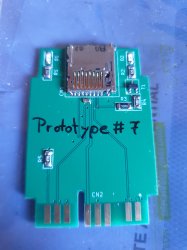
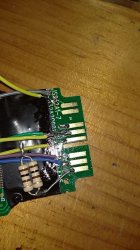
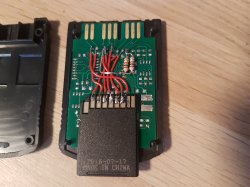
The schematics are available so you can make one yourself using some wires and a resistor.

If you want a factory to manufacture some PCBs for you, the gerber files are freely available for you to send.

If you want to buy something from eBay/Amazon/Aliexpress/Alibaba… you won't find anything there at the moment.
 
I tried ICO... Freezes on the Menu... Hm...

Well, I will look for some more games, which are smaller than 1.86GB and try them. :)

I think the most important thing (right now) is not even game-compatibility, but card-compatibility (so we can get more testers and more cards working, once Prototype-Batch2 is available)!

@wisi & @Maximus32?

On another note: The card-size shown, seems to be wrong for multiple cards, lol.

Oh... and ofc the "Controller-Shutdown" on the DECKARD's is a bummer, lol. ;)
 
I am too stupid for OPL :x I have to say I never used OPL before, it's the first time. It is located on my MC, port 0. When it starts, I get the settings menu. Selecting "Save settings" results in the message "error while saving" or something like that. When I press Circle ("Game List"), nothing happend. Anakin said, that also without an SD card he got an empty game list, so it seems that I'm doing something wrong.
 
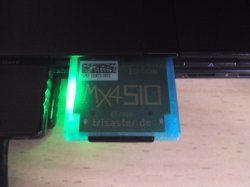
Thanks, after creating the folder mc0:/OPL it works and it shows me the game via MX4SIO.

I've bought a "Sandisk Extreme 64GB A2 uSDXC" (6 euro) card. It does not work.
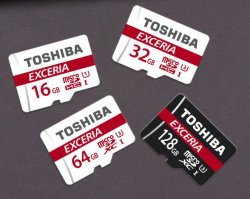
I tested microSD cards from Toshiba, called "Exceria" and both (32 GB und 64 GB) worked with the speed test. And I tested the 32 GB card woth OPL and it workes too. The cards are white with a red line. On ebay I find cards with the keyword "Exceria", nut they are black and I can't find any Exceria-Writing on the card neither on the packaging.
If someone wants to buy a new card I can recommend to buy those cards.

Btw: a smaller toshiba card (4 GB, not "Exceria") doesn't work. None of my sandisk cards were detected. A Lexar card (4 GB, not microSD, sold with the 3DS) works too.

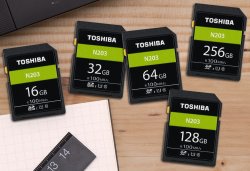
Edit: I bought another SD card from Toshiba: "N203 series", 16 GB, and it works with OPL, too.

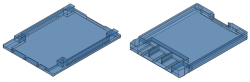
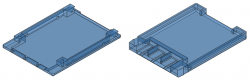
12 printed parts later ...


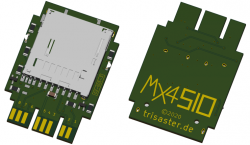
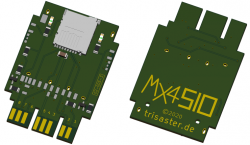
I don't have my own printer, therefore it took a while. But now the case is ready, I uploaded a new data package and updated the german info page on trisaster.de, the english page will follow the next days. I also uploaded all test files (from @Maximus32) and linked some videos.
You can find the data package on the german page or klick here: 09-002-0_MX4SIO.zip

 

Attachments

  • Toshiba_Exceria.jpg
    Toshiba_Exceria.jpg
    88.1 KB · Views: 203
  • Toshiba_N203.jpg
    Toshiba_N203.jpg
    140.8 KB · Views: 193
  • 02-005-3_SD.png
    02-005-3_SD.png
    107.8 KB · Views: 190
  • 02-005-3_mSD.png
    02-005-3_mSD.png
    112.8 KB · Views: 183
  • 10-009_10-010.png
    10-009_10-010.png
    94.6 KB · Views: 176
  • 10-005_10-006.png
    10-005_10-006.png
    67.1 KB · Views: 147
Last edited by a moderator:
The new Batch looks cool!

I am glad we can put either slot on it.

Would you (@Takeshi) or @Anakin94 attach a short video with it in action (in the dark and with light)? :)
It's enough to see the case and LEDs, when - for example - a game is loaded.


For those who haven't seen it: @Takeshi edited his post (above mine) recently!


Edit: @Anakin94 recently uploaded a picture of it to trisaster.de!
MX4SIO_Adapter.jpg
@Takeshi updated the Info-Page on his website (trisaster.de)!
https://www.trisaster.de/page/index.php?topic=574
 
Last edited:
Hi! i need some help, i've tried to do it myself (like in picture here, with two resistors (brown-black-brown gold)) everything as the image shows, with an old memory card, and now none of both ports reads any memory card (i think that now are burned or something) any tips on fixing it? i can provide pics if it's needed. Thanks in advance!
 
now none of both ports reads any memory card (i think that now are burned or something) any tips on fixing it?
Isn't the resistor(s?). you connected something incorrectly. Check the supply line for power first.
Better give a picture of what you did exactly.
If it is not a blown fuse, then it is probably irreparable.
 
It is, because there are only two electrical differences in the hardware. Now there is
- a slot for big SD cards so you can use big SD cards and micorSD cards. You can "only" use microSD cards, but this is nothing outdated.
- a transistor for detecting if there is a card inserted. This feature is currently not used, it is only a possibility for future. Maybe it will never be used.

For the current state of the project look a few posts above.
 
It is, because there are only two electrical differences in the hardware. Now there is
- a slot for big SD cards so you can use big SD cards and micorSD cards. You can "only" use microSD cards, but this is nothing outdated.
- a transistor for detecting if there is a card inserted. This feature is currently not used, it is only a possibility for future. Maybe it will never be used.

For the current state of the project look a few posts above.

I did go back to where I left off and updated myself on what has transpired since.
One of these days I'll get round to trying out the prototype.
 
Isn't the resistor(s?). you connected something incorrectly. Check the supply line for power first.
Better give a picture of what you did exactly.
If it is not a blown fuse, then it is probably irreparable.
here you go, thanks for the help! :)
photo_2020-09-05_15-07-46.jpg
photo_2020-09-05_15-10-12.jpg


PD: it's a microSD adapter btw
 

Attachments

  • photo_2020-09-05_15-14-16.jpg
    photo_2020-09-05_15-14-16.jpg
    149.6 KB · Views: 229
Last edited:
  • Like
Reactions: TnA
I can't see a connection of the second side of the resistors. They have to be connected to ground.
And maybe your SD card is incompatible.
 
  • Like
Reactions: TnA
photo_2020-09-05_16-00-44.jpg
I can't see a connection of the second side of the resistors. They have to be connected to ground.
And maybe your SD card is incompatible.
to the ground? i thought that it was connected to the fourth pin with the 2 cables [extreme facepalm]
 
You might want to check what that pin was and what was fried on the PS2.

I noticed something weird on my SCPH-90004 (R-Chassis, but with old 2.20 BOOT ROM)!

It was established quite a while ago that there are consoles like that. However, since I could not update AssemblerGame's thread and you know how information spreads around the Internet anyway - probably the word didn't get everywhere.

However, I still think it's one way to identify consoles that might potentially not support FMCB. As with the US datecode, this isn't a perfect metric. It means that Sony updated the console, in the middle of a month and it's neither aligned with the new chassis revision.
 
Last edited:

Similar threads

Back
Top