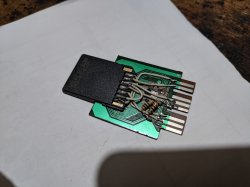
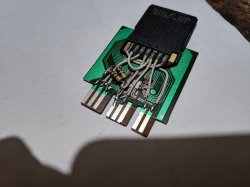
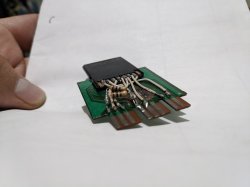
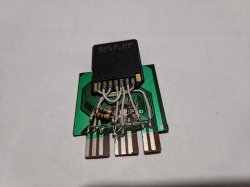
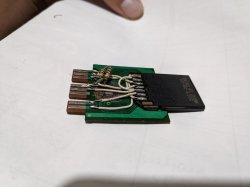
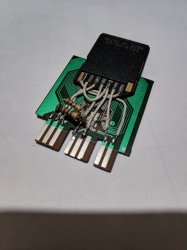
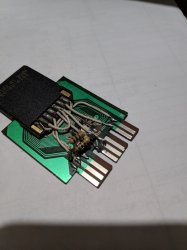
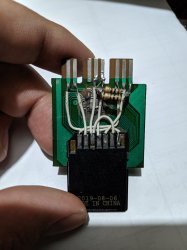
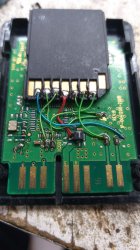
PS2 [MX4SIO/SIO2SD] SD Card Adapter and SD-driver for the PS2 SIO2 interface

You might want to check what that pin was and what was fried on the PS2.


It was established quite a while ago that there are consoles like that. However, since I could not update AssemblerGame's thread and you know how information spreads around the Internet anyway - probably the word didn't get everywhere.

However, I still think it's one way to identify consoles that might potentially not support FMCB. As with the US datecode, this isn't a perfect metric. It means that Sony updated the console, in the middle of a month and it's neither aligned with the new chassis revision.
i've just saw that the fourth pin is gnd
a-59460-sd-card-sio2-driver-img_20171022_214044-jpg.25507
so i don't know what's wrong :( and i don't know where to look at the ps2 to know what's fried
 
Last edited by a moderator:
@Varon9 The connections seem correct. (The 100||100 ohm R couldn't be the reason either (I use 47 on mine - in fact FAT PS2 need lower values in general.))
Do you have a multimeter or some sort of continuity tester? If so, (with the MC-SDCard disconnected from the PS2) check each two lines for short circuit (those that are close together. It is very possible that when soldering you overheated the SDCard and melted the pads so they touched internally for example. Or you connected them externally, but it isn't easily visible. It is always a good idea when doing such thing to first check that, as it is very common to make mistakes (I know from experience :D ).
Also in general, when you test on multiple things, (like in this case you tested on two ports), you should have started with port 2 and when you saw it wasn't working, tried with a known-working PS2 MC, to know if the port still works or not.
BTW, if you are using FreeMCBoot or some other MC-exploit to load stuff, now that both ports are damaged, that won't work too...

Also - how did you disable the original MC from responding? You should cut the /CS (/SS) line and connect the one of the MC chip to the Vdd (+3.5V MC pin 5) with a resistor (47ohm again or 100 ohm should work). But this shouldn't have damaged the PS2 AFAIK... (unless the cards have some odd modes...). So no need to look into that until you determine what is wrong with the PS2.

I see solder on pin 3 of the MC. If you ever connected something to that and powered-up the PS2 with it connected, you may have damaged something very seriously, as it is ~7.5V.

As for repairing the PS2, find the service manual that is closest to your model and find the fuse for the MC ports power.
Older (some? FAT) models have some buffer/protection IC mounted on the PCB with the controller and MC ports and that could be the only thing damaged too, but I don't know an easy way of testing it, and even if you determine it is faulty, it a multi-pin some SMD-type case, for which you probably have no means of replacing (or even finding a new one).
So just check the fuse(s) for the MC ports, and if they aren't what / the only thing that got damaged, then there is little chance of repair.
To check that more easily, just check if there is around 3.5V between Vdd (MC pin 5) and GND (MC pin 4).

And be careful not to short something else when measuring.
Also depending on the PS2 model, you should be ver careful in case you go near the power supply, when the unit is powered on (for FAT models) ... best to avoid such work.

 
@Varon9 The connections seem correct. (The 100||100 ohm R couldn't be the reason either (I use 47 on mine - in fact FAT PS2 need lower values in general.))
Do you have a multimeter or some sort of continuity tester? If so, (with the MC-SDCard disconnected from the PS2) check each two lines for short circuit (those that are close together. It is very possible that when soldering you overheated the SDCard and melted the pads so they touched internally for example. Or you connected them externally, but it isn't easily visible. It is always a good idea when doing such thing to first check that, as it is very common to make mistakes (I know from experience :D ).
Also in general, when you test on multiple things, (like in this case you tested on two ports), you should have started with port 2 and when you saw it wasn't working, tried with a known-working PS2 MC, to know if the port still works or not.
BTW, if you are using FreeMCBoot or some other MC-exploit to load stuff, now that both ports are damaged, that won't work too...

Also - how did you disable the original MC from responding? You should cut the /CS (/SS) line and connect the one of the MC chip to the Vdd (+3.5V MC pin 5) with a resistor (47ohm again or 100 ohm should work). But this shouldn't have damaged the PS2 AFAIK... (unless the cards have some odd modes...). So no need to look into that until you determine what is wrong with the PS2.

I see solder on pin 3 of the MC. If you ever connected something to that and powered-up the PS2 with it connected, you may have damaged something very seriously, as it is ~7.5V.

As for repairing the PS2, find the service manual that is closest to your model and find the fuse for the MC ports power.
Older (some? FAT) models have some buffer/protection IC mounted on the PCB with the controller and MC ports and that could be the only thing damaged too, but I don't know an easy way of testing it, and even if you determine it is faulty, it a multi-pin some SMD-type case, for which you probably have no means of replacing (or even finding a new one).
So just check the fuse(s) for the MC ports, and if they aren't what / the only thing that got damaged, then there is little chance of repair.
To check that more easily, just check if there is around 3.5V between Vdd (MC pin 5) and GND (MC pin 4).

And be careful not to short something else when measuring.
Also depending on the PS2 model, you should be ver careful in case you go near the power supply, when the unit is powered on (for FAT models) ... best to avoid such work.
Thanks so much! i'll try to test if there's 3.5 with the analogical multimeter (the only one i have LOL) and see if there's voltage, and no, i was about to solder in pin 3 when i realised that it wasn't soldered to anything in the picture, so i've skipped it (just added the stain, but nothing more (fortunately)) again, thanks for the help! i'll try to find the service manual, cuz i'm pretty sure that is the fuse (i hope so)

EDIT: You're going to laugh at me so hard... see my solders in pin 4 (gnd)? the solder has sunk the pin on both ports so no gnd for you dear memory xD omg i feel so stupid right now, i've pulled up that pin to its place and now it's working... don't punch me please

EDIT2: I've tried 3 micreoSD (samsung, kingstone and a chinese one) neither of it worked, do i need a pc for something? i've saw in all the videos posted that all of them were using a pc to load the elf, is there any diference? or is just that my microSDs aren't compatible?
 
Last edited:
Could you help me know what I'm doing wrong?
I connect it based on the pins mentioned and the 100 ohm resistors, I am also using the OPL test but it does not work.
 

Attachments

  • IMG_20200926_185814.jpg
    IMG_20200926_185814.jpg
    2.9 MB · Views: 369
  • IMG_20200926_185826.jpg
    IMG_20200926_185826.jpg
    2.8 MB · Views: 356
  • IMG_20200926_190024.jpg
    IMG_20200926_190024.jpg
    2.5 MB · Views: 339
  • IMG_20200926_185852.jpg
    IMG_20200926_185852.jpg
    2.7 MB · Views: 355
  • IMG_20200926_185908.jpg
    IMG_20200926_185908.jpg
    2.8 MB · Views: 334
It looks as if the resistor(s) are connected to Vdd +3V, while they should be connected to GND.

oh, you're right, i've already corrected it, but it's still not recognized by the OPL. :(
Could it be SD problem?
 

Attachments

  • IMG_20200926_224540.jpg
    IMG_20200926_224540.jpg
    1.4 MB · Views: 204
  • IMG_20200926_224553.jpg
    IMG_20200926_224553.jpg
    1.5 MB · Views: 202
  • IMG_20200926_224621.jpg
    IMG_20200926_224621.jpg
    1.3 MB · Views: 199
  • IMG_20200926_224609.jpg
    IMG_20200926_224609.jpg
    1.6 MB · Views: 225
What kind of "chip" is left on there? Remove it!
Try your cards with the Test-App, not just OPL...
 
@Maximus32 : Did you receive the new prototype?
Yes, I received the new prototype. It looks great. But unfurtunately I have not had any time in the past weeks to do anything with the prototype or the driver/opl. I intend to get back to working on it once I have more time, but it's not going to be anytime soon. If anyone else wants to try to improve card/game compatibility/stability, please do.

First thing to fix, I think, is the stability. Games that work hang after some time, and the debug ouput (ps2link/ps2client) already shows some information as to why it hangs (for instance card not responding, or invalid response).
 
I have a question (maybe a bit silly) What files should I have on the SD? or What is the configuration of the SD? (FAT32 Exfat)
 
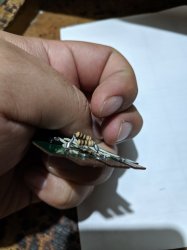
this is my DIY adapter, and it works!

53e492b3-40ff-4f48-99d7-6594a5931e7d.jpg

tested on 8 consoles, 7 versions:

39001 # 1: loads OPL and games perfectly.

39001 # 2: loads OPL and does not recognize Micro SD.

50001: loads OPL, and crashes when loading games.

70003: equal to 50001.

75001: loads the OPL, displays Micro SD content and joystick stops responding and I can't load games.

79001: equal to 75001.

79003: equal to 75001.

90001: equal to 75001.

all consoles with modchip.

different types of modchip on each console.

Only one 39001 worked, but it didn't work on another 39001, problems with modchip?

next tests with modchip off and FMCB...
 

Similar threads

Back
Top