PS2 [MX4SIO/SIO2SD] SD Card Adapter and SD-driver for the PS2 SIO2 interface

Just on a side note... not heard from @TnA in a while here. Hope all is going very well at his end, and the reason for his absence is just because he's busy counting the millions of Euros he just won on the Lottery, or something good like that. Anyways Bro come back we miss you already. Plus Bob from RetroRGB was looking to feature MX4SIO on his podcast soon and had a few questions maybe you could help him with.

Sorry for not answering here. It is kind of overwhelming to answer as a Mod here a mod on Reddit, on other sites, as Admin on the PS2-Scene-Discord...

I can't follow everything anymore, because the scene is soooo active again! It is awesome and kind of crazy!
It REALLY reminds me of the days of FMCB, OPL, FHDB, etc.!

Hi,

Still no breakthrough on having 9000x compatibility?

Cheers
MX4SIO works on 90k since a long time!

Hmm I wonder if this is what makes the bootleg FMCB not work with the Beta OPL from this thread?
Nope!
 
Last edited:
Hey guys, I was wondering if someone could tell me if changing R22 (R7 in the photo) from being a pull-up to a pull-down can affect the sd card or anything else. This is why I ask:
image.png
Since I want to use an N mosfet to drive the data trasmission LED, using a pull-up would make the LED stay always on until data begins to transfer.
 
  • Like
Reactions: TnA
@indrora That's a nice design! do you expect the rev.c to have better compatibility with SanDisk cards? Do you plan to release the design with a compiled gerber files and BOM once the hardware is finalized?

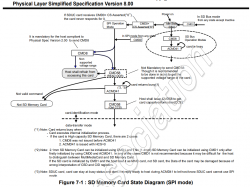
I don't know if it'll help. At this point, I'm going to follow the hardware side suggestions and begin suspecting that we're doing something out of order in software. According to the SD Association's Physical Layer Simplified Specification, this is the flow we should be doing:

upload_2022-2-17_17-34-16.png


  • CMD0
  • CMD8 (determines if it's an old MMC/sd1x card)
  • CMD58 (read OCR for voltage range)
  • ACMD1 to say if we support SDHC/SDXC or not, until card says we're no longer idle
  • CMD58 to get CCS ("are you an SDHC/SDXC card?)
In the SD Card driver itself, we're trying to be "smart" by sending several commands over and over again to see if the card responds, but I suspect that SanDisk cards don't like when you do that? https://github.com/ps2dev/ps2sdk/bl...bb1/iop/sio/mx4sio_bd/src/spi_sdcard_driver.c

I'm going to open a ticket with the ps2sdk side and begin to track it there.

edit: Ticket opened: https://github.com/ps2dev/ps2sdk/issues/247
 

Attachments

  • upload_2022-2-17_17-29-23.png
    upload_2022-2-17_17-29-23.png
    268.7 KB · Views: 45
Last edited:
I don't know if it'll help. At this point, I'm going to follow the hardware side suggestions and begin suspecting that we're doing something out of order in software. According to the SD Association's Physical Layer Simplified Specification, this is the flow we should be doing:

View attachment 36245

  • CMD0
  • CMD8 (determines if it's an old MMC/sd1x card)
  • CMD58 (read OCR for voltage range)
  • ACMD1 to say if we support SDHC/SDXC or not, until card says we're no longer idle
  • CMD58 to get CCS ("are you an SDHC/SDXC card?)
In the SD Card driver itself, we're trying to be "smart" by sending several commands over and over again to see if the card responds, but I suspect that SanDisk cards don't like when you do that? https://github.com/ps2dev/ps2sdk/bl...bb1/iop/sio/mx4sio_bd/src/spi_sdcard_driver.c

I'm going to open a ticket with the ps2sdk side and begin to track it there.

edit: Ticket opened: https://github.com/ps2dev/ps2sdk/issues/247

IIRC the SD card adapter test tool that is linked in this thread reports, that SanDisk cards are answering 0x00 / not answering at all to the CMD0 command. I guess they need the flank from HIGH to LOW on SS before the 74 cycle delay before cmd0.
From what I understood, SS is permanently LOW on SIO2 - correct?
 
  • Like
Reactions: TnA
IIRC the SD card adapter test tool that is linked in this thread reports, that SanDisk cards are answering 0x00 / not answering at all to the CMD0 command. I guess they need the flank from HIGH to LOW on SS before the 74 cycle delay before cmd0.
From what I understood, SS is permanently LOW on SIO2 - correct?

Good question!

I dug up the schematics for the spch-3000R (one of the original models) and we find that there's two possibly interesting pins: /DSR and /INT. I'm going to assume here (dangerous of me) that /INT is what we on the other side call /ATT in Takeshi's schematics...


upload_2022-2-18_10-3-35.png


But hold your horses -- if I open up a later revision (SCPH-30002D/30003D/30004D), we can see that it's tied to something!

upload_2022-2-18_10-25-43.png


The plot thickens. Let's continue to make some dangerous assumptions and go dig around in the 7000 series manuals: with the controller and memory card ports directly on the board, we don't have to guess what pins go where:

upload_2022-2-18_10-30-30.png


The pin Sony is calling /DTR here is what Takeshi tied to CS. That weird pin we saw as INT3 has been given a new name: PS_MODE. There must have been a change in the PS1 bios that is used somewhere between revisions that made it possible to keep the PS1 memory cards awake all the time/not caring? Dunno.

Oh, huh, that's interesting. hey @Takeshi and @AngryHelder -- Am I right in reading this right in that we might just have our logic backwards? When /DSR is high, there's no reason to read or write to the IO port, since we're not ready to handle data on it yet, so do you think the IOP might be doing something Sketchy with that?
 
I built a simple SD card reader for PS2 based on a damaged PS1 memory card and a uSD adapter soldered to the cut off pads on the PCB.
Everything works great on two of my fat PS2 30004 consoles and two on slims 70004.

The problem is only with the other slim consoles SCPH-75004 and 77004, the OPL program freezes after loading and the pad does not work, I can not select any game to run.

What can be the cause of such problems?
 
@damik on my 90004 when I try to turn on OPL BDM3 it hangs on black screen unless I have plugged MX4SIO with mSD/SD card or USB device with existing OPL structure. It seems to be irrevelant for 50k and 70k.
 
Guys, I was about to start designing my own version of the PCB, but i decided to look to the case first, and i noticed that the "ramp" there is on the case is quite substancial compared with my memorycard (clone). Im thingking that it has to do with the PCB thickness. On my clone MC, its exactly 1mm thick. Using FreeCad i was able to guess a pcb thickness of around 1.5mm. Can someone tell me how thick the pcb is supposed to be?

Also, i just noticed that i might be in a problem. I just noticed that my SDcard connector, has one of the pins for the CD connected directly to the shielding (the CD switch is part of the shielding), and with that, the circuitry that is connected to the /ACK line would be useful, since its always going to get GND at the gate. Did someone else encounered this? And how did you solve is?

Also, what is the /ACK line? I mean, the MOSFET has no VCC, so, how does it work exactly? does the /ACK line has a pull-up in the ps2 itself?

Thanks
 
Last edited:
I also tested with OPL for slim 750XX+ from a package attached to a Youtube video found a few posts earlier.
This OPL also does not work on my 75004 and 77004.
 
I also tested with OPL for slim 750XX+ from a package attached to a Youtube video found a few posts earlier.
This OPL also does not work on my 75004 and 77004.

Hey damik, as mentioned by @Haker120 above, to fix this issue - already have a pre-existing (for example) official OPL v1.1.0 on the FMCB memory card, then copy OPL BDM3 into the mc0:/BOOT/ folder (for me it's boot folder on fmcb 1.964), then point to OPL BDM3 via Free McBoot Configurator. You can have both this way (OPL v1.1.0 and OPL BDM3), they will share the same mc0:/OPL/ (config folder / i.e. settings). This fixed that issue with my 77003.

Using FreeCad i was able to guess a pcb thickness of around 1.5mm. Can someone tell me how thick the pcb is supposed to be?

Here in the MX4SIO manual, page 3 it says 1.55mm.

https://www.trisaster.de/file/sony/ps2/mx4sio/dl_hardware/09-002-0_MX4SIO.zip
 
Last edited by a moderator:
Guys, I was about to start designing my own version of the PCB, but i decided to look to the case first, and i noticed that the "ramp" there is on the case is quite substancial compared with my memorycard (clone). Im thingking that it has to do with the PCB thickness. On my clone MC, its exactly 1mm thick. Using FreeCad i was able to guess a pcb thickness of around 1.5mm. Can someone tell me how thick the pcb is supposed to be?

The official Sony PCBs are 1.0m or 1.2mm thick, depending on generation and how you measure them, I suspect some of them are 1mm with a heavier copper weight/ENIG Gold pass. One I found had actual Hard Gold. Whatever Sony could get cheap.

The counterfeit cards I have are nearly universally 1.05-1.08mm, which translates to 1mm with ENIG Gold. The exceptions have been the occasional 1.2mm cards that have the crappiest HASL leadfree fingers I've encountered.

If you're using Takeshi's cases as a guide, Takeshi designed his enclosure for 1.5mm thickness PCBs, which are the near universal default for cheap turnkey PCB shops like PCBway, AllPCB, or JLCPCB.

Also, i just noticed that i might be in a problem. I just noticed that my SDcard connector, has one of the pins for the CD connected directly to the shielding (the CD switch is part of the shielding), and with that, the circuitry that is connected to the /ACK line would be useful, since its always going to get GND at the gate. Did someone else encounered this? And how did you solve is?

Also, what is the /ACK line? I mean, the MOSFET has no VCC, so, how does it work exactly? does the /ACK line has a pull-up in the ps2 itself?

Thanks

The /ACK line is an active-low line (that is, it's considered "set" when its voltage is low). Internally, the line is pulled up by a 10K pullup pack.

I'm going to guess your SD card slot has something like this in its datasheet:

upload_2022-2-19_22-57-44.png

If you don't want a "card detect LED" then you can just slap a 47ohm resistor right on there and tie it straight to the card detect pin on the SD card case. This gets sticky if you want to have an LED for when the card is inserted.

You can use an NPN transistor backwards, however:
upload_2022-2-19_23-39-25.png

This was built in circuit simulator, and you can play with this circuit here: https://tinyurl.com/ycfdzhhq
As for part numbers, any jellybean NPN transistor should do it, nothing special here.

Edit: swapping the LED and resistor works much nicer and makes the transistor more efficient, thus reducing power consumption.
 
Last edited:
Hey damik, as mentioned by @Haker120 above, to fix this issue - already have a pre-existing (for example) official OPL v1.1.0 on the FMCB memory card, then copy OPL BDM3 into the mc0:/BOOT/ folder (for me it's boot folder on fmcb 1.964), then point to OPL BDM3 via Free McBoot Configurator. You can have both this way (OPL v1.1.0 and OPL BDM3), they will share the same mc0:/OPL/ (config folder / i.e. settings). This fixed that issue with my 77003.

That's what I did as you described for your 77003, but I have a black screen when I start OPL BDM3 (version for 7500+).
However, for the usual version of OPL BDM3 on my 75* and 77* consoles appears menu and game list from SD card but the program freezes and the pad does not work.

Maybe something is wrong with the compatibility for consoles version 75004 and 77004?
 
That's what I did as you described for your 77003, but I have a black screen when I start OPL BDM3 (version for 7500+).
However, for the usual version of OPL BDM3 on my 75* and 77* consoles appears menu and game list from SD card but the program freezes and the pad does not work.

Maybe something is wrong with the compatibility for consoles version 75004 and 77004?

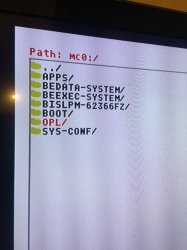
1) Make sure you only have 1 x OPL (config folder) in Path: mc0:/

The Beta OPL BDM3 needs the original OPL Config folder from Official OPL v1.1.0

FMCB.JPG

If there is two OPL folders here, keep the OPL folder that has many files inside, and delete / rename the other OPL folder that has only 1 file inside.

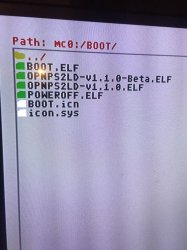
2) See photo below, on my FMCB (Path: mc0:/BOOT/) i have 2 x OPL versions (OPL official v1.1.0 and OPL Beta 1629 BDM3). If you have the same setup as me... then first open official OPL v1.1.0, change the PADEMU settings:- PADEMU = "On" and "Global" (to access "Configure PADEMU" press Triangle button on any game in game list), then "Save Settings". Once done restart your PS2, this time open OPL Beta 1629 BDM3 (both OPL versions will share the same settings that are found in PATH: mc0:/OPL/) and this should fix that issue.

FMCB - Boot Folder.JPG
 
The official Sony PCBs are 1.0m or 1.2mm thick, depending on generation and how you measure them, I suspect some of them are 1mm with a heavier copper weight/ENIG Gold pass. One I found had actual Hard Gold. Whatever Sony could get cheap.

The counterfeit cards I have are nearly universally 1.05-1.08mm, which translates to 1mm with ENIG Gold. The exceptions have been the occasional 1.2mm cards that have the crappiest HASL leadfree fingers I've encountered.

If you're using Takeshi's cases as a guide, Takeshi designed his enclosure for 1.5mm thickness PCBs, which are the near universal default for cheap turnkey PCB shops like PCBway, AllPCB, or JLCPCB.


The /ACK line is an active-low line (that is, it's considered "set" when its voltage is low). Internally, the line is pulled up by a 10K pullup pack.

I'm going to guess your SD card slot has something like this in its datasheet:

View attachment 36316
If you don't want a "card detect LED" then you can just slap a 47ohm resistor right on there and tie it straight to the card detect pin on the SD card case. This gets sticky if you want to have an LED for when the card is inserted.

You can use an NPN transistor backwards, however:
View attachment 36323
This was built in circuit simulator, and you can play with this circuit here: https://tinyurl.com/ycfdzhhq
As for part numbers, any jellybean NPN transistor should do it, nothing special here.

Edit: swapping the LED and resistor works much nicer and makes the transistor more efficient, thus reducing power consumption.
Wow, thanks for the explanation! That way of using transistors blew my mind!

I think that im going to use the BC847B transistor, since im familiar with the BC547 and there is stock of it on my local electronics supplier.

I have only one little question. Isn't the transistor going to get damaged when passing such a load trough the base? I ask because my professors teached me that the base was intended to have very small currents passing trhoug it and the emitter (usually around uA). And even thoe, the datasheet for the transistor I selected says that Vb(max) is 200mA, it still dosent feel right to do it.

The other solution I thought of, was to basically connect the connector's shield to 3.3v. It also feels bad, but it was more straight forward, and it didnt meant to have to increase the components number (my design is meant to be manufactured with the laser print method, thus tracks have to be thick)

Im anyway going to change the mosfet for the transistor, so thanks!
 
Workz_777, thank you for the hint with the pad from PS3 and PS4 PADEMU works fine even via BT, but this is some temporary solution because it is a little inconvenient to change the pad every time. :)
However, I wonder why the normal pad from PS2 in OPL3 BDM3 on my consoles 75004 and 77004 still does not work and hangs, so it already has be is it some kind of inconvenience in this version of consoles?
Where can I find to download any other versions of OPL working with an SD card to?
 
Last edited:
1) Make sure you only have 1 x OPL (config folder) in Path: mc0:/

The Beta OPL BDM3 needs the original OPL Config folder from Official OPL v1.1.0

The files which is linked to in the video that is on my site has both the OPL versions and also has the OPL folder with the configuration files from the V1.1.0 so it should not be any issue with those files but I have heard from Mr.Mario that he could not get it working on his 790XX either so not sure what is going on there.
 
Isn't the transistor going to get damaged when passing such a load trough the base? I ask because my professors teached me that the base was intended to have very small currents passing trhoug it and the emitter (usually around uA). And even thoe, the datasheet for the transistor I selected says that Vb(max) is 200mA, it still dosent feel right to do it.


Early transistors (outside of Bell Labs' voltage-current exchange model) were a pain and could suffer from certain forms of diode breakdown that only really affect mid-70s era germanium diode based biopolar transistors. This is well within the design tolerances and very much an intended use of modern bipolar junction type transistors. The amount of current we're dealing with here is minimal -- 10s of mA at most.

The other solution I thought of, was to basically connect the connector's shield to 3.3v. It also feels bad, but it was more straight forward, and it didnt meant to have to increase the components number (my design is meant to be manufactured with the laser print method, thus tracks have to be thick)

I will caution you against this. If you want to forgo the LED, all you have to do is tie the card detect line to the /ACK line and a 47ohm resistor and you're fine. Otherwise, go for the transistor path.
 
The files which is linked to in the video that is on my site has both the OPL versions and also has the OPL folder with the configuration files from the V1.1.0 so it should not be any issue with those files but I have heard from Mr.Mario that he could not get it working on his 790XX either so not sure what is going on there.

Oh, even with the PADEMU settings "ON" and "Global" ? Do you know what issue did Mr.Mario had, was it like OPL BDM3 black screen, or controller not working?

Workz_777, thank you for the hint with the pad from PS3 and PS4 PADEMU works fine even via BT, but this is some temporary solution because it is a little inconvenient to change the pad every time. :)
However, I wonder why the normal pad from PS2 in OPL3 BDM3 on my consoles 75004 and 77004 still does not work and hangs, so it already has be is it some kind of inconvenience in this version of consoles?
Where can I find to download any other versions of OPL working with an SD card to?

Maybe for now you could use DS3 via USB cable then it will charge while you play (i have it like this). I also use a DS2 and it works perfectly. But it's strange, if you can get working DS3 and DS4 (either via BT or USB) but not the DS2, that's odd. What FMCB version are you using?

For me i had issues like this with FMCB 1.966, so i changed to FMCB 1.964 and it helped fixed those problems. Maybe you could try with a clean FMCB 1.964 setup and see if it makes any difference. Still you will need to have OPL (stable) v1.1.0 first, run / load it then make the changes to the settings like:-
- --- - --- - --- - --- - --- - --- - --- -
Menu (start button)
- Settings
- USB Device Start Mode = Auto
- Default Menu = USB Games
- Save Changes
- --- - --- - --- - --- - --- - --- - --- -
(In USB Games list)
Options (Triangle button)
- Configure PADEMU
- Settings Mode = Global
- Enable Pad Emulator = On
(leave other settings as default)
- Save Settings
- --- - --- - --- - --- - --- - --- - --- -
Then copy across OPL v1.1.0 Beta BDM3, if now when you start OPL BDM3 it goes to black screen, or controller freezes after this, then check you don't have 2 x OPL (config) folders in (Path) mc0:/ (if you have two OPL folders there, open each OPL folder to see which one has many files and which one has only 1 file. Delete the OPL folder with only 1 file, keep the OPL folder with many files inside.

Is your FMCB memory card a Chinese clone, or official Sony Magic Gate? Did you format the memory card just before installing FMCB?
 
Last edited by a moderator:
Workz_777, thank you for the tip, I did tests on FMCB 1.966 but I will check with FMCB 1.964.
My memory card is fresh full formated and FMCB installed the original SONY Magic Gate 8MB.
The most interesting thing is on slim 70004 the same configuration OPL BDM3 works excellently, but on 75004 and 77004 always hangs DS2 pad.

Only OPL BDM3 (version for 7500+) from the package attached to an earlier Youtube video always causes a black screen on all versions of my consoles.
 
Last edited:

Similar threads

Back
Top