PS2 [MX4SIO/SIO2SD] SD Card Adapter and SD-driver for the PS2 SIO2 interface

@Workz_777.

If you want me to stop my tests, then I stop them !!!
Don't forget that there are probably compatibility issues between various PS2 models (FATs and Slims for example). I have another FAT model SCPH-50004 and finally 2 Slims SCPH-70004.
I intend to resume my tests (games in RED only) on the 50004 then the 70004 once I'm done with all the string of games in ISO PS2 that we have, my friends and me. The compatibility list will only be more complete...

It's just a joke, don't take it so seriously, although if you want to use the green high-lighter colour (from time to time) that would be really good too :-p
 
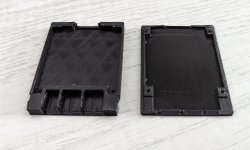
My 3D printer needs tweaking but the print works as intended.

PXL_20220423_005108995.jpg PXL_20220423_005120108.jpg
 
What's the best option for storing our saves / saving our game since the MC2SIO only works with 8MB MagicGate cards? Also Why can't we save to the microsd card in the MC2SIO?
 
What's the best option for storing our saves / saving our game since the MC2SIO only works with 8MB MagicGate cards? Also Why can't we save to the microsd card in the MC2SIO?
I don't know if it works yet, haven't tested yet, but I just tested a MC I bought (It worked BTW and I'm about to post the amazon link in case it's not on the list) but OPL made a bunch of folders on the card when it first saw it, one of those was "VMC" which I assume means you can set up a virtual memory card and save that way. Some games don't like them but if it works, use it, I say!

EDIT: Yep that doesn't work haha. Froze when I added VMC and it took OPL about 15 min to create it. I ended up hot swapping the FMCB card in slot 1 for a generic 64gig card from amazon once the game had booted and that worked fine though, froze a couple of times when it saved but it told me it saved OK.
 
Last edited:
Hullo again everyone, I might have some good news for you! I just tested the 32 gig microSD I bought on amazon for 7 Aussie buckeriedoos (with the adapter) and It worked fine with Dave Mirra Freestyle BMX. (also if that's not on the list...)

https://www.amazon.com.au/gp/product/B07D7883BS/ref=ppx_yo_dt_b_asin_title_o01_s00?ie=UTF8&th=1

In case the link stops working, also because It's Aussie Amazon, the description for the page is:
"MENGMI Micro sd Card 32GB Class 10 U3 Micro SDHC Memory Card 32GB with SD Adapter for Drone 4K Video Capture Ten Year Warranty (32GB U3)"

Here is the amazon link, not to specifically buy it, but so that everyone can see which brand/card it is and that I have confirmed that this one works. It comes up as "generic storage" on the computer (I checked every way I could for a sandisk tag anywhere) and it worked fine once I remembered to put the games in the correct "DVD" or "CD" folder.
So far so good. At least I'll have something to recommend for people looking to get one from me! (Boards are being produced as we speak, by the way, and I'm waiting to get the actual board to see if my printed case fits, I modified a thingiverse file in blender, lucky I did a crash course on it a year or so ago since I hadn't done 3D work since the 3ds MAX days!)

In the mean time, I'm having a ball with the printer. Highly recommended for anyone into pretty much any hobby.
 
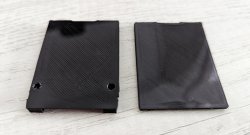
Sorry to double up, I took a photo of my first proto print, not 100% as I hadn't learned what I now know re 3d printing and I'm sure I still have plenty to learn, but next time I should get better results, this was literally the 3rd thing I printed on the machine after a couple of test prints off the stock SD card.
IMG-4114.jpg
EDIT: This is just the test filament that came with the ender 5, the final prints will have a black tray and a glow in the dark top, so the LED should shine through the plastic. That filament arrives in a day or two.

EDIT EDIT: Replaced the dead google photos link that is apparently private and upped to a free host site. Should be visible now.
 
Last edited:
Hey guys, I'm new to this, I have an MX4SIO and so far I'm not able to play games on the SD card no matter what I do. I've put the ISOs in the DVD folder on the root of the SD card, and I've got MX4SIO enabled in OPL. I'm running 1.2.0 Beta 1836 if that helps. I've only got one SD card, one local brand from Microcenter, it's 32gb and it's only got one ISO on it in the DVD folder. I either get "this game is fragmented" or the game loads but I only get a black screen. Is it the game or do I have a bad SD for this?
 
Hey guys, I'm new to this, I have an MX4SIO and so far I'm not able to play games on the SD card no matter what I do. I've put the ISOs in the DVD folder on the root of the SD card, and I've got MX4SIO enabled in OPL. I'm running 1.2.0 Beta 1836 if that helps. I've only got one SD card, one local brand from Microcenter, it's 32gb and it's only got one ISO on it in the DVD folder. I either get "this game is fragmented" or the game loads but I only get a black screen. Is it the game or do I have a bad SD for this?
Which model of PS2 is it? If it's 75xx plus then you will probably have trouble anyway, they're still working on a version that works on those models of slim. Try a different ISO and get a cheap and cheerful micro SD from amazon is my tip, worked great for me and I found a new compatible card too!
 
Sorry to double up, I took a photo of my first proto print, not 100% as I hadn't learned what I now know re 3d printing and I'm sure I still have plenty to learn, but next time I should get better results, this was literally the 3rd thing I printed on the machine after a couple of test prints off the stock SD card.
XLNHcaBaGmt-UjueNUuE4oHSRH6hD4htIsrId1OPXElMDWfRe-9FX39_wIhtEZ5_mXawxRtioAeljSHjfF_W62ZnuDABT5uEy0BO9h34yO8pdogyy0L1YRatej3yXlPHi0CSHGFmrENDsaYORoSA-5u6sVE2mkyX6nIgT-DDKCLqk8COTX44PgaEJXZqzyUnrOKcK29PZd0hWJ2YMcIhyEsQ0JxLPO4h6LBtcclzRXdIponcvvCV29A6eWcUPRPc3UHtDfVIikNALDD5VxeLb25AGM849_zEzEM7radFWJoj57SX2QXhcyLxTlXZbb23yx3e8g-ld8vauUsQiHukQeDQqzEN7qoVUbrxb8LzxP9rqDSZGOe0upadqI4XAYiTt1YaZOTDBD-t_CFEsLnrP_b0qfSTbWAk6LfV1MfGNrXqlNNKjS7wWlY90xNwxVxRl_PuPMiKMjF2xAZ0aWix1WbOwd5YmKA5AxCZbNo8mDN6V1-BvzknIPkW0tZ-_dpn00q9v26F1SQmrumcVHH_e_qSh7O3HyBlXAXJ2U_J9ZisvSbrsroaEX-Sudj_6qdXWtBTsd1S2Ku2lBZ7C4kc3axBCkM1s6cYnJGk0CV8xr77XKuD2slYx8b9M9CRmoh57WcjVV_NMU6xus_ixfOypZYIPxYSlfUZk7KF_yvYf5uifd8akzuOX8cNzqCTnwKYg79xey1EjmlfDjDVqnsrK35TG3wWo-yAvH6TLuv258J9YwM0nSdPXRHZjUoBw5j35joDPRgqb0Y4edN1J5_Q4ihhSmSvWLvozNc=w1614-h1211-no
EDIT: This is just the test filament that came with the ender 5, the final prints will have a black tray and a glow in the dark top, so the LED should shine through the plastic. That filament arrives in a day or two.

Can't see the photo, for me it's a "no entry sign"
 
Hey guys, I'm new to this, I have an MX4SIO and so far I'm not able to play games on the SD card no matter what I do. I've put the ISOs in the DVD folder on the root of the SD card, and I've got MX4SIO enabled in OPL. I'm running 1.2.0 Beta 1836 if that helps. I've only got one SD card, one local brand from Microcenter, it's 32gb and it's only got one ISO on it in the DVD folder. I either get "this game is fragmented" or the game loads but I only get a black screen. Is it the game or do I have a bad SD for this?

Try with the OPL that was designed for MX4SIO, called BDM3, it's here on Page 15, called OPL 1629 BDM3. You can download it from Maximus32's post:- https://www.psx-place.com/threads/m...-ps2-sio2-interface.29210/page-15#post-275928

ISO smaller than 4GB go into the DVD folder, yep ...however ISO larger than 4GB will need to be split down using USBUtil and placed directly on the root of the MicroSD (not in any folder).

Check to see if the game you are testing is compatible on the google game list:-
https://docs.google.com/spreadsheets/d/1zHxhwT4nSkrCCAqJNlSndw1Yeh_9g3eL/edit#gid=2095482473

It helps to format the MicroSD using GuiFormat, FAT32 and 16K clusters. Also check my comment below about OPL settings.

BDM3
OPL Settings:- USB Device Start Mode = Auto
OPL Settings:- Default Menu = USB
PadEmu = Global + Enabled
Never use a PS1 controller

Edit:- Then once you have loaded your games onto your MicroSD (and still connected to your PC), open OPL Manager and it can check your Game Titles are correct, and fix them if they are not correct, or if they are too long (32 characters max).

Which model of PS2 is it? If it's 75xx plus then you will probably have trouble anyway, they're still working on a version that works on those models of slim.

@MetalMonkey ...bro this is not so, i have a 77xxx model PS2 and nearly all my games run perfectly with BDM3.
 
Last edited:
Can't see the photo, for me it's a "no entry sign"
Yeeeeep my bad, blame google photos for only allowing me to see it, checked at a friend's place and saw that last night, I'll re-up the photo at a free site and edit the post in a few min.

Hmm I tested my bodge SIO2SD in my friend's 77xx last night and we either had no controller working at all in OPL with the pre 75xx file as the boot file, or no OPL at all and black screen with the one that was meant to work with his system... I downloaded a bunch of versions but I won't be back at his place for a few days to test again. I gotta get me a broken 77xx slim so I can test this properly! I only tested on my phat version other than my friend's 77002 I think it was.

EDIT: Done with the other edit, also, the issues I'm having might possibly be local to the Aussie version of 77002 (I think it was)?
 
Last edited:
Ok.....went ahead and installed OPL 1629 BDM3 from the link Workz provided but I'm not seeing the games on there. I did see games in the other version that I had in there. I enabled USB but I don't see a setting for MX4SIO anymore.
 
Yeeeeep my bad, blame google photos for only allowing me to see it, checked at a friend's place and saw that last night, I'll re-up the photo at a free site and edit the post in a few min.

Hmm I tested my bodge SIO2SD in my friend's 77xx last night and we either had no controller working at all in OPL with the pre 75xx file as the boot file, or no OPL at all and black screen with the one that was meant to work with his system... I downloaded a bunch of versions but I won't be back at his place for a few days to test again. I gotta get me a broken 77xx slim so I can test this properly! I only tested on my phat version other than my friend's 77002 I think it was.

EDIT: Done with the other edit, also, the issues I'm having might possibly be local to the Aussie version of 77002 (I think it was)?

If you are having a black screen when loading OPL BDM3 it could be down to your FMCB card, if it was a Multi-Install (instead of Cross Region install) when it was made. I think that maybe causing problems, i need to test this theory.

Anyways, here's a way around the BDM3 back screen...

First, never have any USB thumb drives inserted in your PS2 while using MX4SIO and BDM3. If you didn't have a USB thumb drive inserted when you get a black screen, then follow the steps below:-

1) Via your PC, place a few games (less than 4GB ISO) onto your MX4SIO's DVD folder, then check after using OPL Manager the Game Titles are correct.

2) Via your PS2, install (copy/paste) OPL v1.1.0 (Github link below) onto your FMCB card, in the Boot folder.
https://github.com/ps2homebrew/Open-PS2-Loader/releases/download/v1.1.0/OPNPS2LD-v1.1.0.7z

3) Once done, turn off / stand-by your PS2 and insert your MX4SIO into your PS2 with your FMCB

4) Turn on PS2 and load up OPL v1.1.0, make all the setting changes (see below) using this version:

- In OPL Settings:-
- USB Device Start Mode = Auto
- Default Menu = USB
- Press "OK" then "Save Settings" after

5) While still in OPL, load up the list of games, then press the Triangle button, and make the following changes:
- PadEmu = Global + Enabled
- Press "OK" then "Save Settings" after

6) Restart PS2 and install (copy/paste) OPL BDM3 also to your FMCB Boot folder

7) (optional) Configure your FMCB so OPL BDM3 appears in the FMCB menu list at start up.

8) Load up OPL BDM3 and now (all being well) it should work like it should, using / sharing the changes you made from the OPL v1.1.0 because they share the same OPL (config folder) on your FMCB card now.

 
Ok.....went ahead and installed OPL 1629 BDM3 from the link Workz provided but I'm not seeing the games on there. I did see games in the other version that I had in there. I enabled USB but I don't see a setting for MX4SIO anymore.

Just to check you don't have any USB devices inserted into your PS2? If i have a USB thumb drive in my PS2 when using MX4SIO it will show a blank list where the list of games should be. So i'm just checking with you.
 
Just to check you don't have any USB devices inserted into your PS2? If i have a USB thumb drive in my PS2 when using MX4SIO it will show a blank list where the list of games should be. So i'm just checking with you.

Oh no, we got the games list to come up with the boot file meant for the older models but we had no controller input working for some reason, it's weird, works fine on the phat model. The games list came up no worries, and yep, I know to remove USB drives before trying the adapter, that's all good.
The issue we had was with the boot file meant for his model of PS2 slim (the 75xx+ one) OPL wouldn't load at all! We just got black screen and had to reset every time. Strange that it almost works with the file not meant for it, but not at all with the one for that model!
I grabbed every version from the main page, but when we checked the compatibility list it said his model was meant to be on version 2.2 but his status screen said he was on 2.0 which was for 70002, not 77002 which he has. This is why I say, it might be something to do with it being the Aussie version of the console, it's possible that we got some janky downgraded version that somehow mismatches the files or something. I'm not sure yet but next visit I plan to test some other versions of OPL and FMCB in different combinations to see if I can find one that works for his console. I'll update here if I find one that works.
Thanks for checking though, I'm sure leaving the USB in the port is a common issue!
 
Last edited:
If you are having a black screen when loading OPL BDM3 it could be down to your FMCB card, if it was a Multi-Install (instead of Cross Region install) when it was made. I think that maybe causing problems, i need to test this theory.

Anyways, here's a way around the BDM3 back screen...

First, never have any USB thumb drives inserted in your PS2 while using MX4SIO and BDM3. If you didn't have a USB thumb drive inserted when you get a black screen, then follow the steps below:-

1) Via your PC, place a few games (less than 4GB ISO) onto your MX4SIO's DVD folder, then check after using OPL Manager the Game Titles are correct.

2) Via your PS2, install (copy/paste) OPL v1.1.0 (Github link below) onto your FMCB card, in the Boot folder.
https://github.com/ps2homebrew/Open-PS2-Loader/releases/download/v1.1.0/OPNPS2LD-v1.1.0.7z

3) Once done, turn off / stand-by your PS2 and insert your MX4SIO into your PS2 with your FMCB

4) Turn on PS2 and load up OPL v1.1.0, make all the setting changes (see below) using this version:

- In OPL Settings:-
- USB Device Start Mode = Auto
- Default Menu = USB
- Press "OK" then "Save Settings" after

5) While still in OPL, load up the list of games, then press the Triangle button, and make the following changes:
- PadEmu = Global + Enabled
- Press "OK" then "Save Settings" after

6) Restart PS2 and install (copy/paste) OPL BDM3 also to your FMCB Boot folder

7) (optional) Configure your FMCB so OPL BDM3 appears in the FMCB menu list at start up.

8) Load up OPL BDM3 and now (all being well) it should work like it should, using / sharing the changes you made from the OPL v1.1.0 because they share the same OPL (config folder) on your FMCB card now.


Sorry replied to the wrong thread, I missed this one! But pretty much still the same reply, I will try what you suggested now that I have seen it. I think I did the standard install on my ps2 phat so I guess I need to do a fresh install from his slim to get compatibility. We did get a games list with the 3 ROMs I put on the card though, we just had no controller to try and run any of them!

And your step 4 is basically the normal stuff I do when I load up OPL for the first time when using the adapter anyway, so it's good to know I'm doing the right thing already! I'll have to try getting pademu loaded for sure, that might be the cause of the controller not working. Thanks.
 
Cool. Thanks Workz. I think I have a corrupt ISO. I tried it with another ISO and it worked great. Not sure if there's an easy way or not, but I just realized I need to rename some of the ISOs on the HDD. What's the easiest way to do that? Apparently I have a fair number of them marked wrong.
 
Sorry replied to the wrong thread, I missed this one! But pretty much still the same reply, I will try what you suggested now that I have seen it. I think I did the standard install on my ps2 phat so I guess I need to do a fresh install from his slim to get compatibility. We did get a games list with the 3 ROMs I put on the card though, we just had no controller to try and run any of them!

And your step 4 is basically the normal stuff I do when I load up OPL for the first time when using the adapter anyway, so it's good to know I'm doing the right thing already! I'll have to try getting pademu loaded for sure, that might be the cause of the controller not working. Thanks.

So controller not working, but you have the games list, i think that might be a Pademu issue, (needing to be enabled and on Global), but let's see what @TnA says, i can't remember the fix for frozen controller (sorry it's been a while since i had that too).

Maybe someone else here remembers the fix for a frozen controller in OPL (BDM3)
 

Similar threads

Back
Top