PS2 My PS2 stopped reading burnt game discs

Frank_03

Forum Noob
Hi.
I have my PS2 fat for about 23 years and I modded it with a chip at that time (I don't remember which one though).
I put my PS2 fat aside for some years for a while. Now I want to play again but I'm having some problems. Original games start just fine, and I am able to play them without any problems.
When it comes to burnt games though, there's no way to start them. I usually get the red screen of death, but sometimes i get the browser/system configuration menu, the browser saying "reading disk" or just a black screen (that sometimes eventually turns to the red screen). It reads burnt films so I don't think it's the laser.
I've also tried to clean the lens but nothing.
I noticed that the "lights" on the browser/system configuration menu were not spinning, so I decided to replace the CMOS battery. Now the time and the lights work as intended, but it didn't solve the problem with the games.
I can't use FreeDVDBoot because I have a 2.13E dvd firmware on a SCPH-39003, which is currently unsupported (I tried it anyways knowing it wouldn't have worked, and it didn't lol).
What do you suggest? Should I just buy a FreeMCBoot memory card and play games from a USB stick?
 
Try adjusting the trimmers:

How to calibrate your PS2's laser - YouTube

Everything you should know about PS2 Phat Laser calibration - YouTube

Try either clockwise and if doesn't work counterclockwise.

Thank you, I will try this soon. Is it normal though for my PS to read, for example, films and original games and not burnt games? This seems odd to me for some reason because why wouldn't it read games?
 
Thank you, I will try this soon. Is it normal though for my PS to read, for example, films and original games and not burnt games? This seems odd to me for some reason because why wouldn't it read games?
the two discs work the same way, but they are made of different materials. the laser light reflects back a little differently on burnt discs.
 
the two discs work the same way, but they are made of different materials. the laser light reflects back a little differently on burnt discs.
Ok it makes sense, but I have some movies burnt on DVD-R that are of the same type of the games, so they're certainly made of the same material. The thing is that movies just work fine, but games won't even start...
 
Ok it makes sense, but I have some movies burnt on DVD-R that are of the same type of the games, so they're certainly made of the same material. The thing is that movies just work fine, but games won't even start...
in that case, i wonder if your iso files were ripped and burnt properly. (ps2 disc is harder to get right than dvd movie.) some software does not read everything and some do not write needed data. i can not help with that issue because i haven"t ripped or burned a ps2 game in several years. i do know that some people follow old advice of using slowest burn speed. it is better to use the middle supported speed. so if your disc says 4x to 16x, then use 10x. search the forum for advice on which software and options to use.
 
in that case, i wonder if your iso files were ripped and burnt properly. (ps2 disc is harder to get right than dvd movie.) some software does not read everything and some do not write needed data. i can not help with that issue because i haven"t ripped or burned a ps2 game in several years. i do know that some people follow old advice of using slowest burn speed. it is better to use the middle supported speed. so if your disc says 4x to 16x, then use 10x. search the forum for advice on which software and options to use.

Yes, I know this. But my games worked fine before I put my PS aside, so it's definitely not my case. I tried burning one of them again at different speeds anyways, but nothing.
 
Controll the connections of your modchip.
Do you have a BOOT.ELF in a BOOT-Folder on some MC (DEV.1-Mode).
 
Controll the connections of your modchip.
Do you have a BOOT.ELF in a BOOT-Folder on some MC (DEV.1-Mode).
I checked the connections when I opened the console and they were fine. How do I check for the BOOT.ELF? When I browse the MC it doesn't appear.

Edit: Ok, I did some research on the Dev.1 mode, but I think my modchip simply doesn't support it. I can't open any menu or enable any option and I tried the most common combinations on my controller.
 
Last edited by a moderator:
Thank you, I will try this soon. Is it normal though for my PS to read, for example, films and original games and not burnt games? This seems odd to me for some reason because why wouldn't it read games?

As you've already been told, it's not everything the same. Original game disc are printed, they reflect better/are easier to read.

I think if you adjust a little the trimmers the OD will read again also burnt ones. The console must read everything at first attempt, if the lens move more than one time (either for booting or for any reading when loading during gameplay), then the disc isn't correctly burnt.

On Verbatim 16x DVD-R, best speed is 4x.
 
It's usually TRIANGLE or R1... HOLDING, during poweron!

Doesn't work. I'm holding it while pressing the reset button but it just starts up normally.

As you've already been told, it's not everything the same. Original game disc are printed, they reflect better/are easier to read.
At this point my only hope is to try this. I will let you know, thanks.
 
Original game disc are printed,
No... It's not a Magazin... They are PRESSED!
best speed is 4x.
This generalization is TOTAL BS... especially on the Verbatim you've mentioned and it is entirely dependent on the writer, the software and the settings!

STOP SHARING THE BULLSHIT "burn slow myth"!!!

Doesn't work. I'm holding it while pressing the reset button but it just starts up normally.
Old chip then...
 
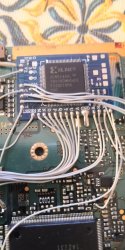
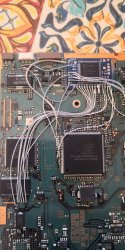
@Frank_03 could you possibly post a picture of the chip , I'm sure there's lots of people on the forum that would be able to tell you what chip it is and what the boot process will be , I'm guessing here but have you tried booting by powering on your system with the power switch so the PS2 is in standby then tap eject pop in your disc and then tap the eject again and see if your disc boots . We're just giving educated guesses here because no one knows which chip it is. Do you get the same issue when you try to boot ps2 backups on cd-r?
 
Last edited:
Old chip then...
There's nothing I can do about it?

@Frank_03 could you possibly post a picture of the chip , I'm sure there's lots of people on the forum that would be able to tell you what chip it is and what the boot process will be , I'm guessing here but have you tried booting by powering on your system with the power switch so the PS2 is in standby then tap eject pop in your disc and then tap the eject again and see if your disc boots . We're just giving educated guesses here because no one knows which chip it is. Do you get the same issue when you try to boot ps2 backups on cd-r?

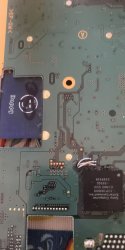
I will disassemble the console again today, so I will post the photo of the chip.
The combination you suggested doesn't work, it stays on the browser/config screen. But I figured something out: If I boot the ps with one click on the reset from standby, it tries to boot after the initial animation, and then black screen. If I click two times on reset from standby, I get the red screen. So it's like there are two settings. Movies only start clicking two times so maybe:
Games: one click
Movies: two clicks
If I put cds in the console the reader makes a lot of noise but the game won't boot.

Edit: I disassembled the PS

Edit 2: I have probably identified my chip from this list (https://www.willsconsolemodifications.co.uk/ps2-wiki/chips.php). It should be "Muppet v12", but I couldn't find any documentation online.
 

Attachments

  • IMG_20230915_104934.jpg
    IMG_20230915_104934.jpg
    1.3 MB · Views: 472
  • IMG_20230915_105026.jpg
    IMG_20230915_105026.jpg
    1.5 MB · Views: 890
  • IMG_20230915_105011.jpg
    IMG_20230915_105011.jpg
    1.9 MB · Views: 625
Last edited:
That is a Bluechip or a clone of it , I know there's a usage guide on PS2Home but I cannot access the site , I keep getting a bad cookie error been like that for months , if you can access the site then search for it there . If your solder joints are correct then please tell me what happens when you boot a ps2 game CD like Gradius III and IV ( this is just an example ) and regular and backup PSX games . If they boot then it's an indication that one of your solder joints need a touch up reflow or your laser is on its way out , you could try fiddling with the trimpots on the laser itself as @Peppe90 said ( this is only if you are certain it's not your soldering ) , mark original positions before you start then follow the tutorial of your choice to get the values right , this can either help or mess up your laser further , if it were me and I was certain I wouldn't even attempt the adjustment and simply get a replacement laser , if you want to fiddle around or your budget doesn't allow then by all means go ahead , but all you are doing is prolonging the inevitable, modchips rarely go bad most issues come from people trying to flash clones with official firmwares .
 
@TnA to each his own I guess , I personally have both and use hotkeys for booting with chip on into DKWDRV , I'm looking forward to the USB / HDD version release , then my optical drive will get even less use , not sure if the Bluechip allows this though , not sure about what your skill level with a soldering iron is @Frank_03 or if you did the install yourself , i know sometimes installers made their installs region free for originals but not able to boot backups I see you're missing the D+ and G point on your install which is why I mentioned this . I think that's all input I can give for now as I only have a clone of that chip and it's uninstalled , my own consoles run on FMCB and Modbo4 and FHDB and Modbo4 , chip is only used for imports /backups not on HD but mainly for PSX games not supported in POPS at present .
 
@TnA to each his own I guess ,
True! I agree.
I personally have both and use hotkeys for booting with chip on into DKWDRV ,
It is DEFINITELY better to use FMCB for that, because Chips are lacking proper system init.
I'm looking forward to the USB / HDD version release , then my optical drive will get even less use ,
The CD-Subsystem-Emulation only works on DECKARD.
not sure if the Bluechip allows this though ,
Does it support DEV.1? Doesn't look like it.
 
Luckily for me I have both a slim and a phat , best of both worlds , the phat will have to be run the way I'm doing it now using force PS1 mode by holding O on pad1 until clouds then hotkeying L2 for DKWDRV at FHDB logo it's the same for the slim except it's FMCB logo . Unfortunately and as you had asked the Bluechip doesn't have DEV1 mode ,my method doesn't need DEV1 but I'm getting side tracked :sem blush: his initial query was why his PS2 backups aren't booting , for that FMCB would suffice , if he wants to find out why his discs aren't booting then his attention should be on his laser or install . That's why I asked if this is reproducible with PS2 cd backups and PSX backups and pointed out the missing wires , but I have to agree he could go the FMCB route if that's what he wants to do .
 
  • Like
Reactions: TnA

Similar threads

Back
Top