Namco system 357 maintenance/information

The red adhesive is custom, i dont think sony used a red adhesive in a PS3 ever... and the tantalum capacitor looks a bit weird
Keep in mind the geometry of the IHS is common for a lot of RSX models, so maybe they only changed the IHS
Try to see if there are solder marks (or little holes made by needles) in this testpads:
https://www.psdevwiki.com/ps3/File:COK-002_SC_UART_testpads.jpg
I'll see If there's any indications of the solder marks you have mentioned. I haven't fully taken the board off the chassis as it wasn't necessary for thermal paste replacement. I thought the added tantalum cap was weird as I have never seen this mod before and I know this definitely wasn't serviced by Sony but who ever did this did a good job! :)
 
Last edited:
Here you can see a list of the RSX models "by series" (ignoring the suffix at the ending)
https://www.psdevwiki.com/ps3/RSX#Alternative_list

The COK-002 motherboard had a 90nm RSX, it can be replaced by a 65nm or 40nm RSX but there are only 2 ways to do it, either by replacing this chip named syscon:
https://www.psdevwiki.com/ps3/CXR713120-202GB
...or by reprogramming syscon (using the testpads i mentioned in my previous post)

So you need to check both things to see if someone was playing around with syscon :D
Sadly, the name "etched" in the RSX IHS is misleading, all we know is it beongs to a 40nm RSX, but thats just the piece of metal, visually is not posible to know if there is a 90nm under it
 
Here you can see a list of the RSX models "by series" (ignoring the suffix at the ending)
https://www.psdevwiki.com/ps3/RSX#Alternative_list

The COK-002 motherboard had a 90nm RSX, it can be replaced by a 65nm or 40nm RSX but there are only 2 ways to do it, either by replacing this chip named syscon:
https://www.psdevwiki.com/ps3/CXR713120-202GB
...or by reprogramming syscon (using the testpads i mentioned in my previous post)

So you need to check both things to see if someone was playing around with syscon :D
Sadly, the name "etched" in the RSX IHS is misleading, all we know is it beongs to a 40nm RSX, but thats just the piece of metal, visually is not posible to know if there is a 90nm under it
Interesting info there! This is why I like you guys! Especially since this hardware is pretty much new territory for me! I'll keep poking around to see if I see other anomalies. I would like to pry open the RSX IHS to see underneath but if has been repaired/removed once and working, then why should I bother :D

I'll will take out the motherboard on a later date and check on those SYSCON solder points. Right now the board is fairly clean. I also put a refurbished PSU from a fat PS3 as the 2 arcade power supplies I got are in terrible shape. Anyone interested in those power supplies and a possibility dead arcade motherboard?
 
Last edited:
I would like to pry open the RSX IHS to see underneath
do the following, on one side of the RSX between the IHS and the chip there is a space without chips where we insert the knife to do the delid, try to take a picture of that part with the cell phone at a right angle in order to be able to see the DIE on the center, with good resolution, so we can have an idea of the size of the DIE and know if there really was a change in RSX or if only the IHS was changed.

possibility dead arcade motherboard?
An idea for you if you are curious like me, as the board is already lost, buy the syscon reader and try to repair it, if it works you can use this board for tests, for example.
Also do, if you can and want, a backup of the Syscon chip and other chips (I don't remember for sure which chips we can read and save their content on the PC, I think @sandungas or @M4j0r can help you with that), it would be interesting to know the differences of unexplored software from retail models and arcades.

edit:
and as you mentioned before, as the IHS was placed again, we don't know what glue they used, it may happen to try to remove it and come with the memory chips, if that happens there will only be two alternatives, exchange the RSX for a 40nm one, worth it, or soak the plate with tears:D
 
do the following, on one side of the RSX between the IHS and the chip there is a space without chips where we insert the knife to do the delid, try to take a picture of that part with the cell phone at a right angle in order to be able to see the DIE on the center, with good resolution, so we can have an idea of the size of the DIE and know if there really was a change in RSX or if only the IHS was changed.

An idea for you if you are curious like me, as the board is already lost, buy the syscon reader and try to repair it, if it works you can use this board for tests, for example.
Also do, if you can and want, a backup of the Syscon chip and other chips (I don't remember for sure which chips we can read and save their content on the PC, I think @sandungas or @M4j0r can help you with that), it would be interesting to know the differences of unexplored software from retail models and arcades.
I would like to but like I said, both the CPU and GPU have already been delided before as red thermal glue. Would be interesting to see what's underneath.

I'll try that but I'm pretty much hopeless that I'll be able to fix up that motherboard :(
 
I'm pretty much hopeless that I'll be able to fix up that motherboard
I understand you, I have a fat CECHG and another CECHB both dead, just remembering the B I want to cry because I bought it to try a repair, you know how it is, discover things and want to test it, I have been using a soldering iron since I was 10 years old and I have 16 currently, when I opened it, completely dead, CELL and RSX damaged in an attempt to repair in addition to replacing the Nec with tantalos, but installed backwards and closing short.
In short, I stopped buying a super slim 250gb for the same price (for repair of course) to buy this B and I had this "surprise":nonchalance:
 
I understand you all, I have a fat CECHG and another CECHB both dead, just remembering the B I want to cry because I bought it to try a repair, you know how it is, discover things and want to test it, I have been using a soldering iron since I was 10 years old and I have 16 currently, when I opened it, completely dead, CELL and RSX damaged in an attempt to repair in addition to replacing the Nec with tantalos, but installed backwards and closing short.
In short, I stopped buying a super slim 250gb for the same price (for repair of course) to buy this B and I had this "surprise":nonchalance:
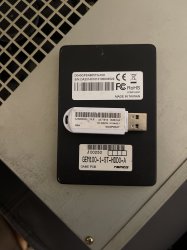
I completely understand you as well! I originally bought this arcade board as it was listed as having the YLOD issue and I thought that it would be somewhat fixable. It was still pretty expensive broken but considering how much a working system cost (around $600 to $1200 at most!), the $400 price tag didn't seem too bad. I was dead wrong of course and but I could get the board to boot for a while. I was pretty disappointed and a bit sad when I received it as the previous owner tried to repair the board themselves. Word of advice for anyone trying to find one for a deal, try Japan auction sites and get the 357C or 369 as they are far more reliable. I got my 357C for a good deal as the original Gundam game it came with had its servers shut down rendering it unplayable. Interestingly enough, this Gundam game isn't mentioned on the PSXDEV 357 wiki or hasn't been dumped. I still have it and it uses a 40GB SSD.
 

Attachments

  • image.jpg
    image.jpg
    1.7 MB · Views: 74
Last edited:
Interesting info there! This is why I like you guys! Especially since this hardware is pretty much new territory for me! I'll keep poking around to see if I see other anomalies. I would like to pry open the RSX IHS to see underneath but if has been repaired/removed once and working, then why should I bother :D

I'll will take out the motherboard on a later date and check on those SYSCON solder points. Right now the board is fairly clean. I also put a refurbished PSU from a fat PS3 as the 2 arcade power supplies I got are in terrible shape. Anyone interested in those power supplies and a possibility dead arcade motherboard?
So that motherboard with the red adhesive is not working ?
By now what i would do if i where you would be to not delid CELL and RSX, we dont know if was reballed and if that reballing was good, but the red adhesive looks like whoever that made it took a bit of care, probably is a flexible silicone, i was talking about it months ago in this forum, there is a red silicone used in automotion to seal the car cabinet from external noises that fits well with this kind of work in the PS3

The best you can do by now is to buy the USB-2-TTL adapter to help diagnostic where is the problem, is just 3$ and to connect it with the PS3 you either need to solder 3 wires in the testpads i mentioned in my previous post... or build an easy tool to touch them with needles (no soldering job required)
This is going to allow you to see the syscon error codes triggered at boot, it also allows to read the RSX software identifyer

Also, for curiosity sake, the syscon have a internal memory to store data and there is an area named "thermal config", the arcade PS3 models could use an specific thermal config different than retail PS3 models... and some other syscon settings specific to arcade
Also, as far i remember there is a syscon setting that allows to run "fself" apps (executable programs and games signed with fake keys), thats actually an official feature used for debugging, but it allows to run homebrew apps, you could enable that setting in syscon... or well... there are a lot more syscon settings to play around

Anyway... if the current problem is "just" it needs a reballing (the syscon error codes will tell) im sure you will be able to find someone in the US from this forum to do the job in a relliable way
 
So that motherboard with the red adhesive is not working ?
By now what i would do if i where you would be to not delid CELL and RSX, we dont know if was reballed and if that reballing was good, but the red adhesive looks like whoever that made it took a bit of care, probably is a flexible silicone, i was talking about it months ago in this forum, there is a red silicone used in automotion to seal the car cabinet from external noises that fits well with this kind of work in the PS3

The best you can do by now is to buy the USB-2-TTL adapter to help diagnostic where is the problem, is just 3$ and to connect it with the PS3 you either need to solder 3 wires in the testpads i mentioned in my previous post... or build an easy tool to touch them with needles (no soldering job required)
This is going to allow you to see the syscon error codes triggered at boot, it also allows to read the RSX software identifyer

Also, for curiosity sake, the syscon have a internal memory to store data and there is an area named "thermal config", the arcade PS3 models could use an specific thermal config different than retail PS3 models... and some other syscon settings specific to arcade
Also, as far i remember there is a syscon setting that allows to run "fself" apps (executable programs and games signed with fake keys), thats actually an official feature used for debugging, but it allows to run homebrew apps, you could enable that setting in syscon... or well... there are a lot more syscon settings to play around

Anyway... if the current problem is "just" it needs a reballing (the syscon error codes will tell) im sure you will be able to find someone in the US from this forum to do the job in a relliable way

No, the board with the red thermal glue is the replacement board I got, sorry for the confusion :/. So far, it works perfectly fine, the first board I got is the one with issues. I'll try SYSCON with that board.
 

Similar threads

Back
Top