
You are using an out of date browser. It may not display this or other websites correctly.
You should upgrade or use an alternative browser.
You should upgrade or use an alternative browser.
New member
- Thread starter Tyson
- Start date

jolek
Senior Member
Let me get this once again in one piece.
You installed* 4.84.2 HFW on your CECH-2501A, which is compatible with CFW (minverchk shows 3.55).
You successfully initialized and patched NOR flash memory with Flash Writer 2.0.1.
You've successfully dumped your Flash Memory using Flash Dumper 2.0.1.
After restarting your console, you're unable to install CFW (e.g. Rebug 4.84.2 REX - Cobra 8.1).
When you want to install it (CFW), it is showing:
The data is corrupted (8002F169).
Am I missing something?
* - It is recommended to install it twice.
You installed* 4.84.2 HFW on your CECH-2501A, which is compatible with CFW (minverchk shows 3.55).
You successfully initialized and patched NOR flash memory with Flash Writer 2.0.1.
You've successfully dumped your Flash Memory using Flash Dumper 2.0.1.
After restarting your console, you're unable to install CFW (e.g. Rebug 4.84.2 REX - Cobra 8.1).
When you want to install it (CFW), it is showing:
The data is corrupted (8002F169).
Am I missing something?
* - It is recommended to install it twice.
You are not missing anything i have done this process over and over and yet it still fails.Let me get this once again in one piece.
You installed* 4.84.2 HFW on your CECH-2501A, which is compatible with CFW (minverchk shows 3.55).
You successfully initialized and patched NOR flash memory with Flash Writer 2.0.1.
You've successfully dumped your Flash Memory using Flash Dumper 2.0.1.
After restarting your console, you're unable to install CFW (e.g. Rebug 4.84.2 REX - Cobra 8.1).
When you want to install it (CFW), it is showing:
The data is corrupted (8002F169).
Am I missing something?
* - It is recommended to install it twice.
jolek
Senior Member
Could you at lest check md5sum of your CFW from your USB drive?
It should takes few minutes.
Here is a tutorial for PS2 games, but it should also work with other files:
https://www.psx-place.com/threads/how-to-check-game-md5-checksum.19277/.
Mainly, just drag&drop CFW file onto program window and hit "Verify".
It should takes few minutes.
Here is a tutorial for PS2 games, but it should also work with other files:
https://www.psx-place.com/threads/how-to-check-game-md5-checksum.19277/.
Mainly, just drag&drop CFW file onto program window and hit "Verify".
i tried dumping again to check md5 and its failing to dump, says it succeeded but its not on flash drive i check my old dump hex file and this is the md5 491A8FD11FBB8C40AB392A9B6D02E863. i'll retry 4.82.2 again but im pretty sure i tried it.BTW are you sure that you wanted to install Rebug 4.84.2 not 4.82.2?
Because mostly this error will pops when you want to install lower firmware than you're already on.
So e.g. 4.82.2 on\over 4.84.2 without enabled QA flag.
jolek
Senior Member
What do you mean retry 4.82.2?
BTW are you sure that you wanted to install Rebug 4.84.2 not 4.82.2?
Because mostly this error will pops when you want to install lower firmware than you're already on.
So e.g. 4.82.2 on\over 4.84.2 without enabled QA flag.
jolek
Senior Member
i tried dumping again to check md5 and its failing to dump, says it succeeded but its not on flash drive i check my old dump hex file and this is the md5 491A8FD11FBB8C40AB392A9B6D02E863. i'll retry 4.82.2 again but im pretty sure i tried it.
Not dump.hex.
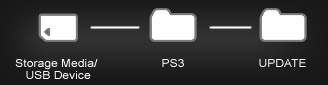
You were suppose to check md5sum of your CFW.
"PS3UPDAT.PUP" inside PS3/UPDATE:
jolek
Senior Member
retry to install rebug 4.82.2, i redid everything as of patching and using the xploits and i isntaled bobbydowngrades CFW overflow 4.84 v7 and did it all over it now i have rebug i did it all over and i have rebug thank you for you help so much <3
I don't understand you...
I don't know how many times I'll repeat:
Previously you wanted to install rebug 4.82.2, that is why you were getting this error.BTW are you sure that you wanted to install Rebug 4.84.2 not 4.82.2?
Because mostly this error will pops when you want to install lower firmware than you're already on.
So e.g. 4.82.2 on\over 4.84.2 without enabled QA flag.
Because you were on 4.84.2 HFW.
When you installed overflow 4.84 v7...
I don't understand you...
I don't know how many times I'll repeat:
Previously you wanted to install rebug 4.82.2, that is why you were getting this error.
I had a lot of typos. The whole thing was meant to install rebug 4.84.2
Because you were on 4.84.2 HFW
When you installed overflow 4.84 v7...
Similar threads
-
-
 PS3 SLPM-65098 config for PS3? (Maybe the wrong place to ask, sorry)
- Started by wulftrick
- Replies: 1
-
 PS3 Installing an 'OtherOS' on PS3 in [current year]..
- Started by Metroid_Hybrid
- Replies: 1
-
 PS3 Where did they take the "Life with PlayStation" picture?
- Started by WailkyS5M5
- Replies: 2