
Developer facanferff who is known for some impressive plugins for Movian as some of his past creations include some of most widely used plugins for the homebrew media player. YouTuve, Navi-X, Oceanus Skin are just a few of the many contributions this developer has made to the Movian (aka Showtime) project, Now the dev is back with a brand new plugin titled Trakt that gives your TV show and Movies alot of added information. Its a welcome plugin to hit Movian (must be on at least v5.0.241), Also the developer has a preview for an update to the Xperience skin that will advance it from the current Alpha stage. View all these details about these new plugins release and/or in the works from developer facanerff.
Trakt for Movian Media Center now available!
Main Screen
Movie View
TV Show Description View
Episode View
Additional Notes & Info about this plugin
Coming Soon- Xperience Skin Update
-
Hi, everyone, it is now available to download at the Plugin Central inside Movian (https://movian.tv/projects/movian) the newest plugin… Trakt!
NOTE: You need Movian version at least 5.0.241.
With it you can see every detail you need to know about a Movie, TV Show, Season or even an episode, follow your Favorite TV Shows (including see when will debut the next episode), maintain your Watchlist for both TV Shows and Movies, browse among different lists like the current trending Movies (and others) and for those who like to mark automatically what they watch on Trakt… scrobble (send to Trakt your playback status of a given media, ideal to mark automatically when you watch a movie/episode)!
-
Main menu(Upcoming Episodes, Movies in my Watchlist and TV Shows in my Watchlist only available when authenticated) The main menu is your point of access to the information, you can browse here quickly to the upcoming episodes for your favorite tv shows (next 31 days), see your watchlist, see lists (e.g. the trending movies).
Please note that the upcoming episodes for your favorite tv shows and access to your watchlists are only available when authenticated (in settings). -
When at the movie view, you can see the details about the movie, including its description and even ratings from external source (i.e. rotten tomatoes and metacritic). -
When seeing the information about a tv show you can see many details, like the description of the tv show, the seasons, the awards (wins and nominations), ratings and some other extras.
If you are authenticated then you can see right here the next episode you should watch next. -
In the episode view you can see details about the episode as well manipulate it, e.g. mark it as seen. -
Let's imagine now you have legal access to a movie and want to see details about it, you may then choose on the movie's context menu the option "Open in Trakt" which will open automatically the correct view (if it is a movie then the movie view, if a tv show then the tv show view, and so on). Finally the "Scrobble" option, which is only available to authenticated users, allows you to start a manual scrobble, letting you choose the correct movie/episode from a list if there is some ambiguity about the media (e.g. "Gotham" may refer to many tv shows/movies, so you'll need to choose the correct one from a list).
Take note that the settings have an option "Enable scrobble", if you use this option that setting will be overriden for this playback session only. But in case you have the setting enabled and start playing the movie/episode normally (not going to the context menu), if it has enough metadata (i.e. an IMDb id) associated then it will try to automatically scrobble the media represented by that metadata, otherwise (e.g. there is no enough metadata) the automatic scrobble will not work for that media and if you really want to scrobble it then you will have to use this option.
Note that once the movie/tv show starts playing (in case you didn't disable the setting "Show Notifications" inside the section "Scrobble") there will be a notification letting you know that the scrobble is active for this playback session, from this point on you just need to relax since you won't need to configure extra things for scrobble for this playback session, everything related to scrobbling, will be handled automatically.
Since it is the initial launch of the plugin there may be bugs, if you find any please report it at https://movian.tv/projects/movian/issues/new mentioning correctly the plugin on the description of the issue.
Take note of the following known issues:
- Touchscreen is not currently full supported
- Remote control does not work
-
Skin Xperience for Movian Media Center — Preview
A new update for Xperience is coming and it will bring a rewritten list view, intended to be more enjoyable while improving your experience with Movian. See the current work-in-progress screenshots below, feel free to give feedback in comments below. There is no scheduled release date yet for the update.
-
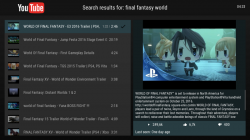
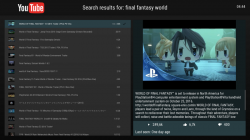
These screenshot are the same but the right has smaller item's height/text content (customization in settings)
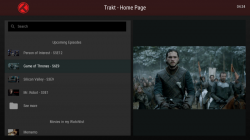
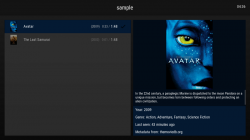
-
Download Plugin: via Movian directly
Last edited:







