PS3 Newly Restored CECHA01 Not Playing PS2 Games

helloimmatt26

Forum Noob
Hello everyone!

I posted earlier about the PS3 that I purchased on OfferUp which was not working properly when I was told it was. I am happy to say that I was able to successfully refurbish it inside and out (used scratch remover all over the case, cleaned the motherboard, and applied new thermal paste/pads) with some upgrades (19-blade fan, manual fan controller, 1TB SSD). I was hoping this would resolve the issue I was having but unfortunately, it did not. My PS3 will not play PS2 games, It will successfully play PS1 and PS3 games but will not play PS2 games. It will recognize the PS2 game and start the process of loading but the screen just remains black. The motherboard is in fact the correct one for a CECHA01 model. If anyone can provide some guidance or a thread I can refer to, that would be amazing. Spent a lot of time cleaning this console up and want to get it back to life.

Thank you!
 
You could try, wouldn't hurt weird its reads dvds. Ps2 discs do have more data to read so could it could be on its last leg. Just make sure you transfer the daughter boards on the drives if you do go that route nand consoles are annoying to remarry BD drives. Or just get replacement laser. Also check the BD drive ribbon data cable and pin on mobo the pin on the mobo is very weird sometimes.
 
Turn off all options in the game tab under settings. A fully backwards compatible PS3 A series won't load a PS2 game if upscaling is turned on
 
The option is there for partial emulation, I don't know why it doesn't work all I know is from experience you can get a blank screen if upscale is turned on. I actually have the same problem but on a CECHC03, check out my post, I have included a YouTube video highlighting the issue.
 
Just gave it a try, no luck :(

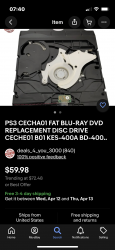
Found a laser replacement on eBay that's says it's refurbished for 60.

I think I'm gonna give that a try

Has anyone bought from this seller before?
Deals_4_you_3000?
 

Attachments

  • 2CD9F029-DB79-4C87-A296-9193D65B3916.png
    2CD9F029-DB79-4C87-A296-9193D65B3916.png
    1.6 MB · Views: 70
It works on soft emulation but not hardware emulation, this means it's a problem with either the hardware chip or RSX
 
Hello everyone!

I posted earlier about the PS3 that I purchased on OfferUp which was not working properly when I was told it was. I am happy to say that I was able to successfully refurbish it inside and out (used scratch remover all over the case, cleaned the motherboard, and applied new thermal paste/pads) with some upgrades (19-blade fan, manual fan controller, 1TB SSD). I was hoping this would resolve the issue I was having but unfortunately, it did not. My PS3 will not play PS2 games, It will successfully play PS1 and PS3 games but will not play PS2 games. It will recognize the PS2 game and start the process of loading but the screen just remains black. The motherboard is in fact the correct one for a CECHA01 model. If anyone can provide some guidance or a thread I can refer to, that would be amazing. Spent a lot of time cleaning this console up and want to get it back to life.

Thank you!
Can I ask you two things?
- what is the region of your PS2 disks you are playing?
- you use HDMI or yPbPr cable?
 
I have been talking a friend who gave me the above diagrams. The signal.goes from the RSX through the DS chip and is simultaneously out put to the HDMI and AV out. So if you have tried both and get the same results, it's likely the DS chip is faulty. This is assuming your not doing anything silly like using the wrong region PS2 disc for example.

The solution is a reflow of the DS chip in case its a BGA issue, if this doesn't work it will need a new DS chip to be installed, in your case a new EE chip
 
Just watched the video, thank you for sharing, I don't have any sound in my case. My PS3 is also not modded software wise. Any other suggestions?
 
Have you tried the AV out? It's worth trying if you haven't tried it. I have sold these with the HD component cable, if you get a PS2 game running via AV it's not all lost.

Your EE chip might just need a reflow, don't forget it could still be a RSX problem as this is where the signal starts. I know Ace Consoles in Australia did a frankenstian on a CECHA16 model, this also could not output PS2 games. After the frankenstian modification if could play PS2 games with no issue, so it's either the EE chip or the RSX. Either way it's expensive, I would put custom firmware on there and try the soft emulation m, if this works you know its either the RSX or EE chip. If your console fails to display the ps2 soft emulation then it's something else.
 
Back
Top