
You are using an out of date browser. It may not display this or other websites correctly.
You should upgrade or use an alternative browser.
You should upgrade or use an alternative browser.
Ofw4.80
- Thread starter Impact
- Start date

nCadeRegal
Senior Member
Now just follow the tutorial here like bg said. Dont skip any steps. Come here if you get stuck or are unsure.

Impact
Forum Noob
Hiya Guys
I`m totally lost. I`m reading things telling me to download a jpeg from grabacatoffawallandputitinabag.co.uk as an example. Then I`m reading. Do not connect to the internet as there is risk of 4.83 being downloaded and installed. I`m not asking come round and do it for me. There is so much stuff. When looking into this pyps3checker there`s like a million bits of code. it has a xml format file can the ps3 read this.
I`m over the moon for the help. But I`m going around in a circle. Long gone are the days of getting your 1/2/4meg eprom. Load the file into your prom programmer. programme the prom remove it stick it the Mega CD and bingo its done unlocked and ready rock and roll.
I`m totally lost. I`m reading things telling me to download a jpeg from grabacatoffawallandputitinabag.co.uk as an example. Then I`m reading. Do not connect to the internet as there is risk of 4.83 being downloaded and installed. I`m not asking come round and do it for me. There is so much stuff. When looking into this pyps3checker there`s like a million bits of code. it has a xml format file can the ps3 read this.
I`m over the moon for the help. But I`m going around in a circle. Long gone are the days of getting your 1/2/4meg eprom. Load the file into your prom programmer. programme the prom remove it stick it the Mega CD and bingo its done unlocked and ready rock and roll.

Hiya Guys
I`m totally lost. I`m reading things telling me to download a jpeg from grabacatoffawallandputitinabag.co.uk as an example. Then I`m reading. Do not connect to the internet as there is risk of 4.83 being downloaded and installed. I`m not asking come round and do it for me. There is so much stuff. When looking into this pyps3checker there`s like a million bits of code. it has a xml format file can the ps3 read this.
I`m over the moon for the help. But I`m going around in a circle. Long gone are the days of getting your 1/2/4meg eprom. Load the file into your prom programmer. programme the prom remove it stick it the Mega CD and bingo its done unlocked and ready rock and roll.
Not entirely sure what you are talking about.
Follow this step by step & use the official ps3xploit website. All files are hosted there including the JPEG file that contains the jailbreak patch.
https://www.psx-place.com/index.php?posts/108103
Regarding pyps3checker, it is not very difficult. Download Python 2.7.15 for Windows from python.org, install it on PC.
Download pyps3tools from github, extract the zip, use pyps3checker from a Windows command line, the syntax to use is simple & described in the Readme file.
Regarding the risk of installing 4.83 OFW, you could simply disconnect the console from the network when installing fw, that would cut the crap.

lord3490
Member
The advice to disconnect internet was meant only for the firmware updates 
Like
1. Disconnect internet and update to 4.82 ofw (twice)
2. Connect internet and follow all exploit steps until you reach the point where you are supposed to install cfw.
3. Disconnect internet and install cfw.
Like
1. Disconnect internet and update to 4.82 ofw (twice)
2. Connect internet and follow all exploit steps until you reach the point where you are supposed to install cfw.
3. Disconnect internet and install cfw.
Impact
Forum Noob
Can any answer this. When I done things the old way I would use a clip or remove the bios/rom. Place this into a plcc socket which. Had a flashing utility grabbed your file and flash or using a clip on top of the chip and do a hot flash. To me this is so long winded. Is there a device to do this. Being dykeslic I'm banging my head off the wall.
In a nut shell your hardwired to the Rom send it the file. Solder it back into the unit. Jobs done
In a nut shell your hardwired to the Rom send it the file. Solder it back into the unit. Jobs done
You keep posting things that don't make sense to me. The JPEG file link first, now this... What url are you using? Because it doesn't sound like the official website at all...This is what I get
The **ps3xploit.com >Domain no Longer owned by team** (ps3xploit.me =new) site works perfectly fine for me, I just tried it.
Don't use ssl though, just ** http://www.**ps3xploit.com >Doma...no Longer owned by team** (ps3xploit.me =new)
Last edited:
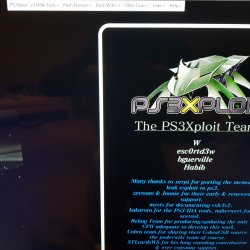

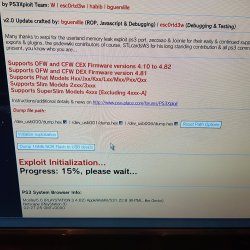
Really? Because I just tested the links in the step vu step & they all work fine.Ok Bguerville. I will try what you have put. I had clicked on a click what was posted on here. About writer and dumper index html
Anyway, you first exploit run attempt failed because you omitted some instructions!
1. Bookmark the Flash Writer & the Flash Dumper pages, not the menu or the index page but both actual exploit pages, ie those linked in the step by step.
2. Set the browser homepage setting to blank.
3. Restart the browser.
4. Launch the bookmark you need.
If you don't do that, initialization is likely to fail. Exploits must always be the first & only web page loaded by the browser to initialise properly.
Now I also assume that you already ran MinVerChk & confirmed that the minimum installable firmware on your console is <= 3.56.. I see no mention of it in this thread. If you haven't, you must do do that first as instructed!
NVM I see it now. 3.50. That's fine.
Last edited:
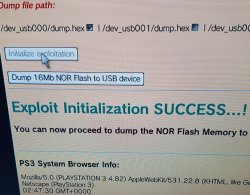
The step by step tells you to use the hdd version, not the usb version!I got this screen now
For the Flash Dumper it's OK I guess but use hdd version with the Flash Writer.
Go ahead & try.
Similar threads
-

-
PS2 Where can i find a memory card image files for PSxMemCard Gen 2 MMCE?
- Started by DTR
- Replies: 5
-
PS3 Bricked ps3 after flashing ofw dex on converted cex to dex ps3 slim cech-2104a.
- Started by cezar_iscru.jpg
- Replies: 2
-