- Activating various modes in a willy-nilly fashion is by no means "cleaner".
- The modes are usually deactivated for a reason... The reason being them the BEST defaults!
- OPL is intended to use clean non-modified images!
- Any kind of non-normal booting can cause issues! Try the thing with the custom ELF on some games like MGS3 (AFAIR) and it will Black-screen, just like when the PS2-Logo-function is turned off.
- If you use an original adapter and the same setup like El_Patas, this seems to point to your image being faulty. Properly dump your original disc via IMGBurn!

You are using an out of date browser. It may not display this or other websites correctly.
You should upgrade or use an alternative browser.
You should upgrade or use an alternative browser.
PS2 [Open PS2 Loader] Game Bug Reports
- Thread starter jolek
- Start date
1- is turning on mode 1 + 6 ever going to hurt? maybe a dev can help... mode 3 is needed OFF only for some multi ELF games and couple more
"Unhook the EE kernel syscall hooks after the very first IOP reboot by the game, to return the EE kernel to its original state. Note that this will cause a failure if the game reboots the IOP multiple times. / OPL will not remain resident in EE RAM after the game resets the IOP with its IOPRP image. Required for games that can overwrite OPL or can somehow confuse OPL's SifSetDma hook. / Mode 3+6 is required to have the EE kernel in its cleanest state (free of any foreign manipulation of the EE kernel)."
maybe this is wrong because is from ps2home... haha
2- like for fuun super combo and some other games that need mode 6 on?
3- OPL works with all kinds of images... clean dumps, homebrew games (mario 64), scrubbed images....apparently you're trying to be more purist than me
4- if the game is compatible with the custom elf option then whats the problem??? faster boot is nice
5-you're probably right, something went wrong with my install or wherever if the game doesnt work on my setup
"Unhook the EE kernel syscall hooks after the very first IOP reboot by the game, to return the EE kernel to its original state. Note that this will cause a failure if the game reboots the IOP multiple times. / OPL will not remain resident in EE RAM after the game resets the IOP with its IOPRP image. Required for games that can overwrite OPL or can somehow confuse OPL's SifSetDma hook. / Mode 3+6 is required to have the EE kernel in its cleanest state (free of any foreign manipulation of the EE kernel)."
maybe this is wrong because is from ps2home... haha
2- like for fuun super combo and some other games that need mode 6 on?
3- OPL works with all kinds of images... clean dumps, homebrew games (mario 64), scrubbed images....apparently you're trying to be more purist than me
4- if the game is compatible with the custom elf option then whats the problem??? faster boot is nice
5-you're probably right, something went wrong with my install or wherever if the game doesnt work on my setup
3- OPL works with all kinds of images... clean dumps, homebrew games (mario 64), scrubbed images....apparently you're trying to be more purist than me
I played without problems many not standard ISOs: with translation (either text and dubbing/music) mods, swapping files (their LBA) into the ISO, played prototype games, etc...
I had problems only with Jak & Daxter tpl prototypes (white screen at boot). So I think it can happen for some not-standard ISO to have problems, since Jak & Daxter tpl retail perfectly works on OPL.
Obviously those prototypes perfectly work on Ps2 (i.e. using a modchip or swapping), also on PCSX2.

mistamontiel
Member
@mistamontiel, SATA HDD... what network adapter are you using to connect the HDD?
I am using the genuine SCPH authentic network adapter. Fitted the MaxDIYPower SATA in myself (lucky me)

El_Patas
Member
@mistamontiel, i tested the game Dog's Life SLUS-21018 with the original IDE network adapterI am using the genuine SCPH authentic network adapter. Fitted the MaxDIYPower SATA in myself (lucky me)
and IDE HDD and it works fine without any Modes.
Tested in OPL v1.0.0.
Maybe it is a incompatibility with the connector of Maxdiypower, although i find this weird,
maybe you have a bad dump of the game, or you are using the VMC and this game it
is incompatible with the VMC and this is why the game do not starts for you, or you
are using some cheats which crashes the game to start, or any other thing.
Best regards.
Last edited:

jolek
Senior Member
Tony Hawk's Project 8
Tony Hawk's Proving Ground
Code:
Title =
ID =
Media =
OPL version =
Device =
Compatibility Mode(s) used =
VMC =
PADEMU =
IGR =
Compatible =
MD5 Checksum =
Notes =
More info what it means is at the bottom of the 1st post.
Code:
Title = Fixed thawk's controller glitch
ID =
Media = NTSC ISO
OPL version = 1730 1.1 oficial
Device = PS2 Slim 90010
Compatibility Mode(s) used =2/6
VMC = didn't worked
PADEMU = Works
IGR = automatically deactivate when turn on the game mode 6
Compatible = yeah
MD5 Checksum = dk
Last edited by a moderator:
jolek
Senior Member
Title = Fixed thawk's controller glitch
ID =
Media = NTSC ISO
PADEMU = Works
MD5 Checksum = dk
Here are some info about these games:
- Tony Hawk's Proving Ground: http://redump.org/disc/20363/
- Tony Hawk's Project 8: http://redump.org/disc/22541/.
https://www.psx-place.com/threads/how-to-check-game-md5-checksum.19277/.
Sometimes PADEMU, GSM, VMC, etc may cause problems so turn off these additional features.
Also try other compatibility modes e.g. 2+3+6.
Maybe this version has a problem...
To exclude this try:

nierisevil
Forum Noob
I've been trying to find a solution to this but I can't find anything. Max Payne will always freeze at the Rockstar logo I've tried messing around in the settings but the same thing always happens.
jolek
Senior Member
I've been trying to find a solution to this but I can't find anything. Max Payne will always freeze at the Rockstar logo I've tried messing around in the settings but the same thing always happens.
Please fill this template:
Code:
Title =
ID =
Media =
OPL version =
Device =
Compatibility Mode(s) used =
VMC =
PADEMU =
IGR =
Compatible =
MD5 Checksum =
Notes =
Additionally both parts that have been released on PS2 do not freeze at Rockstar's logo... At least not through HDD...
You did not specify the device or OPL that you use...
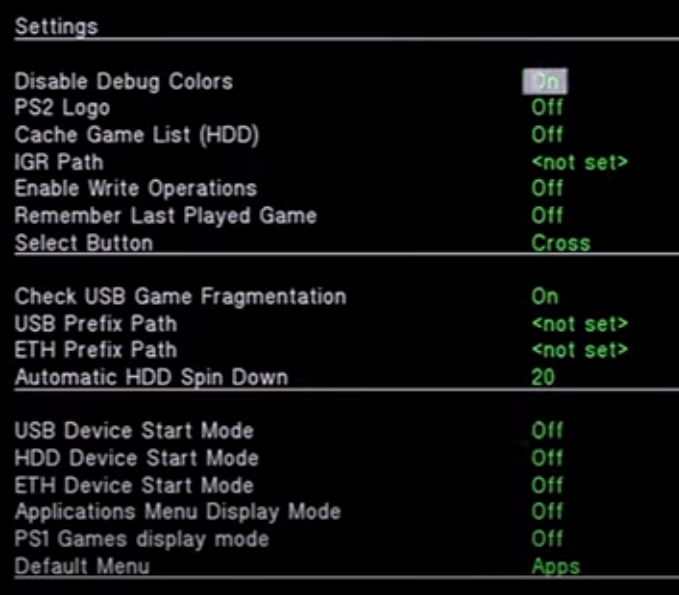
If it is a USB device, Check USB Game fragmentation should be on:
nierisevil
Forum Noob
Please fill this template:
Code:Title = ID = Media = OPL version = Device = Compatibility Mode(s) used = VMC = PADEMU = IGR = Compatible = MD5 Checksum = Notes =
Additionally both parts that have been released on PS2 do not freeze at Rockstar's logo... At least not through HDD...
You did not specify the device or OPL that you use...
If it is a USB device, Check USB Game fragmentation should be on:
Title = Max Payne
ID = SLUS-20230
Media = ps2
OPL version = 1.0.0 and v1.1.0-Beta-DB_all-2074-a2c52bb
Device = usb
Compatibility Mode(s) used = None
VMC = none
PADEMU = none
IGR = none
Compatible = not sure what to fill out for this one
MD5 Checksum = 10dd8182af1e4d4216be61216768f712
Notes =
jolek
Senior Member
Title = Max Payne
ID = SLUS-20230
Media = ps2
OPL version = 1.0.0 and v1.1.0-Beta-DB_all-2074-a2c52bb
Device = usb
Compatibility Mode(s) used = None
VMC = none
PADEMU = none
IGR = none
Compatible = not sure what to fill out for this one
MD5 Checksum = 10dd8182af1e4d4216be61216768f712
Notes =
Turn ON Check USB Game fragmentation in OPL's settings.
Also try mode 6 in compatibility modes.
Additionally try OPL 1771:
https://www.psx-place.com/threads/open-ps2-loader.13415/page-57#post-308220.
nierisevil
Forum Noob
I tried all of that and it didn't show the error when a game is fragmented and it still froze. Also the option to turn on check usb fragmentation doesn't show up in the version you gave me.Turn ON Check USB Game fragmentation in OPL's settings.
Also try mode 6 in compatibility modes.
Additionally try OPL 1771:
https://www.psx-place.com/threads/open-ps2-loader.13415/page-57#post-308220.
jolek
Senior Member
I tried all of that and it didn't show the error when a game is fragmented and it still froze. Also the option to turn on check usb fragmentation doesn't show up in the version you gave me.
Yes, you are right. The option to check game fragmentation is in OPL v1.0.0, not in the latest (1771 at the moment) build.
Some users forgot to turn this option on especially for USB. That is why I asked.
I only have a PAL version of this game...
Tomorrow I can also try it through USB.
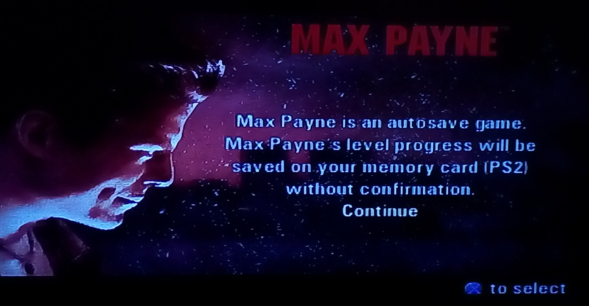
Through HDD I can pass Remedy's logo.
EDIT: Through SMB also I can pass Remedy's logo:
Can you try different USB device?
Or different device? E.g. HDD or SMB?
Last edited:
nierisevil
Forum Noob
I could try another usbYes, you are right. The option to check game fragmentation is in OPL v1.0.0, not in the latest (1771 at the moment) build.
Some users forgot to turn this option on especially for USB. That is why I asked.
I only have a PAL version of this game...
Tomorrow I can also try it through USB.
Through HDD I can pass Remedy's logo.
EDIT: Through SMB also I can pass Remedy's logo:
Can you try different USB device?
Or different device? E.g. HDD or SMB?
jolek
Senior Member
I could try another usb
Today I tried this game through USB with OPL 1771.
I can start new game without a problem...
BTW Game is larger than 4 GiB so there is a need to "slice it" with e.g. USBUtil:
https://www.psx-place.com/threads/usbutil-by-iseko.19048/.
nierisevil
Forum Noob
okay so I fragmented the file and then used defraggler to defragment the files when looked at the file list tab max Payne showed up as 2 different files https://ibb.co/5247Z9KToday I tried this game through USB with OPL 1771.
I can start new game without a problem...
BTW Game is larger than 4 GiB so there is a need to "slice it" with e.g. USBUtil:
https://www.psx-place.com/threads/usbutil-by-iseko.19048/.

Last edited by a moderator:
jolek
Senior Member
okay so I fragmented the file and then used defraggler to defragment the files when looked at the file list tab max Payne showed up as 2 different files https://ibb.co/5247Z9K
You should have at least 5 peaces of your game (Max Payne):
...SLUS_202.30.00, ...SLUS_202.30.01, ...SLUS_202.30.02, ...SLUS_202.30.03, ...SLUS_202.30.04 + ul.cfg.
Could you please use USBUtil v2.2 to which previously I gave you link?
Run it as admin.
Do not patch (DNAS\IOPRP) your ISO:
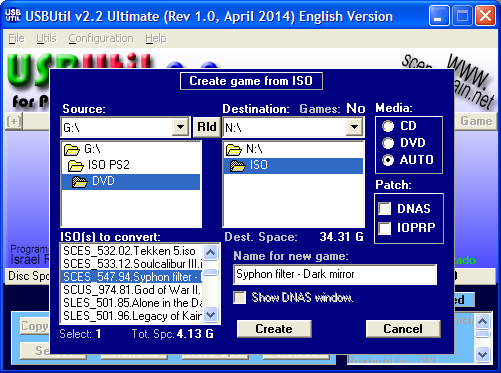
Instead of de-fragmenting.
1. Copy all data to your HDD.
2. Do a quick format of your removable drive.
3. Copy only ...SLUS_202.30.00, ...SLUS_202.30.01, ...SLUS_202.30.02, ...SLUS_202.30.03, ...SLUS_202.30.04 + ul.cfg
to this drive.
If everything will be fine copy remaining files also on this (removable) drive.
Similar threads
-
PS2 Problems Launching "Buzz! The Big Quiz (Europe) (v2.00)" via OPL through sd2psx (PSxMemCard Gen2)
- Started by SawJig511
- Replies: 7
-
-
 PS2 [POC/Outdated] unofficial Open PS2 Loader (uOPL)
- Started by Ripto
- Replies: 58
-
