OPL (Open PS2 Loader)

PS2 Open PS2 Loader v1.1.0

ahhh, figured out testing... he gets and sets variable to configset but without writing to the actual file....clever.

@jolek
Thanks for your input.
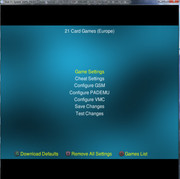
The main reason I was trying this out was pretty much just so when you hit the :but tri: button it actually transitions to another page. Currently it just renders on top of main, I'm pretty sure its acting as like a submenu to Main which is a bit strange but also part of the reason it is able to look the way it does.. so its a submenu with additional submenus in it also.. (inception style)

I'm not sure I'd be able to achieve the exact same appearance/layout while having it as its own screen handler target.. anyway I'll put up a test build at some point but if people disagree with the change I won't try add it :)
 
  • Like
Reactions: TnA
So theoretically now developers can add (or not) notification,
fix support for lng (thm support has been recently fixed).
What to do with Game setting "sub-menu"... (support\suggestions needed).

Some problematic games has been fixed... maybe someone can find something new or broken game.
Some still broken games can be found in 1st post of this topic:
https://www.psx-place.com/threads/open-ps2-loader-game-bug-reports.19401/.

... release stable build...
 
'Compatibility Modes'
'Configure GSM'
'Configure PADEMU'
'Configure VMC'
'Advanced Settings' (possibly for DMA-modes, custom ELF, GAME-ID and other stuff)

Save, Test and Remove settings can be accomplished via using different buttons. This way, the menu would be shorter and the user can not accidentally choose the wrong choice for the exit-behavior from the settings...
 
@TnA
I like the idea of using face buttons for some options, since cross & circle are already used though (one for back and confirm depending on what you set as select) I made Remove and Download Defaults as face buttons... Also since GSM, PADEMU, VMC & Cheats are all like..their own seperate features everything else is now in 'Game Settings'.. so thats modes, dma modes, game id, custom elf..

I think it looks nice and also uses 'mostly' existing lang strings so it shouldnt be a hassle to update translations.
 
Yes, that's looking much more clean and simplified for the end-user! I like it!

I don't care that much, if 'Advanced Settings' and 'Game-Compatibility-Modes' are being collected in one submenu or two. In the end, it could show 'Compatibility Modes' and 'Advanced Settings' in the head-line(s) of those functions, once someone entered the 'Game Settings' - submenu! ;)
 
New version (1383) is out.
Changelog:
  • SFX code cleanup.
  • Fix font not being rendered for custom language when loaded from manually started device.
  • Add notifications feature - disabled by default.
  • Standardise English language strings - use title case for menu/settings items, use sentence case for messages/hints.
EDIT: Version 1386 is out.
Changelog:
  • fix: writing mc icon
  • themes: allow AttributeText and AttributeImage on main page
Get it from here:
https://akuhak.github.io/test_build/,
https://github.com/ifcaro/Open-PS2-Loader/releases/download/0.9.3/OpenPS2Loader_0.9.3_Betas.zip.
 

Attachments

Last edited:
For those who want to test this build, keep in mind that it is NOT a Beta-Build (pull requests has not been merged as of yet) but a Test-build and that it does NOT include, what @Krah has showcased in his previous replies!
 
I've been playing around with allowing AttributeText and AttributeImage to be displayed on Main page with themes.

AttributeMain.jpg
 
Can someone with HDD or SMB try this build:
https://github.com/ifcaro/Open-PS2-Loader/issues/124#issuecomment-535483493.

Delete OPL folder from memory card, launch this test build e.g. from HDD,
saving settings, check if OPL folder with settings will be created in memory card
or at least if OPL will be created.
If settings will be saved only on HDD, there will not be any OPL folder in memory card,
everything should be fine.
 
Last edited:
I hope the new games-settings-menu are getting merged as well, if Noone has any objections about that change(?!?).
 
Last edited:
To be honest...
If someone will at least check how additional sub-menus work...
it'll be different story.
I mean at least test version will be helpful.

What are props and downside of this change?
+ Menus under game settings will be organized.
- To get into e.g. compatibility modes, you'll need to enter another sub-menu.

+ When someone will see previous (old) page
with many options to choose he might get brain-f***.
- Mostly used settings are not on the "front" page.

Probably few more...
 
Last edited:
One problem is the hint text, e.g. "Games List".

The position is hard coded so if there are multiple hints it presents a problem because it has to work for all languages and different languages have different length hints.

The other issue I'd like solved is being able to centre align hint text for themes but it's hard because of the way it currently works.
 
I hope the new games-settings-menu are getting merged as well, if Noone has any objections about that change(?!?).
Yea it's not merge ready yet, generally there are 3 stages when we (Tupakaveli and myself) make changes.
  • Getting it to work.
  • It works but requires code clean ups/ small bug fixes.
  • I think it works and later spot something that can be tidier or a bug that has been overlooked.
Lol, it is on the to do list though.
 
  • Like
Reactions: TnA
Haha... :D
Sure!

I am rather waiting for 1 feature or fix after another to be merged, than all at once.

I thought my question kind of implied that i solely ask for it being merged 'Duke Nukem Forever Style' a.k.a. 'When it's done...' :)
 
What do you guys think about having an option to enable cheats globally?

This would give the user the option to either use per game cheat settings or a global setting to enable cheats for all games.

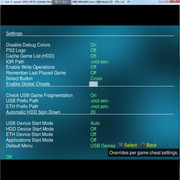
We've already played around with it and have it working but there is a problem. On the Settings screen there isn't enough room to add another string without making it look... silly.

Is there some option in there that can be set to always on and removed? E.g. Check USB Game Fragmentation or PS2 Logo?

Any suggestions?
 
From what I remember, for some period of time, there was an option to enable cheats globally.
I mean this options was at global settings page, under display settings or network settings.

Anyway what about move notifications into display settings?
Now there should be more space.

Additionally scroll button\arrow ( :dir down:, :dir up: ) can added
to inform that there is an another option above or below to choose?

BTW I never used cheat settings before.
Can one cheat be applied for other/all games?
 
Last edited:
Anyway what about move notifications into display settings?
Its already in display settings mate ;)

BTW I never used cheat settings before.
Can one cheat be applied for other/all games?
The Global Option would just turn on Enable Cheats for all games, each game still needs its own game cfg with cheats in.. its handy for example when we got a bunch of widescreen hacks from that repository on github.. you need to go in each game and manually turn on Enable Cheats for every game... Idea is to have a Global Option as well that way people can choose to Enable Cheats for all games or they can do it individually (per game) if they like..

Global Cheats obviously will need to use Cheat Mode 0 which is it uses all cheats in each games cfg per game.. but as I understand it Cheat Mode 1 which is to select cheats individually per game, doesn't actually work anyway.


but as @Tupakaveli was sayin, global cheats option works... it just looks.... a bit shit with that many strings :-P
 
Last edited:
Well, IMO the whole current Cheat-Support-Implementation is kind of bad, because 'some people' (not from here) rather wanted a 'hasty&nasty' kind of implementation of EVERYTHING stuffed into an app, rather than a 'thoroughly thought through' way of an implementation/structure...

I mean that the technical backend and support due to Artemis itself is quite sophisticated and well implemented, but certain things surrounding it in regards to the support of/for it in OPL is VERY crude and structurally not 'ttt'... That's not due to the Dev who implemented it, but rather the suggestions of HOW to implement it...
(and cheats are not the only thing which partially led to a dead-end in certain developments based on these suggestions and implementations, see Info-Page, etc.)


This faults (regarding cheat-support in OPL) include:
  • Partially the CHT-Structure
  • Support within the GUI for loading selective cheats, instead of all cheats which are included in the CHT!
  • It's way of choosing if a game is 'cheated' or not and especially it's implementation into fixed/static settings instead of a run-time-choice.


So... In regards to Cheats, I think the best choice would be a cheat-selection-screen/menu which can be triggered by pressing a non-bound button (is SELECT already in use?) to 'run/start game with cheats' instead of 'run/start game'.


Regarding a 'global settings for games'...
Well, I am all for an own menu for 'global game settings', NOT just limited to Cheats!!! :)
This could include a function for creation of VMC for every game (which has none), or using the 'generic VMCs' on every game, except if the per-game-settings are set/configured and 'say' otherwise...


It would however also require some additional code related to the per-game-settings-menu, so it will only use those alternate settings (alternate to global game-settings), if they are specifically set up.


If someone is interested in it, I can mock up a 'ttt' idea of an implementation/structure for it and explain it more thoroughly. I am currently at my phone, which is kind of uncomfortable to explain it in detail.
 
Last edited:

Similar threads

Back
Top