OpenWrt

The problems about wifi range usually can be improved by adding or replacing the antenna, that small routers doesnt have antenna, but i bet the circuit board have a solder point ready for it
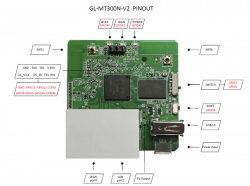
Yeah, My one has sockets on the board for antennas. Kind of convenient if I need them.

upload_2019-12-1_16-12-46.png

I will try streaming some games through it. I do not think I will need 5GHZ at all.
 
Nah, I am just asking, due to the fact that they also provide a squashed image for the TL-WR902ACv3! ;)

Since the snapshots (which do not include LuCi) already support the 5GHz WiFi (which 18.04 or 18.06 did not!), I just hope it supports connecting 2.4GHz and 5 GHz simultaneously (probably with another OpenWRT-Router "on the other end") and including LuCi + since it is an RC, I suppose most modules can be installed without the kernel-version-issue-warning!
 
Last edited:
Yeah, My one has sockets on the board for antennas. Kind of convenient if I need them.

View attachment 21310

I will try streaming some games through it. I do not think I will need 5GHZ at all.
I cant see well the connectors (and i dont know them well enought), but looks like the antenna connectors used in many old "dumbphones"
Incase is that... it was an standard years ago, i thought it was not much used nowadays but it seems that router uses them
Anyway... is nice you have the antenna conectors soldered in it because it should not be much hard to find a cable for them

The point is that cable should have an RP-SMA connector at the other side (i know this connectors a bit better), they started being used in USA first and the rest of the world was using different connectors, but it seems at some point the RP-SMA won the battle
If you take a look at some shop for wifi antennas, probably most of them are going to use that RP-SMA connector

--------------
Btw, is nice the manufacturer soldered that 3 pins for Tx, Rx, Gnd... thats what you need to connect by terminal (for things like changing the bootloader, unbricking, etc)

And the first "mod" that comes to mind while looking at the board is the other 4 "holes" inmediatly below (GPIO4, GPIO5, GPIO45, GPIO46)... they can be repurposed by software (modifying a setting file) and can be used for many things... one of them is you could use them to connect a SD/microSD card
Actually, instead of soldering the card directly you could solder a microSD card slot, this allows you to replace the card at any point

The idea is to use that microSD card for the system files (not for media storage)... this allows you to install many software without need to write in the flash chip :)
You know... the OS (and a swap partition) in the microSD... and the games and other stuff in USB

Im learning about it, im going to do it in one (or more) of my routers because i ripped that microSD slots and some low capacity microSD cards (500mb or 1gb) from a few dumbphones i have that was waiting for some butchery

 
Last edited:
I cant see well the connectors (and i dont know them well enought), but looks like the antenna connectors used in many old "dumbphones"
Incase is that... it was an standard years ago, i thought it was not much used nowadays but it seems that router uses them
Anyway... is nice you have the antenna conectors soldered in it because it should not be much hard to find a cable for them

The point is that cable should have an RP-SMA connector at the other side (i know this connectors a bit better), they started being used in USA first and the rest of the world was using different connectors, but it seems at some point the RP-SMA won the battle
If you take a look at some shop for wifi antennas, probably most of them are going to use that RP-SMA connector

--------------
Btw, is nice the manufacturer soldered that 3 pins for Tx, Rx, Gnd... thats what you need to connect by terminal (for things like changing the bootloader, unbricking, etc)

And the first "mod" that comes to mind while looking at the board is the other 4 "holes" inmediatly under the pins (GPIO4, GPIO5, GPIO45, GPIO46)... they can be repurposed by software (modifying a setting file) and can be used for many things... one of them is you could use them to connect a SD/microSD card
Actually, instead of soldering the card directly you could solder a microSD card slot, this allows you to replace the card at any point

The idea is to use that microSD card for the system files (not for media storage)... this allows you to install many software without need to write in the flash chip :)
You know... the OS (and a swap partition) in the microSD... and the games and other stuff in USB

Im learning about it, im going to do it in one (or more) of my routers because i ripped that microSD slots and some low capacity microSD cards (500mb or 1gb) from a few dumbphones i have that was waiting for some butchery
Yeah, They wanted this to be taken out of the case and used in hardware mods. The case only allows the switch to go to 2 positions, but it has 3 when out of the case, you can widen the hole in the case to access the 3rd position too. Also antenna connections and IO and 5V output are helpful. I just wish it was gigabit, as it upgrades the PS3 wifi to 100meg perfectly (approx 9.8MBs). There are no cheap gigabit bridges as far as i can see..


I wont do this, but I was thinking of a hardware mod for the PS3, cut the traces going to the ethernet port on the ps3, solder wires back to this board going in LAN1, then solder a wire back to the ethernet port on ps3 out from LAN2. Also remove ps3 wifi antennas and wire them into this. It would have to be gigabit though to be worth it.

Built in ps3netserv and 300meg (really only about 22MBs) wifi would be nice upgrade for £14.99 :)
 
Hmmm, you should google a bit what does that third position of the power switch, what im going to say maybe is not related but anyway, there are some routers that works like what im going to say (i have 2 that does this)

When the router boots it reads the contents of an eeprom (a tiny chip with 8 pins). The data in the eeprom allows to boot in many different ways, by default it boots from "FLASH"
To change the boot modes of that eeprom is needed to use a couple of wires to connect some points of the circuit board. This points was supposed to be secret, but someone found them for my router

The point is... by changing the boot mode in the eeprom i can force it to load the rest of the software from another source (different than the FLASH chip). The most useful of that boot modes is by booting from "UART" (with the Tx Rx, Gnd pins connected to a PC)
This technically makes the router unbrickable, lol, i can empty or corrupt the flash chip entirelly and the router is still able to load u-boot from the PC ---> to the router RAM (and later copy the bootloader to FLASH to start restoring FLASH contents)

The third position of the switch in your router could have that purpose :)

*Or maybe instead of UART (with the Tx, Rx, Gnd pins) is booting from I2C (the other 4 pins i suggested that could be repurposed for a microSD slot)... incase is doing the booting from I2C i guess what i said about connecting a microSD slot in them is a bad idea :rolleyes:
 
The problems about wifi range usually can be improved by adding or replacing the antenna, that small routers doesnt have antenna, but i bet the circuit board have a solder point ready for it

A tech at my local repair shop showed me a trick with this that I did not know was possible, and is a WELL OP for you usual home use, but you can attatch the Router via the antenne to a house TV ariel, the one outside lol, and you can get a range of upto 1 mile.

Although why the hell you would need a 1. mile range is beyond me... unless you lived on an farm or something like this lol.
 
A tech at my local repair shop showed me a trick with this that I did not know was possible, and is a WELL OP for you usual home use, but you can attatch the Router via the antenne to a house TV ariel, the one outside lol, and you can get a range of upto 1 mile.

Although why the hell you would need a 1. mile range is beyond me... unless you lived on an farm or something like this lol.
Hmm, i should try it, you made me remember of a thing ive seen, some people uses a satellital parabolic antenna
You know that kind of antennas have like a "cocacola can" in front of the reflector (at the point where the waves are concentrated), they removes that "can" and places the router antenna in that position
As far i remember it have an awesome range, lol
 
Hmm, i should try it, you made me remember of a thing ive seen, some people uses a satellital parabolic antenna
You know that kind of antennas have like a "cocacola can" in front of the reflector (at the point where the waves are concentrated), they removes that "can" and places the router antenna in that position
As far i remember it have an awesome range, lol

Never thought of using a satalite dish... interesting... just a thought but wouldn't a Sat dish make it directional, whereas your normal household TV arieal is omi-directional...?
 
Hmm, i should try it, you made me remember of a thing ive seen, some people uses a satellital parabolic antenna
You know that kind of antennas have like a "cocacola can" in front of the reflector (at the point where the waves are concentrated), they removes that "can" and places the router antenna in that position
As far i remember it have an awesome range, lol

Yeah don't forget It's a 2 way communication, So to take advantage of the extra signal, The device you are connecting to it needs the same range, so if your router has 1 mile range then you need to upgrade your client device to 1 mile range too to be able to reply.
 
A simple mounted router on the front of the "arm" of a satellite-dish might yield 15% directed field, because the antennas on the router still emitt the field "homogeneously"!

A real directional antenna yields much more DB...
We used that satellite-dish + router-method in 2011 (small modifications to the antenna-array) for an air-bridge of "Freifunk" (anonymous, secure open WiFi, which doesn't even need a login, nor a wifi-password and supports Tor and other things through a normal browser, etc.) to bridge a connection of ~3km with a 54MBit/s 802.11g-connection!
Nowadays that's much easier with n/ac and Wifi6, but with g that was still quite a hastle (especially if you want to keep it legal, lol).

Nowadays we use another antenna and 5GHz, to bridge a connection to Reichenhein ~10km away... at a pretty darn high speed! :D

Anyway... The satellite-method is very inefficient! Those with a "can" in front, at least have a way higher efficiency than just a dish and a router...

The "toilet antennas" (made from brushes in metal-casings) are alright as well, but not quite as efficient, because they need to be quite accurate!

A "biquad" is the most efficient, given the amount of work you have to put in them and how precise they need to be!
 
Last edited:
I marked the last block in my previous post, because it seems to be the most important thing in that post...


Btw.: If someone has either the image-builder or something alike installed or has an image which can be flashed on either the TL-WR802n (v2) [Nano-/Travel-Router] or TL-WR841ND (v8.2) and also includes a wpa-supplicant or software (like the full "wpad") which allows logging into a network with PEAP - EAP MSCHAPv2, please link me to it!

That would be reaaally useful, especially if it is a recent build!
I do find snapshots for both, but I forgot what needs to be installed, to have it all running nice and dandy and have access via Web interface/LuCi...


I am currently using the TL-WR902ACv3, to connect to a PYUR Community mesh... It is great and I can walk around and if a WiFi is in my list and in proximity, it gets Internet and I can share it to my devices!
With PYUR Community and Freifunk, I already do not really need to use any mobile data!
I only need a "FON"-login and I would have internet at pretty much every place in Germany, France and maybe elsewhere where at least FON is available!
However... I want to use one of the other 2 routers for this task as well, because then I could use one stationary router at home and one for mobile and still could use the TL-WR902ACv3 for other things!


I REEEEAAAALY HOPE, that more people will introduce the Freifunk-Implementation, because it is really great, IMO!

There is even an OpenWRT-based Freifunk-firmware, which also specifically supports meshes and access to various services in an anonymous way, while using standard-apps/tools!

The literal translation is
"Frei" = "Free"
"Funk" = "Radio"
but is meant to be a WiFi, or free and anonymous way of accessing the internet (FreeWiFi makes more sense than FreeRadio).
It runs through a VPN and offers access to services like TOR, even if you would use any other browser than TOR Browser or Tales (Linux Distro)!

The only possible weak spot is, the connection from you to the Wi-Fi, because that is not encrypted!

But it offers an encrypted VPN-connection as well and it even has/had a connected iodine-server, lol... IPoverDNS your traffic on any Hotspot, which TECHNICALLY has Internet-access, but needs you to log in and tunnel your internet via the iodine-server online, your client-software on a smartphone or even OpenWRT and tunnel them via DNS-Requests or Pings!!! :excitement:

That all is available and implemented, since 2011! :D
 
Last edited:
I had once tried OpenWRT on the D-Link DIR-645 but WLAN was very unstable and the distance short. Maybe it is fixed now, tried it several years ago.
 
Please be more specific what you want, except for the SMB-Support itself!
  • Go to the router-configuration and login --> System --> Software!
  • Update the list and wait...
  • You have to install various stuff, if you want to share it i.e. from USB and via SMB and various filesystem-files + for easier management via the interface the modules regarding the stuff for the web-interface.
Depending on what you want to accomplish, you need to install the additional modules.

Just a short list which comes to mind, if they are not already installed.
  • block-mount
  • fdisk
  • kmod-fs-ntfs
  • kmod-fs-vfat
  • kmod-fs-exfat (you get the picture...)
  • kmod-usb-core
  • kmod-usb-ehci
  • kmod-usb-ohci
  • kmod-usb-storage
  • kmod-usb2
  • luci-app-samba
  • ntfs-3g
  • samba36-server
There are 100s of interesting modules to choose from!
I exchanged the small wpad for the full version and an adblocker running on it and I walk around and it connects to the "PYUR Community"-mesh and the Freifunk-mesh! :)

You can also run it without the webconfig-additions and rather telnet or SSH to it. However, it makes it quite easy to configure without any extra-knowledge via a web-interface simply...!
 
Establish an Internet-connection and install the modules... Then it might already work.
I add missing modules, if there are any...
 
Last edited:
  • Like
Reactions: TnA
Back
Top