
You are using an out of date browser. It may not display this or other websites correctly.
You should upgrade or use an alternative browser.
You should upgrade or use an alternative browser.
OpenWrt
- Thread starter sandungas
- Start date
That's no problem, but I'd be surprised if it worked on anything apart from the gl.inet models with the atheros chipset. It was compiled using the gl.inet sdk and so is targeted for that device environment.Awesome! I've got to test it on my TL-WR902ACv3 Nano/Travel-Router, once I am where it is, lol!
THX for sharing it!
Initially I had tried using the openwrt sdk, and although I could get it to compile and install without error, it never worked properly and I don't have the skills or knowledge to debug it.
The requests were being sent, I could see them on the host, but any reply seemed to get lost and I never worked out why.
In my research though, I did see some more generic builds for nano routers, there was a Russian forum with a few being built. I'll try and dig out the link.
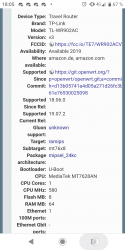
It is, yeah, and probably if it were to install, it'd run fine. I just have no idea whether there's any checks for the target or not before it tries the install?It might... It's a mips 24kc package, right?
View attachment 25551
I'm not entirely sure, though... hence another link/source is of course appreciated!
Obviously a lot of this is over my head, but it's kinda fun when you get it working!
Last edited:
A friend of mine has a problem setting a Open-WRT mini-router to play Ps2 games via ETH (from a USB device connected to the mini-router).
I too have a similar setting, no problem on my end, so we can't figure out what is causing the shared directories to be reset at every router reboot (so he get errore 303 on OPL and can't access the game list).
This is a shot of my config. (his config has just a different SSID):

Pratically, he set the Shared directories as mine, hit save & apply. Then after a Reboot (either a software one or by disconnecting/reconnecting the router, the settings changes. He get all 3 squares checked. allowed users in blank, and sda1 as name instead of PS2SMB).
I too have a similar setting, no problem on my end, so we can't figure out what is causing the shared directories to be reset at every router reboot (so he get errore 303 on OPL and can't access the game list).
This is a shot of my config. (his config has just a different SSID):
Pratically, he set the Shared directories as mine, hit save & apply. Then after a Reboot (either a software one or by disconnecting/reconnecting the router, the settings changes. He get all 3 squares checked. allowed users in blank, and sda1 as name instead of PS2SMB).
Last edited:
tell your friend to change the name of disk to Sda1A friend of mine has a problem setting a Open-WRT mini-router to play Ps2 games via ETH (from a USB device connected to the mini-router).
I too have a similar setting, no problem on my end, so we can't figure out what is causing the shared directories to be reset at every router reboot (so he get errore 303 on OPL and can't access the game list).
This is a shot of my config. (his config has just a different SSID):
View attachment 25737
Pratically, he set the Shared directories as mine, hit save & apply. Then after a Reboot (either a software one or by disconnecting/reconnecting the router, the settings changes. He get all 3 squares checked. allowed users in blank, and sda1 as name instead of PS2SMB).
tell your friend to change the name of disk to Sda1
This is what we've done indeed. It seemed to work at first (no error messages), but he couldn't see the game due to the old OPL version he was using, then he renamed the iso adding the id as a prefix and now he get error 300.
Btw this should be another unrelated problem.
His OpenWRT firmware version is sligltly different than mine. I think his firmware doesn't allow him to change the shared directories name (as mentioned in a guide I read). He didn't upgrade 'cause he heard the last firmware has problems and it's suggested to not upgrade.
However at least the error 303 is solved

ok this are my screen shots of my configThis is what we've done indeed. It seemed to work at first (no error messages), but he couldn't see the game due to the old OPL version he was using, then he renamed the iso adding the id as a prefix and now he get error 300.
Btw this should be another unrelated problem.
His OpenWRT firmware version is sligltly different than mine. I think his firmware doesn't allow him to change the shared directories name (as mentioned in a guide I read). He didn't upgrade 'cause he heard the last firmware has problems and it's suggested to not upgrade.
However at least the error 303 is solved
Attachments
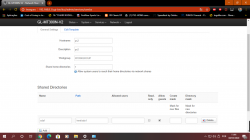
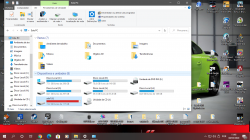
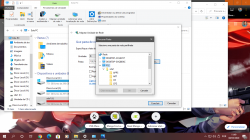
What router model does he have?This is what we've done indeed. It seemed to work at first (no error messages), but he couldn't see the game due to the old OPL version he was using, then he renamed the iso adding the id as a prefix and now he get error 300.
Btw this should be another unrelated problem.
His OpenWRT firmware version is sligltly different than mine. I think his firmware doesn't allow him to change the shared directories name (as mentioned in a guide I read). He didn't upgrade 'cause he heard the last firmware has problems and it's suggested to not upgrade.
However at least the error 303 is solved
Also - try following the steps here https://openwrt.org/docs/guide-user/services/nas/usb-storage-samba-webinterface to make sure everything is mounted properly, it's easier than ssh'ing and changing configs if that's what you're doing at the moment. Remember that it's important to keep everything consistent when it comes to directory & file names. That includes CaSinG (it's easier to keep most thing lowercase).
Another thing is to make sure that you allow that traffic through the firewall, so check accordingly.
Last edited:
What router model does he have?
Also - try following the steps here https://openwrt.org/docs/guide-user/services/nas/usb-storage-samba-webinterface to make sure everything is mounted properly, it's easier than ssh'ing and changing configs if that's what you're doing at the moment. Remember that it's important to keep everything consistent when it comes to directory & file names. That includes CaSinG (it's easier to keep most thing lowercase).
Another thing is to make sure that you allow that traffic through the firewall, so check accordingly.
It is GL-MT300N V2. As for configuration is exactly as my model (Nexx-WT3020F).
Anyway he's about to destroy everything, so he'll just upload the firmware to the same version as mine and everything should work...
YEAH I have same router GL-MT300N V2 and i had a very hard time to put SMB working on OPL and with this router you need to wait for samba start first I recommend to put OPL in SMB option in manual and wait router startsIt is GL-MT300N V2. As for configuration is exactly as my model (Nexx-WT3020F).
Anyway he's about to destroy everything, so he'll just upload the firmware to the same version as mine and everything should work...
I'm not expecting to work straight off with opkg, but it'd be interesting to see if it successfully installed with:
"arch ar71xx-1806 300"
Inserted into the /etc/opkg.conf (probably will want to delete that after the experiment).
Edit : Here's a version of ps3netsrv targeted for gl.inet mtk based devices (Probably. If it works.)
https://mega.nz/file/5gdGmIAJ#AKgx8dYPjRs5pVF_lux-HcOvvfFoMNdBe7H4F3Tcgrg
Last edited:
YEAH I have same router GL-MT300N V2 and i had a very hard time to put SMB working on OPL and with this router you need to wait for samba start first I recommend to put OPL in SMB option in manual and wait router starts
This is for sure. My model (WTF3020) is the same, it takes about 24 secs. to configure itself.
However he managed to update the firmware, but now he's having problems with Putty, that won't enter the router anymore (it was working perfectly so far).
He's having the same exact problem I was having and it was a very stupid thing, but I can't remember. Sure if we manage to solve, this time I will engrave the solution on a stone slab.
It starts faster with the uboot-mod!
I guess it's a very easy thing to do, right?

jcorrea
PSX-Place Supporter
Just to put an "alert" on everybody who was looking for a ps3netsrv for OpenWrt  .
.
Here you can find the newest version (v20220421 at this time) for mips_24kc and mipsel_24kc (downloads are in "Artifacts" section):
https://github.com/jhonathanc/ps3netsrv-openwrt/actions/runs/2626652436
I need to develop a LUCI interface, to let people setup the ps3netsrv, because without it, you have to follow the "After install to openwrt procedure" on:
https://github.com/jhonathanc/ps3netsrv-openwrt
If someone needs another architecture, just let me know and I'll add it to the github action to build on next push.
.Here you can find the newest version (v20220421 at this time) for mips_24kc and mipsel_24kc (downloads are in "Artifacts" section):
https://github.com/jhonathanc/ps3netsrv-openwrt/actions/runs/2626652436
I need to develop a LUCI interface, to let people setup the ps3netsrv, because without it, you have to follow the "After install to openwrt procedure" on:
https://github.com/jhonathanc/ps3netsrv-openwrt
If someone needs another architecture, just let me know and I'll add it to the github action to build on next push.
Last edited:
That's really cool, thanks! I don't use my travel router anymore, but it'd be a nice feature to add to the Xiaomi AX3200 I'm using as a dumb AP.Just to put an "alert" on everybody who was looking for a ps3netsrv for OpenWrt
Here you can find the newest version (v20220421 at this time) for mips_24kc and mipsel_24kc (downloads are in "Artifacts" section):
https://github.com/jhonathanc/ps3netsrv-openwrt/actions/runs/2626652436
I need to develop a LUCI interface, to let people setup the ps3netsrv, because without it, you have to follow the "After install to openwrt procedure" on:
https://github.com/jhonathanc/ps3netsrv-openwrt
If someone needs another architecture, just let me know and I'll add it to the github action to build on next push.
Funny, I hadn't checked this thread for aaages until about two days ago and then you post. I hadn't even realised you were a member.
jcorrea
PSX-Place Supporter
I'll add suport for all arm devices available on openwrt todayThat's really cool, thanks! I don't use my travel router anymore, but it'd be a nice feature to add to the Xiaomi AX3200 I'm using as a dumb AP.
Funny, I hadn't checked this thread for aaages until about two days ago and then you post. I hadn't even realised you were a member.
.That's amazing, saves me faffing around with a VM. Muchas gracias!I'll add suport for all arm devices available on openwrt today
Similar threads
-
 PS4 OpenWRT (PPPwn) - Using your Router to perform PS4 Jailbreak (Supporting Firmware 11.00)
- Started by STLcardsWS
- Replies: 1
-

-
