
You are using an out of date browser. It may not display this or other websites correctly.
You should upgrade or use an alternative browser.
You should upgrade or use an alternative browser.
PS2 OPL poblems
- Thread starter Fannste94
- Start date

jolek
Senior Member
Does one of these games have a progressive-mode (like holding buttons during boot, i.e. TRIANGLE + CROSS), so GSM isn't needed?
https://www.psx-place.com/threads/l...odes-natively-output-in-480p-and-1080i.25516/.

Fannste94
Member
I know that you can only change the resolution in game but maybe it should be tested with GSM adding more resolutions like OPL has, you can send me the Beta test OPL so I can test it out if it works, if not then don't release it
None of the games have 720p and 1080p option at all but those options are available in GSM
None of the games have 720p and 1080p option at all but those options are available in GSM
Fannste94
Member
Focus on the conversation pleaseQ: Does this option to edit your post it is really so hard to find?
A: It is at the bottom:

Please focus on what the staff (me in every sub-forum & jolek in the PS2-section) told you.Focus on the conversation please
Multiple "follow-up posts" instead of edits, will get you nowhere and wastes the time of any reader.
Please try to make sure, that you added every info or question to ONE post, before you press the "Post Reply"-Button!

HWNJ
Developer
Green should be OKLet's say that here is our USB drive:

These green lines are the fragmented files.
If you copy all the data to another HDD\SSD, delete all the files from it and copy it back,
it may looks like that:

It will still have fragmented files.
Sectors will be wrote from the last time there were use.
If I will format it:

Copy files from HDD to USB:

All the files should be continuous.
Red should be FRAGMENTED
That's confusing and totally oposite to what Auslogics Disk Defrag displays.
jolek
Senior Member
Green should be OK
Red should be FRAGMENTED
That's confusing and totally oposite to what Auslogics Disk Defrag displays.
It was just an example made in paint...
I had a problem with expressing myself.
That is why I additionally added legend\map key.
I does not matter which colors are there as long as you read them correctly.
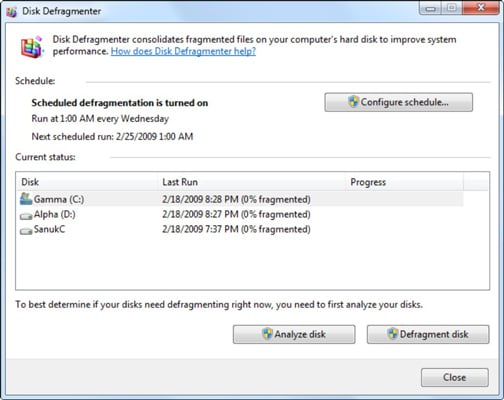
For example win disk defragmenter does not have any grid\colors:
Last edited:
HWNJ
Developer
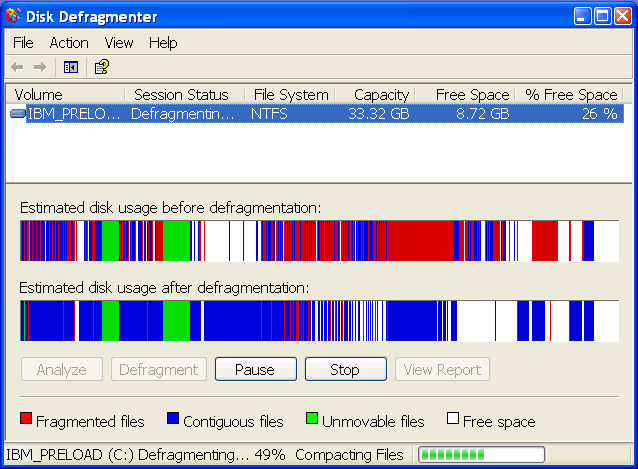
It DOES has colors:For example win disk defragmenter does not have any grid\colors:
jolek
Senior Member
It DOES has colors:
I showed disk defragmenter from win 7.
You showed the one from win XP.
Additionally win 10\8 has similar defragmenter as it is in 7, I am not sure how it looks like in vista.
Last edited:
☝ Please?Let's just get back on topic.

How something is made up visually, doesn't really have to do with the topic of the thread.
HWNJ
Developer
Ok, ok. No more offtopic... but red is always used to mark fragmented in every software so far :p☝ Please?
How something is made up visually, doesn't really have to do with the topic of the thread.


Similar threads
-

-

-
 PS2 Free McTuna! OpenTuna Installers with Free MCBoots via PS2BBL!
- Started by Ripto
- Replies: 26
-
What do the codes mean for OPL, and why so many versions?
- Started by RFaction27
- Replies: 8