
You are using an out of date browser. It may not display this or other websites correctly.
You should upgrade or use an alternative browser.
You should upgrade or use an alternative browser.

Alisson
Member
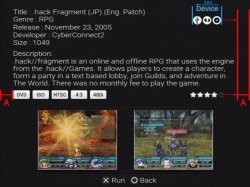
Oh, I mean "about game"/"game details" screen ^^, but it's also need. Thanks.
Sorry

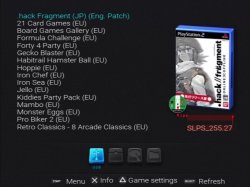
This screen???

More screens with info


Sorry for the poor quality of the pictures, horrible colors on the camera.
Last edited by a moderator:

Krah.Johlito
Forum Noob
@Alisson thanks for testing. The problem with the font is fixed in current beta versions of OPL, grab the latest version from psx-scene and that should fix the font getting cut off. Also I'm interested to see if it fixes screenshots as on mine they appear differently.
@Berion changing the coords to fix spaces in-between containers shouldn't be a problem it will just take me a little while as I'm currently busy with RL stuff. I'll post a new version with fixes when I can .
@Berion changing the coords to fix spaces in-between containers shouldn't be a problem it will just take me a little while as I'm currently busy with RL stuff. I'll post a new version with fixes when I can .


Berion
Developer
Well, so the game descriptions should be shorter ;p
or font size control support
or maybe delete some of the info like i.e "Genre" (IMO useless but I'm sticking to the supported strings)
or "Description" header deleting and leaving only description.
Those screens are stretched. Something wrong with aspect ratio or displayed resolution. Thanks for the effort.
Why devices are empty (no icons)?
or font size control support
or maybe delete some of the info like i.e "Genre" (IMO useless but I'm sticking to the supported strings)
or "Description" header deleting and leaving only description.
Those screens are stretched. Something wrong with aspect ratio or displayed resolution. Thanks for the effort.
Why devices are empty (no icons)?
Alisson
Member
@Alisson thanks for testing. The problem with the font is fixed in current beta versions of OPL, grab the latest version from psx-scene and that should fix the font getting cut off. Also I'm interested to see if it fixes screenshots as on mine they appear differently.
Hi Krah.Johlito, used the last build 1025 and now it's ok.... fonts, description and screenshot are much better now. Thanks for the tip.


Well, so the game descriptions should be shorter ;p
or font size control support
or maybe delete some of the info like i.e "Genre" (IMO useless but I'm sticking to the supported strings)
or "Description" header deleting and leaving only description.
Those screens are stretched. Something wrong with aspect ratio or displayed resolution. Thanks for the effort.
Why devices are empty (no icons)?
Berion, I do not understand these PS2 output resolutions, it always adds that black border in the capture. Previous screens were captured at 640x480, below is a capture at 720x480.

The HDD icon is missing.
Berion
Developer
Those icons for devices are old. I was thinking on start that this is disc icon for optical disc media, so in place of this specific icon, in newer set, there is HDD icon. Oh, right, I didn't attach it yet, sorry. I will publish all my project in PSD form in upcoming AIO PS2, so maybe I forgot to add it to the forum.

About displaying screen I'm not sure but probably it depending on the grabber settings. If PS2 displaying i.e 640x448 (NTSC) and You have setting up any other resolution You will loose quality twice because the image is scalling (and the first image is better). About aspect ratio I don't know. I never used such devices and software.
- - -
@Krah.Johlito I have added proper devices and fixed dock icons (no shadows cuts ;p). I'm sorry but I changed dimensions for dock. Old are 199x54, new is 202x52 which makes center easy.
About displaying screen I'm not sure but probably it depending on the grabber settings. If PS2 displaying i.e 640x448 (NTSC) and You have setting up any other resolution You will loose quality twice because the image is scalling (and the first image is better). About aspect ratio I don't know. I never used such devices and software.
- - -
@Krah.Johlito I have added proper devices and fixed dock icons (no shadows cuts ;p). I'm sorry but I changed dimensions for dock. Old are 199x54, new is 202x52 which makes center easy.
Attachments
Last edited:

Hey guys,
Krah.Johlito (my brother) was having some PC issues and he said he wouldn't mind if I continued working on Korium while he was trying to resolve them. We usually collaborate on themes together.
So I hope that is cool with you also
I corrected all of the spacing on the main page in the video mode that I was testing with but then I noticed that when switching video modes the coordinates of some of the elements are out of whack.
Did some other small fixes to cover overlay coordinates etc.
Also the alpha channel is visible when using the high definition video modes and the description text gets messed up.
I used a dirty version of OPL from Maximus32's hires branch so I could test true 720p but I also tested with the latest beta version from PSX-Scene.
I've added a pack of screen captures so you can see what I mean.
Korium Screen Caps
(I added the white box around the screenshots just for testing purposes and to make it easier to see how they move when switching video modes. They have been removed now)
Some possible fixes would be:
Remove the default disc icon altogether and go back to the original case overlay. So that the disc icon only appears if you have the _ICO ART for the game.
Remove the screenshot boxes from the info page background and use them as overlays, that way the screenshots would always fit inside them properly no matter the video mode used.
(I had this issue on one of our themes and that was the solution)
Here is a new beta version if you guys want to test, it includes your new replacement images.
Edit: Sorry, I uploaded the wrong version. This one is correct.
Krah.Johlito (my brother) was having some PC issues and he said he wouldn't mind if I continued working on Korium while he was trying to resolve them. We usually collaborate on themes together.
So I hope that is cool with you also
I corrected all of the spacing on the main page in the video mode that I was testing with but then I noticed that when switching video modes the coordinates of some of the elements are out of whack.
Did some other small fixes to cover overlay coordinates etc.
Also the alpha channel is visible when using the high definition video modes and the description text gets messed up.
I used a dirty version of OPL from Maximus32's hires branch so I could test true 720p but I also tested with the latest beta version from PSX-Scene.
I've added a pack of screen captures so you can see what I mean.
Korium Screen Caps
(I added the white box around the screenshots just for testing purposes and to make it easier to see how they move when switching video modes. They have been removed now)
Some possible fixes would be:
Remove the default disc icon altogether and go back to the original case overlay. So that the disc icon only appears if you have the _ICO ART for the game.
Remove the screenshot boxes from the info page background and use them as overlays, that way the screenshots would always fit inside them properly no matter the video mode used.
(I had this issue on one of our themes and that was the solution)
Here is a new beta version if you guys want to test, it includes your new replacement images.
Edit: Sorry, I uploaded the wrong version. This one is correct.
Attachments
Last edited:
Krah.Johlito
Forum Noob
Screenshots - I think overlays are the way to go..I tried to not have to use them for the sake of keeping the theme light as having them means another 2 png files in the theme. I thought recent changes to video modes made x and y positioning static regardless of video mode switching but I guess not.
Disc Icon - Come to think of it you could probably add the default icon as a static image by adding another line ie Main5: Static Image and that way resizing would be possible separate to case and disc icon..however it would need to be under the disc icon and would never go away only get covered up but _ICO. Up scaling to 64x64 might look crap though idk
Hint Text - It looks like you adjusted the x pos of the hint text on main screen in order to pseudo 'center' it, which is great for our setups but if people have delete and rename as an option I think the text might run out of screen.
Disc Icon - Come to think of it you could probably add the default icon as a static image by adding another line ie Main5: Static Image and that way resizing would be possible separate to case and disc icon..however it would need to be under the disc icon and would never go away only get covered up but _ICO. Up scaling to 64x64 might look crap though idk
Hint Text - It looks like you adjusted the x pos of the hint text on main screen in order to pseudo 'center' it, which is great for our setups but if people have delete and rename as an option I think the text might run out of screen.
Berion
Developer
Sure thing, thanks for helping Your brother.
About transparent glitches:
I don't see them on old screenshots so it's not a fault of the graphics. However You can check if problem still exist from updated ;] resources from post no.30.
About: disc icon:
Can be removed. The only reason why I added it, was the fact that all skins have it. So don't be shy and kill it. ;p
About resolution:
The problem which I see on all this screens is that all graphics from the skin are stretched. This is an error in skinning system not the skin itself. Proposed solution maybe it is ok but the better would be to extend the skinning system in OPL. First thing: if OPL displaying real 720p not just stretching output video to it, it should display gfx in it's original size. The second thing should be making all coordinates for graphics base not on a constant position XY but on aligning by pixels or percentages to one of the edges. In example:
gamecover.png aligned to the right, so the coordinates should be read not from top left corner but from top right in such case, and not by pixels (if skin should be flexible to various 4:3 and 16:9) by by percentage of overall screen size.
Look in example on: "16-9 EDTV 704x480p @60Hz 24 bit Widescreen On 1.jpg"
About distances:
Only few things and all be perfect. ^^" Sorry for been such pedantic.
PS: And "Menu/Refresh" text and "Start/Select" button icon are not on the same level as other buttons. ;p
About transparent glitches:
I don't see them on old screenshots so it's not a fault of the graphics. However You can check if problem still exist from updated ;] resources from post no.30.
About: disc icon:
Can be removed. The only reason why I added it, was the fact that all skins have it. So don't be shy and kill it. ;p
About resolution:
The problem which I see on all this screens is that all graphics from the skin are stretched. This is an error in skinning system not the skin itself. Proposed solution maybe it is ok but the better would be to extend the skinning system in OPL. First thing: if OPL displaying real 720p not just stretching output video to it, it should display gfx in it's original size. The second thing should be making all coordinates for graphics base not on a constant position XY but on aligning by pixels or percentages to one of the edges. In example:
gamecover.png aligned to the right, so the coordinates should be read not from top left corner but from top right in such case, and not by pixels (if skin should be flexible to various 4:3 and 16:9) by by percentage of overall screen size.
Look in example on: "16-9 EDTV 704x480p @60Hz 24 bit Widescreen On 1.jpg"
- game list size is ok
- font size is ok
- cover size is ok
- buttons size are ok
- category icons are stretched
- cover icon is stretched
About distances:
Only few things and all be perfect. ^^" Sorry for been such pedantic.
PS: And "Menu/Refresh" text and "Start/Select" button icon are not on the same level as other buttons. ;p
Last edited:
Krah.Johlito
Forum Noob
This is about as good as it's going to get given current limitations.
Screenshots are 16:9 EDTV 704x480p @60Hz 24 bit Widescreen On.
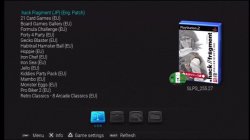
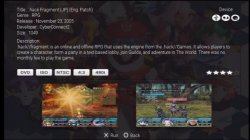
Changes since last update:
Reverted to original cover overlay.
Default disc icon is still in the theme folder (original untouched) but is not used in the theme.
Co-ordinate/spacing fixes.
New device icons are working.
Default cover is working (wasn't before, didn't notice).
Changes to screenshots to try accommodate for multi video modes.
Start/Select & Menu/Refesh are inline with other buttons/text.
Notes:
There is a problem with the description text that can't be fixed to be used in all video modes. It would need to be fixed in the source code. If it is going to be the default theme of OPL the options are to remove the description or limit the theme to just the Main page.
Screenshots are 16:9 EDTV 704x480p @60Hz 24 bit Widescreen On.
Changes since last update:
Reverted to original cover overlay.
Default disc icon is still in the theme folder (original untouched) but is not used in the theme.
Co-ordinate/spacing fixes.
New device icons are working.
Default cover is working (wasn't before, didn't notice).
Changes to screenshots to try accommodate for multi video modes.
Start/Select & Menu/Refesh are inline with other buttons/text.
Notes:
There is a problem with the description text that can't be fixed to be used in all video modes. It would need to be fixed in the source code. If it is going to be the default theme of OPL the options are to remove the description or limit the theme to just the Main page.
Attachments
Berion
Developer
@Krah.Johlito I just tested this version and for me everything looks ok. So beta v4e it's like final release for me. Thanks! I have only FullHD LCD and PS2 connected by RGBA, so it's hard to judge everything but looks ok even after TV scalling in 4:3. So again, thanks. Without You, this skin wouldn't exist.

Similar threads
-

-

-
-
 PS2 [OPL THEME] Platinum Daily Build Anniversary Theme - RR (Ripto Revision) - Supports All OPL
- Started by Ripto
- Replies: 16