
You are using an out of date browser. It may not display this or other websites correctly.
You should upgrade or use an alternative browser.
You should upgrade or use an alternative browser.
PS3 Overheat problems & CELL delidding
- Thread starter place2b
- Start date

sandungas
Developer
I managed to install it (CFU) via the homebrew store through ps3. These are the results.. edit: the screwdriver is just to lift the bd so that air can pass under
The goal of reinstalling the firmware was to solve that problem of your fan stopping in a loop, i cant see in the video if is still happening, but you can tell easillyYour fan was doing this: speed1 -> speed2 -> speed3 -> stop (and repeat in a infinite loop)
The fan is still stopping every X seconds... or not ?
The photos i posted of the metal parts flipped down are from a PS3 FAT, are easy to identify because the PS3 FAT's are the only that have that massive heatsinkI don't know how this setup will work in fat model without bottom plate. I think this picture is from Slim or super slim. In fat, the system fan rests in bottom plastic plate. And heatsinks are not directly above the fan. So if you remove the bottom the heatsinks resting on bottom plate will be loose and system fan won't have a resting place. I mean, the whole system will be loose and there won't be any mounting screws to keep everything together. Also i don't know how PSU and BD drive will be placed. I haven't tried this before.
But anyway, he has managed to install cex successfully.
The heatsink cant be loose because is strongly attached to the motherboard by the metal clamps at the back side of the heatsink with 4 big bolts, i never said to remove this bolts
The only problem of what i said is the BD and PSU needs to be attached in some way when you flip the console, otherway are going to fall when you flip it... but this can be solved by other means (tape, or just grab them with your hands when flipping them)
Irisman or CFU are good for this kind of tests because they shows the fanspeed (multiman or rebug toolbox doesnt)
Last edited:
Fan is not stopping anymore but then it's still in a speed. Temps are still high.The goal of reinstalling the firmware was to solve that problem of your fan stopping in a loop, i cant see in the video if is still happening, but you can tell easilly
The fan is still stopping every X seconds... or not ?
The photos i posted of the metal parts flipped down are from a PS3 FAT, are easy to identify because the PS3 FAT's are the only that have that massive heatsink
The heatsink cant be loose because is strongly attached to the motherboard by the metal clamps at the back side of the heatsink with 4 big bolts, i never said to remove this bolts
The only problem of what i said is the BD and PSU needs to be attached in some way when you flip the console, otherway are going to fall when you flip it... but this can be solved by other means (tape, or just grab them with your hands when flipping them)
Irisman or CFU are good for this kind of tests because they shows the fanspeed (multiman or rebug toolbox doesnt)
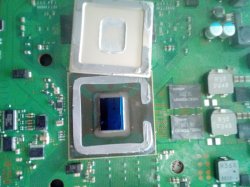
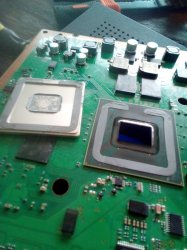
I have without damaging cpu or connections removed IHS. I'm still busy in this proces to finish it. I won't touch rsx as the temperature is ok.
Attachments
Last edited:
sandungas
Developer
Is not stopping ?, nice, thats good news, it means for some weird reason your webman was acting weird, you have fixed it and you are back in the good trackFan is not stopping anymore but then it's still in a speed. Temps are still high.
This thread is a good example why i dont like the custom fancontrol apps in general... because sometimes "shit happens"
Under a combination of weird conditions the custom code could start doing weird things
Sony does the fancontrol "by hardware" for a good reason, hardware is a lot more relliable than software
Under a combination of weird conditions the custom code could start doing weird things
Sony does the fancontrol "by hardware" for a good reason, hardware is a lot more relliable than software
So... now is when we can return to the beginning of the conversation when we was talking only about CELL
Wow, you did it very good, it doesnt seems to have scratches, at this point the only posible reason why CELL could be "dead" is if one or more solder balls "cracked" under it when you was applying force to remove his IHS (lets hope it didnt happened)I have without damaging cpu or connections removed IHS. I'm still busy in this proces to finish it. I won't touch rsx as the temperature is ok.
So... you need to assemble everything with new thermal paste (dont use any glue or silicone to stick the IHS yet btw... you are still in testing stage) and check temperatures
I will explain to you later a couple of tests you should do, are going to tell us how good is working
Ps3 has power red light on and when touching the power bar to turn it on it does not respond..Is not stopping ?, nice, thats good news, it means for some weird reason your webman was acting weird, you have fixed it and you are back in the good track
This thread is a good example why i dont like the custom fancontrol apps in general... because sometimes "shit happens"
Under a combination of weird conditions the custom code could start doing weird things
Sony does the fancontrol "by hardware" for a good reason, hardware is a lot more relliable than software
So... now is when we can return to the beginning of the conversation when we was talking only about CELL
Wow, you did it very good, it doesnt seems to have scratches, at this point the only posible reason why CELL could be "dead" is if one or more solder balls "cracked" under it when you was applying force to remove his IHS (lets hope it didnt happened)
So... you need to assemble everything with new thermal paste (dont use any glue or silicone to stick the IHS yet btw... you are still in testing stage) and check temperatures
I will explain to you later a couple of tests you should do, are going to tell us how good is working
I would believe that CELL is undamaged after Delid only after you can confirm its working. Many funny things can happen in Delid process. Even a hairline scratch is fatal and you may knock out any small component near CPU on motherboard.
Good luck. Now you need to put everything back. Install a high quality thermal paste under IHS. Also you need to put something to keep IHS and CELL chip together. Maybe a tiny silicon gel/ thermal grease on each corner after you install thermal paste. I would also advise to put some tape around the Cell so that you don't damage any of the small components while doing the work. Its that non conducting electronic tape or masking tape which isn't too sticky and easily removable. And you need to clean IHS with 99% or 90% IPA to remove earlier dried paste.
@sandungas
My 3rd Generation CECHP doesn't have metallic casing for Fan and there are no copper pipes on heatsinks and fan assembly. I think your mentioned design is CECHA which was the very 1st generation.
Good luck. Now you need to put everything back. Install a high quality thermal paste under IHS. Also you need to put something to keep IHS and CELL chip together. Maybe a tiny silicon gel/ thermal grease on each corner after you install thermal paste. I would also advise to put some tape around the Cell so that you don't damage any of the small components while doing the work. Its that non conducting electronic tape or masking tape which isn't too sticky and easily removable. And you need to clean IHS with 99% or 90% IPA to remove earlier dried paste.
@sandungas
My 3rd Generation CECHP doesn't have metallic casing for Fan and there are no copper pipes on heatsinks and fan assembly. I think your mentioned design is CECHA which was the very 1st generation.
Ps3 has power red light on and when touching the power bar to turn it on it does not respond..
Try powering on with controller. Or take out the top cover and put finger on sensor directly. Also try eject button. Make sure that small band that connects the front panel to motherboard is properly connected.
I don't have the original ps3 controller. It is a pc/ps3 controller..Try powering on with controller. Or take out the top cover and put finger on sensor directly.
I don't have the top on so that i can try pressing with my finger on the sensor..
grr
So PS3 is stuck on standby mode. You can't power it on. Have you double checked everything specially the small band that connects front power eject panel to motherboard?
@sandungas @Naked_Snake1995
Is this a sign of dead CELL? Does Dead CELL gives YLOD? Or does it simply doesn't come out of standby mode?
@sandungas @Naked_Snake1995
Is this a sign of dead CELL? Does Dead CELL gives YLOD? Or does it simply doesn't come out of standby mode?
I have just checked the small cable. I removed it and placed it again. Everything else sits in the fittings.So PS3 is stuck on standby mode. You can't power it on. Have you double checked everything specially the small band that connects front power eject panel to motherboard?
@sandungas @Naked_Snake1995
Is this a sign of dead CELL? Does Dead CELL gives YLOD? Or does it simply doesn't come out of standby mode?
I must say that when i removed the IHS with blade i accidentally peeled a very super small tiny black thingy from a black chip. I don't think that could cause some problems as it is very tiny. I talk about the chips that some have black thermal pads on.
I didn't had to use force. I just went with my blade around the cpu and then it just came off nice.when you was applying force to remove his IHS (lets hope it didnt happened)
I must say that when i removed the IHS with blade i accidentally peeled a very super small tiny black thingy from a black chip. I don't think that could cause some problems as it is very tiny. I talk about the chips that some have black thermal pads on.
I don't know what black thing you are implying? You have a photo of that?
Anyway, the elephant in the room is CELL. The real question is whether CELL is dead or not.
I just made a video. I'm resending it from my wife's phone through messenger to mine. After that in 2 min it will be uploaded on youtube and i'll put the link here. You will see what i'm talking about.I don't know what black thing you are implying? You have a photo of that?
Anyway, the elephant in the room is CELL. The real question is whether CELL is dead or not.
I don't know what black thing you are implying? You have a photo of that?
Anyway, the elephant in the room is CELL. The real question is whether CELL is dead or not.
Those are NEC Tokin Capacitors and they don't have any thermal pads. And i don't think they are cause of the problem at present.
The real things is whether CELL CPU is dead or not after delid. How to confirm it? Experts can give you better idea. I have already tagged them.
By the way, if you think you haven't done Delid job properly, its not really your fault. Many experts have also failed at this thing even when using best of the hands. Even under best of execution, this thing can go wrong.
The real things is whether CELL CPU is dead or not after delid. How to confirm it? Experts can give you better idea. I have already tagged them.
By the way, if you think you haven't done Delid job properly, its not really your fault. Many experts have also failed at this thing even when using best of the hands. Even under best of execution, this thing can go wrong.
Last edited:
Ok thanksThose are NEC Tokin Capacitors and they don't have any thermal pads. And i don't think they are cause of the problem at present.
The real things is whether CELL CPU is dead or not after delid. How to confirm it? Experts can give you better idea. I have already tagged them.
sandungas
Developer
Damn, i was singing victory too soon :/
The surface of CELL cant be seen very well in the video... anyway, that kind of scratches can be seen only with very good photos taken from an special angle where the light does some reflection on the scratched copper trace
You know better than us that you are seeing with your own eyes, but all i can say is it doesnt seems to have scratches
The small cut of material in a edge of the NEC/TOKIN is not a problem, that material doesnt have any function other than protecting "what is inside", but your cut did not touched "the insides", so dont worry about that, this is not the cause of the problem
Right now the only posible causes i could imagine is what i said before about a "cracked" ball under CELL (or a copper pad lifted by a ball, mostly is the same stuff... is a missing electrical connection of CELL)
Or.. what you said in the video... maybe you bent the motherboard and a copper trace of an internal layer of the motherboard was broken
But dunno... before worrying about what im mentioning is better to check everything several times
The surface of CELL cant be seen very well in the video... anyway, that kind of scratches can be seen only with very good photos taken from an special angle where the light does some reflection on the scratched copper trace
You know better than us that you are seeing with your own eyes, but all i can say is it doesnt seems to have scratches
The small cut of material in a edge of the NEC/TOKIN is not a problem, that material doesnt have any function other than protecting "what is inside", but your cut did not touched "the insides", so dont worry about that, this is not the cause of the problem
Right now the only posible causes i could imagine is what i said before about a "cracked" ball under CELL (or a copper pad lifted by a ball, mostly is the same stuff... is a missing electrical connection of CELL)
Or.. what you said in the video... maybe you bent the motherboard and a copper trace of an internal layer of the motherboard was broken
But dunno... before worrying about what im mentioning is better to check everything several times
I think you're right. A cpu's work is to switch on or off of things that are needed to be switched on or off.Damn, i was singing victory too soon :/
The surface of CELL cant be seen very well in the video... anyway, that kind of scratches can be seen only with very good photos taken from an special angle where the light does some reflection on the scratched copper trace
You know better than us that you are seeing with your own eyes, but all i can say is it doesnt seems to have scratches
The small cut of material in a edge of the NEC/TOKIN is not a problem, that material doesnt have any function other than protecting "what is inside", but your cut did not touched "the insides", so dont worry about that, this is not the cause of the problem
Right now the only posible causes i could imagine is what i said before about a "cracked" ball under CELL (or a copper pad lifted by a ball, mostly is the same stuff... is a missing electrical connection of CELL)
Or.. what you said in the video... maybe you bent the motherboard and a copper trace of an internal layer of the motherboard was broken
But dunno... before worrying about what im mentioning is better to check everything several times
Me asking through the sensor to switch ps3 on is not working because cpu is not responding. Question is why it is not responding..
That's where your point can be validated through testing out if the ball(s) is ok..
Does anyone know how i can test that out?
Damn, i was singing victory too soon :/
The surface of CELL cant be seen very well in the video... anyway, that kind of scratches can be seen only with very good photos taken from an special angle where the light does some reflection on the scratched copper trace
You know better than us that you are seeing with your own eyes, but all i can say is it doesnt seems to have scratches
The small cut of material in a edge of the NEC/TOKIN is not a problem, that material doesnt have any function other than protecting "what is inside", but your cut did not touched "the insides", so dont worry about that, this is not the cause of the problem
Right now the only posible causes i could imagine is what i said before about a "cracked" ball under CELL (or a copper pad lifted by a ball, mostly is the same stuff... is a missing electrical connection of CELL)
Or.. what you said in the video... maybe you bent the motherboard and a copper trace of an internal layer of the motherboard was broken
But dunno... before worrying about what im mentioning is better to check everything several times
Does CPU ball/solder crack can cause PS3 to not come out of standby mode? Or does it give YLOD?
Similar threads
-
-
 PS3 Interesting PS3 Errors (1802, 1701, 1601) and Capacitor Replacement
- Started by Cheshire UK
- Replies: 2
-
Installing Vin Diesel's Wheelman on PS3HEN
- Started by MohAsim
- Replies: 3
-
PS3 Moving from Rebug 4.83(??) to Evilnat 4.92.2
- Started by actuallyasriel
- Replies: 2