
PS3 Overheat problems & CELL delidding

Why thoes Power/Eject Switches are completely flat? As far as i know they are Z Shaped,not flat, making them Flat,you are touching the EMI Sheild, thus breaking the connection and there is the problem why it isnt working, you are lucky your PS3 hasnt gone berserk,after this stunt, shape them into Z´s,but be carefull not to break them,since this is a integrated switch board. :rolling:

The first thing you need to bend is the metal of the buttons, you have them like "smashed", it can be seen in this video:

Compare with this photo, the metal of them does like a "loop"
So you need to restore that loop... but be extremelly carefull while doing it because they can "crack"... or you can pull too much from them and you are going to destroy the copper traces where are soldered
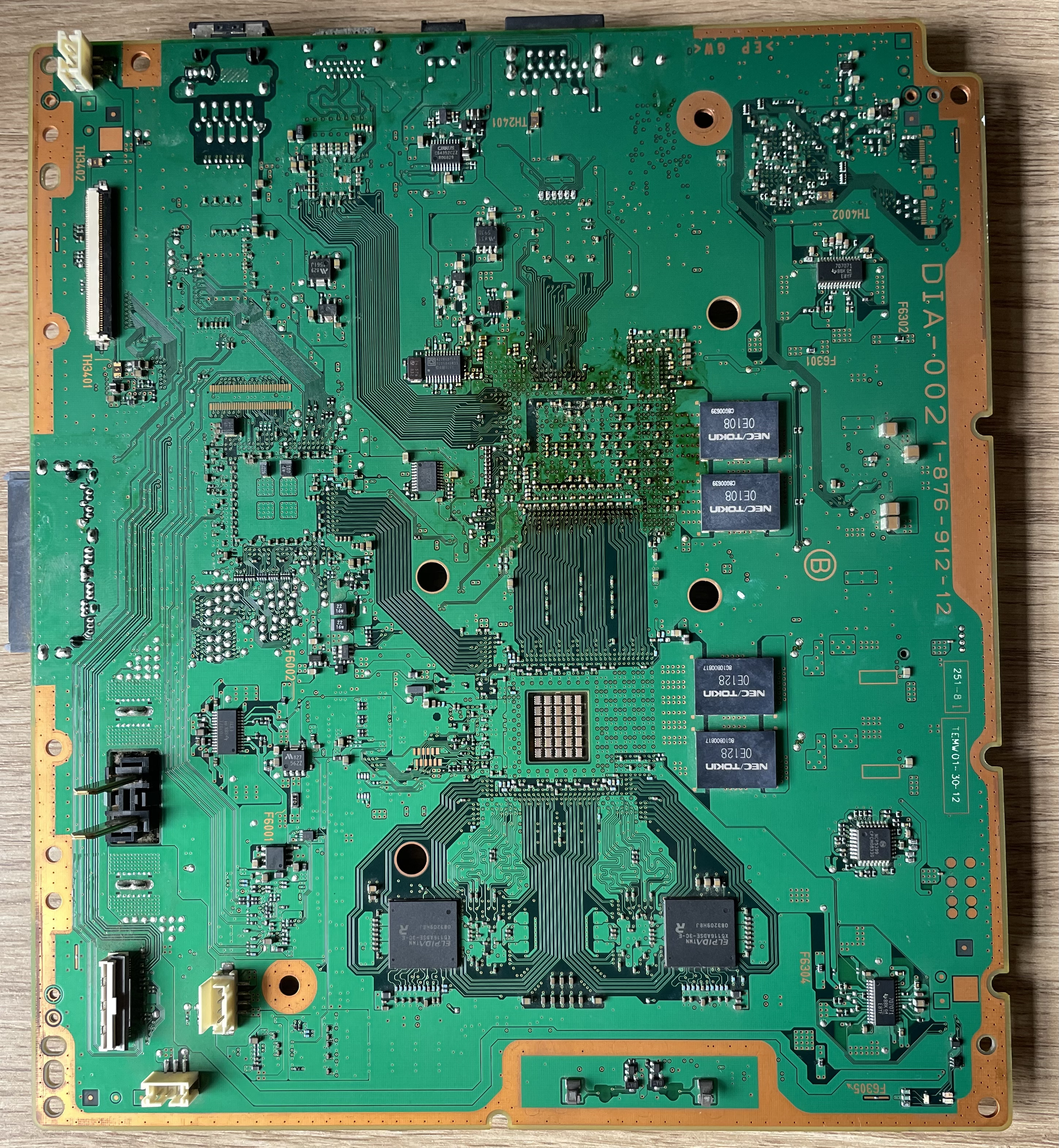
DIA-002_-_1-876-912-22_%28CECHJ%2C_CECHK%29_-_BACK.jpg

Yes before i assembled my ps3 and tested out the temps i have bended the buttons back how they were. I knew they were smashed and that must have happened when i was removing the IHS. And not only that but also when i was trying to power my ps3 on and it did'nt want to listen to me,,, that's when i pressed and pressed and pressed in many ways LOL.
I want to thank everyone involved in helping me out! I also would like to thank the one(s) that created this forum.
I learned alot and i hope that others can learn from this too. It was a good journey.
I know for sure i will be asking alot of help since i want to learn more about everything involved in ps3's and ps4.
WE DID IT TOGETHER! Anyone champagne?
 
Im going to make a last suggestion... at this point you should calm down, fix the loop of the buttons as we mentioned (btw, damned snake you stoled me the trophy by 1 minute)... make one more test if you want to verify again that the PS3 boots, and the buttons works normally... and turn it off

To be honest... i think you should remove the IHS of the RSX... because is a lot easyer than removing the IHS of CELL
You can ask @Naked_Snake1995 he have a tutorial to complete the mission with "S rank" (but not getting the trophy because he uses lethal weapons)


Aaaand... you should really consider buying a good thermal paste... clean that shit you are using and buy a good one
If you are going to order it online try the "thermal grizzlie kryonaut"... or if you want to buy it in a shop of your city try to find the "artic cooling MX-4", is frequently used

Im telling this because after what you did your PS3 is going to be in the "top 10" of the forum for thermal dissipation efficiency (in the group of your model)
You know... one week ago was probably the worst of the forum (it was about to stop working and die by overheats)... and now is going to be one of the bests... is a big difference and i think is worthy, because is not just a "fix" but a huge improvement :)
 
Btw, i was thinking some days ago in renaming the thread title and moving it to the hardware subforum, i did not because it was not clear what the problem was
Now we know everything :)

-The thermal paste under your CELL was weared out (in the photo did not look bad though)
-Your heatsink seats fine on top of both IHS's (this was not the problem)
-Shorcircuit in the buttons (this happened while doing tests)

So... im going to move the thread and change title, like archiving it... eventually other people would find the adventure interesting :)
 
Im going to make a last suggestion... at this point you should calm down, fix the loop of the buttons as we mentioned (btw, damned snake you stoled me the trophy by 1 minute)... make one more test if you want to verify again that the PS3 boots, and the buttons works normally... and turn it off

To be honest... i think you should remove the IHS of the RSX... because is a lot easyer than removing the IHS of CELL
You can ask @Naked_Snake1995 he have a tutorial to complete the mission with "S rank" (but not getting the trophy because he uses lethal weapons)


Aaaand... you should really consider buying a good thermal paste... clean that shit you are using and buy a good one
If you are going to order it online try the "thermal grizzlie kryonaut"... or if you want to buy it in a shop of your city try to find the "artic cooling MX-4", is frequently used

Im telling this because after what you did your PS3 is going to be in the "top 10" of the forum for thermal dissipation efficiency (in the group of your model)

You know... one week ago was probably the worst of the forum (it was about to stop working and die by overheats)... and now is going to be one of the bests... is a big difference and i think is worthy, because is not just a "fix" but a huge improvement :)
In my previous post i mentioned that i already did bend the buttons in the state they normally were. So that's fixed.
I tested my ps3 out and it powers on normally and turns off normally.

Yes i will buy the paste next week cause i ran out of money lol.
From 85° going to 51 is indeed a very huge improvement. I can make a video on how i did the procedure. As i said: The IHS removal was very smooth and fast... I have used hairdryer and heated up the cpu 30 to 40 sec. Then i heated my blade of my precision knive.
I only used the blade without the knive support.. And i just pushed very smoothly and carefully the blade around the cpu 1cm inside cpu.
I didn't even had to push the IHS upwarts cause it came loose after finishing the last cpu side with my blade.
Then i heated up my other blade and peeled off the silicone from IHS.
Maybe the temperatures would be even better if i wouldn't take off the mobo 3 times to clean/inspect it.

And being in top 5 is always a good experience. Teamwork is important and that's what happened here.
And yes i'm calm :) Champagne?
 
Im going to make a last suggestion... at this point you should calm down, fix the loop of the buttons as we mentioned (btw, damned snake you stoled me the trophy by 1 minute)... make one more test if you want to verify again that the PS3 boots, and the buttons works normally... and turn it off

To be honest... i think you should remove the IHS of the RSX... because is a lot easyer than removing the IHS of CELL
You can ask @Naked_Snake1995 he have a tutorial to complete the mission with "S rank" (but not getting the trophy because he uses lethal weapons)


Aaaand... you should really consider buying a good thermal paste... clean that shit you are using and buy a good one
If you are going to order it online try the "thermal grizzlie kryonaut"... or if you want to buy it in a shop of your city try to find the "artic cooling MX-4", is frequently used

Im telling this because after what you did your PS3 is going to be in the "top 10" of the forum for thermal dissipation efficiency (in the group of your model)
You know... one week ago was probably the worst of the forum (it was about to stop working and die by overheats)... and now is going to be one of the bests... is a big difference and i think is worthy, because is not just a "fix" but a huge improvement :)

"By 1 minute"

iojq13mkyruy.jpg
 
Btw, i was thinking some days ago in renaming the thread title and moving it to the hardware subforum, i did not because it was not clear what the problem was
Now we know everything :)

-The thermal paste under your CELL was weared out (in the photo did not look bad though)
-Your heatsink seats fine on top of both IHS's (this was not the problem)
-Shorcircuit in the buttons (this happened while doing tests)

So... im going to move the thread and change title, like archiving it... eventually other people would find the adventure interesting :)
You do what you think is good. I'm all for good. I trust your decisions.
 
Yeah, is time for champagne :)
large.jpg


What i mentioned about buying new thermal paste... well i advised you at beginning that most probably you was going to open and close the PS3 lot of times, not sure how much paste you wasted but is needded to assemble it one more time
Now that you know everything is ready is when you need to clean all the old paste with alcohol and apply new one very well spreaded and assemble it definitivelly

But before that i really think you should consider removing the RSX IHS
Btw, the IHS of the RSX doesnt have the silicone cord all around... search in google for some photos of RSX without the IHS
The paste in the 4 corner "memory chips" of the RSX works a bit like glue... and you can actually "cut" it with your blade

Also, the memory chips in the corners of the RSX doesnt gets damaged if you scratch them a bit at top... is the same i said about the NEC/TOKIN capacitor you cutted in a edge... that black material doesnt have electrical functions... so an scratch in it doesnt matters
Only matters if it "cracks" (like a fracture all along)... a bit like a rock where you see the fracture in the surface of it but the fracture spreads all inside
 
Yeah, is time for champagne :)
large.jpg


What i mentioned about buying new thermal paste... well i advised you at beginning that most probably you was going to open and close the PS3 lot of times, not sure how much paste you wasted but is needded to assemble it one more time
Now that you know everything is ready is when you need to clean all the old paste with alcohol and apply new one very well spreaded and assemble it definitivelly

But before that i really think you should consider removing the RSX IHS
Btw, the IHS of the RSX doesnt have the silicone cord all around... search in google for some photos of RSX without the IHS
The paste in the 4 corner "memory chips" of the RSX works a bit like glue... and you can actually "cut" it with your blade

Also, the memory chips in the corners of the RSX doesnt gets damaged if you scratch them a bit at top... is the same i said about the NEC/TOKIN capacitor you cutted in a edge... that black material doesnt have electrical functions... so an scratch in it doesnt matters
Only matters if it "cracks" (like a fracture all along)... a bit like a rock where you see the fracture in the surface of it but the fracture spreads all inside
I work with electronics repair many years and is my hobby so i definitely will be removing the rsx IHS.
Can that value actually be decreased? it's already at a good value of 43°.. That's the only reason why i didn't touched it.
Oh and yeah i was looking through my posts here and i had actually reached 89° so the difference is huge.. can't believe how such a small fix can make a huge difference. I actually never believed that removing IHS would solve the overheating. I thought my cpu was half dead
 
Last edited:
And being in top 5 is always a good experience
I edited my post to "top 10" after i thought there is more people in the forum with a PS3 where they delidded CELL and RSX... but are not much as far i know really... dunno how many but i would not say more than 15 or 20

By now you should be inside the "top 10" (of the people with your same PS3 model)... but if you delid RSX and you use a nice quality thermal paste this is going to boost you into the first positions :D

Just joking a bit about this inexistant competition about who are the "best 10" of the forum, but is a bit like that :)
 
New thermal paste under IHS is working great.

Some final suggestions. Order a good quality thermal paste. I recommend NON CONDUCTIVE thermal paste which doesn't short circuit in case its accidentally spilled in motherboard. Regarding those sensor buttons. Be very careful in bending them. If they break....big problem. By the way, you can simply install a tiny insulation tape if you do not want to bend those buttons or the plate. And i won't recommend delidding RSX .... yet. You should run some tests after full assemble of PS3. Remember the basic lesson, Delid is last resort surgery. Avoid it until its very necessary. You don't know right now if you need it or not. Basically you should check that your RSX can be kept under 68c during gameplay with control fan utility at reasonable fan speeds (40%-50% fan speeds). (you finish the assembly of PS3 and we will tell you what kind of games you need to be testing)

After final installation of fresh thermal paste under IHS, i recommend sealing IHS with MINIMAL amount of silicon glue. Just tiny bit on each corner to make IHS stick....and easily removable if need arises.

Good luck.
 
I edited my post to "top 10" after i thought there is more people in the forum with a PS3 where they delidded CELL and RSX... but are not much as far i know really... dunno how many but i would not say more than 15 or 20

By now you should be inside the "top 10" (of the people with your same PS3 model)... but if you delid RSX and you use a nice quality thermal paste this is going to boost you into the first positions :D

Just joking a bit about this inexistant competition about how is the "best 10" of the frum, but is a bit like that :)
No worries" life is like a competition already. :D I just have to make one post and i'll gain a trophy LOL just kidding
 
New thermal paste under IHS is working great.

Some final suggestions. Order a good quality thermal paste. I recommend NON CONDUCTIVE thermal paste which doesn't short circuit in case its accidentally spilled in motherboard. Regarding those sensor buttons. Be very careful in bending them. If they break....big problem. By the way, you can simply install a tiny insulation tape if you do not want to bend those buttons or the plate. And i won't recommend delidding RSX .... yet. You should run some tests after full assemble of PS3. Remember the basic lesson, Delid is last resort surgery. Avoid it until its very necessary. You don't know right now if you need it or not. Basically you should check that your RSX can be kept under 68c during gameplay with control fan utility at reasonable fan speeds (40%-50% fan speeds). (you finish the assembly of PS3 and we will tell you what kind of games you need to be testing)

After final installation of fresh thermal paste under IHS, i recommend sealing IHS with MINIMAL amount of silicon glue. Just tiny bit on each corner to make IHS stick....and easily removable if need arises.

Good luck.
That's exactly what i'm going to test out and perhaps post a video so that more people could possibly like to see it.
And thanks for that advice of the rsx.
You and sandungas were very involved in this matter so tnx
 
Final thing i forgot to mention.

Always run your PS3 on fan control software. You can install webman which automatically boots up every time with PS3 start up. Though i personally use Control Fan utility on payload mode which has hassle of manually starting every time but its more effective for FAT models.Only use one fan control software at a time. If you are running webman fan control, do not run CFU. Same thing vise versa.

If you wanna use webman on FAT model, i recommend putting minimum fan speed at 37% on dynamic fan control in webman settings. Or you can run webman with fix fan speed (say 45%).

You should observe the Temps you are getting and you will become familiar with the system and settings it needs. PS3 FAT models are all about Temp control.
 
Is better to dont use the PS3 by now... the most important thing is you know is working

The next thing you would like to know is how good is working, and for that is needed to make a couple of temperature tests, and probably you are going to need to repeat them several times:
-A test made in a very stable enviroment, and at the first boot minutes, to see the difference in between CELL/RSX
-A stress test with the most demanding game following a very defined sequence of actions... to see the max temperature peaks of RSX

But doing this tests right now is pointless, if you are going to change something (new paste and decide if removing RSX IHS) the values you have now are going to be different later
 
Hi all, just want to give an update.
I have not touched my ps3 since my last post here. (I had stuff to do)
Now i want to dig into my ps3 again. I want to know what difference will it make between buying the kryonaut or mx4?
Ps3 is getting old and if the difference between those two pastes will be 3 degrees or 4 then it actually would not bother me.
And also, should i remove the RSX or not since the temp is 43°.
I have for now the game Lego batman and i have not done test yet to see the temps as i'm playing the game.
 
Hi all, just want to give an update.
I have not touched my ps3 since my last post here. (I had stuff to do)
Now i want to dig into my ps3 again. I want to know what difference will it make between buying the kryonaut or mx4?
Ps3 is getting old and if the difference between those two pastes will be 3 degrees or 4 then it actually would not bother me.
And also, should i remove the RSX or not since the temp is 43°.
I have for now the game Lego batman and i have not done test yet to see the temps as i'm playing the game.
Ive heard good things about the Kryonaut, same with the MX-4,so its nothing to be bother about, both are high quality products.

Sent from my G8141 using Tapatalk
 
Ive heard good things about the Kryonaut, same with the MX-4,so its nothing to be bother about, both are high quality products.

Sent from my G8141 using Tapatalk
In that case i will use the mx4 as for that price of kryonaut i can buy 2 x 4gram mx4 paste.
So should i dig into the rsx or not?
Thanks
 
In that case i will use the mx4 as for that price of kryonaut i can buy 2 x 4gram mx4 paste.
So should i dig into the rsx or not?
Thanks
I highly advise so, its more sensitive and more important regarding maintenance, than CELL.

Sent from my G8141 using Tapatalk
 
Hi all, just want to give an update.
I have not touched my ps3 since my last post here. (I had stuff to do)
Now i want to dig into my ps3 again. I want to know what difference will it make between buying the kryonaut or mx4?
Ps3 is getting old and if the difference between those two pastes will be 3 degrees or 4 then it actually would not bother me.
And also, should i remove the RSX or not since the temp is 43°.
I have for now the game Lego batman and i have not done test yet to see the temps as i'm playing the game.
Yep, the difference in between the kryonaut and the mx-4 is going to be just 3ºC or 4ºC, in the link i posted appeared the exact numbers
Both are good, the kryonaut is a bit more expensive than the mx-4 but doesnt matters
The most important factor that could you make choose one or the other is how hard is to you to find them on sale
If you found a shop nearby with the mx-4 but without the kryonaut... go for the mx-4

In my PS3 i used the mx-4
But next time i will try to find the kryonaut
 

Similar threads

Back
Top