PS3 PKGi PS3 v1.2.2 released

I've just released PKGi PS3 v1.1.0

quite a bunch of changes this time:

* Added TTF fonts to support Japanese characters
* Added SSL support (the app can download https:// links)
* Added package install bubble for Direct downloads
* Added background music
* Added settings options for music and auto-update
* Fixed UI issue where texts could go beyond the screen limits

Merry X-mas! :D
Great release, thanks.
 
if i understood correctly only hen supports rap directly, you could add ability to choose between rap/rif, because to use rap on cfw we need another app to create rif, for example reactpsn or i miss something and cfw also support rap files?

regards
 
if i understood correctly only hen supports rap directly, you could add ability to choose between rap/rif, because to use rap on cfw we need another app to create rif, for example reactpsn or i miss something and cfw also support rap files?

regards

Rap Works on cfw, you just need an activated account on the PS3.
 
it's a good question, does it make sense to add the rap->rif conversion to PKGi , or just leave it to HEN, the latest CFW (as Rebug 4.85) or an external tool such as reactpsn?

(as I don't have a CFW PS3 myself, I didn't pay too much attention to it)
 
it's a good question, does it make sense to add the rap->rif conversion to PKGi , or just leave it to HEN, the latest CFW (as Rebug 4.85) or an external tool such as reactpsn?

(as I don't have a CFW PS3 myself, I didn't pay too much attention to it)
you can just simply add an option 'save license as rap/rif'

regards
 
you can just simply add an option 'save license as rap/rif'

regards

adding the option is simple, but the process is not as simple as saving a ".rap" with a ".rif" extension. There's quite a bit of backend code involved to generate it.
 
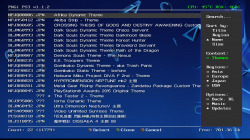
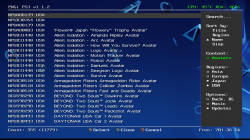
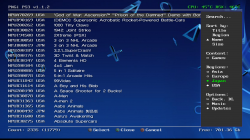
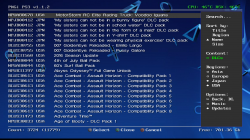
PKGi PS3 is a PlayStation 3 port of PSVita pkgi.

The pkgi-ps3 homebrew app allows to list, select and download .pkg files directly on your PS3.

View attachment 21535

Download link: https://github.com/bucanero/pkgi-ps3/releases/latest
Source code available on GitHub


  • PKGi PS3 v1.1.0
    https://github.com/bucanero/pkgi-ps3/releases/latest

    Quite a bunch of changes this time:

    Added
    • Added TTF fonts to support Japanese characters
    • Added SSL support (the app can download https:// links)
    • Added package install bubble for Direct downloads
    • Added background music
    • Added settings options for music and auto-update
    Fixed
    • Fixed UI issue where texts could go beyond the screen limits

    Merry X-mas! :D


  • v1.1.0

    Added
    • Added TTF fonts to support Japanese characters
    • Added SSL support (the app can download https:// links)
    • Added package install bubble for Direct downloads
    • Added background music
    • Added settings options for music and auto-update
    Fixed
    • Fixed UI issue where texts could go beyond the screen limits

    v1.0.8

    Added
    • Added analog pad support
    • Added CPU/RSX temperature status
    • Added Details screen
    • Added automatic download after version update check
    Fixed
    • Improved empty .pkg file generation using async IO.
    • Improved UI

    v1.0.5

    Added
    • Generic text database format support
    • Credits ( :but select: ) and Exit ( :but start: ) confirmation dialogs
    • Changelog file
    Fixed
    • The app now creates /dev_hdd0/exdata if the folder doesn't exists
    • Fixed unresponsive background download dialog while creating a PKG file
    • Fixed a bug when the URL was missing

    v1.0.0

    Added
    • Text search filtering using on-screen keyboard
    • Background download task mode (uses internal Download Manager)
    Fixed
    • Fixed incorrect progress bar information during direct download

  • Installation notes

    After installing the application, you'll need to create a "pkgi.txt" database file on /dev_hdd0/game/NP00PKGI3/USRDIR

    The file should contain the list of PKG files (URLs) that you'd like to list in the app.
    The file is simply a CSV (comma separated value) text file with the following format (each line means one item in the list):
    Code:
    contentid,flags,name,description,rap,url,size,checksum

    where:
    • contentid is full content id of item, for example: UP0000-NPHA99999_00-0000112223333000.
    • flags is currently unused number, set it to 0.
    • name is arbitrary string to display for name.
    • description is currently unused alternative item's description, leave it empty.
    • rap is the 16 hex bytes of the RAP file, if needed by the pkg (.rap will be created on hdd0/exdata). Leave empty for no rap file.
    • url is http url where to download the content .pkg file.
    • size is size of pkg in bytes, or 0 if unknown.
    • checksum is sha256 digest of pkg as 32 hex bytes to make sure pkg is not tampered with. Leave empty to skip the check.

    For example, the pkgi.txt could be something as:
    Code:
    EP0000-NP9999999_00-0AB00A00FR000000,0,My PKG Test,,dac109e963294de6cd6f6faf3f045fe9,http://192.168.1.1/html/mypackage.pkg,2715513,afb545c6e71bd95f77994ab4a659efbb8df32208f601214156ad89b1922e73c3
    UP0001-NP00PKGI3_00-0000000000000000,0,PKGi PS3 v0.1.0,,,http://bucanero.heliohost.org/pkgi.pkg,284848,3dc8de2ed94c0f9efeafa81df9b7d58f8c169e2875133d6d2649a7d477c1ae13

  • original PS Vita version by mmozeiko
    ported to PlayStation 3 by Bucanero


See the project's README on GitHub for more information: https://github.com/bucanero/pkgi-ps3


feel free to share you comments and ideas! :cool2:
Works but only by direct download method. HEN users will have to unpack pkg/ then convert PS3 TSV file with this tool https://www.sendspace.com/file/j33eru/ copy pkgi.txt to USRDIR/ repack/ then install.
 
It appears background downloads work after all my bad LOL.

Yes, background downloads will show up after a reboot on the internal download manager (XMB -> Network -> Download manager).
My suggestion is to queue everything you need, and then do one reboot at the end.

btw no need for conversion tools. Since version 1.0.5 you can use any text database file without doing any conversion. You just need to define a "dbformat.txt" file so the app knows how to handle the custom format.
Check here for examples on how to define a format file for your list:
https://github.com/bucanero/pkgi-ps3#user-defined-db-format
 
tried this one and its really cool app, specially the background download feature. I wish that it natively supports tsv files from that pkg repository site.

its kind of unfortunate that it still doesnt support by categories. it would also be cool if the app supports DLC downloads, I hope there's a option that shows only the DLC which game is currently installed. or at least the games queued on background downloads. its quite clever that the app knows what app/game is installed on the system and insert a solid diamond icon if its installed.
 
tried this one and its really cool app, specially the background download feature. I wish that it natively supports tsv files from that pkg repository site.

its kind of unfortunate that it still doesnt support by categories. it would also be cool if the app supports DLC downloads, I hope there's a option that shows only the DLC which game is currently installed. or at least the games queued on background downloads. its quite clever that the app knows what app/game is installed on the system and insert a solid diamond icon if its installed.

as I mentioned, the app actually supports any kind of text database, (.csv, .tsv, etc). You only need to define a "dbformat.txt" file ( https://github.com/bucanero/pkgi-ps3#user-defined-db-format ). You can easily build your own by following the examples.

About categories and other type of content: check the latest version 1.1.2 . I've added support for mutiple database files, so now you can load data for many types of content, and then filter it from the app as needed.
 
Last edited:
ok thanks, managed to load the tsv file (need to be renamed as pkgi.txt) and use the dbformat.txt below to make it work

now with the loading multiple database, how can I make that work?
and also how can I make each database distinguish on each other like one database is for games and another one is for DLC etc.... without doing a a modification of the file (except for the filename change, to be honest it would be cool if we can just pre-define this on a config.txt and tell which is which database is for games, dlc, themes. etc....) to be honest I dont want to insert flags on each line of the database just to identify them that they are DLC or game or theme.
 

Attachments

ok thanks, managed to load the tsv file (need to be renamed as pkgi.txt) and use the dbformat.txt below to make it work

now with the loading multiple database, how can I make that work?
and also how can I make each database distinguish on each other like one database is for games and another one is for DLC etc.... without doing a a modification of the file (except for the filename change, to be honest it would be cool if we can just pre-define this on a config.txt and tell which is which database is for games, dlc, themes. etc....) to be honest I dont want to insert flags on each line of the database just to identify them that they are DLC or game or theme.

Good to hear that you were able to load your database by using a dbformat.txt file. :)

oh, I totally forgot to explain how to use the new feature for loading multiple database files. I need to update the Readme.
Anyways, quick how-to for loading multiple databases and categories:

Save your database files using any the following file names
  • pkgi_games.txt
  • pkgi_dlcs.txt
  • pkgi_themes.txt
  • pkgi_avatars.txt
  • pkgi_demos.txt
  • pkgi_managers.txt
  • pkgi_emulators.txt
  • pkgi_apps.txt
  • pkgi_tools.txt
items on each of these files will be auto-categorized to the file content type.
(note: the app assumes that every database file has the same format, as defined in dbformat.txt)

the other option is to define the "flag" column in your database for each item, using this table:

type valueContent
0ContentUnknown
1ContentGame
2ContentDLC
3ContentTheme
4ContentAvatar
5ContentDemo
6ContentManager
7ContentEmulator
8ContentApp
9ContentTool
 
thanks for the assistance, all I can say that this app is now functional. all works well, with this, there's no longer needed for those XMB mods that include all the pkg links.

now if we can only move this app to network menu section on xmb (instead in game section) it would make it really neat. I know this is possible but cant remember how exactly.
 

Attachments

  • PKGi PS3_1.png
    PKGi PS3_1.png
    968.9 KB · Views: 822
  • PKGi PS3_2.png
    PKGi PS3_2.png
    926.6 KB · Views: 817
  • PKGi PS3_3.png
    PKGi PS3_3.png
    768.1 KB · Views: 820
  • PKGi PS3_4.png
    PKGi PS3_4.png
    1 MB · Views: 838
now if we can only move this app to network menu section on xmb (instead in game section) it would make it really neat. I know this is possible but cant remember how exactly.

well, I never thought about it, but yes maybe it makes sense to add PKGi to the "Network" section on XMB. Btw, it's just a category change in the PARAM.SFO.

For now, if you want, you can edit it yourself with any param.sfo editor and then overwrite the file. You might need to rebuild the database for the change to take effect.
 
Also, I forgot to explain how to use the database update/refresh feature:

If you want to be able to refresh or sync a database online, you need to add the db URL to the config.txt file. For example:

Code:
url http://www.mysite.com/mylist.csv
url_demos http://www.demos.com/otherlist.csv
url_emulators http://www.example.com/emulators.csv

in this scenario, "pkgi.txt" will be updated with 'mylist.csv', "pgi_demos.txt" with 'otherlist.csv' , and "pkgi_emulators.txt" with 'emulators.csv'.

Next time you open the app, you'll have an additional menu option called "Refresh..." . If you select it, the local databases will be sync'ed with the provided URLs.
 
Last edited:
Something like XMBPD might be suitable, without the non pkg categories?

@DeViL303 , I've added the categories feature we were discussing earlier . Do you think I missed any meaningful category?
(btw, I've only recycled the unused "flags" column for the content type value, so any old database will just tag items as "unknown")
  • Unknown
  • Game
  • DLC
  • Theme
  • Avatar
  • Demo
  • Manager
  • Emulator
  • Application
  • Tool
 

Similar threads

Back
Top