
You are using an out of date browser. It may not display this or other websites correctly.
You should upgrade or use an alternative browser.
You should upgrade or use an alternative browser.

PS2 POPStarter Game Installer for OPL v1.0.0.1
- Thread starter HWNJ
- Start date


HWNJ
Developer
It works on the latest official OPL version. Be sure to always download OPL from the official sources:Games created with this tool won't start with the current OPL version, it just opens the PS2 menu again
https://github.com/ps2homebrew/Open-PS2-Loader

Fannste94
Member
I already have the 1.1.0 versionIt works on the latest official OPL version. Be sure to always download OPL from the official sources:
https://github.com/ps2homebrew/Open-PS2-Loader

jolek
Senior Member
POPStarter has a debug feature:
https://bitbucket.org/ShaolinAssassin/popstarter-documentation-stuff/wiki/debug-mode.
If it kicks to OSDSYS in 99% you are missing something.
Anyway does the same thing happen when you launch these games through u\wLe?
https://bitbucket.org/ShaolinAssassin/popstarter-documentation-stuff/wiki/debug-mode.
If it kicks to OSDSYS in 99% you are missing something.
Anyway does the same thing happen when you launch these games through u\wLe?
HWNJ
Developer
Or maybe, the pendrive works with BDM drivers but not with the 2019's MASS drivers.If it kicks to OSDSYS in 99% you are missing something.
Fannste94
Member
Yes I just downloaded a game with the Bin and Cue files and added the Cue files in the tool and it created the game on the USB external hard drive in the POPS folder, it worked on the previous OPL but since I installed the 1.1.0 version it just opens the PS2 menuPOPStarter has a debug feature:
https://bitbucket.org/ShaolinAssassin/popstarter-documentation-stuff/wiki/debug-mode.
If it kicks to OSDSYS in 99% you are missing something.
Anyway does the same thing happen when you launch these games through u\wLe?
jolek
Senior Member
Yes I just downloaded a game with the Bin and Cue files and added the Cue files in the tool and it created the game on the USB external hard drive in the POPS folder, it worked on the previous OPL but since I installed the 1.1.0 version it just opens the PS2 menu
That is why I suggested to use debug feature...
To notice what has changed...
Fannste94
Member
That is why I suggested to use debug feature...
To notice what has changed...
It says that it's missing some files but I already have them in the folder
Attachments
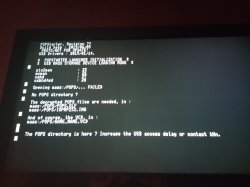
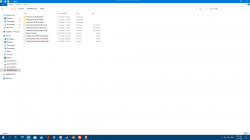
Last edited by a moderator:
jolek
Senior Member

$USBDELAY_#:
https://bitbucket.org/ShaolinAssassin/popstarter-documentation-stuff/wiki/special-cheats.
if that does not help
Line $413:
https://bitbucket.org/ShaolinAssassin/popstarter-documentation-stuff/wiki/configuration-table.
Note from the dev:
https://www.psx-place.com/threads/popstarter-external-hdd-error.19326/#post-131596.
Fannste94
Member
From the Github page here https://github.com/ps2homebrew/Open-PS2-Loader/releases/tag/v1.1.0- If we take what the program says: You need to have more USB delay
Or
- Maybe it is BDM's fault
Where did you downloaded your OPL from?
And how do I type that?
$USBDELAY_#:
https://bitbucket.org/ShaolinAssassin/popstarter-documentation-stuff/wiki/special-cheats.
if that does not help
Line $413:
https://bitbucket.org/ShaolinAssassin/popstarter-documentation-stuff/wiki/configuration-table.
Note from the dev:
https://www.psx-place.com/threads/popstarter-external-hdd-error.19326/#post-131596.
Last edited by a moderator:
Fannste94
Member
I can't find itUsing hex editor on opened POPStarter. It is explained in the link You quoting.
OK but what about the Game installer tool, can it be fixed? or OPL?I attached edited versions of POPStarter with 0x09, 0x7E and 0xFF delay options.
Rename and replace the ELF in use.
All of them are debug-enabled
Last edited by a moderator:
HWNJ
Developer
Replace the ELF with the one that works for you.OK but what about the Game installer tool, can it be fixed? or OPL?
Go to "Requeridos" and then replace "POPSTARTER-20190605.ELF"
It is that simple.
Fannste94
Member
Ok thxReplace the ELF with the one that works for you.
Go to "Requeridos" and then replace "POPSTARTER-20190605.ELF"
It is that simple.
I replaced the ELF file and now it opens The Popstarter launcher screen and it's stuck like thatReplace the ELF with the one that works for you.
Go to "Requeridos" and then replace "POPSTARTER-20190605.ELF"
It is that simple.
Last edited by a moderator:

A/M
Member
Does this support the EXfat USB format?
because i can't convert ps1 games, always give me an error message
Sorry, i can't edit my post, so...that was not the program, but the multi BIN files of the game (Colin McRae 2.0 us)
BUT, once the game is installed on the USB stick, it appears on "APP" on OPL but at launch always bring me back to UlaunchElf, saying "there is no disk" (OPL is version BDM4 and ps2 90004)
because i can't convert ps1 games, always give me an error message
Sorry, i can't edit my post, so...that was not the program, but the multi BIN files of the game (Colin McRae 2.0 us)
BUT, once the game is installed on the USB stick, it appears on "APP" on OPL but at launch always bring me back to UlaunchElf, saying "there is no disk" (OPL is version BDM4 and ps2 90004)
Last edited by a moderator:
Similar threads
-

-

-
 PS2 Investigating Champions Of Norrath PAL freeze using OPL
- Started by WATW
- Replies: 11
-
