PS3 Project RSX Boost: Overclock your Retail PS3 RSX Speeds (ps3 cfw only)

I mentally prepared for it as soon as I saw it was a 20XX :')
Next time I will simply avoid these models.

By the way, I remembered this user reporting the same issue at 700MHz core.
I don't question the wear of the NEC Tokins in my console, but couldn't it be a simple limitation of these capacitors ?
I was wondering, maybe they just can't hold out with such high speeds (and resulting noise/ripple) in intensives games ?

I fixed these instability issues by disabling the FPS counter and changing fan from dynamic to 40% manual. Since doing that over a week ago, I've had no issues whatsoever - no three beep shutdowns and no freezes rebooting or starting/exiting games. I've even been able to put the VRAM back up to 950 with no problems.

It seems the combination of the high overclock and whatever interrupts these plugins are doing is too much for the system to take. I noticed even on stock clocks that the FPS counter sometimes caused freezes, so perhaps that's a bit buggy.

TLDR - if you're having occasional freezes/shutdowns, try disabling the FPS counter and setting a manual fan speed.
 
I fixed these instability issues by disabling the FPS counter and changing fan from dynamic to 40% manual. Since doing that over a week ago, I've had no issues whatsoever - no three beep shutdowns and no freezes rebooting or starting/exiting games. I've even been able to put the VRAM back up to 950 with no problems.

It seems the combination of the high overclock and whatever interrupts these plugins are doing is too much for the system to take. I noticed even on stock clocks that the FPS counter sometimes caused freezes, so perhaps that's a bit buggy.

TLDR - if you're having occasional freezes/shutdowns, try disabling the FPS counter and setting a manual fan speed.
If it wasn't so late, I'd test it now ! But yeah, 1:16 AM x)
You give me a lot of hope ! Thanks ! :D

(I wonder if "Akari FPS counter" would work without these issues ?)
 
Last edited:
Sorry I didn't read 88 pages but... what is default MHz and FPS and those going to 1000/1000?
Is it night and day or 30 FPS to 36 FPS?
*I have OC'd in my day and witnessed great benchmarks but still throttled back my hard drive access and things
Is it a game changer (pun intended) or tweaker hawks looking for the bleeding edge the system can push?
*this is a great thread - don't get me wrong
 
Sorry I didn't read 88 pages but... what is default MHz and FPS and those going to 1000/1000?
Is it night and day or 30 FPS to 36 FPS?
*I have OC'd in my day and witnessed great benchmarks but still throttled back my hard drive access and things
Is it a game changer (pun intended) or tweaker hawks looking for the bleeding edge the system can push?
*this is a great thread - don't get me wrong
Do not dare attempt 1000/1000. You'll brick your console instantly. On slims 40nm start with 700/900. And go up 50 at a time on the core. If no artifacts on crysis. Try more. Until artifacts. Crysis HD is the perfect testing game. It's only a 3gb game.
 
@RIP-Felix hey, i'm trying to find the FAB ID from the lv1 dump but I'm lost once I open it in HxD like you said. I try searching for my clock speed but it doesn't show up. Might be doing something wrong...
 
Sorry I didn't read 88 pages but... what is default MHz and FPS and those going to 1000/1000?
Is it night and day or 30 FPS to 36 FPS?
*I have OC'd in my day and witnessed great benchmarks but still throttled back my hard drive access and things
Is it a game changer (pun intended) or tweaker hawks looking for the bleeding edge the system can push?
*this is a great thread - don't get me wrong
It really can be night and day.
We should make a list somewhere.

Crysis at a stable 30fps, GoW Ascension can hit 60fps, GT6 running at 60fps, +10fps at Empire City (Night) in Sonic Unleashed, way more stable framerate in Skyrim (even with mods) and Fallout New Vegas..., BioShock Infinite unlocked running at an average of 50fps, +15-20fps in some CoD games, etc ...
As long as a game is not completely CPU bottlenecked, it will have a nice boost.
Of course, the results will depends on the "intensity" of overclock.
 
Last edited:
It really can be night and day.
We should make a list somewhere.

Crysis at a stable 30fps, GoW Ascension hitting 60fps, GT6 running at 60fps, +10fps at Empire City (Night) in Sonic Unleashed, way more stable framerate in Skyrim(even with mods) and Fallout New Vegas..., BioShock Infinite unlocked running at an average of 50fps, +15-20fps in some CoD games, etc ...
As long as a game is not completely CPU bottlenecked, it will have a nice boost.
Of course, the results will depends on the "intensity" of overclock.
When it comes to the bethesda games having an SSD and an OC is night and day
 
I got slim2508B and runs amazing with 700/900 but 750/900 is artifacts all over screen , should I go for 700/950-1000 or no?And if I do can u make pup for both?thanks
 
Indeed. I'm using windows 11 myself. I'm not really sure what's causing errors for others. I have the base version of mfw builder in Program Files (x86), which requires full privileges to Users in order to write the keys iirc. On desktop, where I put yours, I just ran the exe as administrator. @haxxxen suggested running the tools folder as administrator as well iirc, so members with issues might mess with that. I don't have to myself.
Interesting.
Personally I just put it in Program Files (x86) and... that's all. I don't need to run anything as administrator. That said, I use Windows 7 for it.

@Mitsu™ Unfortunately, 900 975 had a glitchy screen, so I fell back to 850 975.
You've found your limits ! Congrats, your PS3 is among the best !

I got slim2508B and runs amazing with 700/900 but 750/900 is artifacts all over screen , should I go for 700/950-1000 or no?And if I do can u make pup for both?thanks

You can try but proceed step by step as you're approaching 1000MHz.
The brick risk is real.

700/925
https://www.mediafire.com/file/xyan4c4hg08ckin/evilnat_4.91.2_b8_700_925.PEX-PS3UPDAT.zip/file

700/950
https://www.mediafire.com/file/h10h4kvwbvqv1gp/evilnat_4.91.2_b8_700_950.PEX-PS3UPDAT.zip/file

700/975
https://www.mediafire.com/file/s02c4l0ooqc1j7w/evilnat_4.91.2_b8_700_975.PEX-PS3UPDAT.zip/file

700/1000
https://www.mediafire.com/file/ll42zjl2sypkrgb/evilnat_4.91.2_b8_700_1000.PEX-PS3UPDAT.zip/file
 
Last edited:
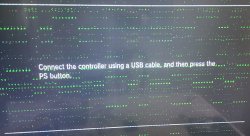
Yep, brick risk is real and it comes without warning. My second Slim was perfectly fine with 1000 memory, flashing 1025 bricked it. I can enter recovery mode technically but my authentic DS3 controller won't connect through USB (plugging it in turns all LEDs off). If anyone knows a way around this let me know.

It turns on normally but to a black screen, ironically there the controller pairs.
 

Attachments

  • 20240512_122650_1.jpg
    20240512_122650_1.jpg
    1.2 MB · Views: 86
Last edited:
Yep, brick risk is real and it comes without warning. My second Slim was perfectly fine with 1000 memory, flashing 1025 bricked it. I can enter recovery mode technically but my authentic DS3 controller won't connect through USB (plugging it in turns all LEDs off). If anyone knows a way around this let me know.

It turns on normally but to a black screen, ironically there the controller pairs.

wow, that looks really bad. I don't know if what I say will be helpful, but two things. some people with bricked from oc units have reported placing a desk fan, aimed at the system, helped lower temps, if it's a temps issue. another thing is I'd just try another controller. I had a similar issue with the pstv years ago, to where a legit controller wouldn't work for unknown reasons in the recovery menu, but a fake one did. there are probably more fake ones on say eBay now than real ones, so you might consider trying it. with my issue, it eventually started working fine, but it may have been after a reinstall of enso, as I used the original 3.65 version where the config.txt was on vs0.
 
It's strange, sometimes it lets me further into the recovery menu and I was able to scan for updates, then it froze again. I even got the XMB violin noise but wasn't able to see anything. Wonder what the fastest way to flash an update is?
 
Yep, brick risk is real and it comes without warning. My second Slim was perfectly fine with 1000 memory, flashing 1025 bricked it. I can enter recovery mode technically but my authentic DS3 controller won't connect through USB (plugging it in turns all LEDs off). If anyone knows a way around this let me know.

It turns on normally but to a black screen, ironically there the controller pairs.
Firstly, sorry for what happened.
IIRC, @Tanzu15 got a similar bricking (with recovery menu still reachable and this kind of artifacts).
By cooling it down with a fan, he managed to reinstall a working firmware.
Also, you can try to power it on without the upper shell to cool it down a bit.
And as @Charles_n_town said, try another controller, maybe a 3rd party one.
 
Last edited:
Interesting.
Personally I just put it in Program Files (x86) and... that's all. I don't need to run anything as administrator. That said, I use Windows 7 for it.


You've found your limits ! Congrats, your PS3 is among the best !


You can try but proceed step by step as you're approaching 1000MHz.
The brick risk is real.

700/925
https://www.mediafire.com/file/xyan4c4hg08ckin/evilnat_4.91.2_b8_700_925.PEX-PS3UPDAT.zip/file

700/950
https://www.mediafire.com/file/h10h4kvwbvqv1gp/evilnat_4.91.2_b8_700_950.PEX-PS3UPDAT.zip/file

700/975
https://www.mediafire.com/file/s02c4l0ooqc1j7w/evilnat_4.91.2_b8_700_975.PEX-PS3UPDAT.zip/file

700/1000
https://www.mediafire.com/file/ll42zjl2sypkrgb/evilnat_4.91.2_b8_700_1000.PEX-PS3UPDAT.zip/file
Could you make 650/900 for me as well?
 
I think that was it. I Waited half an hour and tried again, it worked without showing any artifacting. Perhaps the memory modules overheat at this high a clock? Thank you!
Great ! :D
Apparently, heat play a huge role here, indeed.
This is at least the second PS3 saved just by cooling it down (by waiting or by using a fan, etc...).
Could you make 650/900 for me as well?
Done :encouragement:

650/900
https://www.mediafire.com/file/v4shd77q3thy2ph/test_650_900_beta8.pup_4.91.CEX-PS3UPDAT.zip/file

I fixed these instability issues by disabling the FPS counter and changing fan from dynamic to 40% manual. Since doing that over a week ago, I've had no issues whatsoever - no three beep shutdowns and no freezes rebooting or starting/exiting games. I've even been able to put the VRAM back up to 950 with no problems.

It seems the combination of the high overclock and whatever interrupts these plugins are doing is too much for the system to take. I noticed even on stock clocks that the FPS counter sometimes caused freezes, so perhaps that's a bit buggy.

TLDR - if you're having occasional freezes/shutdowns, try disabling the FPS counter and setting a manual fan speed.
I retried 700/900 with MGRR and had this same issue again unfortunately with a new 1002 (NEC/Tokins) error on the log. Probably too much noise/ripple for them. They are supposed to work at 500/650 (550/700 if we consider the original speeds).
Buuut I will try Skyrim, I'm curious.
 
Last edited:
Back
Top