PS1 ISO generation on PS3

I'll double check the disc, but normally, I do this by holding it up to the light and see if I can see light coming through the label in any location. I've had that before with Bluray movies, where the G/F at the time decided it would be a really good idea to use one of my limited edition Dark Knight Bluray movies discs as a coaster for her and her friend alcoholic beverages in a drunken state whilst I was away.

I'll see if I can see any light coming through Overboard!. If I can't see any light, then I have to presume that the disc condition is still good. I seem to remember when I was experimenting with CFW on my PSP a few years ago, that I successfully managed to get Overboard! on to the PSP ok. I can't remember how I did this now though. If I copied this disc with the PSP software, then it must have worked only a few years ago. (Just long enough ago that I cannot remember much of what I was doing back then)
 
So I've not got time for anything else but I did check my Overboard! Disc, and I have to say it's immaculate. Factory fresh immaculate. Both sides. Label is mint. Zero scratches anywhere. Just an imgburn issue it seems.
 
So I've not got time for anything else but I did check my Overboard! Disc, and I have to say it's immaculate. Factory fresh immaculate. Both sides. Label is mint. Zero scratches anywhere. Just an imgburn issue it seems.
Its possible, the fact that a couple of other people on the net had issues with Overboard! with imgburn too makes me think there is something unique to it that imgburn just can't handle, but other programs will probably still work fine so just try something else, lots of image making programs out there, with it being a CDDA game anyway using Retroarch would probably work best (well Reumper would but we already know your drive isn't compatible so lets forget that) to make it compatible with CUE2CU2 (or you will get the same message you got with RE2).
 
Right, a quiet Sunday afternoon to myself has allowed me to finish dumping the rest of my game discs (save for one I've yet to find. It's Time Crisis, and I think it's back in its original box with the light gun etc, but I can't even get near to the wardrobe right now due to maddams mess!) I'll do that one later.

This left me with only Overboard! which wouldn't copy, so I've now installed RetroArch and tried the "dump disc" option on there. It's seems to have worked (took me ages to find where it'd put the dump files though!). However, there is a problem. It's created 31 individual track files as .bin and then the .cue file lists them all. I'm guessing this is useless? I can only put up to a maximum of 5 .bin files into the pop-fe-ui software.

I'll move back on to making .pkg files from the most recent imgburn dumps i've got. This is all taking me a lot of time due to so many games to do. So thank you for being patient with the protractedness of my progress. I know i'm not the fastest.

EDIT: I've just downloaded a program called Anyburn, and tried that with Overboard! and it *seems* to have worked perfect. Proof will be in the pudding of converting it to a package of course, but it looks like a step in the right direction....
 
Last edited:
Right, a quiet Sunday afternoon to myself has allowed me to finish dumping the rest of my game discs (save for one I've yet to find. It's Time Crisis, and I think it's back in its original box with the light gun etc, but I can't even get near to the wardrobe right now due to maddams mess!) I'll do that one later.

This left me with only Overboard! which wouldn't copy, so I've now installed RetroArch and tried the "dump disc" option on there. It's seems to have worked (took me ages to find where it'd put the dump files though!). However, there is a problem. It's created 31 individual track files as .bin and then the .cue file lists them all. I'm guessing this is useless? I can only put up to a maximum of 5 .bin files into the pop-fe-ui software.

I'll move back on to making .pkg files from the most recent imgburn dumps i've got. This is all taking me a lot of time due to so many games to do. So thank you for being patient with the protractedness of my progress. I know i'm not the fastest.

EDIT: I've just downloaded a program called Anyburn, and tried that with Overboard! and it *seems* to have worked perfect. Proof will be in the pudding of converting it to a package of course, but it looks like a step in the right direction....
Hey congrats on getting it dumped, But when RetroArch dumps a game that is CDDA (1 Data Track and the rest are audio tracks like a music CD) it does make it into a lot of files, but the CUE is still only 1 game, so you dont need to put each .bin into pop-fe you just load the 1 cue file into pop-fe and it will do the rest, this will be the same for all games with audio tracks like Resident Evil 2 as well and any others you have when dumped with it, this is the format that CUE2CU2 likes (i personally dont like this format and prefere just a clean bin+cue).
 
Hey congrats on getting it dumped, But when RetroArch dumps a game that is CDDA (1 Data Track and the rest are audio tracks like a music CD) it does make it into a lot of files, but the CUE is still only 1 game, so you dont need to put each .bin into pop-fe you just load the 1 cue file into pop-fe and it will do the rest, this will be the same for all games with audio tracks like Resident Evil 2 as well and any others you have when dumped with it, this is the format that CUE2CU2 likes (i personally dont like this format and prefere just a clean bin+cue).

The .cue file still referenced ALL the .bin files within it, not just the first one?

So you're saying that the RetroArch output is "better" then?

Since last posting, I went through all the remaining file conversions needing done, including Overboard! (using the Anyburn output) and noted the remaining games with the cuecu2 warning. So at least I've got a reference to those games which need doing again. So at this point I'm ready to start installing them all on to the console and see what's what.

Are you suggesting then, for the games with cuecu2 warnings, that I should consider redoing these games using RetroArch, and then just reference the first .bin file output within pop-fe and try the conversion output from that instead (if the game(s) don't run right on the console)

I never got the cuecu2 warning with Overboard!, but it is the oddball output as it was done using Anyburn. It'll be interesting to see if it's good/different in any way...
I could also try Overboard! again, but use the RetroArch output (with its many file output format). See if the result is different at all on the console (or even from pop-fe).

On a side note, I got my windscreen redone again on Saturday, and the car was rained on last night. So far so good. Still dry inside. Fingers crossed. I'll be keeping an eye on it before I put the inside of the car back together again. What a palaver!

In the words of Arnie himself "I'll be back".
 
The .cue file still referenced ALL the .bin files within it, not just the first one?

So you're saying that the RetroArch output is "better" then?

Since last posting, I went through all the remaining file conversions needing done, including Overboard! (using the Anyburn output) and noted the remaining games with the cuecu2 warning. So at least I've got a reference to those games which need doing again. So at this point I'm ready to start installing them all on to the console and see what's what.

Are you suggesting then, for the games with cuecu2 warnings, that I should consider redoing these games using RetroArch, and then just reference the first .bin file output within pop-fe and try the conversion output from that instead (if the game(s) don't run right on the console)

I never got the cuecu2 warning with Overboard!, but it is the oddball output as it was done using Anyburn. It'll be interesting to see if it's good/different in any way...
I could also try Overboard! again, but use the RetroArch output (with its many file output format). See if the result is different at all on the console (or even from pop-fe).

On a side note, I got my windscreen redone again on Saturday, and the car was rained on last night. So far so good. Still dry inside. Fingers crossed. I'll be keeping an eye on it before I put the inside of the car back together again. What a palaver!

In the words of Arnie himself "I'll be back".
im honestly not sure if the warning matters, only IF there are problems with the games that give the warning then you should consider it (so test them fully and make sure music and audio plays when it should and plays correctly), the retroarch .cue does reference the other .bin files but pop-fe reads the .cue file and it knows how to handle the format since only 1 is the data (the game) and the rest are audio it knows this and just converts them correct, anyway its just a way to get around the warning IF it becomes a issue, if they play fine as is then don't worry about it. Good luck.
And congrats on getting your windowscreen sorted, and fingers crossed that is sorted too.
 
Are you suggesting then, for the games with cuecu2 warnings, that I should consider redoing these games using RetroArch, and then just reference the first .bin file output within pop-fe and try the conversion output from that instead (if the game(s) don't run right on the console)

No, specify the CUE file to pop-fe, not the bin file(s).
The cue file will reference all the individual bin files. You can open the CUE file in notepad and see. It is just a text file.

(If your dump consists of multiple bin file pop-fe will automatically re-assemble them into a single disk image during the conversion process. Always specify the cue file. Never the bin file (unless special circumstances). )

EDIT: I have changed pop-fe-psp/ps3 to no longer show the BIN files in the file selector by default. This is not important enough to warrant a new release right now but will help in the future.
I should not expect/demand that all users know the intricate details about why/what bin files are
and hiding these by default will improve the goal of "it should just work".
 
Last edited:
Excellent Ronnie. Yes, I get the use of the .cue file over the .bin file when selecting the next game to convert (after Devildwarf corrected me). So that makes sense since the .cue file does mention all of the .bin files present from the CD dump. As i say, currently, all my conversions are of dumps where I've only got one .bin and one .cue file. All but one, from Imgburn, and the one game (Overboard!) done with Anyburn.

Whilst I have you here. Here's a question. I converted Metal Gear Solid last night. There are two discs to this game. However, I also have the special missions, disc 3 too. When selecting the files for the conversion process, I pointed your program at one folder location for each of the first two MGS discs, and then pointed to a different file location for the special missions disc 3. My thinking was to make one package with all three discs together. I also did *not* tick the enable disc swap option.
Is this all acceptable? Seems to have done what I wanted, but yet to install on the console and try out.
 
Excellent Ronnie. Yes, I get the use of the .cue file over the .bin file when selecting the next game to convert (after Devildwarf corrected me). So that makes sense since the .cue file does mention all of the .bin files present from the CD dump. As i say, currently, all my conversions are of dumps where I've only got one .bin and one .cue file. All but one, from Imgburn, and the one game (Overboard!) done with Anyburn.

Whilst I have you here. Here's a question. I converted Metal Gear Solid last night. There are two discs to this game. However, I also have the special missions, disc 3 too. When selecting the files for the conversion process, I pointed your program at one folder location for each of the first two MGS discs, and then pointed to a different file location for the special missions disc 3. My thinking was to make one package with all three discs together. I also did *not* tick the enable disc swap option.
Is this all acceptable? Seems to have done what I wanted, but yet to install on the console and try out.

I think that should be fine and should work.

(The "enable disc swap option", this should really go into some popup info-box when you hover over the item, but the python gui
I use I don't think support help-text-boxes :-(
I am relatively new to PS1/PS3 scene and do not have the same context and knowledge as many of the old-timers have. I do know well
how to create a pkg that the ps3 will accept, but when it comes to other things, like how the emulator on the PS3 works
my knowledge is very sketchy. So do not take this as absolute truth:
My understanding is that most multi-disk games on PS1 called a special kernel function to "ask user to swap to the next disc" when it came to switch to a new disk.
I think the PS1 emulator on PS3 intercepts this call and this is what allows you to "swap disk" when you press the PS button.
If the game did the normal call to "ask to swap disk" then the emulator would allow you to do it in the PS button menu. If the game didn't then it won't allow you to switch disk.

But a small number of games did the "you need to swap disk now" screen differently and since they did it differently the emulator did not
detect it and did not allow you to do this from the PS menu.
The "enable disc swap" option is to tweak the config we feed into the emulator to "always allow the user to swap disks, at any time, no matter what".

It doesn't hurt to have it enabled but also only a very small number of multidisc games need it.

Maybe I should change pop-fe to default this option to on. As far as I know it will never hurt/harm the game to have this option on.
)


Also, Metal Gear Solid is possibly the best game ever made.
 
Last edited:
Yeah you don't need the swap disc option, you can switch discs at the proper points still, there is also ALWAYS a option to choose what disc is in by using the reset option then it asks which disc to reset too (but dont do this if you havent saved if you are at a disc swap because it will reset, just change discs at disc swap sections if you can), that option was mostly added for games/cheat systems that ask you to change the disc and are not recognized by the ps1 emulator on ps3, it allowed me and Haxxxen to load Action Replay and Xploder/Xplorer cheat discs since they dont work normally.
So summary, Ignore that option unless you are adding a cheat disc to the games pkg.
And yes adding all 3 discs to MGS PKG will be fine.

PS. Metal Gear Solid is a fantastic game.
 
I'm glad you both approve of MGS. I don't think that would ever be game to hear many people say it wasnt a great game to be fair. :glee:
I'm not sure how rare it is having the Special VR missions disc too, but in addition to that, the actual MGS I have is the collectors one in the big box with T shirt and dog tags and music CD etc.

Here's another question.

For the following discs, I've taken copies of them, but they wont convert to packages. I wasn't surprised really as I thought it was a bit of push, but curiostiy is making me ask if there is any way to make these discs into packages anyway....

demo one (original CD shipping with the original Phat PS1 console with the T-Rex demo etc on it)
Metal Gear Solid contained Silent Hill demo disc
Rage Racer contained Namco demo disc
Resident Evil Directors Cut contained Resident Evil 2 demo disc
Ridge Racer Type 4 contained Ridge Racer Turbo edition demo disc (I don't believe turbo edition was ever released as a full title)
 
I'm glad you both approve of MGS. I don't think that would ever be game to hear many people say it wasnt a great game to be fair. :glee:
I'm not sure how rare it is having the Special VR missions disc too, but in addition to that, the actual MGS I have is the collectors one in the big box with T shirt and dog tags and music CD etc.

Here's another question.

For the following discs, I've taken copies of them, but they wont convert to packages. I wasn't surprised really as I thought it was a bit of push, but curiostiy is making me ask if there is any way to make these discs into packages anyway....

demo one (original CD shipping with the original Phat PS1 console with the T-Rex demo etc on it)
Metal Gear Solid contained Silent Hill demo disc
Rage Racer contained Namco demo disc
Resident Evil Directors Cut contained Resident Evil 2 demo disc
Ridge Racer Type 4 contained Ridge Racer Turbo edition demo disc (I don't believe turbo edition was ever released as a full title)
I have tried Demo Disc 1 before into a PKG (didnt test in on PS3 though) and didnt get any errors, i dont have the other demo's so i cant really check those, what error do you get when trying ?
 
I have tried Demo Disc 1 before into a PKG (didnt test in on PS3 though) and didnt get any errors, i dont have the other demo's so i cant really check those, what error do you get when trying ?
It just so happens when I tried, that i saved a screenshot of what went on. The circumstances were all the same from memory for all of these demo discs, so i only felt the urge to screenshot this one.

(I had no idea there was more than one demo disc ever released by Sony. Where did you get the other demo discs, and how many were there?)

Error screenshot:
demo one error.png
 
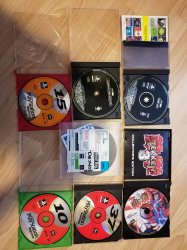
These are the demo discs i still own, i have disc One and Users demo 03 and a tekken 3 collections edition demo disc, the blood bag demo disc, playstation magazine 10,15,37.
I will try dumping disc One again later to see if i can get it worknig, i tried ages ago and it did seem to work but again i didnt check or test it, i will post back later when i get some spare time (gotta go out now and looks like rain soon)
IMG_20241008_07431222.jpg
 
It just so happens when I tried, that i saved a screenshot of what went on. The circumstances were all the same from memory for all of these demo discs, so i only felt the urge to screenshot this one.

(I had no idea there was more than one demo disc ever released by Sony. Where did you get the other demo discs, and how many were there?)

Error screenshot:
View attachment 44410

Ah, it fails because it does not have an ICON0 image for this disk.
ICON0 is the small game image that is shown on the XMB to represent the disk. It is usually the front cover of the game.
Without ICON0 the game will look absolutely terrible in the XMB since there is nothing to show for the game in the list :-(

I could change it so that it allows to create a pkg without ICON0, but, again, the game will look absolutely terrible in the game list as there is nothing to show.
A better solution is if you can find a link to a good image to use as the "front cover" to use for the game, so it will look good on the XMB.
Send me a link to a good image to use and I will add it to the database for the game.
(the games should not just convert, they need to look good on the xmb too)
 
Thy shall be done [emoji6]

(Perhaps force someone to enter an image if it's a requirement for the software to do its thing rather than crash? On-screen advisory, or prevent the execute button from being clickable or something?

I do industrial automation for a living. Inhibit logic is a big thing to stop the operator getting into any sticky wickets)
 
Last edited:
Thy shall be done [emoji6]

Thanks!.
Pick something that you think represents the game well. It could be a game cover (unlikely as it is a demo disk) or maybe just a scan of the disk itself?

I added a bunch of the disks for Playstation Us / Uk magazine disks and I picked just a scan of the front page of the magazine it was shipped with as ICON0.
But please feel free to pick something that you think represents the game well and you want it to show up as in the XMB list and I will add it.

The other two images that PS3 use on the XMB is
PIC1 which is usually a background/fanart image that takes up the whole screen and is shown when you highlight the game on the XMB. It is probably hard for find a good picture for this :-(

PIC0 this is usually the game logotype that is shown in the lower right quadrant of the screen when the game is highlighted in the XMB.
Again, it it is probably difficult to find a good image for this. Maybe I should just create an image with the text "DEMO" and use it for all the demo disks? Maybe that is actually a good idea. Let me think about it and maybe add it.

The final and fourth asset is called SND0. This is the audio file used to play when the game is highlighted on the XMB. For this I mostly just specify link to the OST on youtube. This will be an, up to 5 minute, jingle that plays in a loop when the game is highligted in the XMB.

Adding all these is a manual process and takes FOREVER but I think it is worth it.
The ICON0 I think should be mandatory because without it it will just be a grey "image missing" box in teh game list on the XMB. The other assets are optional, but the more of them are specified the better the game will look in the XMB.


Sorry but I am just very anal about "the games need to look good on the XMB too, or else why would I even want to play them".
 
I'll see what I can do. I have the cardboard sleeve for the demo one disc (I'm 90% sure it's easily findable as I've been keeping the disc in a crystal case), so maybe a scan of that, so it's like you're pulling the disc out of the original sleeve?
 
I'll see what I can do. I have the cardboard sleeve for the demo one disc (I'm 90% sure it's easily findable as I've been keeping the disc in a crystal case), so maybe a scan of that, so it's like you're pulling the disc out of the original sleeve?

Sounds good to me !
 
Back
Top