
PS2 PS2 slim con OPL non legge i giochi da CD/PS2 slim with OPL does not read games from CDs

ok...then identify whether for ps1 or ps2....convert to VCD for ps1 and to iso for ps2. I already know that the iso files go into the CD folder, while the VCD files should be placed in which folder? Don't you need any other program other than OPL to load VCDs and ISOs? Is there any setting to activate on OPL to read ps1 CDs (VCDs)?

As I said, when OPL can read PS2 CD isos we move on to something more complex such as the PSX games procedure in the APP section of OPL.
Meanwhile, you don't want to run without first walking.
 
As I said, when OPL can read PS2 CD isos we move on to something more complex such as the PSX games procedure in the APP section of OPL.
Meanwhile, you don't want to run without first walking.

ok, I'm looking for a game on CD that is for PS2, I convert it to ISO and insert it into the "CD" folder of the stick: let's see if it works.
 
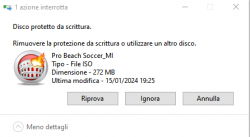
Ho cercato e credo trovato (controllando le liste dei datacenter di Playstation) un CD per PS2 (sles_514.92=Pro Beach Soccer). Convertito con Burnaware: tutto ha funzionato bene. Piccolo problema: quando provo a spostare il file iso nella cartella "CD" della chiavetta compare il seguente messaggio (non so perché)

[ALLEGARE=completo]42096[/ALLEGARE]

Forse la chiavetta USB è stata "bloccata" dalla PS2?
Ho 3,5 GB liberi e il file è di circa 280 MB

upload_2024-1-15_20-1-53.png
 

Attachments

  • upload_2024-1-15_19-39-4.png
    upload_2024-1-15_19-39-4.png
    17.9 KB · Views: 26
Last edited:
I tried to copy everything that was on the flash drive onto the PC disk (for safety). I formatted the stick again (fat32). I tried inserting the files from the PC to the USB stick again: as before, "write-protected disk"....doesn't transfer the files....what's happening?
 
I managed to remove the protection with difficulty, format....replaced it clean with the PS2SMB folder....inserted into the ps2, restarted with OPL..it created all its sub-folders....I tried to copy the file iso in the CD folder...it starts copying...everything seems fine....but after a while "disk is write protected".......

I'm literally going crazy....
 
Finally, after various tests and settings, I managed to remove the protection from the flash drive, format it and restore it as at the beginning (working on PS2). Using the link you suggested (datacenter) I was able, to carry out some tests, to select CD backups only for PS2. Converted to iso with BurnAware, placed the file in the CD folder of the stick: EVERYTHING works correctly on OPL. PS2 games work. Naturally, from a CD where I created an ISO, then started via OPL, I noticed that the game crashed almost immediately: I imagine the CD-ROM is corrupted... I can't do anything else about it. So I think we can say that the first phase should be finished (for PS2 games on CD). Shall we close this thread and start another to continue with the PS1 CD games?
 
Ho cercato e credo trovato (controllando le liste dei datacenter di Playstation) un CD per PS2 (sles_514.92=Pro Beach Soccer). Convertito con Burnaware: tutto ha funzionato bene. Piccolo problema: quando provo a spostare il file iso nella cartella "CD" della chiavetta compare il seguente messaggio (non so perché)

[ALLEGARE=completo]42096[/ALLEGARE]

Forse la chiavetta USB è stata "bloccata" dalla PS2?
Ho 3,5 GB liberi e il file è di circa 280 MB

View attachment 42097

Try removing write protection from your USB drive by doing the following:

1.Press "Windows+R" key

2.- In the Dialog box write:

Code:
diskpart

3.-In the command console type:

Code:
list disk

4.-See which number corresponds to your USB device

5.-Write the following:

Code:
select disk n

where "n" is the number of your USB.

6.-Once your device is selected, write:

Code:
attributes disk clear readonly

7.-When the process is finished, close the console and disconnect your USB.

8.-Connect your USB to the PC again and see if it is solved.
 
I was right to use the "should" time......it always gives me problems copying iso files from PC to USB stick: "write protected disk".....I don't know what to do anymore.... .
 
Try removing write protection from your USB drive by doing the following:

1.Press "Windows+R" key

2.- In the Dialog box write:

Code:
diskpart

3.-In the command console type:

Code:
list disk

4.-See which number corresponds to your USB device

5.-Write the following:

Code:
select disk n

where "n" is the number of your USB.

6.-Once your device is selected, write:

Code:
attributes disk clear readonly

7.-When the process is finished, close the console and disconnect your USB.

8.-Connect your USB to the PC again and see if it is solved.


now it's ok with your procedure... I had done it with regedit on the registry..... why does the stick go into protection every time I add something?
 
Finally, after various tests and settings, I managed to remove the protection from the flash drive, format it and restore it as at the beginning (working on PS2). Using the link you suggested (datacenter) I was able, to carry out some tests, to select CD backups only for PS2. Converted to iso with BurnAware, placed the file in the CD folder of the stick: EVERYTHING works correctly on OPL. PS2 games work. Naturally, from a CD where I created an ISO, then started via OPL, I noticed that the game crashed almost immediately: I imagine the CD-ROM is corrupted... I can't do anything else about it. So I think we can say that the first phase should be finished (for PS2 games on CD). Shall we close this thread and start another to continue with the PS1 CD games?

I recommend seeing the OPL compatibility list.

https://www.psx-place.com/threads/open-ps2-loader-game-compatibility-lists.19037/

To install PSX games follow this guide and if necessary comment on that thread.

https://www.psx-place.com/threads/m...ames-in-the-app-section-of-opl-via-usb.41184/
 
Yesterday everything worked, today I try to convert another PS2 CD to ISO and insert the file into the flash drive... is there a reason why the write lock is "inserted" for no reason?

Try low-level formatting that will return your device to its factory state.

WARNING: you will no longer be able to recover files you had on that device after formatting.

1.- Download this free tool.
use the option "Download Windows Executable (works without installation)".

https://hddguru.com/software/HDD-LLF-Low-Level-Format-Tool/

2.-Open the program and continue with the free version.

3.-Select your unit and click next.

4.-Select the "LOW-LEVEL FORMAT" tab and if it is checked, uncheck the "perform quik (just remove partitions and MBR)" box.

5.-Click on "FORMAT THIS DEVICE".

6.-Test your formatted drive.
 
If I were to change USB stick (buy one with a larger capacity) I can easily transfer everything that's already there (OPL+POPSTARTER+ps1 and ps2 games) from one to the other...or not?
 
If I were to change USB stick (buy one with a larger capacity) I can easily transfer everything that's already there (OPL+POPSTARTER+ps1 and ps2 games) from one to the other...or not?

Just make sure you give it the same drive letter and that the folder names don't change so you don't conflict with the "conf_apps.cfg" file.
 

Similar threads

Back
Top