PS3 PS3 60GB reads PS2 disc but the screen is black

CECHA

Member
Whenever I put in a PS2 disc, it reads and detects that there is a disc and that is a PS2 disc, upon selecting the disc the screen goes black which is the screen just stays black.Anyone have any clue as the what the issue may be?
I can read DVD BD PS3 PS1, enter PS2 and press the PS key to see the menu
 
I have this same issue on a CECHB00 and it´s unknown why this happens. There is no guaranted fix for this problem. You can try swapping the PS2 components like the EEGS, PS2 bridge chip or the RDRAM but it usually doesn´t fix it so it´s basically a gamble.
 
I have this same issue on a CECHB00 and it´s unknown why this happens. There is no guaranted fix for this problem. You can try swapping the PS2 components like the EEGS, PS2 bridge chip or the RDRAM but it usually doesn´t fix it so it´s basically a gamble.

Swapping EE_GS fixed it for my case. But you need to be sure you have visually inspected the boaard for damaged/ missing components . Anything that is messed between and around Bridge chip, EE/GS and RSX can cause black screen. I myself knocked one resistor around one of those and it was instantly black screen. You also need to check that all the voltages for ps2 subsystem are ok. IRC there is one voltage regulator component somewhere near the BD drive that feeds one of the voltages to ps2 section, I knocked it once too and also got black screen. Once you confirm that those things are ok, then you can try swapping the big chips. This is how I would diagnose these things. You can also try to read uart from EEGS, but oftentimes it won't show anything unusual.
 
Swapping EE_GS fixed it for my case. But you need to be sure you have visually inspected the boaard for damaged/ missing components . Anything that is messed between and around Bridge chip, EE/GS and RSX can cause black screen. I myself knocked one resistor around one of those and it was instantly black screen. You also need to check that all the voltages for ps2 subsystem are ok. IRC there is one voltage regulator component somewhere near the BD drive that feeds one of the voltages to ps2 section, I knocked it once too and also got black screen. Once you confirm that those things are ok, then you can try swapping the big chips. This is how I would diagnose these things. You can also try to read uart from EEGS, but oftentimes it won't show anything unusual.
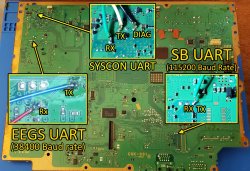
I can´t really find anything about the EEGS UART logs. Do you just hook it up and Auth in or is there an extra step I need to do?
 
I can´t really find anything about the EEGS UART logs. Do you just hook it up and Auth in or is there an extra step I need to do?

It is based on this https://www.ps2-home.com/forum/viewtopic.php?t=4828

Felix had an image about all UART points. I don't know where the thread is but here is the picture. It's a separate uart output that you can read in a terminal. Use Putty.
UART_All2.jpg
 
I tried to hook up to the UART and only got garbage. I´ll see if it´s an issue with my connection by hooking up to my good PS3.

The board with faulty EEGS also showed garbage in UART. Though I never checked uart after putting another EEGS, since it began to boot the games... But there's a chances that failing one will have garbled output.
 
The board with faulty EEGS also showed garbage in UART. Though I never checked uart after putting another EEGS, since it began to boot the games... But there's a chances that failing one will have garbled output.
I hooked up the UART to the good PS3 and still only got garbage. I don´t know if it´s my serial conection or that my UART adapter is defective. I can read regular syscon logs fine so I don´t know what it could be.

I hooked up the UART to the good PS3 and still only got garbage. I don´t know if it´s my serial conection or that my UART adapter is defective. I can read regular syscon logs fine so I don´t know what it could be.
But I should add that I get a lot more text than with the nops2 console.
 
Last edited by a moderator:
The board with faulty EEGS also showed garbage in UART. Though I never checked uart after putting another EEGS, since it began to boot the games... But there's a chances that failing one will have garbled output.
I just got some new UART adapters and tested the PS3 and got some text. It says failed to initialize memory so I belive that the RDRAM is dead.
Code:
# Initialize memory (rev:4.00, ctm:118Mhz, cpuclk:88Mhz detected)
# failed to initialize memory: InitRDRAM returned -1
 
I just got some new UART adapters and tested the PS3 and got some text. It says failed to initialize memory so I belive that the RDRAM is dead.
Code:
# Initialize memory (rev:4.00, ctm:118Mhz, cpuclk:88Mhz detected)
# failed to initialize memory: InitRDRAM returned -1

Hopefully replacing them will fix it. Report back if it helped.
 
Just because it failed to initialize, doesn't meant the RDRAM is dead. It may may not be getting power, unclean power, or something.

You should reset the game and check the EEGS log multiple times to see if that's a consistant error, not just a one time fluke.
 
Back
Top