PS3HEN PS3 CECHB00 HEN3.0.1 CPU

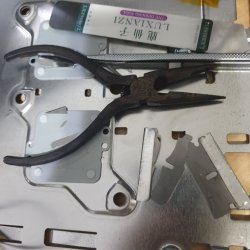
These are the tools I have. Can the ones on the left be use?

Use the strongest. You don't want it bending when you add pressure. But you also don't want to go too hard, incase you slip and catch a component, more work then. Just take it slow, start from the small gap and work your way around.
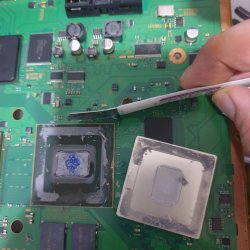
Some people find it easy, I found it pretty nerve racking, not wanting to damage the CPU die.

The yellow clip of 3 spudgers, I'd use the one on the left.

EDIT: Congrats on the find btw. 18 days of play time on a full HW backwards compatible model is not the most common of finds.
 
Last edited:
Use the strongest. You don't want it bending when you add pressure. But you also don't want to go too hard, incase you slip and catch a component, more work then. Just take it slow, start from the small gap and work your way around.
Some people find it easy, I found it pretty nerve racking, not wanting to damage the CPU die.

The yellow clip of 3 spudgers, I'd use the one on the left.

EDIT: Congrats on the find btw. 18 days of play time on a full HW backwards compatible model is not the most common of finds.

OK. But the spudger is relatively thicker than the piece that looks like guitar pick. I will try it on one of the dead PSS phats to have a feel. The CECHA06 is a no go. But I will try to send it to someone for fix. Here, the country is lock down, so no travels, probably will take a long while.
 
Last edited:
OK. But the spudger is relatively thicker than the piece that looks like guitar pick. I will try it on one of the dead PSS phats to have a feel. The CECHA06 is a no go. But I will try to send it to someone for fix. Here, the country is lock down, so no travels, probably will take a long while.
The thickness is critical, but is also important that it needs to be curved in an angle

Imagine we try to do it with a knife... is imposible because we need to grab the knife (so ours fingers are in between the knife and the motherboard)
Technically the knife should be in paralell with the motherboard, but our fingers doesnt allows to do it in paralell :D

The only solution is to "bend" the knife at 45º degrees or so
 
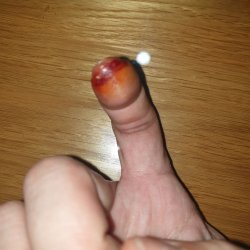
Reporting back. Got myself a deep cut on my finger and didn't manage to remove the ihs.... @@#$@^#^!$##&%(

Ooffff, sorry to hear that buddy.
That strip around the IHS is basically thermal glue, it is very tough. Some heat can make it a little more malleable, but you'll need a heat gun and a way to protect surrounding components.

It's a learning curve but at least your bothered to have a go at it. Which I always like to see.
Learn from your mistakes (and in this case, take some time for you finger to heal) and have another go with a fresh mind.
 
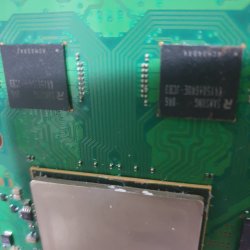
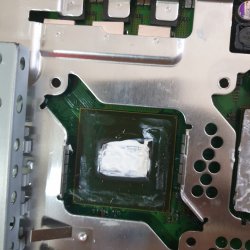
This is the result.
 

Attachments

  • 20200610_220204.jpg
    20200610_220204.jpg
    654.7 KB · Views: 67
  • 15917984158308302561806385863267.jpg
    15917984158308302561806385863267.jpg
    511.9 KB · Views: 65
  • 15917984487756140711206291989434.jpg
    15917984487756140711206291989434.jpg
    514.2 KB · Views: 73
Did it..... More bruises... hahaha... Will assemble back and see if it improves.
 

Attachments

  • 20200611_122213.jpg
    20200611_122213.jpg
    556.7 KB · Views: 69
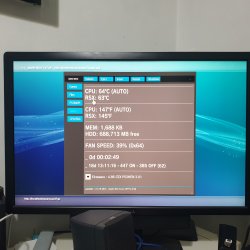
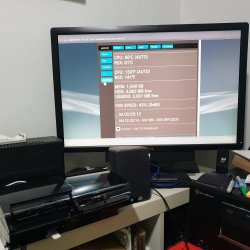
Results... 64deg c idle for CPU and gpu, good? And
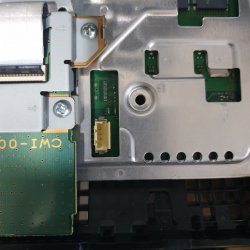
.. I think I spoiled the blue ray flexible cable during the disassembly and reassembly.... When I press eject, there's no beep sound and the Blu-ray drive don't respond at all... Any suggestions?
 

Attachments

  • 15918710305745473093241330913648.jpg
    15918710305745473093241330913648.jpg
    1.1 MB · Views: 56
The Blu-ray flex cable with the blue piece of plastic at the end. The blue plastic came off. I try to stick it back and slot it into the latch. It does not work. Previously it have the machanical sound, now totally no sound. Only blue light blinks. Btw, the cable is secured into the slot, but no response when press eject button.
 
Last edited:
I am guessing there's no power to the Blu-ray drive. I measured the four pins. Top to bottom. 0v, 0v, 0v and 5v. Resistance to ground. Top is 0ohm, 0ohm, 0ohm and open circuit.
 

Attachments

  • 15918796220104852663177959609032.jpg
    15918796220104852663177959609032.jpg
    513.3 KB · Views: 52
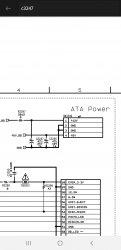
Check manual: remember the cracked capacitor from the first post? It's connected to the 12v line.
 

Attachments

  • Screenshot_20200611-204610_Adobe Acrobat.jpg
    Screenshot_20200611-204610_Adobe Acrobat.jpg
    219.1 KB · Views: 49
I was going over your pics for this cracked component you mentioned. But I cant quite see what you mean.

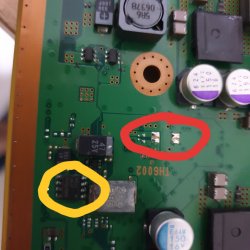
But, in looking I've spotted a couple of things. First is circled in yellow, I think that chip is related to power for the bluray drive. If damaged can cause the problem your having (no drive power). But I can't see any discoloration, so doesn't look burned out.
The second, circled in red, is a missing capacitor (A476C, 47u 16v tantulum capacitor) this is more than likely the culprit here.

20200612_122447.jpg
 
Last edited:
I was going over your pics for this cracked component you mentioned. But I cant quite see what you mean.

But, in looking I've spotted a couple of things. First is circled in yellow, I think that chip is related to power for the bluray drive. If damaged can cause the problem your having (no drive power). But I can't see any discoloration, so doesn't look burned out.
The second, circled in red, is a missing capacitor (A476C, 47u 16v tantulum capacitor) this is more than likely the culprit here.

View attachment 26226
Updates :
1) I jump 12v to the 12v of Blu-ray drive. And the CECHB00 drive came alive.
2) CECHA06 is alive!!!
 

Attachments

  • 15920464805354963900572270900396.jpg
    15920464805354963900572270900396.jpg
    1.2 MB · Views: 59
Update again people. Now I have got 2 sets of CECHA06 and 1 set of CECHB00. The issue is :
Set 1 (CECHA06) - best of the best. Good condition and everything works.
Set 2 (CECHA06) - Blu-ray drive doesn't work. Put in games, DVD, CD, etc no response. Able to upgrade firmware.
Set 3 (CECHB00) - Blu-ray drive reads only Game disc. DVD, CD got no response.

Question. Will switch the drive from CECHH still allow me to have super audio CD abilities? Or... Any suggestions? Thanks.
 
Set 2 will more than likely need a new laser
Set 3 mayb the same but 1st try cleaning the lenses both on top and under it and see if theres any improvements as this can often help.

U can use a 5V source briefly on the lasers diodes pin outs to temporary see if the lasers both emits the blu-ray (violet) and dvd (Red) diode lights, Generally the red diode fails b4 the Blu-ray so this is common. Even if u see both diodes light up correctly sometimes they can still not read but u can at least rule them out 100% if u dont see any at all.
 

Similar threads

Back
Top