
PS3 PS3 FAT CECHC04 - SEM-001 - BDROM not recognized

SkaziChris

Member
Hello everyone,

perhaps someone alread had such issue..

Original state:
YLOD, 3 beeps
Flux residue on the mobo, around the bdrom fpc connector.
FPC connector with ripped of flip part.
BDROM missing - not included.

Steps:
CPU delid
RSX delid
RSX removed, reballed, resoldered back.
Console boots up - old OFW in German.

FPC connector... sad story. Two pads ripped of from mobo - by previous man working on the console.
FPC connector removed. Pads revived. Connectivity test -> passed.
New (drawer type) FPC FFC 60pin connector soldered.
Connectivity test between pads and attached ribbon -> passed.


ps3xploit -> REBUG 4.86.1 NoBD flashed properly.
Console boots up properly.
WebMan + Burnout Paradise for rsx testing purposes.

Now... I took my test BDROM that is 100% working - tested on another console.
Attached it.
Flashed REBUG 4.86.1 Lite (standard, with wifi/bt/bdrom included).

Flashing went okay...
no 8002F14E error - meaning, that Bluray logic board was discovered by updater,
and it allowed flashing to proceed.
Console restarted.

1. I tried to input disk into bluray -> no reaction. Does not "fetch" the disk.
2. When starting any homebrew -> black screen, meaning bluray not connected.

3. I notice bluray diode blinking every time when console starts.

Further steps:

- TH3401 and TH3402 are not blown
- all smd's directly close to the fpc connector -> replaced from donor board.
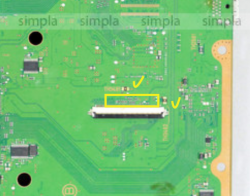
Screenshot 2022-01-31 at 15.10.25.png

Still same issue.
I retested bdrom and the ribbon on another console -> it is working just fine.


Perhaps the issue might be caused by 88SA8040-TBC1 IC?
 
Hello everyone,

perhaps someone alread had such issue..

Original state:
YLOD, 3 beeps
Flux residue on the mobo, around the bdrom fpc connector.
FPC connector with ripped of flip part.
BDROM missing - not included.

Steps:
CPU delid
RSX delid
RSX removed, reballed, resoldered back.
Console boots up - old OFW in German.

FPC connector... sad story. Two pads ripped of from mobo - by previous man working on the console.
FPC connector removed. Pads revived. Connectivity test -> passed.
New (drawer type) FPC FFC 60pin connector soldered.
Connectivity test between pads and attached ribbon -> passed.


ps3xploit -> REBUG 4.86.1 NoBD flashed properly.
Console boots up properly.
WebMan + Burnout Paradise for rsx testing purposes.

Now... I took my test BDROM that is 100% working - tested on another console.
Attached it.
Flashed REBUG 4.86.1 Lite (standard, with wifi/bt/bdrom included).

Flashing went okay...
no 8002F14E error - meaning, that Bluray logic board was discovered by updater,
and it allowed flashing to proceed.
Console restarted.

1. I tried to input disk into bluray -> no reaction. Does not "fetch" the disk.
2. When starting any homebrew -> black screen, meaning bluray not connected.

3. I notice bluray diode blinking every time when console starts.

Further steps:

- TH3401 and TH3402 are not blown
- all smd's directly close to the fpc connector -> replaced from donor board.

View attachment 36040

Still same issue.
I retested bdrom and the ribbon on another console -> it is working just fine.


Perhaps the issue might be caused by 88SA8040-TBC1 IC?
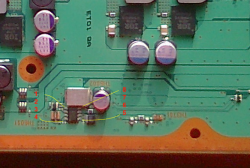
IMG_20220131_170739.jpg
 
Now please don't quote me but I'm 99% sure that is the ic I replaced on a cech c03 to get the disk drive to take a disk in after I had same issue, been a long time but its that ic I'm sure. Good luck hope it works
 
Screenshot 2022-01-31 at 18.19.52.png

TH6001, TH6002 and TH3701 are not blown.
0 Ohm resistors are ok.


Probing in Resistance mode

pin\boardDonorMobo with issues
1charge/discharge cycle
20.25 MO0.25 MO
30.820 kO0.666 kO
40.25 MO0.25 MO
5over 3 MOover 5 MO
6over 3 MOover 5 MO
7over 3 MOover 5 MO
8over 3 MOover 5 MO

charge/discharge cycle
Probing in diode mode

pin\boardDonorMobo with issues
111448
2OLOL
35111321
4OLOL
510291662
610291660
75341830
85341830
 
Last edited:
Ok I actually never tested mine I just replaced, and amazingly it worked pulled disk in problem solved, hopefully it will work for you
 
BDROM missing - not included.
You're missing one important step. If you already fixed the socket and console doesn't throw an error when updating, then you only need to remarry a non original BD drive to a new host, in this case your console. If you don't remarry it, then nothing appears on screen when you put a disc.

Here: https://www.psx-place.com/threads/my-adverture-of-remarry-bluray-drive-on-4-86.30896/

Careful, you can brick your console if you don't follow the guide step by step. Don't update while in factory service mode.
 
You're missing one important step. If you already fixed the socket and console doesn't throw an error when updating, then you only need to remarry a non original BD drive to a new host, in this case your console. If you don't remarry it, then nothing appears on screen when you put a disc.

Here: https://www.psx-place.com/threads/my-adverture-of-remarry-bluray-drive-on-4-86.30896/

Careful, you can brick your console if you don't follow the guide step by step. Don't update while in factory service mode.

I am familiar with the process - thanks :)

Point 3 states:
3- Open ★ Rebug Toolbox then go to Selector Column the 2nd one ,scroll down until you see Toggle XMB CFW Settings make sure that is Enabled​
...and it is impossible to do so in current state. Pls read on.


Well, yes, if bdrom is not remarried (but connected) - nothing appears on the screen when you put a disc.
At the moment, when bdrom is attached to this particular console,
it is not accepting the disk insert - not "fetching".

Again, this bdrom was tested, and works just fine in 2 other consoles.

However,
if you have CFW and some homebrew (eg. irisman/multiman etc) or some pkg games installed,
and bdrom is connected but not remarried -> homebrew and pkg games should work just fine (no black screen).

if you have bdrom disconnected, then starting homebrew/pkg games always ends up with a black screen and a forced manual console turn off...


What this console has, is bdrom connected, but still a black screen while starting any homebrew.
 
That's a shame I was hoping that would of sorted the issue... Looks like you will have to trace back from the 60 pin ribbon connector for continuity as you replaced it it may just be 1 out of the 60 connections is not right?
 
Fixed!
The problem was 2 smd's blown on the right side of the eject button, on the left side of the IC.
Replaced from doner board -> working!
 
Back
Top