PS3 HDD Decryption Helper

PS3 PS3 HDD Decryption Helper 2023-12-07

OBS studio but in my last post I converted video to gif.
But You loading Your own, manually compiled ufs.ko/whole kernel, right?
Yes, Finally! Compiling this kernel and getting everything right has taken me at least 45 hours I've spent about a week on this day and night and now everything works just perfect for me. I even customized my boot screen using rEFIned bootloader:D ... I'd say I did okay though considering I never use Linux a week ago. So now that I have injected the erk does that mean the key is stored on the drive in case I lose it? What was I seeing in tasker script output? I didn't have anything decrypted but it showed something under /dev/sda? ... And because I've done all this I did put the drive back in the PS3 to confirm everything still works... I'm not sure if I need to try the TRIMM command yet because this drive is brand new I'm not sure if I want to take that risk. If I can back up the content I will try and let you know.
 
Compiling module alone is just few seconds. ^^"

rEFInd is cool but cannot load disc images, so I staying with GRUB2 (also customized ;p).

I'd say I did okay though considering I never use Linux a week ago.
That's totally normal for a person with in autism spectrum. ;}

- - -
So now that I have injected the erk does that mean the key is stored on the drive in case I lose it?
Yes, until You make full format on PC (I'm not sure if PS3 touching areas not in use during her full format, which means beyond partitions boundary).

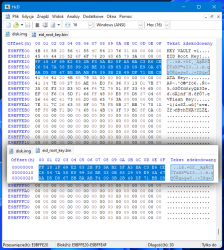
Open PS3 SSD in HxD and go to last sector. Open on new tab also ERK. If You see there ERK contents, it means operation was performed successfully. If not, then, well, better restore last_sector.bin. :D

What was I seeing in tasker script output?
What exactly You have in mind? Output from dd which saying what he doing? I cannot silence him because it will also silence progress percentage.

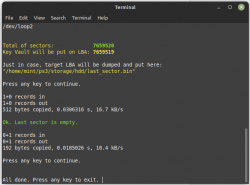
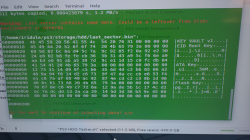
If last sector is not empty (empty means zeroes), then it will show You what contains first 16 addresses:
Code:
hexdump -C ${HOME}/ps3/storage/hdd/last_sector.bin | head -16
to help decide user if he want continue, based on what he seeing there (to judge if this is something important or garbage).

I didn't have anything decrypted but it showed something under /dev/sda? ...
Isn't You mislead Tasker with Reporter? He displaying first 8 addresses from (in order): encrypted drive, still encrypted but in byte order understand by x86, decrypted hdd, decrypted vflash, decrypted vflash skipping to sub-partition table.

Reporter is for me to easy judge based on that output what user did in compare to his claims and will. ;)
 
That's totally normal for a person with in autism spectrum. ;}
:onthego: Perhaps? I'll ask my psychiatrist.:sfun teleport:
So now I have become lost...I have ERK opened in one tab (not shown here) and am at last sector in HxD...I am not good at calculations
Screenshot_20230129_091045.png
 
@Berion I think did make a mistake but not sure what to do to fix. When I installed reEFIned I had my ps3hdd where the boot sector for my pc was. I think it tried to write the boot code to the ps3 drive? is that what I see here? (drive works fine in ps3 still...
Screenshot_20230129_104841.png
 
Last edited:
And that's perfect case when warnings and hiding stuff are put for a REASON. :D

"blockdev --getsize" returned for You for pointed device that there is 1875385008 sectors.
injecterk-png.39578


If sector size is equal to 512 bytes, and we need lower value by 1, it gives You 960197123584 bytes total. After converting it to hexadecimal, it is DF90355E00. And this is the offset of starting last sector. I'm suck at math too, so: ;)
Code:
calc 1875385007*512
printf '%x\n' 960197123584

Are You totally sure that You have opened PS3 HDD in HxD? Because last offset points it is ~120GiB position. ;)

My example:
ps3_kv_1.png ps3_kv_2.png

I think did make a mistake but not sure what to do to fix. When I installed reEFIned I had my ps3hdd where the boot sector for my pc was. I think it tried to write the boot code to the ps3 drive? is that what I see here? (drive works fine in ps3 still...I
If You would do that, PS3 will not accept this HDD because installing boot loader means killing PS3 partition table, so for her it is blank disk.

For that reason, I have added backup PS3PT in Tasker script. ;p Otherwise is unfixable in other meaning than making sector by sector image of this ssd, formatting ssd on ps3, copying first 36 sectors, writing back image, writing those 36 sectors. A lot of space and time wasted without that backup.
 
Last edited:
@Berion
Are You totally sure that You have opened PS3 HDD in HxD?
Warning blah blah ...
lol I had the wrong drive open :orange: Thank you for the calculation :D I got it now, I can't see ERK though :(
Hopefully having PSD HDD when I ran rEFIned for first time didn't hurt anything/not sure if rEFIned actually wrote anything...I remember it gave me an error, drive still works on ps3.
ERK:
Screenshot_20230129_112211.png
PSDHDD:
Screenshot_20230129_112140.png
 
Last edited:
I had the wrong drive open :orange: Thank you for the calculation :D I got it now, I can't see ERK though :(
Maybe because You not looking at 0xDF90355E00 but at 0xDBD837BF60? ;]

On the right, You have LBA in decimal, seek 1,875,385,007 if this is easier for You than CTRL+G. ;}

not sure if rEFIned actually wrote anything
If it would, then PS3 would want format it.
 
@Berion I'm pretty sure the key is there I was curious and tried to run your script again it says there is information there. It's probably my fault I'm just looking in the wrong place. I better stop messing with things before I fix them to where they can't be fixed :D by the way it's much easier just to run your script again to verify the key rather than switch to Windows and use HxD. Now it's a key verifier and Tasker :topsy turvy:

Screenshot_20230129-192342-893.png
 
@Iridule
Can't find it...I can only see DF903550E0
I think You have again chose wrong drive. ;)

I better stop messing with things before I fix them to where they can't be fixed
If You want protect Key Vault from any kind of format on anything, You can close it in HPA area, so all software be see HDD smaller by this one sector (including Linux software which this script using). Until HPA be lifted of course (that's the purpose of HPA, limiting visible sector range, in other words, limiting available size). So if You want mess more, You can make one step further to a disaster. :D

by the way it's much easier just to run your script again to verify the key rather than switch to Windows and use HxD. Now it's a key verifier and Tasker
That's a good idea TBH. Why I didn't think about it before? ;d
 
@Iridule

I think You have again chose wrong drive. ;)
I was definitely looking at the right drive this time I even tried to search the entire drive for the correct line but never found it. Took like 3 hours to search. Is it possible I got the wrong program because it's a 2021 version?
 
If You search exactly the same ASCII string from 0x0 to end:
Code:
KEY VAULT v1
and You did found nothing, while doing stuff with script it shows You (last_sector.bin is a dump from as name suggest, last sector) it means it is wrong drive for sure.

Anyway, You can jump already to last sector, no need for searching. CTRL+G, leave 0 in text field, change radio button from Start or Current to End. ;)
 
If You search exactly the same ASCII string from 0x0 to end:
Code:
KEY VAULT v1
and You did found nothing, while doing stuff with script it shows You (last_sector.bin is a dump from as name suggest, last sector) it means it is wrong drive for sure.

Anyway, You can jump already to last sector, no need for searching. CTRL+G, leave 0 in text field, change radio button from Start or Current to End. ;)
So I went to the last sector and I've double checked I absolutely have the right drive this time it's been searching for about an hour 30 minutes from the last sector upwards and so far found nothing. I'm confused. :/ ... It has to be on there though right because the script said ERK injection already there?
Screenshot_20230131-185756.png
 
Last edited:
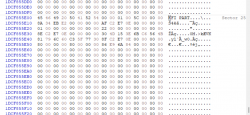
@Berion I did find this on the drive it repeats a few times on the first sector. Could this be when I trying to install rEFInd with the ps3 drive plugged in? Searching KEY VAULT v1 returned nothing however.
Screenshot_20230131_082850.png

Screenshot_20230131_083709.png
 
Last edited:
@Berion I think I found a problem...HxD isn't recognizing all sectors.
Script says:
"Total of sectors: 1,875,385,008
Key Vault will be put on LBA: 1,875,385,007"
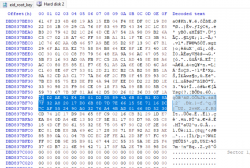
Update: I found it, another win for Linux :D
EIDROOTKEY.png
 
Last edited:
@Iridule
I did find this on the drive it repeats a few times on the first sector. Could this be when I trying to install rEFInd with the ps3 drive plugged in? Searching KEY VAULT v1 returned nothing however.
No. That's one of the mysteries. For some reason, sometimes PS3 left some data untouched and unencrypted in first sector. No one know why and when exactly. What You see is leftover from MBR written by Windows (not full of course, just part of it).

I think I found a problem...HxD isn't recognizing all sectors.
Works for me. And I don't see any anomaly here: ;)
1875385007*512 = 960197123584d = DF90355E00h = 15762015257o

I see that You love making Your life harder. :D Who in the hell using octals?
Code:
printf "%o\n" 1875385007
 
Last edited:
@Iridule

No. That's one of the mysteries. For some reason, sometimes PS3 left some data untouched and unencrypted in first sector. No one know why and when exactly. What You see is leftover from MBR written by Windows (not full of course, just part of it).


Works for me. And I don't see any anomaly here: ;)
1875385007*512 = 960197123584d = DF90355E00h = 15762015257o

I see that You love making Your life harder. :D Who in the hell using octals?
Code:
printf "%o\n" 1875385007
lol I am horrible with numbers anything after 2+2 I am lost, I'll leave the maths to the super smart peoples ...:D:D Well... that part of the sector was not visible using HxD for some reason yet easily found in the Linux Hex editor.
There is some info that HxD omits part of the last sector sometimes? maybe this has something to do with it?
https://forum.mh-nexus.de/viewtopic.php?t=925 Anyways glad I found key vault really is there. I think if I need again I will just use your script to verify, still much simpler. It is interesting that MBR would be there I never formatted this drive with windows I got it new and put it right in PS3.
 
Last edited:
Hi, I have an issue that ought to be simple to fix.

bswap16 is not compiling for me. My distro (Arch, kernel 6.1.11) does not have a build subdirectory. I can't read C, so I don't know what it's trying to access in that build directory, nor how I should modify the makefile or bswap file to compensate.

Thanks for your work in developing these tools and supporting end-users!
 
@Romanenko I'm not familiar with Arch - it is to smart distribution for me. ^^ In bswap16 source dir, You have two makefiles, have You tried both? But anyway, would be great if You paste here output from terminal. @Iridule using bswap16-ecb with his 6.x kernel series so module works there. Obstacle could be some Arch stuff. Good news is I'm interesting in solving that because if there is some extra step or src modification, would be good idea to add it to the script too for eg Arch users.

BTW: If You will figure out this without me, remember this version of "PS3 HDD Decryption Helper (2023-01-28)" and all older, unmounting can not work (because umount trying them unmounting from mount points instead from mounted devices like in newer umount). So use this one: https://www.psx-place.com/attachments/ps3-hdd-umounter-v1-3-7z.39583/ It will be part of future update.

My is only toolkit. ufs module is original (but I will delete it in future updates, found better solution) and bswap16-ecb was written by Decaf_code.

You're welcome. ^^
 
In all honesty Arch is a more braindead distro, considering nearly everything has been ported to it :cupcake:

I made a "build" subdirectory to see what happens, in case the script just wanted it to exist (but didn't care about the actual content). Keep in mind that arch, by default, has no such subdirectory ;)

Code:
$ make
make -C /lib/modules/6.1.11-arch1-1/build M=/home/username/Desktop/ps3hdddecrypt/ps3/apps/source/bswap16-ecb modules
make[1]: Entering directory '/usr/lib/modules/6.1.11-arch1-1/build'
make[1]: *** No rule to make target 'modules'.  Stop.
make[1]: Leaving directory '/usr/lib/modules/6.1.11-arch1-1/build'
make: *** [Makefile:7: all] Error 2

I did find your notes of caution regarding the lack of compatibility in umount, but I have yet to get that far haha! I do believe the issue is how Arch packages the kernel versus other distros; but, as you said, Arch is popular enough at this point that it probably makes sense to include a compatible script. If I have time this week I'll download Mint and see if I can find the corresponding files in Arch, as I can't believe the distros are all that different.
 
Last edited:

Similar threads

Back
Top