PS3 HDD Decryption Helper

PS3 PS3 HDD Decryption Helper 2023-12-07

@Romanenko Try to remove "/build" from "Makefile" instead messing with kernel source. ;)
Code:
KSRC_DIR=/lib/modules/$(shell uname -r)/build
obj-m += bswap16.o

all:
   make -C $(KSRC_DIR) M=$(PWD) modules

clean:
   make -C $(KSRC_DIR) M=$(PWD) clean
If this still will not compiling, additionally install kernel-headers.


BTW: You cannot use toolkit from that dir, "ps3" must be put in Your home (eg. "/home/romanenko/ps3/"). It is not related to Your issue but it is related to all other issues in future once You will get bswap16-ecb module. ;)
 
Last edited:
@Romanenko Oh, noted. In next update, before compiling, script will install linux-headers by default (yes, I mislead the name, of course not "kernel-headers" but "linux-headers"; I just trying solve some problem last time related to kernel and this word has impregnated my brain strongly, when I making scrambled eggs on breakfast, I see kernels... everywhere kernels now ;p). Thanks for the information.

@Ratchet It is Linux toolkit for PC, not PS3 so Your question doesn't have any sense. However, on HEN, You cannot currently read ERK, so You cannot also decrypt PS3 internal HDD and mount its partitions:
https://www.psx-place.com/threads/h...on-3-hdd-on-pc-tutorials-tools-hub-faq.36261/
 
Damn, another issue; this time with the Makefile in the /ufs directory.
Code:
$ make
make: *** No targets. Stop.

From what I could find, it seems like there isn't anything that's actually being specified in the Makefile. This stackexchange thread seems to cover what's going on here, with the lack of "make" command in the makefile (or an "all:" specifier; probably that, actually. I just really have no clue what I'm doing). At least it's another easy issue, though!

Thanks again :)
 
@Romanenko You don't need ufs.ko if You don't want write anything on main partition. Source added to PS3 HDD Decrypter Helper will not compile on 6.x kernels, also You need some additional software to compile it. If You really want it, try script from the attachment, it will replace PS3 KO Compiler in future updates. In addition, delete "~/ps3/apps/source/ufs" and turn on in repositories source code or else script will fail on trying to get linux-modules (I don't know how to do it in Arch, I'm using on Mint always his update manager; if there is no gui for that on Arch, search about sources.list (something like that)).

//attachment removed, it is now part of official release
 
Last edited:
Okay, I think I've reached the end of the road, as far as my willingness to get this working :D . From what I've read UFS read support is barely supported on Linux, let alone write; hence the need to compile such specialized tools to the kernel. In addition it seems the consensus from Arch devs years ago was that Linux UFS write, when implemented, has too high a chance of wiping disks outright. I can't find anything regarding UFS in either of the Arch repositories (if I'm understanding you right), and don't want to break anything, so I'll stop here.

What alternatives are there for file transfer to PS3? I've been using FTP via Wi-Fi but the speeds are unbearably slow (maxing at 2 megabytes per second, often below that) and somewhat unreliable, thus not ideal for larger files. The USB method seems poor as well, considering only FAT32 is supported. FTP via ethernet, it is?
 
All Linux kernels have support for various of UFS but only read. Write must be turned on which means compiling module with write flags and loading it on demand. That's why this problems came from.

Write is experimental indeed, but no one yet complains about write in UFS2 in Linux, PS4 included (eg PSitarch by default mounting with write internal HDD and many people using it daily for emulators which saving there vram dumps (aka savestates) etc.).

USB is to slow, and I'm not sure if exFAT can be used for write. I didn't interesting much in PS3 scene last few years TBH.
FTP Server is unstable, all, on all models. For unknown reasons.
On Wi-Fi You can get slower speed than via RJ45 (but still slow ~20MiB/s maximum, for me often 10 and crashing on thousands of small files).
 
You will be disappointed, not alternative to writing on UFS2 as You have hope for (there is no safe alternative), but instead attaching ufs kernel module source, putting in script downloading it with linux-modules package - the reason behind that decision is this src doesn't compiling on all versions so wiser is downloading it per specific kernel version from repositories. Anyway, I still didn't solve Mint problem with it (changes in .config aren't taking so Mint during compiling it must read it from elsewhere and I don't know from where - I gave up as this brings me only frustration ^^). Newest script is in attachment in earlier post.

Also, I took Your activator idea and made unattended mounting/unmounting scripts which will be better (because quicker) than script which asking about everything. If You want try it, here they are (You need to replace sdx by Your device of course, script doesn't asking about storage):

//attachment removed, it is now part of official release
 
Last edited:
Some new upcoming goodie:

ps3hdddechlp_buppreview.png


- - -
It is possible that toolkit will cover in future more distributions than Debian/Ubuntu/Mint etc. alone but also Arch, OpenSUSE, Fedora. Until then, users must by hand replace "apt install" by "pacman install" (Arch), "zypper install" (OpenSUSE), "dnf install" (Fedora) and deal with package names in their repositories.

I do not want prepare all those versions and test script on them, including various of distribution versions. Maybe I will find some workaround for this, maybe some converter script? I dunno.

For sure Mint will stay target distribution.
 
WARNING! In Tasker script, attempting to fix bootloop will WIPEOUT ALL PS3 HDD partitions contents and for unknown to me reason all ~/ps3 dir contents. In addition, making softbrick on NOR models. Jesus Christ!

I don't understand why but this is because:
Code:
sudo rm -rv ${HOME}/ps3/storage/hdd/dev_hdd1 *
I'm sure that I have tested this half year ago and works as intended... WTF?

So until new update, replace above shit by:
Code:
sudo rm -rfv ${HOME}/ps3/storage/hdd/dev_hdd1/*
 
Maybe there was some change in the -rv param behaviour and now is destructive, which is very odd as the rm command is standard across Linux systems.

Perhaps it has something to do with the UFS filesystem?.
 
@GuilloteTesla
Maybe I'm for some reason put space instead slash (but I don't thinks so TBH). But still, this doesn't explain why he jumped few levels above.
Code:
~/ps3/storage
├── flash
│  ├── dev_flash
│  ├── dev_flash2
│  └── dev_flash3
├── hdd
│  ├── dev_flash
│  ├── dev_flash2
│  ├── dev_flash3
│  ├── dev_hdd0
│  ├── dev_hdd1
│  └── dev_hdd2
└── ram
Normally it should stay in dev_hdd1, why he goes higher? Maybe that was kind of traversal bug, but I didn't have file or folder named with double dots there. This was testing HDD, so nothing has happen which I would be regret (thanks God he didn't escape to home, that would be deadly for me) but imagine someone who attaching PS3 HDD full of games etc. to just fix bootloop to avoid HDD format and he sees how his data evaporating in blink of an eye. When I looking at terminal, my first thoughts was: "o Boże, o kurwa". :D

PS: On dev_hdd1 mounted is FAT32. It is cache partition on which games putting temporary data but also update manager unpacking PUP. Corruption on it causing bootloop.
 
Last edited:
Indeed, luckily you've detected this issue before going public. I too suspect that the " *" might be the cause as the rm command interprets it to remove the volume, then remove all the files.

These type of commands are very tricky because of the many params they allow to use.
 
Berion updated PS3 HDD Decryption Helper with a new update entry:

PS3 HDD Decryption Helper (2023-02-23)

  • Fixed critical bug in bootloop fixing task, which deleting all contents of all partitions!
  • Fixed "PS3 HDD Umounter" for current version of umount (script now trying unmount from both: devices and mount points).
  • Unhide Key Vault creation in "PS3 HDD Tasker".
  • Added NAND support in "PS3 HDD Tasker".
  • Added "Unattended PS3 HDD Mounter" scripts for users which know what they doing ;) and/or want to make activator.
  • Added "PS3 KO Manager" which from now will handle all...

Read the rest of this update entry...
 
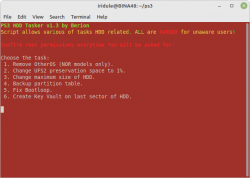
@Berion I have tried most scripts for NAND including unattended mount/unmount. All is working well (on kernel 6.1.9) Mint 20.3 Though I see no option in for "Unhide Key Vault creation in "PS3 HDD Tasker"?
tasker.png
 
Ad 1
typo found in ko manager
here
Code:
7)
        echo
        cd ${HOME}/ps3/apps/source/bswap16-ecb
        sed -i -e "s/KSRC_DIR=.*/KSRC_DIR=`readlink -f ${HOME}/ps3/apps/source/bswap16-ecb`/g" apps/source/bswap16-ecb/Makefile
        make -j`nproc`
KSRC_DIR means kernel dir so not bswap16-ecb dir itselt, thus while comnilation give error. Correct is ${HOME}/ps3/apps/source/kernel
Ad 2
in bswap16-ecb dir there is no Makefile file but Makefile_1 and Makefile_2 are identical, so now also gave compilation error thus there is no Makefile file, so delete Makefile_2 and rename Makefile_1 to Makefile
 
Last edited:
@Iridule Thank You for tests!

That's my English. ^^ What I have in mind was to making this option (number 6) no longer hidden (wip-1 in older version). I tested this on another HDD and indeed it is not slow. My old HDD just started to dying. :)

In next version I will add option to dump "hidden zone" of HDD, IDPS retrieving (NOR models only) and Key Vault dumping back with disassembling it to separate keys.

@DUDUŚ Those makefiles aren't identical. ;) And I did this that way to keep both for different kernel spectrum range. I totally forgot about change it also in WSL2 part. TBH I rushed a little with this release because of critical bug I found. I will check WSL2 soon and fix what need to be fixed.
 
@Berion I was just curious I have someone I'm trying to help with their PS4 it's stuck in a boot loop will the Tasker script for PS3 fix the boot loop on the PS4?
 

Similar threads

Back
Top