PS3 savegame corrupted after upgrade CFW

Not sure at wich point you mean, but hdd's of this size only gets power from 5v
And when they have power are spinning, so you can hear the spinning noise (until the hdd entered in standby)
So if it was silent (and not in standby) when you disconnected then is ok, no harm done

If you disconnect it while spinning is going to make a "clack" noise... this can create a bad sector, and smart will try to remap it at the next boot (until the hdd is out of spare sectors)

You can see the amount of remapped blocks in smart... it should be zero... and a max of around 200... but this depends of the hdd... some hdd's has more

Is also posible to deactivate the sector remaping... so it can happen that you see zero in smart but you could have a lot of damaged sectors
 
Last edited:
I had spinning noise (3 "Clacks" at start) at start from time to time when the HDD had no use (various month without play PS3). Maybe it's the beggining.

I read a lot from HDD sectors, detecting and monitoring (i lost 2 HDD recently, but thanks to tests and SMART, i could backup 99% data).

Thanks

@sandungas Do you know how to burn to USB the mhdd32ver4.6.iso (i tried rufus)? If it can...
 
Last edited:
The easyer way to use MHDD is booting it from a CD... there are some CD compilations of apps that includes it, like "hiren's boot cd" (google it, all versions have it)

The problem is when you boot this way the app is not able to store a .log file with the detailed scan results (i did read this log can take some big amount of mb btw) because it cant write in the CD
I tryed to install it in a specific hdd only for using with this purpose (with a MS-DOS installed in it) but i could not make it work
And from USB im not so sure if can be booted

But well... forget about the .log
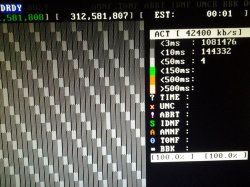
After the scan it shows a report of counters at right-bottom corner where you can count the sectors that had different speed response
Are ordered by its speed... having a few "lazy" sectors (aka slow ones) is ok, the hdd should be considered usable
But if you have some marked as "unreadable" then the hdd has a real problem
Depending in how are spreaded along the surface you can try to remape some (incase the hdd still has spare sectors)... or crop the capacity of the hdd (with one of the smart functions you can reduce its capacity to keep the damaged areas out of the "usable" area")... or if there are too much and are spreaded in an annoying way (at the start) then there is no solution and the best you can do with it is to throw it to the trash bin... or open it to take a look for curiosity sake and then to the trash bin

Btw... with the other damaged hdd's you have... you should make this same surface scan, is nice to have a damaged hdd to practise a bit with MHDD, this way you are going to see very well how it looks a damaged surface, lol

And last btw... when you do the scan... you can select the sector where it starts... and the sector where it ends
For a good scan you should scan everything (and look at the counters when completed)
But a serious scan of the whole surface take hours to complete... before it you can make a few small ones that are going to be fast to complete... specially at the beggining of the hdd because this ones are critical... and most specially the first sector of the hdd
So to practise a bit with MHDD make some small scans from sector 0 to sector 10.000 or so
 
Last edited:
Thank you. Appreciated.

I will try do the scan (windows xp). If i have bad sectors, i will try to exclude them with partition magic (if i reached the limit sector reallocation) or whatever :)
 
Last edited:
Ok. I tested the HD and it's fine.

Maybe is a short circuit from bus SATA.
 

Attachments

  • test hd toshiba reducido.jpg
    test hd toshiba reducido.jpg
    246.3 KB · Views: 251
Ok. I tested the HD and it's fine.

Maybe is a short circuit from bus SATA.
That hdd is nice, like new, very relliable

And the PS3 is still having problems to boot with that hdd connected ?... i cant imagine why, did you check the sata connector solder points in the PS3 motherboard ?
At this point i dont remember if can be seen (one side of the sata connector is covered with metal for shielding), but try to take a look at the solders
Use a loupe, and when looking at it move the sata connector up and down (is designed to allow move a bit)... if there is some solder point with the solder "broken" when you move it you are going to notice it better

Also, try to follow the copper traces that carries the "data" (from sata to southbridge)... maybe there is some small component in between that could be damaged
 
Last edited:
I don't know much about "electronic", but i will see on detail if there is some wrong.

Yes, still have problems with HDD connected. Maybe, if i can't do anything, i will send to a pro to repair this "mess".

Thank you.
 
@rocknard i jst realized there is another thing you should suspect about... the power supply
Maybe the PSU has some problem in the voltages
The 5v line that goes to the hdd we are not sure (at least im not right now) if it comes directlly from the PSU... or if it comes from a voltage regulator that does the 12v--->5v conversion specific for the hdd
Because the hdd is mechanic and drains a good amount of power... is probable it has that voltage regulator in the PS3 motherboard to make the 12v--->5v
If this is the case the problem could be in the 12v "prong" of the PSU

If what im saying is wrong... and the 5v comes directlly from the PSU... maybe is that 5v output where is the problem

Anyway... you should try to make a couple of tests to see if is the PSU
In other words... if you have another PS3 with the same power supply try to replace it... or use a multimeter to meassure the voltage outputs of your PSU

Here you have a table with the different PSU models, and its compatibility
http://www.psdevwiki.com/ps3/Power_Supply#PSU_Model_.40_SKU_compatiblity

Yours is a CECH-25xx right ?... it can use the PSU from the previous PS3 slim models CECH-21xx and CECH-20xx (olders has higher power so no problem with that), one of them doesnt fitst well inside CECH-25xx chasis but for a test is ok
 
Last edited:
Well, guys, y "repaired" the PS3 (the Technician). The problem was the HDD (incredible), but the problem is the Technician UPDATED my Console to OFW 4.81 (Mother Fu***). I don't have a dump NOR (i did, but i lost it).

So... Can i downgrade with E3 flasher without a backup of NOR?

Very sad...
 
Ok. I could downgrade my PS3 (e3 flasher) and now i can play. I will live with this savegame corrupted.

Thanks to anyone who helped me.

(you can close the thread)
 

Similar threads

Back
Top