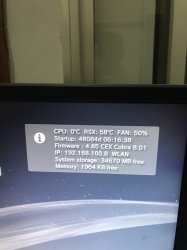
PS3 PS3 Temperature issues - Staying at 255 degrees celsius

Thank you i might get a Thermal Grizzly Kryonaught after the community quarantine it might improve and the ambient temps are high here morning to afternoon.
The Gelid GC Extreme is very good quality too btw, take a look at this review, specially the table in page #12
https://www.guru3d.com/articles-pages/guru3d-thermal-paste-roundup-2019,12.html

In my oppinion some of the thermal pastes that appers on top of the table are not worthy because are very hard to find them locally (incase of ordering them online no problem)
Most populars from the top of the table (and easyer to find locally) are the thermal grizzly kryonaut , and the artic cooling mx-4, the difference of temperatures in between them is only 2.4C (and thats theoretically, we are not sure if the values of that table are extremelly accurate)

Your Gelid GC Extreme is rated as better than mx-4 so dont worry, there is no need to replace it :encouragement:

To ease your mind you should make a few temperature tests to check how your PS3 behaves
 
The Gelid GC Extreme is very good quality too btw, take a look at this review, specially the table in page #12
https://www.guru3d.com/articles-pages/guru3d-thermal-paste-roundup-2019,12.html

Thank you Sir temperature is a problem in my room cause in the morning to afternoon its blazing hot , thank you for your time replying to my question god bless .

In my oppinion some of the thermal pastes that appers on top of the table are not worthy because are very hard to find them locally (incase of ordering them online no problem)
Most populars from the top of the table (and easyer to find locally) are the thermal grizzly kryonaut , and the artic cooling mx-4, the difference of temperatures in between them is only 2.4C (and thats theoretically, we are not sure if the values of that table are extremelly accurate)

Your Gelid GC Extreme is rated as better than mx-4 so dont worry, there is no need to replace it :encouragement:

To ease your mind you should make a few temperature tests to check how your PS3 behaves
 
And i need help about my system i cannot enable Hen with my system after i installed hen toolbox 1.0.0 and i installed this ps3 pro 4K and i cant see the browser on my ps3 i reformatted my ps3 hdd is there a way i can restore the ps3 ? Im desperate i should have not installed the hen toolbox. Can i have your facebook page so i chat with you ?
 
And i need help about my system i cannot enable Hen with my system after i installed hen toolbox 1.0.0 and i installed this ps3 pro 4K and i cant see the browser on my ps3 i reformatted my ps3 hdd is there a way i can restore the ps3 ? Im desperate i should have not installed the hen toolbox. Can i have your facebook page so i chat with you ?
Did you try reinstalling the Official Firmware through the Safe Mode? Install it first, then you'll have to reinstall 4.85 HFW again following by installing HEN.

As far as i know the PS3 4K Mod should have an uninstaller embedded into it, although i know it has for CFWs, not sure about HEN,@LuanTeles knows better than i do.

For the HEN Toolbox, i am unsure if it has been updated for the 4.85.1 HFW, you'll need a Firmware Compatible HEN Toolbox, if the Homebrew hasn't been updated for compatibility with the 4.85, then don't bother installing it as it will present problems.
Sent from my G8141 using Tapatalk
 
Did you try reinstalling the Official Firmware through the Safe Mode? Install it first, then you'll have to reinstall 4.85 HFW again following by installing HEN.

As far as i know the PS3 4K Mod should have an uninstaller embedded into it, although i know it has for CFWs, not sure about HEN,@LuanTeles knows better than i do.

Sent from my G8141 using Tapatalk
Im a total newbie ill try to reinstall what you stated is there a process so i wont f it up , im wondering why i cannot see my browser .
 
Im a total newbie ill try to reinstall what you stated is there a process so i wont f it up , im wondering why i cannot see my browser .

For removing my mod you can run the installer again and choose UNINSTALL

For removing HEN Toolbox go to "PS3 DATA something" and delete it

Or you can always install the HFW again
 
This my friend is a broken thermal sensor for the Cell processor

What model do you have?

Search google for 'PS3 thermal wiki' ps3 dev wiki

AD51/067ARMZ-REEL is the part number, but near impossible to buy anymore. You will need to find a donor board to replace it.

Hi there,

Recently I bought a broken FAT PS3 with backwards PS2 included for cheap, the original issue was an overheating problem which I fixed by delidding the CELL and RSX chips. The console now boots up fine, however, on WebMan the CPU temperatures do not change at any point from 255 degrees celsius while the RSX temperature will change.

I've changed out the terminal paste again using MX4, however, still the same issue. Currently, I'm running the fans on manual 50% speeds, but was wondering why the CPU temperatures are remaining the same.

If manual speeds are removed, the fans will say at 25% and console gets very hots.

If you require any more information please feel free to ask.

I look forward to your reply.
 
The syscon has 19 profiles in its fantable policy - sony have set 9 of them and the rest are fallback profiles set to 100%

Split between tzone - sensors zones 0 CELL, 1 RSX
Southbridge has a tzone but no profile set.

The fantable is uniquely set for the initialisation and default running modes.

So if the thermal monitor is borked then he should be hearing the fan go at 100% as that is its default if the thermal sensors fail.

Only reason i know all this is because i've managed to change the default fan policies in the syscon permantley via the EEPROM.

Will be sharing this soon.

Is really a very rare problem, having 255ºC on CELL is imposible
Btw, 255 (decimal) is = 0xFF (hexadecimal)
In other words, is the max value you can store in 1 byte, you PS3 is displaying that because is displaying the value 0xFF as a fallback.... but is not real

You should take a look at the thermal monitor chips from the photos i posted before, maybe there is something burned near them... or some scratch cutting a line

But this is very confusing, it makes me think that maybe the cause is a software problem... the syscon chip is supposed to "monitor" the temperature values at all times... if at some point syscon finds a 0xFF (like the one you are having) it would trigger all alarms and would shut down the PS3 automatically
Your PS3 is not shutting down.... so from the point of view of your syscon everything is fine
 
The syscon has 19 profiles in its fantable policy - sony have set 9 of them and the rest are fallback profiles set to 100%

Split between tzone - sensors zones 0 CELL, 1 RSX
Southbridge has a tzone but no profile set.

The fantable is uniquely set for the initialisation and default running modes.

So if the thermal monitor is borked then he should be hearing the fan go at 100% as that is its default if the thermal sensors fail.

Only reason i know all this is because i've managed to change the default fan policies in the syscon permantley via the EEPROM.

Will be sharing this soon.
Nice you are going to share how to edit the fantbl :encouragement:
Better post it in the thread where we was talking about all this, there is not much info in the forum about how all this works so is better to cummulate it in the same thread
Or create a new thread dedicated to it... but remember to add huge warnings in eyebleeding red colors and bold :D

My logic when i was writing my previous posts of this thread (please reads all them, not sure if you missed some of what i was trying to explain) is the thermal monitors from PS3 slim looks very robust, also the only "input" they have is just a signal from the thermal sensor inside CELL/RSX, and that input is going to be very stable even in the worst conditions (lets say CELL or RSX dies by overheat... but the thermal signal sent by them is going to be still under normal values)... so that input is not able to damage the thermal monitors
I guess the only way that could be damaged is by a massive overheat.... but if we consider that are components related with thermal it would not surprise me if they can keep working normally over high temperatures like 90ºC or more... they should be ready for it

Anyway... this im saying applyes mostly to the thermal monitors used in PS3 slim onwards... but im not sure how looks or the specs of the thermal monitors used in the first PS3 models... maybe are a bit more weak and more prone to malfunction
Actually, you are the first person i see saying in a forum that eventually the thermal monitors of the PS3 fats can malfunction (the other day you wrote a post about it, not sure in which thread), thats pretty interesting, but believe me i been reading forums related with PS3 scene since years ago and never seen anyone mentioning it, this shows how infrequent is it :D

Back to how syscon works.... lets say the thermal monitor starts malfunctioning... it seems in that case syscon takes the value 0xFF for it, but we dont know why... maybe is just an unexpected consequence caused by how the communication protocol in between syscon and the thermal monitor works... or maybe the syscon is ready for it detects the problem and outputs the 0xFF just as an indication about it (like an error output, for repair purposes)
 
Last edited:
Yep going to do a new post about this gem. And making sure the red colours and discalaimers are added!

Doing the ground work on the SYSCON connection via serial uart mode document - asked mina to proof read as he has been giving me loads of useful info! - So thanks @mina

So back to the thermal monitors

As a hobby I fix the old PS3 fats, restore them then sell them or give them away depending on condition.

I've had plenty of ps3 boards to mess about with and break each bit to see what syscon says.

The two central thermal monitors for say the SEM-001 board CELL and RSX the ADT7461 are rare to break but a short by accident or whatever will kill them as on standby pin 1 is always live 3.3V on them.

I think they die more often now as people open their ps3 up and probably short them by mistake!

The fail safe i think was by design for sony, as the syscon cant communicate to those monitors then it just defaults to 100% mode on the fan - the pwm is directly connected to the syscon chip so always has control regardless.

I removed the thermal monitors to see what happened, and yes it booted but fan was 100%

The syscon console messages showing temp value errors confirms that if no communication it falls back to FF mode.

And finally, the fantbl is fascinating as it shows that sony did a rush job of setting a terrible default

0 CELL
fantbl get 0
fancon No:00
P0: TempD:0.0(0x0000) - TempU:76.0(0x4c00) duty:20%(0x33)
P1: TempD:56.0(0x3800) - TempU:77.0(0x4d00) duty:29%(0x4a)
P2: TempD:56.50(0x3880) - TempU:82.0(0x5200) duty:30%(0x4d)
P3: TempD:57.0(0x3900) - TempU:83.0(0x5300) duty:31%(0x50)
P4: TempD:57.50(0x3980) - TempU:84.0(0x5400) duty:32%(0x52)
P5: TempD:58.0(0x3a00) - TempU:85.0(0x5500) duty:34%(0x57)
P6: TempD:58.50(0x3a80) - TempU:86.0(0x5600) duty:36%(0x5c)
P7: TempD:59.0(0x3b00) - TempU:87.0(0x5700) duty:55%(0x8d)
P8: TempD:79.50(0x4f80) - TempU:88.0(0x5800) duty:65%(0xa6)
P9: TempD:80.0(0x5000) - TempU:91.0(0x5b00) duty:100%(0xff)
P10: TempD:255.75(0xffff) - TempU:255.75(0xffff) duty:100%(0xff)
P11: TempD:255.75(0xffff) - TempU:255.75(0xffff) duty:100%(0xff)
P12: TempD:255.75(0xffff) - TempU:255.75(0xffff) duty:100%(0xff)
P13: TempD:255.75(0xffff) - TempU:255.75(0xffff) duty:100%(0xff)
P14: TempD:255.75(0xffff) - TempU:255.75(0xffff) duty:100%(0xff)
P15: TempD:255.75(0xffff) - TempU:255.75(0xffff) duty:100%(0xff)
P16: TempD:255.75(0xffff) - TempU:255.75(0xffff) duty:100%(0xff)
P17: TempD:255.75(0xffff) - TempU:255.75(0xffff) duty:100%(0xff)
P18: TempD:255.75(0xffff) - TempU:255.75(0xffff) duty:100%(0xff)
P19: TempD:255.75(0xffff) - TempU:255.75(0xffff) duty:100%(0xff)
1 RSX
fantbl get 1
fancon No:01
P0: TempD:0.0(0x0000) - TempU:84.0(0x5400) duty:20%(0x33)
P1: TempD:56.0(0x3800) - TempU:85.0(0x5500) duty:29%(0x4a)
P2: TempD:56.50(0x3880) - TempU:86.0(0x5600) duty:30%(0x4d)
P3: TempD:57.0(0x3900) - TempU:87.0(0x5700) duty:31%(0x50)
P4: TempD:57.50(0x3980) - TempU:88.0(0x5800) duty:32%(0x52)
P5: TempD:58.0(0x3a00) - TempU:89.0(0x5900) duty:34%(0x57)
P6: TempD:58.50(0x3a80) - TempU:90.0(0x5a00) duty:36%(0x5c)
P7: TempD:59.0(0x3b00) - TempU:91.0(0x5b00) duty:55%(0x8d)
P8: TempD:77.0(0x4d00) - TempU:92.0(0x5c00) duty:65%(0xa6)
P9: TempD:78.0(0x4e00) - TempU:95.0(0x5f00) duty:100%(0xff)
P10: TempD:255.75(0xffff) - TempU:255.75(0xffff) duty:100%(0xff)
P11: TempD:255.75(0xffff) - TempU:255.75(0xffff) duty:100%(0xff)
P12: TempD:255.75(0xffff) - TempU:255.75(0xffff) duty:100%(0xff)
P13: TempD:255.75(0xffff) - TempU:255.75(0xffff) duty:100%(0xff)
P14: TempD:255.75(0xffff) - TempU:255.75(0xffff) duty:100%(0xff)
P15: TempD:255.75(0xffff) - TempU:255.75(0xffff) duty:100%(0xff)
P16: TempD:255.75(0xffff) - TempU:255.75(0xffff) duty:100%(0xff)
P17: TempD:255.75(0xffff) - TempU:255.75(0xffff) duty:100%(0xff)
P18: TempD:255.75(0xffff) - TempU:255.75(0xffff) duty:100%(0xff)
P19: TempD:255.75(0xffff) - TempU:255.75(0xffff) duty:100%(0xff)

These are insane values, but even more worrying is that is not the same for all boards - Another SEM-001 board as different values as these fan tables are programmed via the eeprom, so dont change on sys updates - tried this out.

Nice you are going to share how to edit the fantbl :encouragement:
Better post it in the thread where we was talking about all this, there is not much info in the forum about how all this works so is better to cummulate it in the same thread
Or create a new thread dedicated to it... but remember to add huge warnings in eyebleeding red colors and bold :D

My logic when i was writing my previous posts of this thread (please reads all them, not sure if you missed some of what i was trying to explain) is the thermal monitors from PS3 slim looks very robust, also the only "input" they have is just a signal from the thermal sensor inside CELL/RSX, and that input is going to be very stable even in the worst conditions (lets say CELL or RSX dies by overheat... but the thermal signal sent by them is going to be still under normal values)... so that input is not able to damage the thermal monitors
I guess the only way that could be damaged is by a massive overheat.... but if we consider that are components related with thermal it would not surprise me if they can keep working normally over high temperatures like 90ºC or more... they should be ready for it

Anyway... this im saying applyes mostly to the thermal monitors used in PS3 slim onwards... but im not sure how looks or the specs of the thermal monitors used in the first PS3 models... maybe are a bit more weak and more prone to malfunction
Actually, you are the first person i see saying in a forum that eventually the thermal monitors of the PS3 fats can malfunction (the other day you wrote a post about it, not sure in which thread), thats pretty interesting, but believe me i been reading forums related with PS3 scene since years ago and never seen anyone mentioning it, this shows how infrequent is it :D

Back to how syscon works.... lets say the thermal monitor starts malfunctioning... it seems in that case syscon takes the value 0xFF for it, but we dont know why... maybe is just an unexpected consequence caused by how the communication protocol in between syscon and the thermal monitor works... or maybe the syscon is ready for it detects the problem and outputs the 0xFF just as an indication about it (like an error output, for repair purposes)

 
Hey guys,

New member here:

I got to create a new account to share with you guys something.

Long story short, I decided to come back to my ps3 and played some red dead before playing the red dead 2. My first impression when opened my beloved ps3 again, is the machine is smoothly quiet. I mean I always find interesting to know that my ps3 is always cooler than ps4 when gaming, eventhough it got a long history of ylod.

But this time is was weirdly quiet, it's like the fan is not spinning , and the machine is keep getting hotter and hotter. After 30 minute and boom , instantly shut down. I really panic at that time, but still I can open it again. But then after 15 min, shut off again.

My first assumption is the fan system is defected or something, so I was thinking about get it cleaned and replace thermal paste, etc.

But after doing research about ps3 sensor , and monitoring. I found the webman mod , risky open my ps3 again , install it.

And boom, magical happens. Right after I install the pkg, the fan starting to speed up , found the display monitor. Just feel like the ps3 is working normal again. All the number are below 60, which is fine imo. I set the dynamic fan at 60 celsius

I really feel relief about that, turn off the machine , went to sleep. About 2 days go by, and open it again. After about 30 minute, it shut off again :(((
I tried to change between static and dynamic , no point. It still keep shutting off again and again

However what I am notice now is the display right now is the cpu is display as 0 celsius, sometimes 1 then back to 0. This is really strange cuz , the momment I install webman, I could see it showing both. Check my pics below

I can have my conclusion like this: the temp sensor is fucked up so it could not detect the cpu temp which causing the ps3 auto shut down to protect the hardware. The momment I install the pkg i supposed it just a lucky time it work out again. My workaround for this is : leave the machine completely cool , unplug al the wire if not playing , and set the fan 50 static. That's might the temporary solution for now.

if anyone here has any recommendations, I would highly appreciated.

Information : ps3 slim 2000 series and look really in good condition. I'' pretty sure if i'm open the is not even that dusty. On good old day, the machine really cool and normal comparing with my noisy ps4
 

Attachments

  • D9320BB3-D911-4F0F-B5C0-97094317DC66.jpeg
    D9320BB3-D911-4F0F-B5C0-97094317DC66.jpeg
    1.4 MB · Views: 81
Updated:

play nearly an hour now on red dead without any issues. The cpu which was 0 all the time surprisingly show the real number, but pop up to 0 when open again.

But auto fan is pretty sure dead now. Gotta say thanks to this webman monitor that I would know the root cause and can configure to use static fan alternatively. Ps3 homebrew is awesome.
 
Start by doing a visual inspection of the "thermal monitor" chips we was talking about in this thread, i posted a couple of photos of them from a CECH-25xx

Are located really close to CELL/RSX... so is relativelly easy to drop some thermal paste on top of them by mistake... and if that thermal paste is electrical conductive it could make them fail
 
Ok, I guess i'm reviving this one.

I have a ps3 A01 C0K-001 that shut down randomly in a ps1 game, when I restarted it was running fine but the cpu was showing 255c in webman. So reading through this thread and trying all software related fixes I could think of (change cfw, rebuild database, restore system, change hdd, install ofw). I decided to swap a new sensor from a donar board I have (SEM-001). The swap went fine, I swapped the sensor from the gpu side because I wasnt happy with how the cpu side sensor came off the board. I'm confident the chip is in place correctly and all pads are connected good. but when i went to test it out I got the ylod, I tripple checked my work and looked over the whole board for problems but all looks good. So I attached some syscon wires and got a 2030 error (Thermal Sensor, CELL).

So i'm wondering what my next step should be, should I resolder the old sensor back in place? are they compatible between boards?
and what components should be tested in the area? I'm actually used to working on older boards (arcade pcbs / crt chassis) so telling smd resistors / caps apart is a bit difficult for me.
RFBpnPXc5t8JLg5
 
Welp I attached the original sensor and the ylod is gone but still back to the same issue. I guess it didnt like my new sensor, whats the part # on these so i can order new ones (AD51/067ARMZ-2RL) ?
dXotsqgEamHMffY
 
Back
Top