

- Forums
- PlayStation 3 (PS3)
- PS3 Jailbreak CFW and PS3HEN
- Ps3Xploit [Official Forum's] PS3HEN & PS3 Toolset
- PS3HEN (Homebrew Enabler for All PS3 Models)
You are using an out of date browser. It may not display this or other websites correctly.
You should upgrade or use an alternative browser.
You should upgrade or use an alternative browser.

Hey @aldostools, i am interested in the increased fan speed. I live in Greece, summer is coming and i already have a toaster, no need for a second one.
So, i just install https://github.com/aldostools/MAMBA_PRX_Loader/tree/master/PS3HEN_2.0.x instead of public HEN v.2.0 and i am good to go ?
So, i just install https://github.com/aldostools/MAMBA_PRX_Loader/tree/master/PS3HEN_2.0.x instead of public HEN v.2.0 and i am good to go ?


Joonie
Developer
Do you support cheating to modify eboot?
Is the fix patch of PSN supported
The PSN issue has never been a problem from HEN, it was wMM's bug which is currently fixed on 1.47.20

esc0rtd3w
Developer
i have a small nitpickFYI I updated my repo @ github. The download_plugin.sprx is now removed from the pkg.
Also changed the parameters of the internal fan controller. I hope it is less loud.
https://github.com/aldostools/MAMBA_PRX_Loader/commit/60359616358f898e8c6a0b04b39bfee1d3fb1ecd
The target is a fan speed of 40% @ 65°C with +/- 2% per degree.
If temp is higher than 70°C the fan speed will increase to 50% +/- 5% per degree
If temp is higher than 78°C the fan speed will 98%.
If temp is lower than 60°C it will use SYSCON.
 that PSN ball on bottom of Package Manager is weird now lol
i think that icon would serve better as a folder with PSN ball inside, to match the others...or its just me

download_plugin stuff also seems to be working ok. @DeViL303
 (tested with the RCO and XML from pkg)
overall, your edits, updates, and patches are all very nice
EDIT:
i guess that was us who originally forgot to use folder icon with PSN ball when making original offline packages! ooops!
but for some reason it didn't look weird being on top haha
EDIT 2:
like this, is what i mean, but red. on the bottom is fine.

@DeViL303 want to make red ball folder icon? hehe

Last edited:
ayassinsayed
Member
I can confirm that content created with Retro XMB (with RetroArch installed on the console) works perfectly fine, I have created so far various Sega Genesis and Sega CD stand-alone XMB roms and they all work flawlessly.
Time to play some Sega CD snatcher
How i can create stand alone retro xmb roms ? Could u explain?
Sent from my iPhone using Tapatalk
ayassinsayed
Member
The cfg is stored in /dev_hdd0/vm
The same path used by cobra and mamba payloads
Regarding the download plugin, I think you are right. I will remove the sprx when I get back home. The xml is still needed.
So download plugin will patch on the fly and still have download plugin feature ?
Sent from my iPhone using Tapatalk
esc0rtd3w
Developer
yes, with @DeViL303 patches added by @Joonie in @aldostools fork.So download plugin will patch on the fly and still have download plugin feature ?
Sent from my iPhone using Tapatalk
i assume we will merge some of this code into main source for next release, after testing

ShaolinAssassin
Developer
i have a small nitpick
i think that icon would serve better as a folder with PSN ball inside, to match the others...or its just me
download_plugin stuff also seems to be working ok. @DeViL303
overall, your edits, updates, and patches are all very nice
EDIT:
i guess that was us who originally forgot to use folder icon with PSN ball when making original offline packages! ooops!
but for some reason it didn't look weird being on top haha
EDIT 2:
like this, is what i mean, but red. on the bottom is fine.
@DeViL303 want to make red ball folder icon? hehe
Oh, that was not intentionnal ? The red ball folder exists in the RCO, it's just not the same name as in the stock RCO.
category_game.xml line 735
<Pair key="icon_rsc"><String>tex_psn_big</String></Pair> replace by
<Pair key="icon_rsc"><String>item_tex_online_storage</String></Pair>
Joonie
Developer
whoever's good at XML/RCO editing, please make a complete REBUG themed rco/xml pack as well as stock themed one.. I can't really stand this spinning icon when PS button's pressed or duplicated entries.. There are so many XML/RCO mods out there due to various toolbox/xml/rco mod supports. I find it very difficult to find the perfect/simple one..


ShaolinAssassin
Developer
I can't really stand this spinning icon when PS button's pressed or duplicated entries.. There are so many XML/RCO mods out there due to various toolbox/xml/rco mod supports. I find it very difficult to find the perfect/simple one..
View attachment 17693
View attachment 17694
To "fix" the spining icons/duplicated items issue, disable in root the queries that you do not use.
Code:
            <Query
                class="type:x-xmb/folder-pixmap"
                key="game_xmbm_hdd0"
                src="xmb://localhost/dev_hdd0/game/XMBMANPLS/USRDIR/game_main.xml#seg_xmb_hdd0_app"
                />
           <Query
                class="type:x-xmb/folder-pixmap"
                key="han_toolbox_xmb"
                src="xmb://localhost/dev_hdd0/game/HANTOOLBX/USRDIR/han_toolbox_xmb.xml#han_toolbox_xmb_main"
                />
            <Query
                class="type:x-xmb/folder-pixmap"
                key="xmb_app3"
                attr="xmb_app3"
                src="xmb://localhost/dev_hdd0/xmlhost/game_plugin/fb.xml#seg_fb"
                />
If HAN Toolbox or XMBManager+ Aldo version or XMBManager+ Berion version is not installed and the querie in root "enabled", then the issue comes.
*
For a complete set, looks like explore_category_psn.rco should also be replaced ("what's new" in PSN column)
esc0rtd3w
Developer
that looks so much better nowOh, that was not intentionnal ? The red ball folder exists in the RCO, it's just not the same name as in the stock RCO.
View attachment 17692
category_game.xml line 735
<Pair key="icon_rsc"><String>tex_psn_big</String></Pair> replace by
<Pair key="icon_rsc"><String>item_tex_online_storage</String></Pair>
thanks

Last edited:
ShaolinAssassin
Developer
Does installing HEN_v2_Offline_Installer_HDD_signed.pkg also include PS3HEN.BIN and stackframe.bin, or should those two be installed first?
They are included - and will be installed into dev_hdd0/hen. Don't worry about that, the installer will place them at the correct place.

AndyC3
Member
They are included - and will be installed into dev_hdd0/hen. Don't worry about that, the installer will place them at the correct place.
Thank you! At least now I know I should go straight to the "Quick Setup Offline HDD" instrcutions.
I feel truly bad for myself because I've read the instructions MANY times and I am still not sure how to enable HAN before installing HEN... :/
The instructions at http://**ps3xploit.com >Domain no Longer owned by team** (ps3xploit.me =new)/help/hen.html say:
Quick Setup Offline HDD (Recommended Method)
Requirement
1) Place HEN_v2_Offline_Installer_HDD_signed.pkg on dev_usb000
2) Run /html/han_flash_mount.html
3) Install HEN_v2_Offline_Installer_HDD_signed.pkg
4) Reboot PS3
Step 2) anyway is run from the px3xploit webpage, so why is this recommended method called "Offline", if I still need to be online?
Note that step 2) is different from what is written under Enable HAN here http://**ps3xploit.com >Domain no Longer owned by team** (ps3xploit.me =new)/help/han.html.
(at least I understand that it is called "HDD" because when later I will enable HEN I won't need the USB drive anymore)
ShaolinAssassin
Developer
Step 2) anyway is run from the px3xploit webpage, so why is this recommended method called "Offline", if I still need to be online?
Note that step 2) is different from what is written under Enable HAN here http://**ps3xploit.com >Domain no Longer owned by team** (ps3xploit.me =new)/help/han.html.
(at least I understand that it is called "HDD" because when later I will enable HEN I won't need the USB drive anymore)
It's called "Offline" because it installed the "Enable HEN" item in game column (item that uses an offline script). You will not need local/online page to enable HEN anymore after you install it.
But yeah, you have to use either local/online HAN Enabler+Flash Mounter (/html/han_flash_mount.html) to install it this item (and also the *.bin files).
(if you want to do step 2 fully offline, replace it by
a) in HAN Toolbox, use Offline HAN Enabler, then
b) in HAN Toolbox, go to Advanced and use Flash Mounter - this flash mounter is an offline script
then follow step 3).
AndyC3
Member
It's called "Offline" because it installed the "Enable HEN" item in game column (item that uses an offline script). You will not need local/online page to enable HEN anymore after you install it.
But yeah, you have to use either local/online HAN Enabler+Flash Mounter (/html/han_flash_mount.html) to install it this item (and also the *.bin files).
(if you want to do step 2 fully offline, replace it by
a) in HAN Toolbox, use Offline HAN Enabler, then
b) in HAN Toolbox, go to Advanced and use Flash Mounter - this flash mounter is an offline script
then follow step 3).
All right, now I see! Thanks a lot for clarifying this to me
I suppose that the HAN Toolbox can be used in this way also for enabling HAN before installing any other PKG file, for example MultiMAN, and not just HEN.

There won't be....a file manager if a plugin bricks.
There should be a flag check to skip plugins load from usb
If a plugin bricks, the user just need to use *this* file manager to delete the boot_plugins.txt or the actual plugin before activate HAN or HEN:
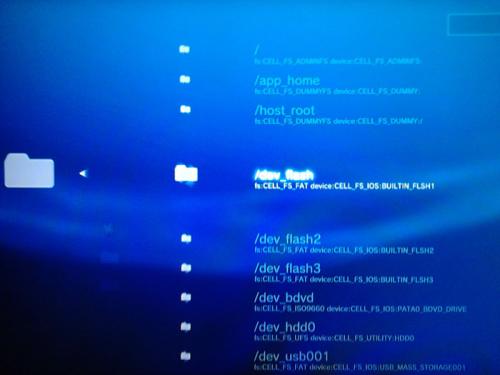
This is a feature of OFW that don't require any payload loaded.
I already included it in the category_game.xml of the current offline packages in my fork.
It's found in ★ Delete Package Files > PS3™ System Storage. The option now has 2 queries: The original query to /dev_hdd0/packages + the file browser with the folders listed in the picture above.
Unlike Cobra or kernel plugins like MAMBA that load when the system boots in CFW, the PS3HEN payload is loaded from XMB, so a recovery flag is not really needed. If a faulty plugin bricks, a simple restart will recover the system and the user can delete the faulty file(s) to use HAN/HEN again. The only exception that I see is when the fault is caused by a file modified in dev_flash that will require a reinstallation of HFW (but this would happen in any case)
---- OFF-TOPIC QUESTION RELATED TO COBRA / MAMBA ----
@Joonie @habib Now that we have the fan syscalls available in the kernel payload (thanks to your magic). Do you think that it would be possible to start the thread for dynamic fan control in the function setup_iso of ps2emu_stage2? Are the symbols different in ps2emu_stage2 or are they the same used in stage2?
ppu_thread_create(&fan_control_id, fan_control, 0, -0x1D8, 0x4000, 0, "fan_control");
If we achieve this, this would allow to have dynamic fan control in PS2 games.
Similar threads
-
 PS3 PS3 Firmware 4.93 - Update is Live! (CFW and HFW Released)
- Started by LuanTeles
- Replies: 38
-
 PS3Xploit Flash Writer (4.93 HFW Req)
- Started by Evilnat
- Replies: 10
-
 PS3 PS3HEN 3.4.0 + HFW 4.92 - Officially released by esc0rtd3w of Team PS3Xploit
- Started by STLcardsWS
- Replies: 46
-
PS3HEN How to download and install PS3HEN on 4.92.1.
- Started by Bubbolovespizza
- Replies: 3