PS3 PS3Xploit: Big problems with act.dat / idps.hex.

razorgate

Forum Noob
I already installed several games, ps3 and psp, I did everything right, I managed to reassign them, but none works. all give error (80010017).
I think the problem is in my files act.dat and idps.hex. I managed to dump both of them with no problems, but it turns out that act.dat have 4.05KB and idps.hex have 0KB.
I saw in videos on youtube that in the tutorials the files idps.hex has 1KB, so I think the problem is this. I can not make the games work because when I use the PS3xploit Resigner, my idps.hex has 0KB, and should give problem. This can only be the explanation, because only with me it is going wrong.
How can I get an idps.hex of 1KB ??

Thank you

My PS3 is Slim 3001.
 
Last edited:
I already installed several games, ps3 and psp, I did everything right, I managed to reassign them, but none works. all give error (80010017).
I think the problem is in my files act.dat and idps.hex. I managed to dump both of them with no problems, but it turns out that act.dat have 4.05KB and idps.hex have 0KB.
I saw in videos on youtube that in the tutorials the files idps.hex has 1KB, so I think the problem is this. I can not make the games work because when I use the PS3xploit Resigner, my idps.hex has 0KB, and should give problem. This can only be the explanation, because only with me it is going wrong.
How can I get an idps.hex of 1KB ??

Thank you

My PS3 is Slim 3001.
The idps is 16 bytes long. For such a size, some devices might display 1kb & others 0kb..
The best way to know for sure if the file is good & contains your idps is to open it in an hex editor such as HxD.
Check the contents of your file with the structure presented in this page:
http://www.psdevwiki.com/ps3/IDPS

The idps should start with these 6 bytes:
'00 00 00 01 00 8x'

The 6th byte ie '8x' would be your console TargetID which depends on your console's region. For example 84 is US, 85 is Europe etc... (check http://www.psdevwiki.com/ps3/Target_ID for details).

However check it but I doubt that idps.hex is the source of your problems tbh. You are most likely omitting a step or following wrong instructions.
 
Last edited:
I'll check yes and then post here. If that's not the problem, I can not imagine what it might be, I've tried everything and I believe I've done the right thing. Thank you for your support and congratulations for the good work that you and your team have been developing.
 
The idps is 16 bytes long. For such a size, some devices might display 1kb & others 0kb..
The best way to know for sure if the file is good & contains your idps is to open it in an hex editor such as HxD.
Check the contents of your file with the structure presented in this page:
http://www.psdevwiki.com/ps3/IDPS

The idps should start with these 6 bytes:
'00 00 00 01 00 8x'

The 6th byte ie '8x' would be your console TargetID which depends on your console's region. For example 84 is a US, 85 is Europe etc... (check http://www.psdevwiki.com/ps3/Target_ID for details).

However check it but I doubt that idps.hex is the source of your problems tbh. You are most likely omitting a step or following wrong instructions.


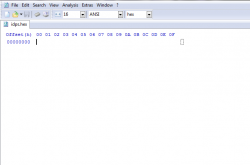
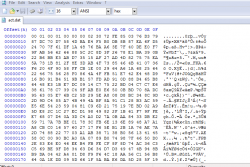
My idps.hex file shows this in hdx
 

Attachments

  • Capturar.PNG
    Capturar.PNG
    12.7 KB · Views: 684
Last edited:
Well, I guess I'll never be able to install anything on my PS3 slim 3001 American model. Unfortunately. I already did everything and nothing worked.

The tools are installed, I do everything according to the tutorials and no game, whether psp or ps3, nothing works. I can not even install psp. From ps3 I installed a 5 and none works, all show error 80010017.

I have been trying for many days, I have read and reread everything, I have seen all possible videos. I have deleted and re-edited a new user, activated it, etc. I have ditched the act.dat and idps.hex several times and nothing is certain.

I am discouraged
:(
 
Try to dump the files again. Something is wrong in your idps.hex file. That's most likely the root of all your issues.

I've done it a thousand times, my friend.

I have several original psn games on hd, the device is semi new, well taken care of, never gave a problem, I do not know what happens. I did everything as I read and saw.
 
Then try another USB stick.
something changed!! tried with a new usb device and idps.hex now came with 16 kytes! had never occurred before.

I'll try to install it now to see if it works. Then I report the results.
I never thought of changing the device, because what I used is new.

Thank you friend
 
IT WAS RIGHT !!! I GOT IT !!! :) :) :)
I ACTIVATED A PS3 GAME, MORTAL KOMBAT !!!

Thank you, my friend, thank you very much indeed. it was the same usb device that was giving trouble. Yesterday I even thought I could try with another usb device, but I thought it was bullshit. Sometimes what we think is bullshit is the X of the question.
Wow, I've been through many days of agony.

I thank all PS3Xploit Team developers for their special thanks to bguerville for their support.
It was even a problem of idps.hex to have 0kb yes, I always suspected it, for being 0 kb. It was enough to change the usb device to do the dump and I got a functional idps.hex.

Thank you my friend ShaolinAssassin, it helped a lot! and I hope this topic helps in the future those who go through the same problem as I, since I have seen in other places people with this error 80010017.
 

Similar threads

Back
Top