

STLcardsWS
Administrator
-
PS4 Homebrew Store
"What if your Downloads came to you?"
Features
- Downloads and Installs Apps whatever you want to add
- Built-in Updating System no need to reinstall the Store PKG every Update
- Optimized for Slow Networks
- Hand Picked Software Libraries
- Light PKG Size about 10 MBs
- HDD Download Cache By Default
- When at Main Menu O goes to the page before
- INI Saving System with Native Floating Keyboard
- Uninstall APPs straight from the Store DL Page
Custom Backgrounds
Easy n Simple Downloads
User-Friendly Error Dialogs
-
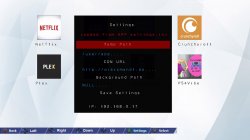
Settings
- Shows if your INI is loaded from APP or USB
(click to view full image)
- Temp Path: Select your Download tempory Path
- CDN URL: Host your Own custom CDN using the guide posted or use anyone else's CDN
- Background Path: Choose your own Custom Background PNGs ONLY, Background must be 1280x720
- Load INI from either USB or APP
- APP INI Path - /user/app/NPXS39041/settings.ini
- USB INI Path - /mnt/usb0/settings.ini - Copies INI from USB to APP every APP Launch
-
Information
- Default CDN: http://orbismandl.darksoftware.xyz
- Currently 7 Download Pages
- Default Download temp path : /user/app/temp.pkg
- Size 10 MBs
- Default Background is: NULL (hosted by your CDN)
- IP is Local IP Only
Huge thanks to these people
- SocraticBliss
- TheoryWrong
- Znullptr
- Flatz
- My Homebrew Testers
- @TOXXIC407
- MasterZorag
- BigBoss
- Specter
- Anyone i forgot
Download & Source: https://forum.darksoftware.net/threads/release-ps4-homebrew-store.8876/


