
You are using an out of date browser. It may not display this or other websites correctly.
You should upgrade or use an alternative browser.
You should upgrade or use an alternative browser.
PS2 PSX DESR needs hdd
- Thread starter 10101100011000
- Start date

beholder
Forum Noob
But AFAIK, DVR area is not needed for DESR to boot and work fine except features I mentioned. I could be wrong but people who using normal Sony PS2 HDDs, which don't have DVR area doesn't complaining other than no updates and no DVR features (video recording etc.). ;]
this site says different things
https://www.psdevwiki.com/ps2/PSX
Note: PSX2 (DESR-x500 and DESR-x700) requires the DVR-partition to boot. Thus, these consoles can NOT boot from a 40 GB PS2 drive!Some private methods for using a 40 GB PS2 drive in a PSX2 involving a downgrade of DVRP's firmware to that of a PSX1 exist.

El_isra
Developer
Corrupted DVR are makes XMB halt at blue ball, like my DESR-5000 when I bought it.But AFAIK, DVR area is not needed for DESR to boot and work fine except features I mentioned. I could be wrong but people who using normal Sony PS2 HDDs, which don't have DVR area doesn't complaining other than no updates and no DVR features (video recording etc.). ;]
Repartition DVR are fixed issue.
beholder
Forum Noob
Thanks so much! I am going to test itOk, I hope this is what you actually need to fix the issue

Last edited:
beholder
Forum Noob
Corrupted DVR are makes XMB halt at blue ball, like my DESR-5000 when I bought it.
Repartition DVR are fixed issue.
I share my progress:
Attempt 1:
System files were format using HDD manager while game partition area was set to 0gb resulting system partition so small to accommodate XMB files.
. __MBR 128MB,
__net 32MB, __system 32MB, __sysconf 32MB and __commom 32MB.
To restore normal XMB partitions, I followed these steps:
1. I moved the HDD from the non-working PSX DESR(0GB game area) to the working one (40GB game area).
2. With the working PSX DESR, I powered it on and formatted the HDD using the HDD manager through FMCB.
3. Then I reinstalled the HDD into the non-working PSX DESR and powered it on with FMCB.
4. This successfully restored the XMB partitions to their normal size.!!
. __MBR 128MB,
__net 128MB, __system 256MB, __sysconf 512MB and __commom 1024MB.
5. I copied the XMB files from the working PSX DESR to the non-working one.
6. I also copied the .opt files to xfrom, removed memory cards, and unplugged the USB power cable before rebooting.
Result:
The blue ball did not appear, and after checking the dvr_hdd0: _xdata and _xcontents were not created.
Attempt 2:
In this attempt, I performed the following steps:
1. I moved the HDD from the non-working PSX DESR(0GB game area) to the working one (40GB game area).
2. In the HDD manager of the working PSX DESR, I created the __xdata and _xcontents folders.
3.These partition appeared in HDD0:/.
4.Then I moved the HDD back to the non-working PSX DESR and booted it with FMCB.
5. This action made the _xdata and _xcontents partitions appear in the dvr_hdd0:/ area.!!
Result:
The non-working PSX DESR now boots until the blue ball freezes.
Attempt 3:
Following the steps from attempt 2, I also copied/pasted the .opt files to xfrom.
Result:
The blue ball still halts at the same point in the booting process.
Last edited:
beholder
Forum Noob
Corrupted DVR are makes XMB halt at blue ball, like my DESR-5000 when I bought it.
Repartition DVR are fixed issue.
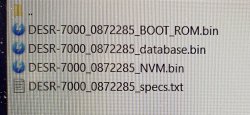
Could you tell me please what are that files and how to copy them to a psx desr?
BootROM, database, NVM specs??
Attachments
beholder
Forum Noob
__xdata and __xcontents are not folders but partitions. :P
Those files are firmware dump from BOOTROM (ROM) and NVM (EEPROM). They are not to restore anywhere, maybe except last but it is pointless in Your case.
thanks I changed the description
beholder
Forum Noob
__xdata and __xcontents are not folders but partitions. :P
Those files are firmware dump from BOOTROM (ROM) and NVM (EEPROM). They are not to restore anywhere, maybe except last but it is pointless in Your case.
In case I want to try to dump those files, how I can do it? Could you please explain?
many thanks
I get one psx2 desr 5500 and by error i use 1.31 update disc now i get the error -1, well i use a lot of methods, using fmcb to bypass laser check after use copy of cd update 2.21 well the psx say i get the last fw update, i get another psx2 5500 and pass all files before any thing i make a backup of everything and put the files and nothing, i use mechapwn to restore nvm nothing, the hdd its working because after that update the console works and get fw 2.06 now i gonna try a backup with linux I got a lot of files cd updates and a some files from a russian forum with all the backup files of all fw of psx but nothing any suggestion?

Lady_Yuna
Member
I was reading the previous messages this topic. Well, I have a PSX that the hdd is stuck, it inicializes and suddenly it freezes. It has happened when I tried to install the 1.31 OS update. Anyway, I would like to restore my PSX. I read some forums if you have PS2 HARD DISK DRIVE SCPH-20400 you have to format it to ATA (FAT 32 or NFTS are not recognized) and install the OS update disk to this new hdd. Am I right?What "Sony HDD" means to You?

Berion
Developer
Not ATA but APA.  And this must be done on DESR because it encrypting HDD. Plus copying files to target partitions for fw You have installed. Second area You will not recreate (lack of tools) so all DVR features will be locked. DESR must boots to a moment to be at least run FMCB.
And this must be done on DESR because it encrypting HDD. Plus copying files to target partitions for fw You have installed. Second area You will not recreate (lack of tools) so all DVR features will be locked. DESR must boots to a moment to be at least run FMCB.
Lady_Yuna
Member
I understand. So, I don't need to format the HDD to APA format, and then connect to the DESR? Will the console itself do it automatically?Not ATA but APA.
What I didn't understand, some forums mention that the multimedia recorder functionality would be lost, because the HDD no longer has the storage capacity for it. Is this statement valid? I don't care about the multimedia part working. The only thing I care about is that the features and layout work. My console is frozen.
Berion
Developer
You need but cannot do that because of encryption. We don't know how and by what it is performed, so we cannot prepare that on PC (disks used in SCPH aren't encrypted by PS2, while DESRs are). One day we will, but for now, not yet. That's why You need do that on DESR side.
DESRs have two partitions with partitions indexes (consider partition index as form of partition table). One is like on normal PS2s, the "__mbr" (do not mislead it with Master Boot Record, it is nothing like that!) and covers up first 40GiB AFAIR (so it covering up "__net", "__system", "__sysconf", "__common" etc.). Second one is "__extend" which covering up the rest space and this is the DVR area ("__xdata" and "__xcontent"), handled in special way by special hardware not existed in normal PS2s. All PS2 apps developed up to today, don't allows to make this second area due to limitations of libraries etc.
I'm not familiar with restoring dead logic structure / clean HDD to a working state. I don't have DESR myself (it is still damn costly and have damn high failure rate, not to mention it was designed to be a time bomb). So what I know is what I read from other ppl experience. Maybe try this? https://www.psx-place.com/threads/psx-desr-needs-hdd.31053/page-6#post-374613
DESRs have two partitions with partitions indexes (consider partition index as form of partition table). One is like on normal PS2s, the "__mbr" (do not mislead it with Master Boot Record, it is nothing like that!) and covers up first 40GiB AFAIR (so it covering up "__net", "__system", "__sysconf", "__common" etc.). Second one is "__extend" which covering up the rest space and this is the DVR area ("__xdata" and "__xcontent"), handled in special way by special hardware not existed in normal PS2s. All PS2 apps developed up to today, don't allows to make this second area due to limitations of libraries etc.
I'm not familiar with restoring dead logic structure / clean HDD to a working state. I don't have DESR myself (it is still damn costly and have damn high failure rate, not to mention it was designed to be a time bomb). So what I know is what I read from other ppl experience. Maybe try this? https://www.psx-place.com/threads/psx-desr-needs-hdd.31053/page-6#post-374613
After formatting each partition, did you upload the files again or did you format and the files on the partitions were restored on their own?


Wisi na ekranie ostatni obraz.
[/CYTAT]
After formatting each partition, did you upload the files again or did you format and the files on the partitions were restored on their own?
hey guys this is a long shot but im not sure where else to go. i have a 7000 with fw 1.20 was working and booting into xmb. decided to do the English patch and think i screwed up somehow. after the psx logo i just get static and i can't go to the menu like i was able to do before. if anyone can help that would be great if not its not a big deal. thanks, in advance
Similar threads
-

-

-
 PS3 Discussion for Supporting > 1TB HDD/SSD on PS3 using Multiple Partitions
- Started by GrahamCracker
- Replies: 8
-
